What Deep Linking Is, and How to Check That a Link Opens the App
Two files on your website decide whether a tap reaches your app or the browser. See what Apple and Android fetch, when they check, and how to read it.


/ On this page9 sections
A deep link is a web address that opens one named screen inside a mobile app instead of the app's front page, or the matching page in a browser when the app is not there.
Whether it works is not settled inside the app. A file published on your website settles it, together with whether the platform has fetched that file and agreed the app is yours.
The phrase carries a second, older meaning: a link pointing at an interior page of a website rather than its home page. Everything below is about the app sense.
What a Deep Link Is: One Address, Two Destinations
A deep link carries someone past the app's front door to one named place inside it.
The example is easier than the definition. Say a shoe retailer emails a customer about one pair.
Tap that link with the app installed and the app opens on the pair. Tap it without the app and the same address opens the product page in a browser.
One address, two destinations, and no choice handed to the person tapping.
A web link works the moment you publish it, and an app link does not.
The Difference Between a URL and a Deep Link
A deep link is a URL. Nothing in the address itself makes it deep.
What makes it a deep link is a claim made elsewhere. An app has told the operating system that it handles addresses on that domain, and it knows which screen each path means.
So the difference sits in what has been registered about the domain, not in the link. Hand two phones the same address, https://shop.example.com/shoes/8412, and they can behave differently, depending on what each one has installed and approved.
That is why a link that "does not work" is often not a broken link.
The address is fine. The claim behind it was never accepted.
Matching is not the same as routing. Even though your intent filters match a given address, Android gives no guarantee it will route the link to your app.
What Happens Between the Tap and the Screen
Between the tap and the screen, the operating system makes one decision, and it makes that decision before your app is involved.
Android routes in a fixed order. Open the user's default app for the address if one was designated, otherwise open the only available app that can handle it, otherwise show a disambiguation dialog and let the user choose.
Read that order backwards and the design goal is clear.
A verified link never reaches the third step, because the system already knows whose address it is.
When the App Is Already Installed
With the app installed and the domain approved, the tap goes straight to the screen the path names. Nothing appears in between, no chooser and no browser.
That is the whole promise, and it holds only while the approval holds. The same tap on a phone where the domain was never verified takes a different branch.
On Android 12 and higher, the difference is invisible to the person tapping. A generic web intent resolves to an activity in your app only if Android has approved the app for that domain.
If it is not approved, the intent resolves to the user's default browser app instead.
No dialog, no error, no signal that anything else was meant to happen. The link opens a web page, and everyone assumes that was the plan.
When the App Is Not Installed
Without the app, an ordinary web address still works, because it is an ordinary web address.
The browser opens the page and the visit continues.
A custom scheme address has no such fallback. Nothing on the phone claims it, so the tap fails or lands on an error, which is one reason plain web addresses became the sensible default.
The harder case is the person who taps, installs the app, and opens it for the first time on a blank home screen. Carrying them to the screen they asked for takes a separate mechanism.
Four Ways a Link Can Reach an App Screen
Four routes reach an app screen, and only one of them is verified. Android names the first three as its supported types, and the fourth exists because the first three all assume the app is already there.
The four are a custom scheme address, a plain web address, a verified web address, and a deferred link that survives an install.
Custom Uniform Resource Identifier (URI) Schemes, and Why They Stopped Being Enough
A custom scheme is an address in a made-up protocol that an app claims for itself, in the shape example://products/123.
They still work, and they remain useful for navigation inside software you control. What they cannot do is prove who owns them.
A custom scheme is not a standard web link, and it can still trigger Android's disambiguation dialog if another app registers the same scheme.
That collision is worse than an annoying dialog.
Mohanty and Thiyagarajan put the consequence plainly in the Journal of Computing and Intelligent Systems in 2023: "any other app or malicious app can register the same scheme and trick you into opening their app."
The paper is blunt about it: "As a result, they can steal your information."
The platforms answered in two steps, and the same paper dates them: the intent URL in 2013, the App Link in 2015.
Plain Web Addresses, and What Android 12 Changed
A plain web address uses http or https and works everywhere, which is what makes it versatile and what leaves it unclaimed.
The change came with Android 12. Web links that are not verified App Links generally open in a web browser by default.
On previous versions a disambiguation dialog might have appeared instead, if an app could handle the link.
Verified Links: Apple's Universal Links and Android's App Links
A verified link is a plain web address that the platform has confirmed belongs to your app. Apple calls the result Universal Links, and Android calls it App Links.
App Links have been available since Android 6.0, and they are verified web links. Once verified, the system routes links for that domain directly to your app, skipping the disambiguation dialog entirely.
The confirmation is a file on your website, and it is the only part of the mechanism that does not live in the app.
One condition is easy to miss. App Links is supported on Android 6 and later, on devices that have Google services.
Deferred Deep Links, for People Who Do Not Have the App Yet
A deferred deep link holds the destination across the install. Someone taps, lands in the app store, installs, opens the app, and arrives at the screen the original link named rather than the home screen.
Neither platform carries the destination into the app for you, because the address is gone by the time the new app first runs. Something has to match the click to the install, and that is either work you build or a service you buy.
Google used to offer one and stopped.
Firebase Dynamic Links shut down on August 25th, 2025.
Every link clicked after that returns a 404 status response to the person who tapped it. For an app that is already installed, Google now points at App Links and Universal Links as the platform-supported way to do this.
A link that also carries information about where the click came from is sometimes called a contextual deep link. It is the same mechanism with campaign data attached.
Which of the Four to Choose
Choosing between the four is mostly settled by where the link will be tapped, and by whether the person tapping already has the app.
A link that leaves your control, in an email, an advertisement or a social post, has to be a verified web address. Nothing else survives contact with a phone that does not have your app.
A custom scheme is the right tool inside software you own, where no stranger can register the same scheme against you.
A deferred link is for the case where acquiring the app is part of the point, and it is the only one of the four that costs you something outside the platforms.
The Two Files That Decide Whether Any of It Works
Two files decide whether any of this works, one for each platform, and both live on your website rather than in the app. The app names a domain, the domain names the app back, and the platform checks that the two agree.
Apple's file is called apple-app-site-association and has no extension. Android's is called assetlinks.json.
Both are served from the /.well-known/ directory at the root of the domain.
Apple sets three hosting rules, and each is a way to fail: "You must host the file using https:// with a valid certificate and with no redirects."
Android publishes the address it queries rather than the rules, and that address is also an https one under /.well-known/.
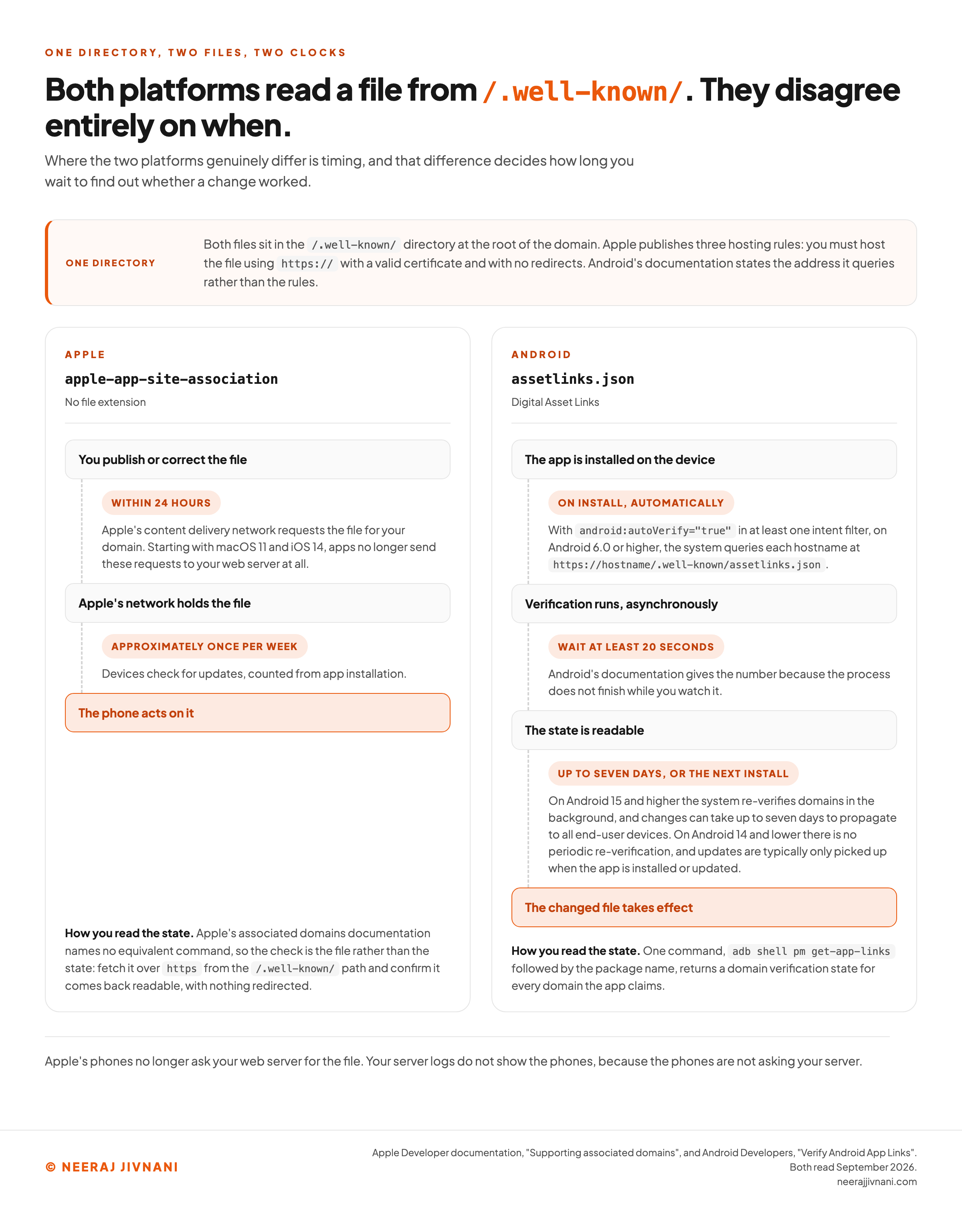
Where the two platforms genuinely differ is timing, and that difference decides how long you wait to find out whether a change worked.
What Apple Fetches, and When
Apple's phones no longer ask your web server for the file. Starting with macOS 11 and iOS 14, apps no longer send requests for apple-app-site-association files directly to your web server.
They send those requests instead to an Apple-managed content delivery network (CDN) dedicated to associated domains.
That single change explains most of the confusion about why an edit did not take effect. Your server logs do not show the phones, because the phones are not asking your server.
Apple publishes both intervals. Its content delivery network requests the file for your domain within 24 hours, and devices check for updates approximately once per week after app installation.
So a corrected file is not live when you upload it.
It is live when Apple has fetched it and the phone has next looked, and neither event is yours to trigger.
There is one escape hatch, and it is for development only. Apple's alternate mode lets an app bypass the network and connect directly to a private domain while the web server is unreachable from the public internet.
Subdomains do not come free either.
Apple requires a separate entitlement entry for each subdomain, and each must serve its own association file.
What Android Checks, and When
Android verifies on install, and it tells you how long to wait. When android:autoVerify="true" is present in at least one of the app's intent filters, installing the app triggers verification automatically.
That holds on any device running Android 6.0 or higher. The system then queries each hostname for the Digital Asset Links file at https://hostname/.well-known/assetlinks.json.
Verification is asynchronous, which is why Android gives a number. Wait at least 20 seconds for the process to complete before checking the result.
One older behavior is worth knowing if you own several domains. On Android 11 and lower, the system makes your app the default handler only if it finds a matching file for every host in the manifest.
So on those versions one broken domain took the rest down with it.
A corrected file has two different answers on Android, and the split is the Android version.
On Android 14 and lower the system does not perform periodic background re-verification, and updates to the file are typically only picked up when the app is installed or updated.
On Android 15 and higher the system re-verifies domains in the background, and changes can take up to seven days to propagate to all end-user devices.
So on the older versions the wait is not a wait. Nothing lands until the app is installed or updated on the device.
Use this chart — embed code and citation
<a href="https://neerajjivnani.com/blog/deep-linking/"><img src="https://neerajjivnani.com/infographics/deep-linking/two-clocks.png" alt="Diagram comparing when each mobile platform reads the association file it verifies a deep link against, showing Apple's content delivery network requesting the apple-app-site-association file for a domain within 24 hours and devices re-checking approximately once per week after app installation, beside Android's assetlinks.json being queried on install and verified asynchronously with a documented wait of at least 20 seconds, and then the separate clock for a file that changes later, where Android 15 and higher re-verifies in the background with changes taking up to seven days to propagate while Android 14 and lower picks up an update only when the app is installed or updated, with the shared hosting rules of HTTPS, a valid certificate and no redirects named once for both, and with each lane closing on how the state is read, sudo swcutil dl -d for a domain on a Mac to confirm the file downloads and then a sysdiagnose from a device carrying swcutil_show.txt, whose entry for the App ID reports whether Apple's content delivery network has approved the universal links and when it last asked and will next ask for the file, beside adb shell pm get-app-links for the package on Android." width="1200"></a>
<p>Chart: <a href="https://neerajjivnani.com/blog/deep-linking/">Neeraj Jivnani</a></p>Neeraj Jivnani, "What Deep Linking Is, and How to Check That a Link Opens the App", neerajjivnani.com, https://neerajjivnani.com/blog/deep-linking/Free to republish with a link back to this page.
How to Tell Whether a Link Is Verified
Android will tell you whether a link is verified, and it takes one command. Running adb shell pm get-app-links followed by the package name returns a domain verification state for every domain the app claims.
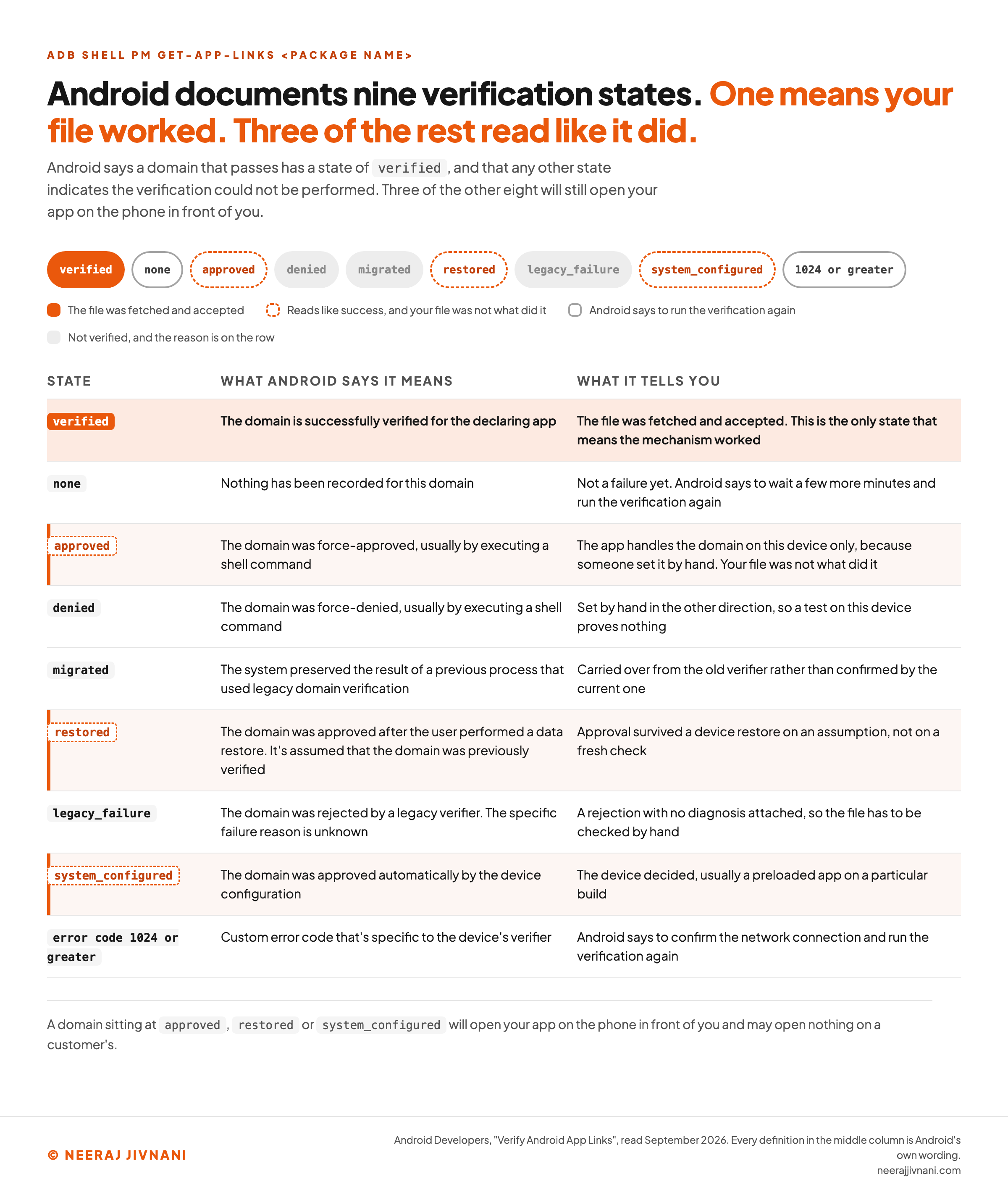
The state is the answer. Domains that successfully pass have a state of verified, and any other state means Android could not perform the verification.
Android 17 adds a second diagnostic: a --debug-link flag for am start that reports how the system resolved an address and which intent filters matched.
Both of those need a developer and a connected handset. One of the checks Google lists needs neither: a deep links page in the Play Developer Console.
That page gives an overview of your existing setup, reports on advertisement addresses which are not deep linked, and publishes fixes without needing a new app release.
The Nine States, and the One That Counts
Nine values are documented, and only the first row below means the file was fetched and accepted.
| state | what Android says it means | what it tells you |
|---|---|---|
verified | The domain is successfully verified for the declaring app | The file was fetched and accepted. This is the only state that means the mechanism worked |
none | Nothing has been recorded for this domain | Not a failure yet. Android says to wait a few more minutes and run the verification again |
approved | The domain was force-approved, usually by executing a shell command | The app handles the domain on this device only, because someone set it by hand. Your file was not what did it |
denied | The domain was force-denied, usually by executing a shell command | Set by hand in the other direction, so a test on this device proves nothing |
migrated | The system preserved the result of a previous process that used legacy domain verification | Carried over from the old verifier rather than confirmed by the current one |
restored | The domain was approved after the user performed a data restore. It's assumed that the domain was previously verified | Approval survived a device restore on an assumption, not on a fresh check |
legacy_failure | The domain was rejected by a legacy verifier. The specific failure reason is unknown | A rejection with no diagnosis attached, so the file has to be checked by hand |
system_configured | The domain was approved automatically by the device configuration | The device decided, usually a preloaded app on a particular build |
| error code 1024 or greater | Custom error code that's specific to the device's verifier | Android says to confirm the network connection and run the verification again |
Three of the eight that are not verified read like success, because Android's own gloss for each of them says the domain was approved. They are approved, restored and system_configured.
A domain sitting at any of those three will open your app on the phone in front of you and may open nothing on a customer's.
Checking the Apple Side
Apple's check comes in two parts, and only the first runs on your Mac. sudo swcutil dl -d followed by the domain confirms the association file downloads, and sudo swcutil verify reads a downloaded file back against the path you expect it to match.
The state itself sits on the handset. Take a sysdiagnose from a device with the app installed, open swcutil_show.txt inside it, and find your App ID.
That entry says whether Apple's content delivery network has approved your universal links, when it last asked your site for the file, and when it will ask again.
Those last two lines are the ones that separate a wait from a failure, and Android's command has no equivalent for them.
Two answers end the check before any of that. A 403 or a 404 is your site denying access rather than a missing file, which Apple's technote on debugging universal links usually puts down to an unreachable path.
Use this chart — embed code and citation
<a href="https://neerajjivnani.com/blog/deep-linking/"><img src="https://neerajjivnani.com/infographics/deep-linking/nine-states.png" alt="Reference card of the nine domain verification states that Android's pm get-app-links command reports for an App Link, listing verified, none, approved, denied, migrated, restored, legacy_failure, system_configured and error codes of 1024 or greater with Android's own definition of each, marking verified as the single state that means the association file was fetched and accepted, and flagging approved, restored and system_configured as the three states that read like success while meaning the file was never what granted the approval." width="1200"></a>
<p>Chart: <a href="https://neerajjivnani.com/blog/deep-linking/">Neeraj Jivnani</a></p>Neeraj Jivnani, "What Deep Linking Is, and How to Check That a Link Opens the App", neerajjivnani.com, https://neerajjivnani.com/blog/deep-linking/Free to republish with a link back to this page.
Why a Link That Looks Right Still Opens the Browser
A link that looks right still opens the browser for five reasons. Two are broken hosting rules, one is a clock, one is the phone you happen to be testing on, and one is where the link was tapped.
Take them in the order they break, because the first two are settled before anything is verified at all.
- A redirect on the `/.well-known/` path. Apple's rule allows no redirects, so a rewrite that quietly sends the request somewhere tidier fails the fetch. Content management systems and edge configurations add these without being asked.
- A login or an access rule in the way. The file has to come back to an anonymous request from any address. Anything that answers with a page instead of the file, including a security challenge, ends the check.
- A stale file the platform has not re-read. The edit is correct and the answer is still wrong, because Apple's network fetches within 24 hours and the device looks about once a week, and Android 15 takes up to seven days. On Android 14 and lower nothing re-reads it until the app is installed or updated, so waiting alone never resolves it.
- A test on the wrong device state. A domain reading
approved,restoredorsystem_configuredon the test phone was not verified by your file, so the test confirms the phone rather than the setup. - A link opened inside another app. A tap in a mail client or a social feed can be handled by that app's own browser, which never hands the address to the operating system, so the routing you configured is never consulted.
Why the Failure Goes Unreported
The pattern behind all five is worth naming on its own. Deep linking fails silently by design, because the fallback is a working web page.
A working web page looks like a success to everyone who is not checking the state. Nobody files a complaint about a link that opened the site.
That is what separates this from an ordinary bug. An ordinary bug produces a report, and this one produces a slightly worse conversion rate that gets attributed to something else.
Blocked, or waiting
A deep link that does not open the app is in one of two conditions, and they need opposite responses. Either a published rule is in the way, which is yours to change today, or a platform clock is still running, which nothing you can run will shorten. Answer for your own setup and the two come apart.
The phone you are testing on
Where you tapped the link
The file on your website
- The file is served over https:// with a valid certificate
- Nothing redirects on the /.well-known/ path
- It comes back to an anonymous request from any address
Which of the two you are in
Say which phone you are testing on
Apple publishes the hosting rules and both platforms publish a clock, so the same broken link reads differently on an iPhone and on an Android handset. Nothing is scored here, and nothing is graded. Two lists come back: what is blocking, and what is still running.
What a Deep Link Is Worth to a Campaign, and What It Is Not
A deep link is worth two or three clicks to a campaign. Landing users directly on in-app content saves them an average of 2-3 clicks, a figure Google published in May 2025.
The payoff is time: fewer clicks to reach the content means more of the visit is spent in the app.
That is a modest claim, and it is the honest one. That saving repeats everywhere campaigns live, because one address can sit in an email, an advertisement, a social post or a referral program and behave correctly in all of them.
Carrying campaign information in the link is what makes the arrival measurable.
The path names the destination, the query string names the source, and the app can read both.
Google reports one side of this for you. Search Console includes performance for a site's Android app deep links, under the Android App search appearance filter.
What a Deep Link Does Not Buy
Deep linking does not change how your pages rank in search, and Google says so outright. Search continues to use the content of your web pages for indexing and ranking.
Google turns that into a condition. Add deep links only where the app page carries the same content as the corresponding web page.
Otherwise the title and snippet shown in Search could mislead people about what they will see after the click.
Layout differences are fine, as long as the content matches.
So a deep link improves the arrival and leaves the acquisition alone. Anyone selling it as a ranking tactic has read something else.
The Decisions That Sit With Marketing, Not Engineering
Four decisions here are not engineering decisions, and they are the ones that stall a deep linking project. Engineering can build any of the four answers and cannot choose between them.
- Which addresses matter. Deep linking every page is rarely the goal, and the honest list is usually the handful of destinations campaigns point at.
- What happens with no app installed. The web page is one answer and the app store is the other, and one of them costs you the visit you already had.
- The content match Google imposes. Deciding that an app screen and a web page carry the same content is an editorial judgment, made page by page.
- Who owns the file. The file lives on the website, so the web team holds it, while the thing it breaks belongs to the app team, and the failure is invisible to both.
That last one is why these projects go quiet.
The check is cheap and the state is published. Run it after every app release, and after any change on the website that could touch the file, such as a new redirect rule or a certificate renewal.