Agentic Browsing Is Software Using Your Site, and Your Structure Decides How Far It Gets
An AI agent can now use your website the way a person does, working from structure rather than design. Here is what it reaches, and what stops it.

/ On this page9 sections
An AI agent can now use your website the way a person does. It opens the page, finds the controls, types, clicks and carries on to the next step.
What it works from is the structure of the page rather than the look of it.
So the two things worth knowing are what it reaches and what stops it. Both are decided by markup you already owed a human reader.
What Agentic Browsing Is
Agentic browsing is software that operates a browser to finish a task you described in ordinary language.
You describe the outcome. It opens pages, reads them, fills in what needs filling in, clicks through, and keeps going across sites until the job is done or it gets stuck.
What makes it browsing rather than an integration is that it uses your interface. No feed, no endpoint, no arrangement with anybody: it works the same controls a person works, in a browser, signed in as them.
Which is why the state of your front end decides what it can do.
The tasks are the clearest definition anyone has. Booking a table, comparing one spec across six retailers, filling in a long application, pulling this week's numbers out of four dashboards.
Perplexity's Comet and Gemini inside Chrome are two you can try today and watch do it.
It is not the same as a script. A script follows fixed steps and breaks the moment a page changes.
An agent reads the page each time and adapts, which is where both its usefulness and its failures come from.
Agentic, Assisted, and Ordinary Browsing
Three things get called AI browsers. Two of them describe a page to you; the third one acts.
| The browser | Who does the work | What you give it |
|---|---|---|
| Ordinary | You. Every click is yours | A URL |
| AI-assisted | Still you. A sidebar summarizes, answers, drafts | A question about the page in front of you |
| Agentic | The browser, under your login | A goal, in a sentence |
The third row is the one that changes anything. The actions happen inside a session that is already signed in as the person, so the agent inherits whatever that person can reach.
That is also why the security writing on this subject is so loud.
An assistant that gets something wrong writes a bad paragraph. An agent that gets something wrong submits a form.
What the Agent Sees When It Opens Your Page
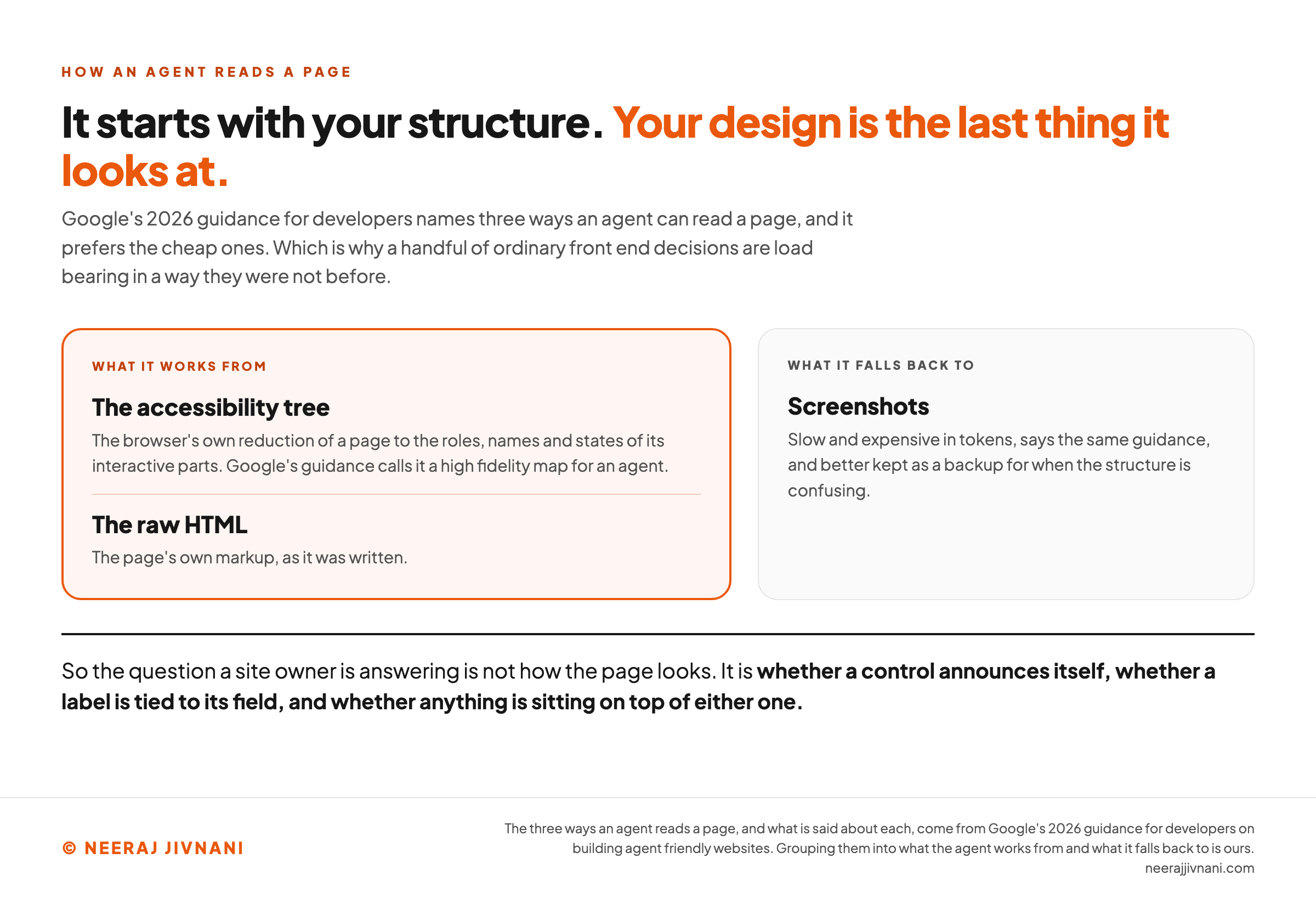
An agent has three ways of reading a page, and it prefers the cheap ones.
Google's 2026 guidance for developers names them as screenshots, the raw HTML, and the accessibility tree, which is the browser's own reduction of a page to the roles, names and states of its interactive parts.
That guidance calls the tree a high-fidelity map for an agent, and says analyzing screenshots is slow and expensive in tokens, better kept as a backup for when the structure is confusing.
The same guidance says modern agents combine all three, reading the structure first and cross-referencing it against a visual rendering for layout and grouping.
Your design is the last thing it looks at.
Which makes a handful of ordinary front-end decisions load-bearing in a way they were not before.
A Control Has to Announce Itself
A <div> with a click handler looks like a button to a person and like nothing in particular to an agent.
Google's guidance is to prefer <button> and <a>, and where that is impossible, to give the element an explicit role and a tabindex so it still appears as something operable. It also names cursor: pointer in CSS as a strong signal of actionability.
Labels matter for the same reason. The for attribute on a <label> ties the wording a human reads to the field an agent has to fill, so the purpose of the input travels with it.
Hidden and Half-Hidden Things Are Worse Than Missing Ones
The same guidance warns about ghost elements and transparent overlays, because an agent's visual analysis may discard a node that is covered even when the thing covering it is invisible.
It also puts a floor on size. An interactive element needed to continue the journey should have a visible area larger than 8 square pixels, or visual analysis filters it out.
Neither of those is a design choice anybody makes on purpose. They accumulate.
A Moving Layout Is a Missed Click
An agent that works from coordinates picks a target, then acts on it a moment later.
Chrome's 2026 documentation for the layout stability check puts the failure plainly: unexpected shifts can make an agent miscalculate the position of a button or an input, and the interaction fails.
A person notices the page jump and corrects. An agent has already clicked.
Build the same four things two ways
Each row is a decision somebody already took on a page you own. Change it and read the two columns: what the version you picked is to a visitor, and what it is to the software working the same page.
The left column is the page. The right column is the page the agent gets.
What it works from is the structure of the page rather than the look of it, which is why four decisions this small decide how far it gets.
Use this chart — embed code and citation
<a href="https://neerajjivnani.com/blog/agentic-browsing/"><img src="https://neerajjivnani.com/infographics/agentic-browsing/what-it-reads-first.png" alt="Diagram of the three ways an agent reads a page, as named in Google's 2026 guidance for developers, split into the two it works from and the one it falls back to. On the left, framed in the brand orange, sit the accessibility tree, described as the browser's own reduction of a page to the roles, names and states of its interactive parts and called a high fidelity map for an agent, and the raw HTML, the page's own markup. On the right, in grey, sit screenshots, described as slow and expensive in tokens and better kept as a backup for when the structure is confusing. The heading states the finding: an agent starts with your structure, and your design is the last thing it looks at." width="1200"></a>
<p>Chart: <a href="https://neerajjivnani.com/blog/agentic-browsing/">Neeraj Jivnani</a></p>Neeraj Jivnani, "Agentic Browsing Is Software Using Your Site, and Your Structure Decides How Far It Gets", neerajjivnani.com, https://neerajjivnani.com/blog/agentic-browsing/Free to republish with a link back to this page.
Which Browsers Do This Today
Two different kinds of product get filed under one name, and separating them makes the category much smaller.
The consumer ones are browsers you install and sign into: Perplexity's Comet, Opera's Neon, Dia from The Browser Company, Fellou, Google's Gemini inside Chrome and Microsoft's Copilot inside Edge.
The developer ones are infrastructure. Browser Use, Browserbase, Skyvern and similar tools run headless browsers for software, not for a person with a laptop.
The category is young enough that products come and go inside a year.
OpenAI's Atlas is the clearest case. The company deprecated it, moved browser-based agentic work into ChatGPT and Codex, and set 9 August 2026 as the day Atlas would stop working.
Cost mostly arrives bundled. These browsers ship inside an AI subscription somebody is already paying for rather than being bought on their own.
The three browsers tested in a 2026 study by Topinkova and Schwemmer were all reached through the same $20 a month consumer tier.
The number that varies is what the agent's own work costs, because a long task burns tokens whether or not it succeeds.
What Stops One, and What Does Not
Nothing stops an agent quietly. The barrier that worked in testing is the one your visitors notice too.
Start with the part nobody has closed. OpenAI's own chief information security officer called prompt injection a frontier, unsolved security problem in 2025.
The shape is simple. An agent reads a page to work out what to do next, so text on that page can be written to look like an instruction from the person who sent it.
Hidden text, a comment, a forum reply, a line in a document the agent was asked to open.
The agent cannot reliably tell the difference between content it was sent to read and orders it was sent to follow.
Vendors have layered defenses on top. Wiz's 2025 year-end review of seven of these browsers found the same three recurring: a confirmation before a payment, isolation that keeps an agent on task-relevant sites, and a second model checking the plan against what you asked for.
Its own reading of them is that no single layer is a silver bullet, and that together they raise the cost of an attack.
What Held Them Up in Testing
The narrower question for a site owner is what stands in an agent's way when it lands on your pages, and that has been measured.
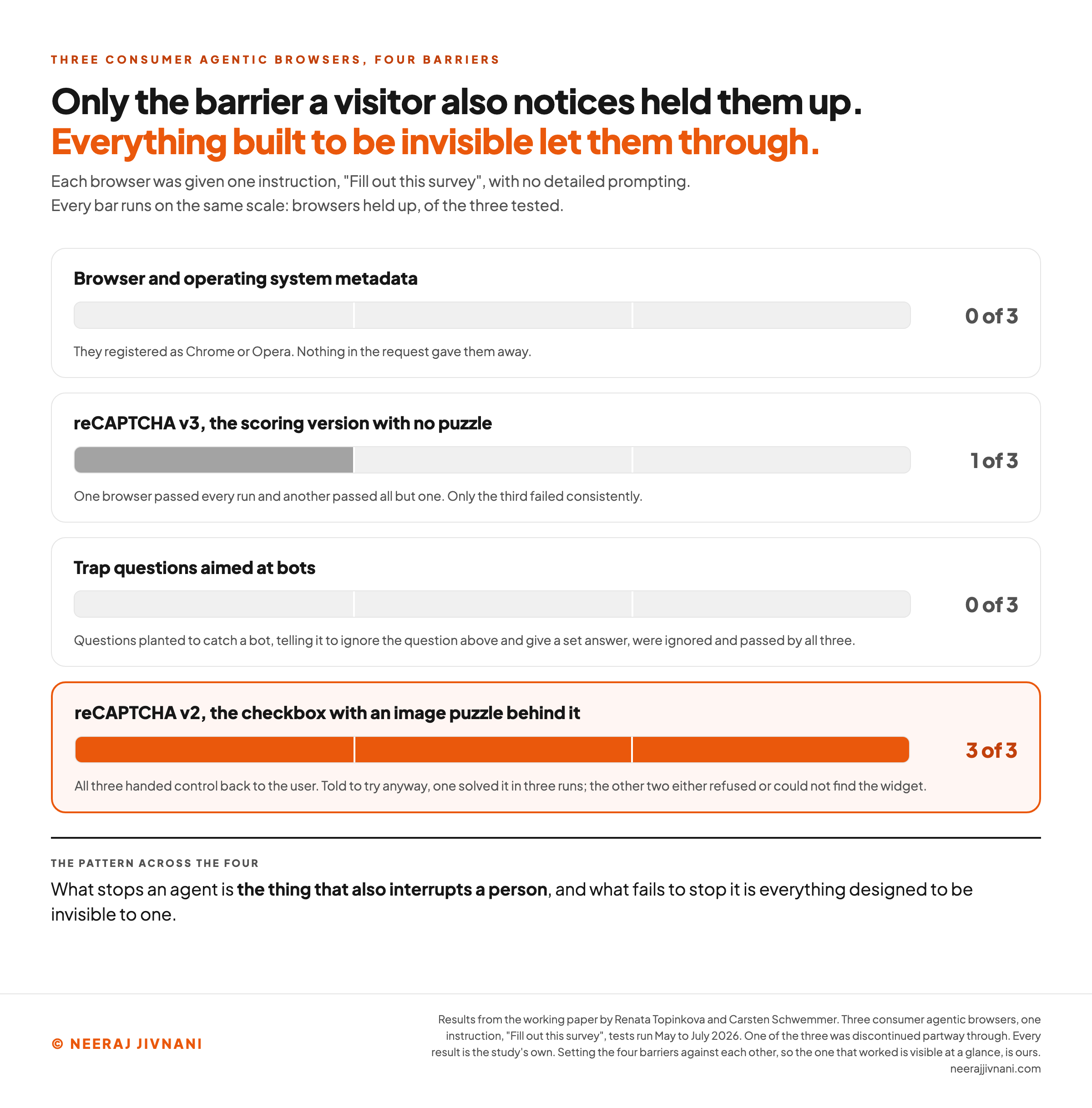
Topinkova and Schwemmer gave three consumer agentic browsers one instruction, "Fill out this survey", with no detailed prompting, across tests run between May and July 2026. One of the three was discontinued partway through, so fewer runs sit behind its results.
The results are worth reading in order.
Nothing in the request gave them away. Browser and operating system metadata looked like ordinary browsers, registering as Chrome or Opera.
Invisible checks mostly let them through. On reCAPTCHA v3, the scoring version with no puzzle, one browser passed every run and another passed all but one. Only the third failed consistently.
The visible challenge was the real barrier. On reCAPTCHA v2, the checkbox with an image puzzle behind it, all three handed control back to the user. Told to try anyway, one solved it in three runs; the other two either refused or could not find the widget.
Trap questions aimed at bots did nothing. Questions planted to catch a bot, telling it to ignore the question above and give a set answer, were ignored and passed by all three.
Sit with the last one. A clever line written into a page is the cheapest thing to try, and it is the one that failed.
The pattern across the four is consistent. What stops an agent is the thing that also interrupts a person, and what fails to stop it is everything designed to be invisible to one.
That is uncomfortable if the plan was to filter agents quietly. A consumer agentic browser is a signed-in human session with software at the keyboard, so a rule written for crawlers in robots.txt is not looking at the same thing.
Use this chart — embed code and citation
<a href="https://neerajjivnani.com/blog/agentic-browsing/"><img src="https://neerajjivnani.com/infographics/agentic-browsing/what-stopped-them.png" alt="Chart of what stopped three consumer agentic browsers when each was given one instruction, Fill out this survey, with no detailed prompting, in tests run May to July 2026 by Topinkova and Schwemmer. One of the three was discontinued partway through, so fewer runs sit behind its results. Four bars show the four barriers tested. Browser and operating system metadata identified none of the three. Invisible reCAPTCHA v3 stopped one of three, with one browser passing every run and a second passing all but one. Trap questions planted to catch a bot, telling it to ignore the question above and give a set answer, were ignored and passed by all three, stopping none. Visible reCAPTCHA v2, the checkbox with an image challenge, interrupted all three, and only one solved it after being told to try anyway, in three of its runs, making it the single barrier that worked. The visible challenge bar is drawn in the brand orange and the other three are grey, so the finding is legible without reading a word." width="1200"></a>
<p>Chart: <a href="https://neerajjivnani.com/blog/agentic-browsing/">Neeraj Jivnani</a></p>Neeraj Jivnani, "Agentic Browsing Is Software Using Your Site, and Your Structure Decides How Far It Gets", neerajjivnani.com, https://neerajjivnani.com/blog/agentic-browsing/Free to republish with a link back to this page.
What Changes on a Site You Own
What changes is less than the volume of writing on this subject suggests, and none of it is a new project.
Google's own 2026 developer writing splits the question in two, and the split is the useful part. "When agents are just searching for websites, the principles for Search Engine Optimization (SEO) still apply," it says.
The new half is the second one, when an agent interacts with the site directly.
The Check Chrome Already Ships
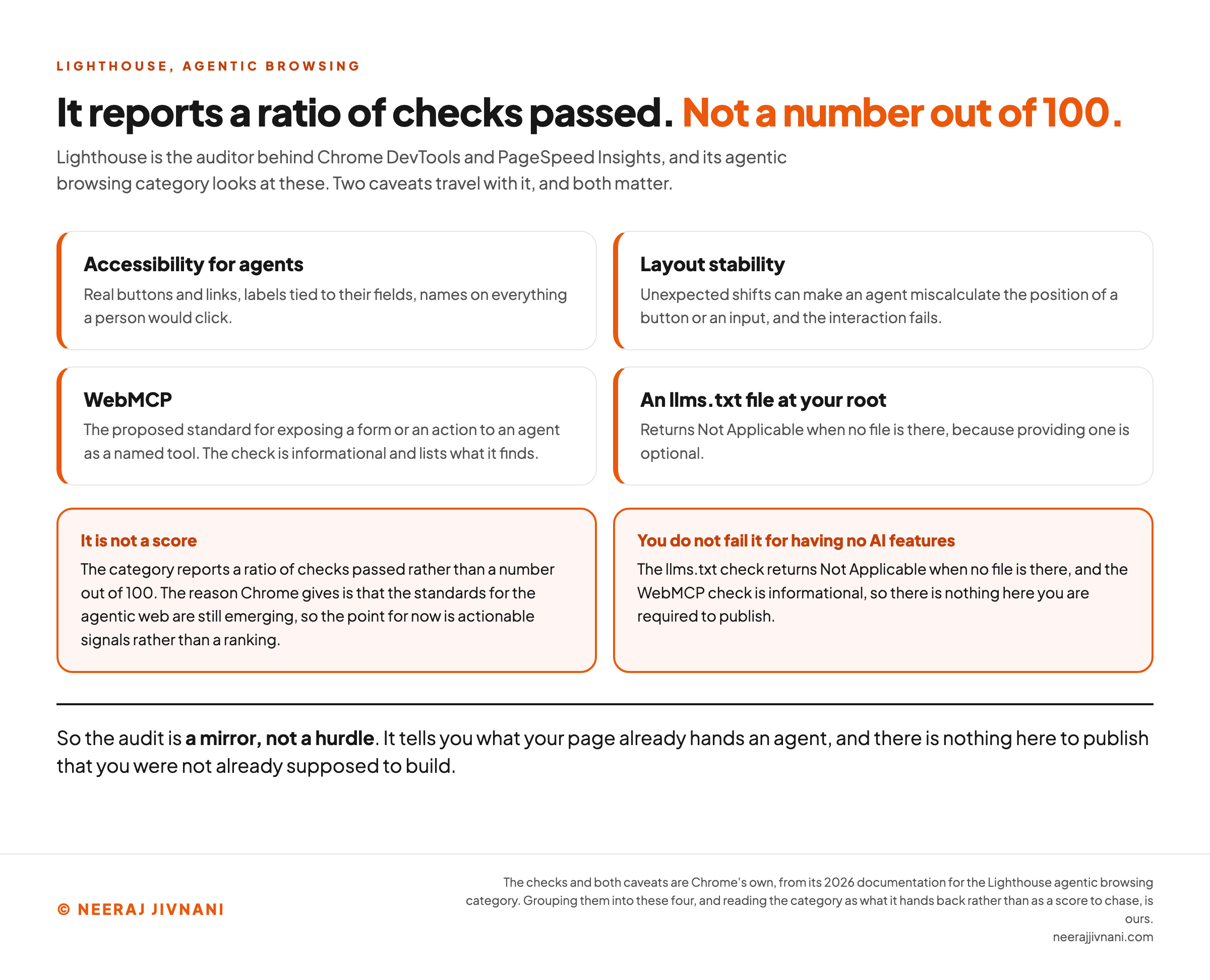
Lighthouse, the auditor behind Chrome DevTools and PageSpeed Insights, has an agentic browsing category. It looks at accessibility for agents, layout stability, WebMCP, and whether an llms.txt file sits at your root.
Two caveats travel with it and both matter.
It is not a score. Chrome's 2026 documentation says the category reports a ratio of checks passed rather than a number out of 100.
The reason it gives is that the standards for the agentic web are still emerging, so the point for now is actionable signals rather than a ranking.
You also do not fail it for having no AI features. The llms.txt check returns Not Applicable when no file is there, because providing one is optional.
WebMCP, the proposed standard for exposing a form or an action to an agent as a named tool, is informational and lists what it finds.
So the audit is a mirror, not a hurdle.
The Three Questions Worth Asking of Your Own Page
Can every control be operated by something that cannot see the design? Real buttons and links, labels tied to their fields, names on everything a person would click.
Does the page hold still once it has loaded? Reserve the space for images, ads and anything injected late.
Is the thing you want a visitor to do reachable without a judgment call you never wrote down? If a human has to infer a step, an agent will guess it.
Every one of those is accessibility work. It was owed to people using screen readers long before any of this arrived, and Google's 2026 guidance says the same, that everything suggested to make a site agent-ready also makes sites better for humans.
That is the honest headline. The new audience does not want a new site, it wants the one you were supposed to build.
Use this chart — embed code and citation
<a href="https://neerajjivnani.com/blog/agentic-browsing/"><img src="https://neerajjivnani.com/infographics/agentic-browsing/a-ratio-not-a-score.png" alt="Chart of what Chrome's Lighthouse agentic browsing category looks at and the two caveats that travel with it, from Chrome's 2026 documentation. Four cards carry accessibility for agents, layout stability, WebMCP and the presence of an llms.txt file at your root, each with a one line note on what it looks at. Below them two highlighted panels carry the caveats: the category reports a ratio of checks passed rather than a number out of 100, because the standards for the agentic web are still emerging, and you do not fail it for having no AI features, because the llms.txt check returns Not Applicable when no file is there and the WebMCP check is informational. The heading states the finding: it reports a ratio of checks passed, not a number out of 100." width="1200"></a>
<p>Chart: <a href="https://neerajjivnani.com/blog/agentic-browsing/">Neeraj Jivnani</a></p>Neeraj Jivnani, "Agentic Browsing Is Software Using Your Site, and Your Structure Decides How Far It Gets", neerajjivnani.com, https://neerajjivnani.com/blog/agentic-browsing/Free to republish with a link back to this page.
What Agents Are Good At, and Where They Stall
Agents are good at bounded, repetitive, form-shaped work on pages that behave predictably.
Comparing the same twelve fields across six sites. Filling in an application whose answers you already know.
Pulling a weekly number out of a dashboard that has no export button. Watching a page and reporting when something on it changes.
Those are the jobs where the tedium is real and the judgment is nil, and a browser is genuinely better at them than a person is.
They stall in three places.
The first is any step needing a decision nobody specified. The agent will pick something and continue, and it will be confident.
The second is a deliberate human check. That is the finding above, and it cuts both ways: the challenge that protects your form also stops the agent your customer sent.
The third is a page that rebuilds itself. Steps that appear conditionally, interfaces that redraw, layouts that settle late.
There is a fourth thing worth naming, and it is about reporting rather than capability.
In the Topinkova and Schwemmer tests, the surveys were completed in times that overlapped with human ones and produced coherent, plausible answers. Success and failure look alike from the outside.
Questions People Ask About Agentic Browsing
What does agentic search mean? It usually means the finding half rather than the acting half: an assistant runs searches, opens results and reads them to answer a question. Agentic browsing is the part after that, where something acts on what it found. Google's developer guidance treats them separately, and says the searching half is still ordinary search optimization.
What is the most popular agentic browser? There is no honest ranking to give, and any list of them dates quickly. The two a general reader is most likely to meet are Perplexity's Comet and Gemini inside Chrome. OpenAI retired Atlas in August 2026 and moved its browser work into ChatGPT.
Is an agentic browser the same as an AI browser? No, and the difference is worth keeping. An AI browser summarizes and answers alongside you. An agentic browser takes an action on your behalf, under your login.
Are they safe to use? Safe enough for low-stakes work and not for anything you would mind having done wrongly. The standing advice from the security side is consistent: keep them out of banking and email, leave the confirmation prompts on, and use a separate browser profile so an agent is not signed into everything you are.
Should we block them? You can block declared crawlers in robots.txt, and that choice is about training and indexing. It does not reach this case. A consumer agentic browser arrives as a signed-in person's own session and looks like an ordinary browser, so blocking it means blocking the customer it is working for.
Nothing New to Build
Nothing here needs building. Write semantic markup, hold the layout still, label things honestly, and the preparation is done.
Agentic browsing is a visitor with a narrow way of seeing. It reads the structure of a page, acts on what it can identify there, and gives up or guesses when it cannot.
There is no quiet setting that keeps agents out and customers in.
Pick the pages that are meant to be operated by software, and build those properly.
The markup underneath them was overdue anyway.