What a Website Migration Is, and Which Steps Yours Actually Needs
Some moves rewrite every address on your site and some rewrite none. Find out which one yours is, what it puts at risk, and the order to work in.

/ On this page10 sections
A website migration is any change that alters what search engines already have on file for your site. Moving host, changing platform, switching to a new domain, restructuring your addresses: all of them count, and they do not carry anything like the same risk.
Which is why the long checklists feel so heavy. They are written for the worst case, and most moves are not it.
What a Website Migration Is
A migration is a change to the thing search engines have indexed, not a change to your content.
The distinction matters because the risk sits in the index. Rewrite every paragraph on a page and the address stays put; move the page and the address is what has to be repaired.
So the working definition is broad on purpose.
Seven things get called a migration, and all seven qualify:
- Moving to a new host or server.
- Changing your content management system.
- Turning on encryption, so your addresses start with
https://rather thanhttp://. - Changing your domain.
- Folding a subdomain into the main site.
- Merging two sites into one.
- Reorganizing your URL structure.
A redesign is the one people expect to see on that list, and it is not there. Changing how a site looks, on the same addresses with the same words, alters nothing a search engine has on file.
Put a redesign on top of any of the seven and it changes. Now the content or the structure moves too, which is one more thing to relearn.
That is why a redesign counts toward the total without being a kind of move in its own right.
The Line That Actually Matters
Put every one of those into two buckets and the job becomes tractable.
Your addresses change. A new domain, a new URL structure, a protocol switch, a subdomain folded into a subfolder. Every one of your pages gets a new name, and every link anyone ever made to the old name now needs redirecting.
Your addresses stay the same. A hosting move. A platform change where the new system is configured to serve the identical URLs. Here nothing in the index has to be rewritten, and the work is mostly making sure nothing changes by accident.
The second kind is the low risk one.
Almost everything that makes a migration frightening belongs to the first bucket. If you are in the second, you can skip a great deal of it with a clear conscience.
The Kinds of Move, and What Each One Puts at Risk
Five kinds cover almost every real move, and it is worth naming which one you are making before you plan anything.
| The move | Example | Addresses change? | The main risk |
|---|---|---|---|
| Hosting change | Same site, new server or new host | No | Downtime while the naming system points at the new server, and files or database rows that do not arrive |
| Platform change | WordPress to a different system | Usually yes | The new system invents its own URL scheme, and templates drop page titles or descriptions |
| Protocol change | HTTP to HTTPS | Yes, technically | Half the site moves and the insecure version keeps answering |
| Domain change | One name to another | Yes | Every external link now points at the old name, and only a redirect saves it |
| Structure change | Reorganizing sections, merging two sites, folding a subdomain in | Yes | Pages that quietly lose their place in the navigation and stop being found |
Hybrids are common and they are where the trouble lives. A replatform that also restructures your URLs is two of these at once, and a redesign layered on top makes it three.
Why the Label Is Worth Arguing About
Naming the move decides your scope, and scope decides what you can skip.
A hosting change needs a backup, a tested copy, a plan for the domain name system (DNS) switch and a week of monitoring. It does not need a redirect map, because there is nothing to redirect.
A domain change needs all of that plus an address map, a Search Console filing, and an outreach list for the links you can get updated.
Getting this wrong in the cautious direction costs you a week of unnecessary work. Getting it wrong in the other direction costs you the traffic.
What a Move Does to Your Search Traffic
Expect a dip, expect it to be temporary, and treat a flat line after two months as a problem rather than as patience.
That is the honest shape of it, and both halves matter. Google's site move guidance says to expect temporary fluctuation in ranking during a move, because its systems have to recrawl and reindex before the new addresses settle.
Nobody can promise you it ends, though.
How Long the Uncertainty Lasts
For a medium sized site, Google's guidance puts it at a few weeks or more before its results start showing the new URLs in place of the old ones, and longer for larger sites.
Real projects run longer than that. NP Digital surveyed 250 marketers who had run or completed a migration, and published the results in 2024.
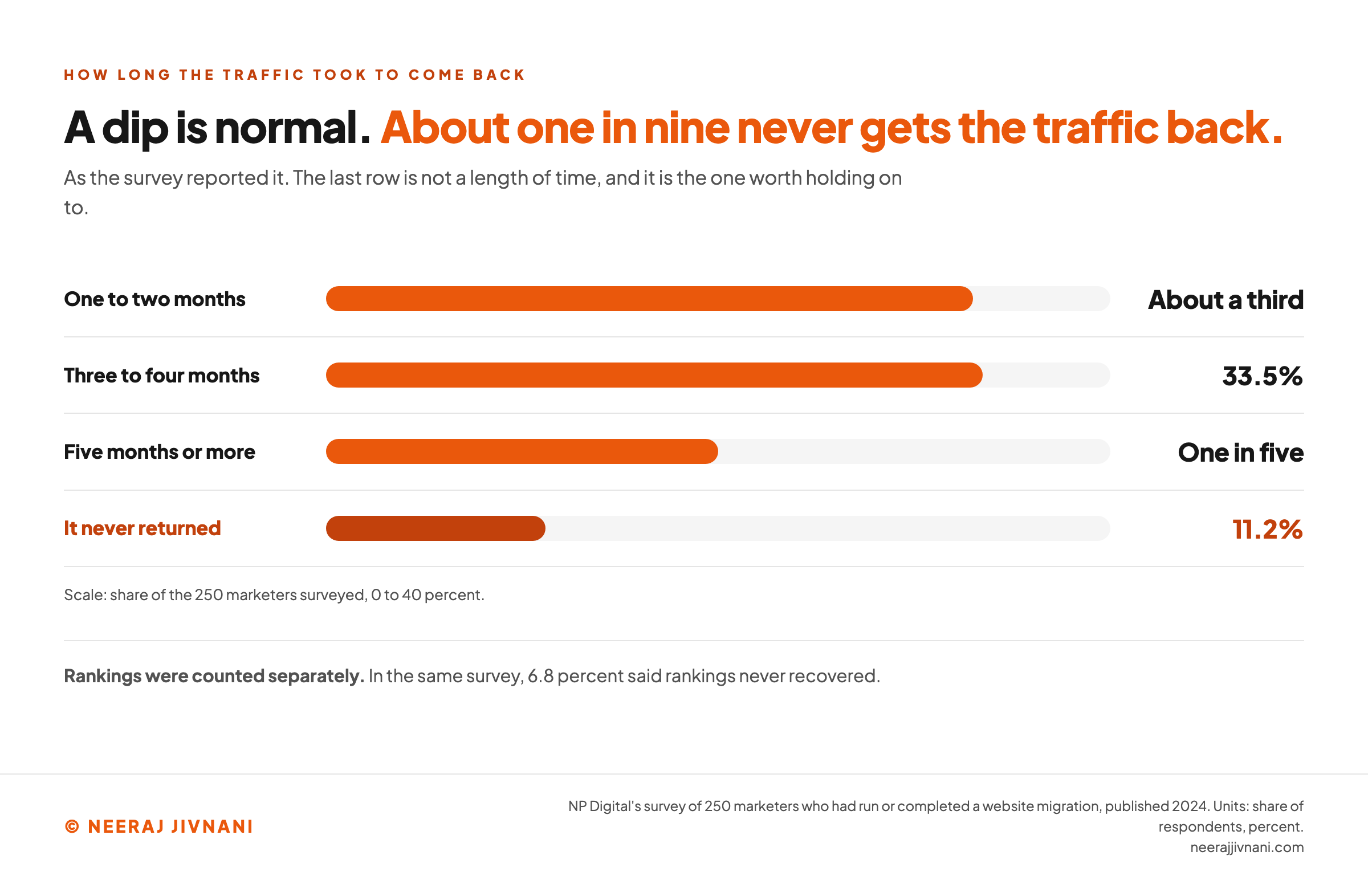
About a third of them said traffic returned to pre-migration levels within one to two months. Another 33.5 percent said three to four months, and one in five said five months or more.
The number worth holding on to is the one at the end of that distribution. In the same survey, 11.2 percent said traffic never returned at all, and 6.8 percent said rankings never recovered.
That is about one in nine.
That is not a reason to avoid migrating. It is the reason to know which kind of move you are making, and to stop adding changes to it.
Why Two Changes at Once Cost More Than Two Changes in Turn
Every change you make asks search engines to relearn something. Two changes at once ask them to relearn two things while you have lost the ability to tell which one went wrong.
Google states the consequence directly. Its help for the Change of Address tool says that combining a site move with a redesign of the content and URL structure will probably cost you some traffic, because its systems have to relearn and reassess the individual pages.
And its site move guidance says to plan changes one after the other rather than everything at the same time, giving the worked example of moving to a new domain first and changing the layout afterwards.
This is the part that is genuinely a decision rather than a task.
You will be told that combining changes is efficient, and it is, in developer hours. It is not efficient in the currency you are spending, which is your ability to diagnose a problem in the two weeks after launch.
A move that goes wrong with one variable takes an afternoon to find. A move that goes wrong with three takes a month, and by then the traffic has been gone for a month.
So the rule we would give anyone: decide the smallest move that gets you what you want, run it on its own, and let it settle before you start the next one.
There is one exception, and it runs the other way. For a small or medium site, Google recommends moving all your URLs at once rather than a section at a time, because a partial move is harder for its systems to detect.
Splitting a move into sections is advice for large sites, and it is about pages rather than about stacking a redesign on top.
The moves inside your move
Tick every change your launch contains. It comes back twice: once as the single launch you planned, with that many variables in it, and once as the separate moves it is actually made of.
What the launch contains
Nothing ticked yet. Migrations do not go wrong because somebody missed step nineteen of a twenty nine step checklist. They go wrong because three projects were launched as one and nobody could tell which of them broke.
One thing this does not mean
Do not split a single move into sections. For a small or medium site, Google recommends moving all your URLs at once rather than a section at a time, because a partial move is harder for its systems to detect. Splitting by section is advice for large sites, and it is about pages rather than about stacking a redesign on top.
Use this chart — embed code and citation
<a href="https://neerajjivnani.com/blog/website-migration/"><img src="https://neerajjivnani.com/infographics/website-migration/recovery-distribution.png" alt="Horizontal bar chart of how long traffic took to return after a website migration, drawn from NP Digital's survey of 250 marketers: about a third said one to two months, 33.5 percent said three to four months, one in five said five months or more, and 11.2 percent said traffic never returned at all." width="1200"></a>
<p>Chart: <a href="https://neerajjivnani.com/blog/website-migration/">Neeraj Jivnani</a></p>Neeraj Jivnani, "What a Website Migration Is, and Which Steps Yours Actually Needs", neerajjivnani.com, https://neerajjivnani.com/blog/website-migration/Free to republish with a link back to this page.
What Has to Exist Before You Move
Five artefacts. Each one prevents a specific failure, and the failure is the reason to build it rather than the tidiness.
None of them takes long on a small site. All five are cheaper to make before the move than to reconstruct after one, which is the only reason they come first.
A List of Every Address You Have
Crawl your own site and export the result, then add everything the crawl will miss.
A crawler only finds what something links to. Pages nothing points at, old campaign landing pages, PDFs, images with links pointing at them: all of them are live addresses and none of them shows up.
So pull from more than one place.
Your analytics knows every page someone visited. Search Console knows every page Google indexed, and your content system knows every page that exists.
The failure this prevents: a page you forgot about returns an error on launch day and you find out from a customer.
A Map From Old to New
Two columns, old address and new address, one row per page. Nothing more sophisticated is needed and nothing less will do.
The work is not the format, it is the decision in each row. Every page on that list is going to be redirected, rebuilt at a new address, or retired, and somebody has to say which.
Retiring is a real option and it is underused. A page with no traffic, no links and no purpose does not need a new home, and pointing it somewhere irrelevant is worse than letting it return a clean error.
One thing to check before you write a single row: your current redirects. If your site has been moved before, there are rules already in place, and the new configuration will overwrite them unless you carry them across.
The failure this prevents: finding out on launch day that nobody ever decided what happens to four hundred pages.
The Numbers You Will Be Compared Against
Write down what your site does now, two or three weeks before you move, and keep the file.
You want organic traffic, your rankings for the terms you care about, your indexed page count, your conversion numbers, and a note of which twenty or thirty pages carry most of it.
Nothing about it shows up on the finished site, which is why it gets postponed and then forgotten. It is also the only item here you cannot make later.
The failure this prevents: six weeks after launch somebody asks whether traffic is down, and nobody can answer, because the comparison everyone is arguing about was never recorded.
A Copy Search Engines Cannot Reach
Build the new site somewhere real, and make sure nothing indexes it.
Password protection, or an allowlist of the addresses your own machines connect from, is the reliable way. A robots.txt disallow is the tempting way, and it carries a hazard the others do not: the file travels with the site.
If that disallow reaches the live server on launch day, you have blocked your own site from being crawled, and the symptom is that nothing is wrong on the page while your pages fall out of the index.
Same for a noindex tag applied across the staging build. Removing both belongs on the launch checklist in writing, not in somebody's memory.
The failure this prevents: the unfinished site getting indexed while the finished one is still live, so the two compete for the same queries.
A Way Back
Decide, before launch day, what would make you undo this and who gets to make that call.
The answer is usually something like: the site is broken in a way we cannot fix in two hours, or a core function like checkout is failing. Write it down.
The reason to decide it in advance is that nobody makes this call well at eleven at night with a deploy half finished. By then the sunk cost is doing the thinking.
The failure this prevents: a bad launch that stays live for three days because reverting felt like admitting defeat.
The Launch Itself
Pick the launch day by your own traffic rather than by the calendar, and block out hours of your own time rather than minutes.
If you are changing host, lower your DNS time to live at least a week beforehand. Google's guidance on changing hosting suggests a conservative low value such as a few hours, which is what makes both the switch and an undo propagate fast.
The order on the day is short.
- Take a final backup of the old site.
- Remove the blocks. Password protection, the noindex tags, the robots.txt disallow.
- Switch the DNS or the server configuration.
- Turn on the redirects.
- Check the pages you listed as your most important, by hand, one at a time.
- Submit the new sitemap in Search Console, and file the Change of Address if your domain changed.
What the Server Should Say While You Are Switching
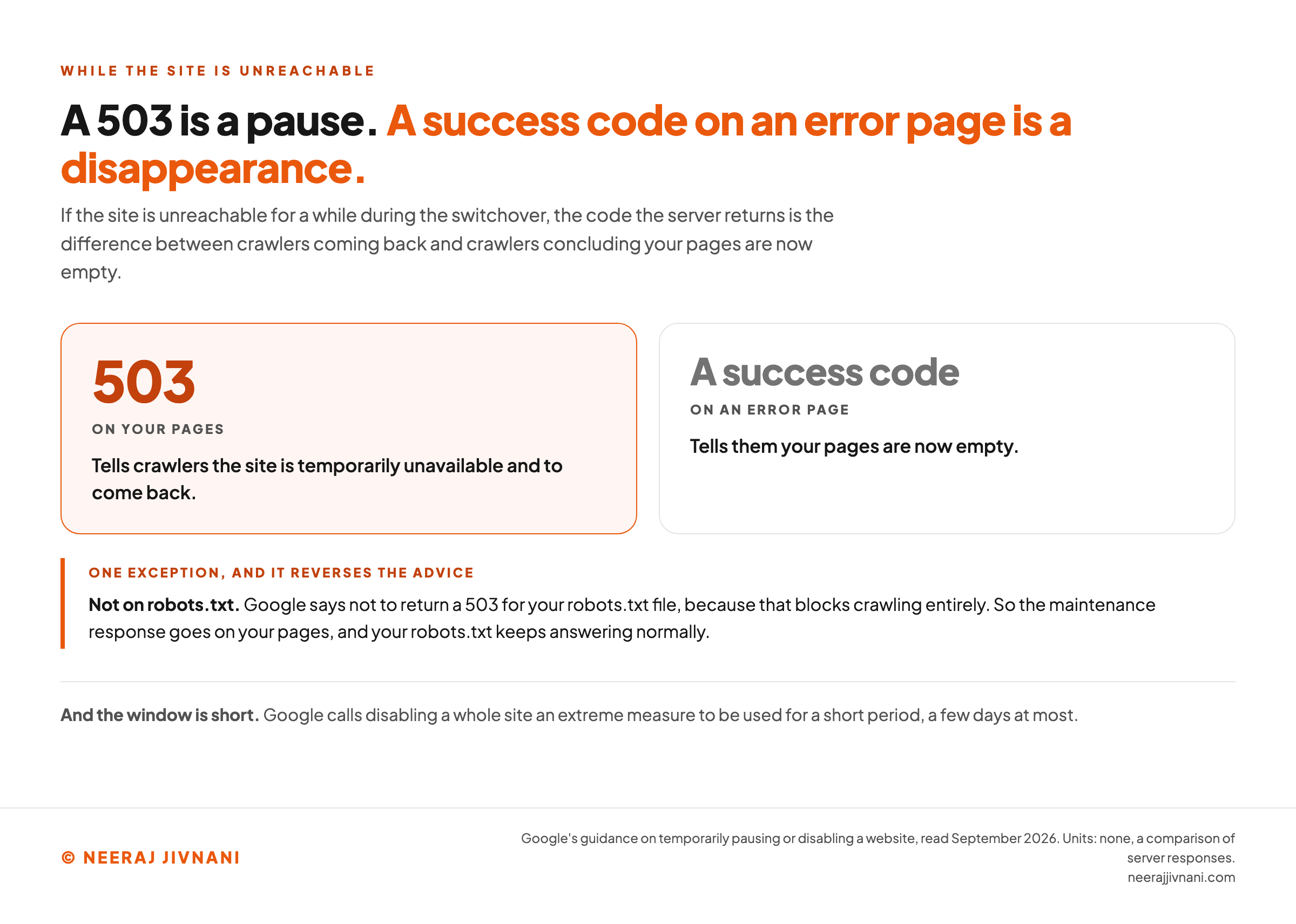
If the site is unreachable for a while, the code it returns is the difference between a pause and a disappearance.
A 503 tells crawlers the site is temporarily unavailable and to come back. An error page returning a success code tells them your pages are now empty.
Two limits are worth knowing.
Google's guidance on temporarily pausing a site calls disabling a whole site an extreme measure to be used for a short period, a few days at most. And it says not to return a 503 for your robots.txt file, because that blocks crawling entirely.
So the maintenance response goes on your pages. Your robots.txt keeps answering normally.
Use this chart — embed code and citation
<a href="https://neerajjivnani.com/blog/website-migration/"><img src="https://neerajjivnani.com/infographics/website-migration/what-the-server-says.png" alt="Comparison of what a server should return while a site is unreachable during a switchover, setting a 503 on your pages, which tells crawlers the site is temporarily unavailable and to come back, against a success code on an error page, which tells them your pages are now empty, with the exception that a 503 must not be returned for robots.txt because that blocks crawling entirely." width="1200"></a>
<p>Chart: <a href="https://neerajjivnani.com/blog/website-migration/">Neeraj Jivnani</a></p>Neeraj Jivnani, "What a Website Migration Is, and Which Steps Yours Actually Needs", neerajjivnani.com, https://neerajjivnani.com/blog/website-migration/Free to republish with a link back to this page.
After Launch, and for How Long
The checking is front loaded and it does not finish on launch day. A site can look perfect while it is dropping out of the index, and looking at the site is not how you would find that out.
- In the first hours, open your robots.txt and read it. Check that your most important pages return a success code. Follow three or four old addresses and confirm they land where the map says. Confirm your analytics is recording.
- In the first week, watch Search Console's page indexing report. New pages should start appearing, old ones should start dropping out. Watch for errors you did not have before.
- In the first month, compare against the file you wrote before you moved. Look at your priority pages individually rather than at the site total, because a site total hides a section that died.
One reading that looks like a failure and is not: after a hosting change, Google says a temporary drop in crawl rate immediately after launch is normal, followed by a steady increase over the next few days.
The 180-Day Window
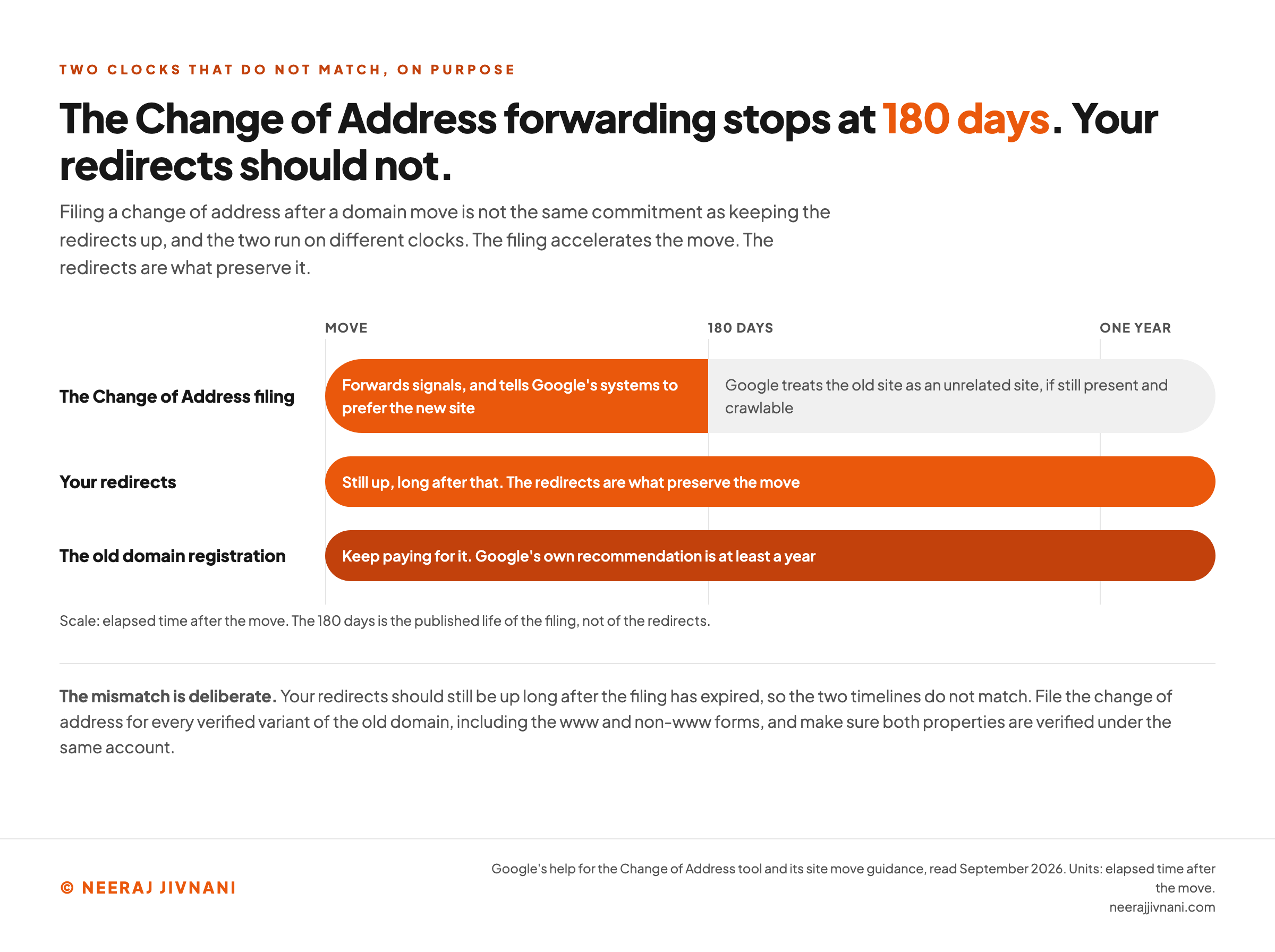
If you changed domain, the Change of Address filing in Search Console has an expiry date.
Google's help for the tool says it forwards signals and tells its systems to prefer the new site for 180 days.
After that period, in Google's words, it "does not recognize any relationship between the old and new sites, and treats the old site as an unrelated site, if still present and crawlable".
Your redirects should still be up long after that, so the two timelines do not match, and that is deliberate. The filing accelerates the move; the redirects are what preserve it.
Two practical consequences. File it for every verified variant of the old domain, including the www and non-www forms, and make sure both properties are verified under the same account.
And keep paying for the old domain. Google's own recommendation is at least a year, to stop somebody else buying an abandoned name you spent years pointing links at.
Use this chart — embed code and citation
<a href="https://neerajjivnani.com/blog/website-migration/"><img src="https://neerajjivnani.com/infographics/website-migration/the-180-day-gap.png" alt="Timeline comparing three clocks that run after a domain move: the Change of Address filing, which forwards signals for 180 days and then leaves Google treating the old site as unrelated, the redirects, which stay up long after that and are what preserve the move, and the old domain registration, which Google recommends keeping for at least a year." width="1200"></a>
<p>Chart: <a href="https://neerajjivnani.com/blog/website-migration/">Neeraj Jivnani</a></p>Neeraj Jivnani, "What a Website Migration Is, and Which Steps Yours Actually Needs", neerajjivnani.com, https://neerajjivnani.com/blog/website-migration/Free to republish with a link back to this page.
The Failures Worth Knowing By Name
Six failures recur, and each one has a symptom. The symptom is how you catch it before it costs you a quarter.
- Staging blocks left on the live site. Symptom: the site looks perfect and pages start dropping out of the index within days. Cause: a robots.txt disallow or a noindex that traveled with the build.
- Redirects pointing everything at the homepage. Symptom: bounce rate up, and rankings falling on pages that were fine. Cause: a bulk rule written because mapping individually was tedious.
- Analytics that stopped recording. Symptom: traffic looks catastrophic and nothing else corroborates it. Cause: the tracking code did not survive the template rebuild. Of all the failures here, this is the one that manufactures a crisis out of nothing.
- Internal links still pointing at old addresses. Symptom: nothing visible, slightly slower pages, and a crawler spending its time on redirects. Cause: links updated in the navigation and forgotten in the body copy.
- The old redirects overwritten. Symptom: a slow decline that has no obvious cause because the broken links are years old. Cause: a new configuration file replacing the old one.
- Search Console verification lost. Symptom: you cannot file the Change of Address and cannot see your own data at the moment you most need it. Cause: the HTML verification file or the meta tag did not travel to the new site. Google's hosting guidance names this specifically, and it is a two minute fix before the move and an awkward one after.
Doing It Yourself, or Paying Someone
Three routes, and the honest answer depends almost entirely on which kind of move you named earlier.
- Yourself. A hosting change on a small site is genuinely a plugin and an afternoon. A domain change on a hundred page site is a weekend if you are careful and a disaster if you are not.
- Your host. If your host offers to move the site for you, that is usually the cheapest route, and the limit on it is in the contract rather than in the quality of the work.
- An agency or a specialist. Worth it when addresses change, when the site earns money from search, or when you are combining a move with a redesign despite everything above.
On price, two published price lists give you the shape.
HubSpot lists its migration into Content Hub at $500 setup plus $20 per page, up to 150 pages, taking two to four weeks, and says it excludes design work, custom development and content strategy.
Cloudways publishes bands by type: free to $1,000 for a straight host to host move, and $100 to $2,500 for a simple WordPress site.
Both of those are for moving a site, not for rebuilding one. Anything described as a migration that includes a new design is two projects in one invoice, and you should price it as two.
What a Host's Migration Service Actually Promises
Read the terms before you hand over your credentials, because a host migration is a service with a contract, and the contract is usually clear about who carries the risk.
Network Solutions publishes the terms for its TransferMe migration service.
It states in capitals that it makes "NO WARRANTY THAT THE MIGRATION OF YOUR WEBSITE TO OUR HOSTING PLATFORM WILL BE TIMELY, SECURE, OR ERROR FREE", and that you "WILL BE SOLELY RESPONSIBLE FOR ANY LOSS OF DATA THAT MAY RESULT FROM THE TRANSFER".
That is not a trap and it is not unusual. It is what a service of that kind reasonably says.
But it settles the question people have, which is whether using the host's migration means somebody else carries the risk. It does not. You do.
Which makes the backup you took before anyone touched anything the only real protection you have, and worth more than any of the paperwork.
Five Things People Ask Before They Move
Five questions come up before almost every move.
What does website migration mean? Moving a site to a new home, in any of the senses that matter to a search engine: a new server, a new platform, a new domain, a new set of addresses. Rewriting a page is not a migration. Renaming it is.
How much does it cost to migrate a website? Anywhere from nothing to five figures, decided by whether your addresses change and how many pages you have. A host to host move can be free. HubSpot's published rate for moving a site into its platform is $500 plus $20 a page, capped at 150 pages, which puts a hundred page move at $2,500.
How long does a website migration take? The switch itself can be an hour. Getting back to where you were takes longer: Google's guidance says a few weeks or more for the new addresses to settle for a medium sized site, and the marketers in NP Digital's 2024 survey mostly reported one to four months.
Rankings, and the Seven Rs That Are Not About Websites
Will a migration hurt my rankings? Temporarily, usually. Permanently, sometimes. Google states that permanent redirects do not cause a loss in PageRank, so the signals are designed to carry across, and the losses that stick are almost always a mistake in the move rather than a tax on it.
What are the seven migration strategies? Rehost, replatform, repurchase, refactor, retire, retain and relocate. Those are Amazon Web Services' seven Rs for moving software to the cloud, which is a different job from moving a website. The one idea that transfers is the retire option: on a website move, deciding which pages do not deserve a new home is the most useful hour in the whole project.
Make the Move Smaller
Migrations do not go wrong because somebody missed step nineteen of a twenty nine step checklist. They go wrong because three projects were launched as one and nobody could tell which of them broke.
So the useful work is making the move smaller. Name the move you are making, take out everything that does not serve it, and put the redesign in a separate quarter.
Then the checklist shrinks to something you can hold in your head, the dip lasts the few weeks it is supposed to, and if something does break you will know what it was by lunchtime.