What Robots.txt Is, and Which of Its Rules a Crawler Follows
Your robots.txt is a request, not a lock. See what each line does, what it cannot keep out of search, and how to read yours in about a minute.

/ On this page10 sections
Robots.txt is a plain text file at the root of your site, listing the parts of the site each named crawler should not fetch.
Every line in it is a request rather than a barrier.
And when two lines match the same URL, only one of them applies. Which is where this file goes wrong, at the joins between its rules rather than at the rules themselves.
What a Robots.txt File Is
A robots.txt file tells crawlers which URL paths on your site they should not request. A well-behaved crawler reads it before it fetches anything else.
That order is the whole mechanism.
The file is fetched first, the rules are parsed, and only then does the crawler decide what else to ask for.
It was built for load. Martijn Koster proposed the original in 1994, when the worry was crawlers overwhelming the servers they visited, and managing traffic is still the job it does best.
What it is not is a permission system.
A crawler can ignore every line in the file and nothing breaks. The specification says so itself.
The protocol was fixed in writing in 2022 as Request for Comments (RFC) 9309, which is the form an internet standard takes. Its opening section states that these rules are not a form of access authorization.
Where Yours Already Lives
You either have one or you have a 404 where one would be, and both are answers. Type your domain followed by /robots.txt into a browser and you will see which.
Open it in a private window.
A logged-in session, a cache or a country-specific redirect can show you something a crawler would never be served.
If your site runs on a content management system, the file is probably generated rather than written by hand. The place to edit it is in the settings rather than on the server.
What Each Line in the File Means
Every line is a field name, a colon and a value. Nothing else parses, and anything a crawler does not recognize is skipped.
Here is a complete, working file with three groups in it:
``` User-agent: * Disallow: /cart/ Allow: /cart/shipping-info
User-agent: Bingbot Disallow: /internal-tools/
Sitemap: https://www.example.com/sitemap.xml ```
Three things are worth noticing before the details.
- A blank line separates one group from the next.
- The field names are not case sensitive.
- Everything after a
#is ignored.
User-Agent: Who the Rule Is For
Every group opens with a user-agent line naming the crawler the rules below it apply to. An asterisk means every crawler that has no group of its own.
The name you write is a short product token, not the long browser-style string a crawler sends. Googlebot announces itself with a whole line of browser vocabulary, and the line that matches it is the short User-agent: Googlebot.
Capitalization does not matter here.
Crawlers are required to match that token case-insensitively, which RFC 9309 makes a requirement rather than a courtesy, so googlebot and Googlebot are the same line.
Disallow and Allow: What They Cover
Disallow names a path a crawler should not fetch. Allow names one it may, and its real job is to carve an exception out of a disallow above it.
Both take a path starting from the root.
A rule with no path at all is ignored, so Disallow: on its own line blocks precisely nothing.
Here the capitalization rule reverses, and that is the first of two things that catch people. Field names are matched case-insensitively and their values are not, so Disallow: /Photo leaves /photo open to Google.
The other is the trailing slash, which decides how much you caught.
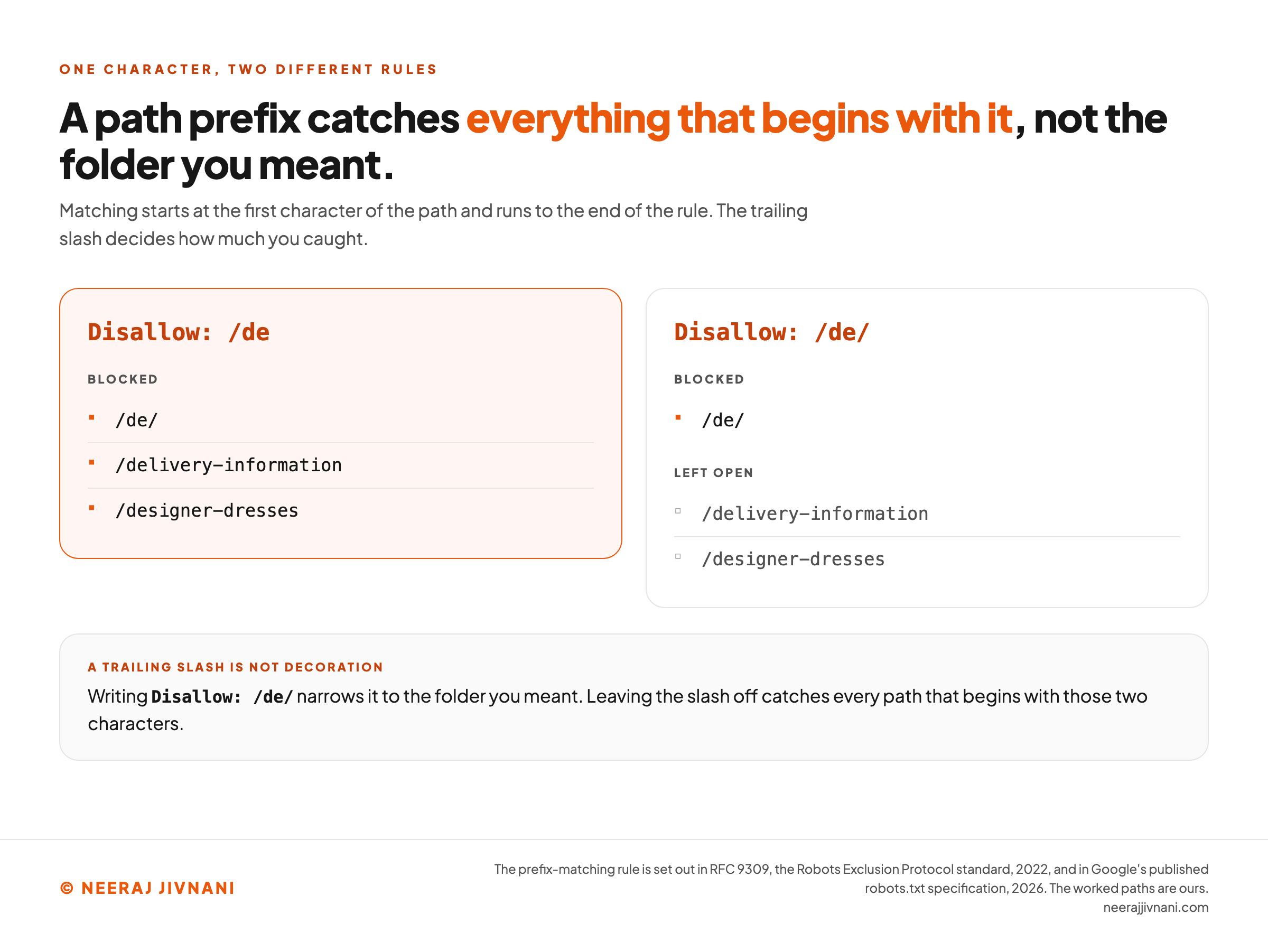
Matching starts at the first character of the path and runs to the end of the rule, so a path prefix catches everything that begins with it. Disallow: /de blocks /de/, and it also blocks /delivery-information and /designer-dresses.
Writing Disallow: /de/ narrows it to the folder you meant.
The Three Characters That Change a Rule
Three characters in a path do something other than stand for themselves, and between them they replace most of the long files people write.
| Character | What it does | Example |
|---|---|---|
* | Stands for any run of characters, slashes included | Disallow: /products/*? catches every parameterized product URL |
$ | Anchors the match to the end of the URL | Disallow: /*.pdf$ catches /file.pdf but not /file.pdf?id=7 |
# | Starts a comment; the rest of the line is ignored | Disallow: /tmp/ # staging only |
An asterisk at the end of a rule does nothing at all. Matching already runs to the end of the rule and no further, so Disallow: /fish* and Disallow: /fish are the same instruction written two ways.
Comments are worth more than they look on a file somebody else will inherit. A line saying why a directory is blocked is the difference between a rule that survives and a rule someone deletes because it looked like a mistake.
Sitemap: The Line That Is Not About Blocking
Sitemap points at your sitemap file, and it is the one line in here that asks for something rather than refusing it. It takes a full URL including the protocol, and you can list as many as you have.
It belongs to no group.
Put it at the top or the bottom and every crawler reads it, whichever user-agent line it happens to sit under.
That last part hides a trap. A crawler ignores any field it does not recognize as a rule, so a sitemap line sitting between two user-agent lines does not end the first group, and the two agents end up sharing whatever rules follow.
Read this one the way it looks, and only betabot is blocked:
``` User-agent: alphabot Sitemap: https://www.example.com/sitemap.xml
User-agent: betabot Disallow: / ```
Read it the way a parser does, with the unrecognized line dropped, and the two user-agent lines join into a single group. Both bots are then blocked from the entire site.
Crawl-Delay, and Who Still Reads It
Crawl-delay asks a crawler to wait a stated number of seconds between requests. It never made it into the standard, and support for it is uneven.
Google ignores it outright and says so in its robots.txt specification, updated in 2026.
Some other engines still read it, each with its own reading of what the number means.
Work out what you are asking for before you set one.
A delay of 10 seconds means one page every 10 seconds and no faster, which is generous for a brochure site and nowhere near enough for a catalog.
Use this chart — embed code and citation
<a href="https://neerajjivnani.com/blog/robots-txt/"><img src="https://neerajjivnani.com/infographics/robots-txt/where-the-slash-stops-it.png" alt="Two panels comparing what one character does to the reach of a single rule. The headline reads that a path prefix catches everything that begins with it, not the folder you meant, and a line beneath it explains that matching starts at the first character of the path and runs to the end of the rule, so the trailing slash decides how much you caught. The left panel, highlighted in orange, is headed Disallow: /de and lists three blocked addresses: /de/, /delivery-information and /designer-dresses. The right panel is headed Disallow: /de/ and splits the same three addresses in two. Blocked: /de/ alone. Left open: /delivery-information and /designer-dresses. A band underneath says a trailing slash is not decoration, that writing Disallow: /de/ narrows the rule to the folder you meant, and that leaving the slash off catches every path that begins with those two characters." width="1200"></a>
<p>Chart: <a href="https://neerajjivnani.com/blog/robots-txt/">Neeraj Jivnani</a></p>Neeraj Jivnani, "What Robots.txt Is, and Which of Its Rules a Crawler Follows", neerajjivnani.com, https://neerajjivnani.com/blog/robots-txt/Free to republish with a link back to this page.
Which Rule Wins When Two of Them Match
A file with one rule in it behaves the way you expect. A file with several is where the surprises live, because more than one rule can match the same URL and only one of them gets applied.
Three things decide the answer, and none of them is the order you wrote the rules in.
Longest Match, Then Allow
The rule with the most characters in its path wins, whether that rule allows or disallows.
Take Disallow: /blog/ and Allow: /blog in one group, against the URL /blog/post-title/. The disallow path is six characters and the allow path is five, so the longer one applies and the page is blocked.
When two matching rules are exactly the same length, the allow wins. RFC 9309 frames that as a should rather than a must, and Google's specification describes the same tie-break as taking the least restrictive rule.
Crawlers that never implemented the standard may resolve the same file some other way. That is one more argument for keeping it short enough that nothing overlaps in the first place.
A Crawler Reads One Group, Not All of Them
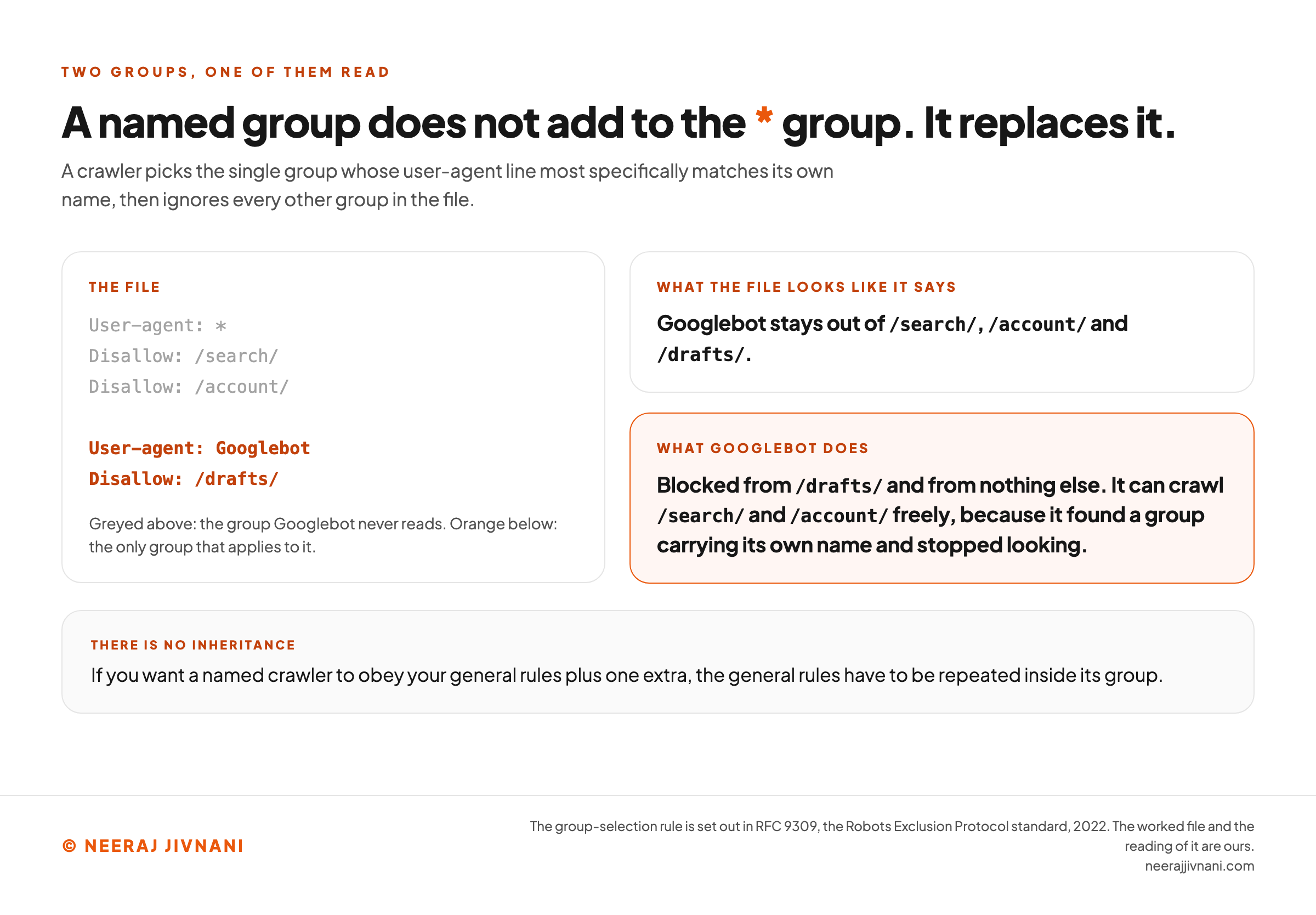
A crawler picks the single group whose user-agent line most specifically matches its own name, then ignores every other group in the file. The * group is not added to it.
Here is what that does to a file that looks perfectly reasonable:
``` User-agent: * Disallow: /search/ Disallow: /account/
User-agent: Googlebot Disallow: /drafts/ ```
Googlebot here is blocked from /drafts/ and from nothing else. It can crawl /search/ and /account/ freely, because it found a group carrying its own name and stopped looking.
If you want a named crawler to obey your general rules plus one extra, the general rules have to be repeated inside its group. There is no inheritance.
Two groups naming the same crawler are the exception.
Those are merged into one before any rule is read, so splitting a bot's rules across the file is untidy rather than broken.
One File Per Host, Protocol and Port
Rules apply only to the exact host, protocol and port the file was fetched from. Nothing else.
So https://example.com/robots.txt says nothing about https://shop.example.com/, nothing about http://example.com/, and nothing about https://example.com:8181/. Each of those needs its own file.
It is the rule a staging subdomain breaks on. A Disallow: / written to keep the test site quiet does nothing at all, because the file it was written into belongs to the main domain.
The file also has to be at the root.
A crawler will not go looking in a subdirectory for it.
Use this chart — embed code and citation
<a href="https://neerajjivnani.com/blog/robots-txt/"><img src="https://neerajjivnani.com/infographics/robots-txt/a-named-group-replaces-it.png" alt="A worked robots.txt file beside the two ways it can be read, showing that a named group does not add to the star group but replaces it. A line under the headline states the rule: a crawler picks the single group whose user-agent line most specifically matches its own name, then ignores every other group in the file. On the left is the file itself, with the first group greyed out, reading User-agent colon star, Disallow colon slash search slash, Disallow colon slash account slash, and the second group in orange below it reading User-agent colon Googlebot, Disallow colon slash drafts slash. A note says the greyed lines are the group Googlebot never reads and the orange lines are the only group that applies to it. On the right are two readings of that file. The first, what the file looks like it says, is that Googlebot stays out of /search/, /account/ and /drafts/. The second, highlighted in orange and headed what Googlebot does, says it is blocked from /drafts/ and from nothing else, and can crawl /search/ and /account/ freely, because it found a group carrying its own name and stopped looking. A band underneath is headed there is no inheritance and says that if you want a named crawler to obey your general rules plus one extra, the general rules have to be repeated inside its group." width="1200"></a>
<p>Chart: <a href="https://neerajjivnani.com/blog/robots-txt/">Neeraj Jivnani</a></p>Neeraj Jivnani, "What Robots.txt Is, and Which of Its Rules a Crawler Follows", neerajjivnani.com, https://neerajjivnani.com/blog/robots-txt/Free to republish with a link back to this page.
What Robots.txt Cannot Do
The file controls fetching, and every limit on it follows from that one sentence.
Three of them are worth knowing. Two cost people something, and the third, the media exception, runs the opposite way.
A Blocked Page Can Still Be Listed
A disallow governs the fetch. Being listed is a separate decision, made out of whatever a search engine already knows about the address, and one link on somebody else's site supplies enough of that.
So the result you were trying to suppress turns up anyway, carrying your URL and nothing underneath it.
Google's guidance on the file describes that outcome precisely: the URL can still appear in search results, but the result "won't have a description".
Removal is a different control, and it lives on the page rather than in this file.
It is a noindex value in a robots meta tag, or the same value in a response header for file types that have no head to put a tag in.
Which puts it on the wrong side of the order this whole file works by. Rules are read before pages are, so a URL you have disallowed is a URL whose removal notice nobody ever collects.
Two settings that look like they reinforce each other cancel out instead.
Take the block off, let the page be fetched once, and let the noindex do the job it was written for.
The Exception: Images, Video and Audio
There is one case where a disallow does remove something from results.
A media file is not a page. Disallowing an image, a video or an audio file does keep it out of Google's results, and Google states that directly in the same guidance that says the opposite about web pages.
The distinction is the type of file, not the folder it sits in. A blocked page can still be listed; a blocked photograph is not shown.
What the rule does not do is stop anybody linking to the file or opening it.
The address still works for anyone who has it.
The File Is Public, and It Names What You Hid
Anybody can read your robots.txt, including the people you would least like reading it. It is plain text at a known address with nothing guarding it.
A line reading Disallow: /admin-backup/ is an announcement rather than a precaution. RFC 9309 says as much in its security section: listing paths in the file exposes them publicly and makes those paths discoverable.
If something must not be reached, the control is authentication.
A password on the directory works against every visitor. A disallow works only on crawlers that read the file and choose to obey it.
One more thing stops at a blocked page, and it is easy to forget. Links pointing into it, and links inside it, pass nothing on.
What to Block, and What to Leave Alone
Block the pages that exist for a session rather than for a reader: internal search results, carts, checkouts, account pages, and anything that mints a fresh URL for every combination of filters.
None of those belongs in a search index, and all of them can generate addresses without limit.
Leave alone your CSS, your JavaScript, your images, and anything else a page needs to render. A crawler that cannot load those sees a broken version of the page and judges it as it finds it.
Never block anything you want removed from search.
That is the noindex job, and the noindex needs the crawl.
Beyond those, most sites need nothing here at all.
Two mechanical things stop a file working before any rule in it is read. It has to be plain text in the Unicode encoding UTF-8, saved by an editor that does not quietly insert curly quotes, and it has to be named robots.txt in lowercase.
Crawl Budget, and the Size It Starts At
Crawl budget is the usual reason given for writing rules anyway, and Google publishes a rough scale for who the question is even for. Its crawl-budget guide, updated in 2026, points at sites over 1 million pages changing weekly, or over 10,000 changing daily.
It says in the same breath that those are estimates rather than exact thresholds. It adds a third case carrying no number at all, a site with a large share of its addresses sitting in Search Console as discovered and not indexed.
Below all that, a disallow is a tidiness decision rather than a performance one. Write it because the URLs are worthless, not because you think you are rationing something.
AI Crawlers, and the Group They Quietly Replace
Blocking an AI crawler takes one line, and that line does more than it looks like it does.
GPTBot, ClaudeBot, CCBot, PerplexityBot and Google-Extended are user-agent tokens like any other. Which means a group naming one of them is a named group, and a named group replaces the * group instead of adding to it.
So a file written to keep one crawler out of one folder can do the opposite:
``` User-agent: * Disallow: /checkout/ Disallow: /members/
User-agent: GPTBot Disallow: /training-data/ ```
GPTBot is now the only crawler on that site free to walk into /checkout/ and /members/. It matched on its own name, and every rule written for everybody else stopped applying to it.
A crawler you want held to one more rule than the others has to be given all the others too, written out again inside its own group.
One Token for Training, Another for Answering
Being crawled to train a model is not the same as being read to answer somebody's question, and some operators publish a separate token for each.
Block the wrong one and you can remove yourself from an answer you wanted to appear in.
How far this has already gone is measurable.
Comparing the 200 most visited domains against their archived copies from before ChatGPT launched, Chang and He found in 2025 that 143 user-agents which had been permitted are now banned. Of those domains, 71 now disallow every robot outright.
GPTBot is the most refused name in that set, disallowed by 43 of the 200, ahead of CCBot at 37 and ClaudeBot at 34.
Our own read is that the decision here is commercial and the syntax is incidental. The line costs nothing, it binds only the crawlers that read the file, and there is nothing behind it but goodwill.
If the content genuinely must not be taken, a disallow is not the control you are looking for.
When the File Itself Is the Problem
Three things go wrong with the file rather than with the rules inside it.
All three are silent, and each one can leave your file doing something other than what it says.
500 Kibibytes, and What Falls Off the End
The standard sets a minimum that a crawler has to parse, and it is 500 kibibytes. Google enforces the same figure as a ceiling, and content past it is ignored.
Ignored is the word to notice.
An oversized file does not fail loudly.
It stops being read partway through, and the rules at the bottom quietly do nothing at all.
Half a megabyte of rules is not something anyone writes by hand. If your file is anywhere near it, the rules are being generated, and one wildcard almost certainly replaces several hundred lines.
Your Edit Is Not Live Yet
Crawlers cache this file. Google keeps its parsed copy for up to 24 hours, so a rule you added this morning may not be the rule being applied this afternoon.
That cuts both ways.
A block you removed can keep blocking for a day, and a block you added does not take hold the moment you hit save.
A Missing File and a Broken One Mean Opposite Things
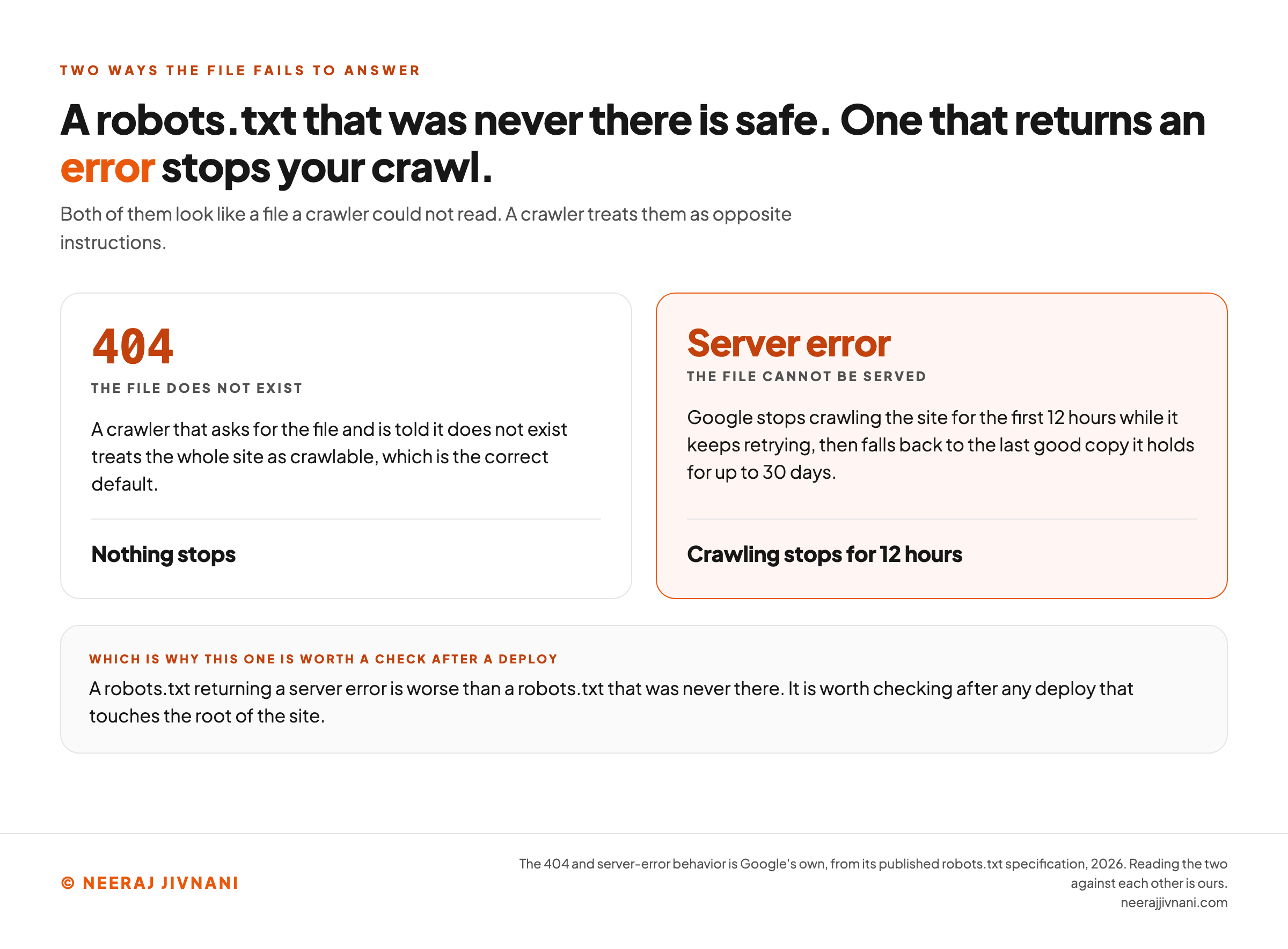
A 404 on your robots.txt is not a problem. A crawler that asks for the file and is told it does not exist treats the whole site as crawlable, which is the correct default.
A server error is another matter entirely.
Google stops crawling the site for the first 12 hours while it keeps retrying, then falls back to the last good copy it holds for up to 30 days.
So a robots.txt returning a server error is worse than a robots.txt that was never there. It is worth checking after any deploy that touches the root of the site.
Use this chart — embed code and citation
<a href="https://neerajjivnani.com/blog/robots-txt/"><img src="https://neerajjivnani.com/infographics/robots-txt/missing-and-broken-are-opposite.png" alt="Two panels setting the two ways a robots.txt fails to answer against each other. The headline reads that a robots.txt that was never there is safe while one that returns an error stops your crawl, and a line beneath adds that both of them look like a file a crawler could not read while a crawler treats them as opposite instructions. The left panel is headed 404, the file does not exist, and says a crawler that asks for the file and is told it does not exist treats the whole site as crawlable, which is the correct default. Its verdict, set off below a rule, reads nothing stops. The right panel, highlighted in orange, is headed server error, the file cannot be served, and says Google stops crawling the site for the first 12 hours while it keeps retrying, then falls back to the last good copy it holds for up to 30 days. Its verdict reads crawling stops for 12 hours. A band underneath says a robots.txt returning a server error is worse than a robots.txt that was never there, and that it is worth checking after any deploy that touches the root of the site." width="1200"></a>
<p>Chart: <a href="https://neerajjivnani.com/blog/robots-txt/">Neeraj Jivnani</a></p>Neeraj Jivnani, "What Robots.txt Is, and Which of Its Rules a Crawler Follows", neerajjivnani.com, https://neerajjivnani.com/blog/robots-txt/Free to republish with a link back to this page.
Is Robots.txt Legally Binding?
No. Nothing in the file grants or withholds a legal right, and in the common-law jurisdictions where the question has been argued, a crawler that ignores it has not, by that act alone, broken a law.
Three different questions get asked under this one heading, and they have three different answers.
Is it access authorization? No. RFC 9309 rules that out in its opening section, which is why a crawler that reads your file and walks straight past it has still only declined a request.
Is ignoring it a crime? Not on its own. Reviewing the literature in 2025, Chang and He conclude that violating robots.txt alone does not incur criminal liability under current law, and argue that civil doctrine is the better fit.
Has it ever mattered in court? Yes, and less cleanly than that answer sounds.
Chang and He record scholars generally reading the courts as having treated robots.txt as a technology measure under section 512(i) of the Digital Millennium Copyright Act.
The same survey records the field agreeing on the broader proposition the other way, that courts reject robots.txt as a technological protection measure.
What is not in dispute is narrower. The file's presence has counted in civil disputes over scraping.
Their own argument goes further. Writing in Computer Law and Security Review, they make the case that a robots.txt file can, in the right circumstances, function as a unilateral contract or as notice sufficient to ground a claim in tort.
What That Means for a Site You Own
All of it is narrower than it sounds. A file does not stop a scraper, and a scraper that ignores it is a server problem before it is a legal one.
Rate limits, authentication and blocking by address are the controls that act.
The file is the notice.
How to Check Yours Before It Costs You
Two checks catch almost everything, and neither of them needs a tool.
Open the file in a private browsing window at your own domain. If you see the rules you expect, a crawler can see them too; if you get a login page or a 404, that is your answer and it is a different one.
Then take a URL you care about and work it against the rules by hand, longest match first. If you cannot say which rule applies to it, the file is too complicated to keep.
Worked against your rules
Paste your own file, name one address and one crawler, and the three resolution rules are applied to them here, in your browser. Nothing is sent anywhere.
Rules apply only to the exact host, protocol and port the file was fetched from, so the address is read as a path on the host this file came from. Capitals are ignored in the crawler name and kept in the path.
Fill in all three. A join is not visible in any single line, so this has something to say only once your own file, your own address and one crawler are in front of it together.
This follows the published rules, and it matches a crawler name exactly, ignoring capitals. Crawlers that never implemented the standard may resolve the same file some other way, which is one more argument for keeping it short enough that nothing overlaps in the first place.
Search Console reports the rest, and three of its states are worth knowing by name.
| What it says | What it means | What to do |
|---|---|---|
| Blocked by robots.txt | A URL you disallowed is not indexed | Nothing, if that was the intention |
| Indexed, though blocked by robots.txt | A disallowed URL is in the index anyway | Remove the block, let it be crawled, and use a noindex |
| Submitted URL blocked by robots.txt | A URL in your own sitemap is disallowed | The sitemap and the file are giving opposite instructions; one of them is wrong |
The middle row is the one worth acting on, and the fix runs against instinct.
Taking the block off is what lets the page be removed.
Write the Shortest File You Can Defend
A robots.txt file is not a security control, not a way out of search results, and not a performance lever on any site small enough for one person to hold in their head. It is a traffic instruction that most crawlers choose to obey.
Which makes the useful question the opposite of the one people ask.
Not what to put in the file, but what you can take out of it.
Every line you add is another rule that can match a URL you were not thinking about, another interaction with the rules above it, and another thing to be wrong about in a year.
The shortest file that does the job is the one whose behavior you can still predict.
Four lines covers most of what a site needs: a * group, two disallow rules for the session pages nobody should index, and a Sitemap line.
Start from empty. Add a rule only when you can say out loud which URLs it catches and which crawler will ever read it.
If you cannot say whether a line is aimed at Googlebot or at GPTBot, it is doing less work than you think. Saying it out loud is what you would have to do later anyway, so it may as well be the test now.