HTTP Status Codes: What Every Code Means, and Which One to Send
The first digit tells you whose problem it is and whether a retry will help. Get the full reference, the pairs people mix up, and how to read one fast.

/ On this page9 sections
A status code is three digits, and the first of them tells you whose problem it is. The class also answers whether retrying will get you anywhere.
The other two digits only tell you why.
That holds whether you are reading a code out of a log or deciding which one to return.
What an HTTP Status Code Actually Is
A status code is a three digit integer on the first line of every hypertext transfer protocol (HTTP) response, and it is the part of the answer that machines act on.
Valid codes run from 100 to 599. That is the whole space, and the specification is blunt about what sits outside it.
Next to the number sits a short phrase: Not Found, Internal Server Error. That phrase is decoration.
Those rules are set by RFC 9110, a request for comments (RFC) document from the Internet Engineering Task Force, and it is the current one: its own header lists the earlier specifications it obsoletes.
It states that the reason phrases "are only recommendations" and that they can be "replaced by local equivalents or left out altogether without affecting the protocol."
A server can answer 404 Nothing Here, or send nothing after the number at all, and every client that follows the specification still behaves the same way.
The number is the only part of the response that has an agreed meaning everywhere.
The body is for humans. The number is for everything else.
The Five Classes, and What Each One Asks of You
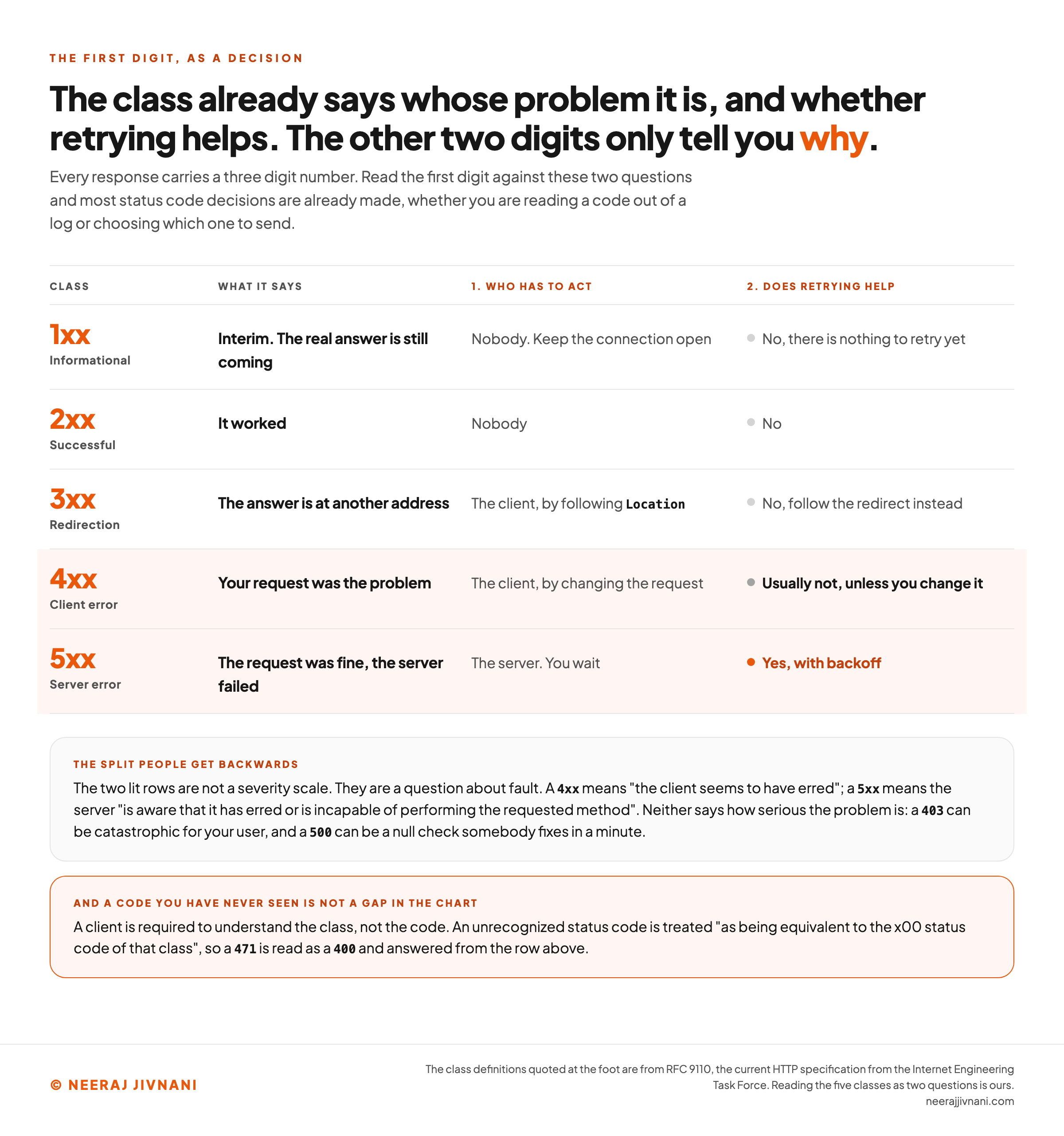
Each class answers two questions before you look anything up: whose problem this is, and whether retrying will get you anywhere.
The first digit does all the sorting, and the specification is explicit that nothing else does any: "The first digit of the status code defines the class of response. The last two digits do not have any categorization role."
Five values, five contracts.
| Class | What it says | Who has to act | Does retrying help |
|---|---|---|---|
1xx | Interim. The real answer is still coming | Nobody. Keep the connection open | No, there is nothing to retry yet |
2xx | It worked | Nobody | No |
3xx | The answer is at another address | The client, by following Location | No, follow the redirect instead |
4xx | Your request was the problem | The client, by changing the request | Usually not, unless you change it |
5xx | The request was fine, the server failed | The server. You wait | Yes, with backoff |
Read the last two columns together and most status code decisions are already made.
The 4xx and 5xx split is the one people get backwards, because it looks like a severity scale and is not one. It is a question about fault.
A 4xx means, in the specification's words, that "the client seems to have erred". A 5xx means the server "is aware that it has erred or is incapable of performing the requested method".
Neither class says how serious the problem is. A 403 can be catastrophic for your user, and a 500 can be a null check somebody fixes in a minute.
The Fallback Is the First Digit
You will meet codes you do not recognize, and there is a defined answer for that.
A client is not required to know every registered code. It is required to understand the class.
RFC 9110 puts the obligation in those terms: a client "MUST understand the class of any status code, as indicated by the first digit, and treat an unrecognized status code as being equivalent to the x00 status code of that class."
The specification then works the example through with a number assigned to nothing.
A client receiving 471 "can see from the first digit that there was something wrong with its request and treat the response as if it had received a 400 (Bad Request) status code."
That is why the class is worth more than the lookup. A handler written against five classes is complete; a handler written against a list of codes is out of date the moment somebody adds one.
Use this chart — embed code and citation
<a href="https://neerajjivnani.com/blog/http-status-codes/"><img src="https://neerajjivnani.com/infographics/http-status-codes/whose-problem-and-does-retrying-help.png" alt="A decision chart of the five HTTP status code classes, each answering two questions. The rows are the five classes with their first digit. 1xx informational: nobody has to act, the real answer is still coming, and there is nothing to retry yet. 2xx successful: nobody has to act, and there is nothing to retry. 3xx redirection: the client acts by following the Location header, and the retry answer is to follow the redirect instead. 4xx client error: the client acts by changing the request, and retrying the identical request usually returns the identical answer. 5xx server error: the server has to act while the client waits, and retrying with backoff is the right move. A note across the foot reads that the 4xx and 5xx split is about fault and not about severity: a 4xx means the client seems to have erred and a 5xx means the server is aware that it has erred, and neither says how serious the problem is. A second note reads that a client is required to understand the class rather than the code, so an unrecognized status code is treated as being equivalent to the x00 status code of that class, which is why a 471 is read as a 400 and answered from the 4xx row." width="1200"></a>
<p>Chart: <a href="https://neerajjivnani.com/blog/http-status-codes/">Neeraj Jivnani</a></p>Neeraj Jivnani, "HTTP Status Codes: What Every Code Means, and Which One to Send", neerajjivnani.com, https://neerajjivnani.com/blog/http-status-codes/Free to republish with a link back to this page.
The Codes You Will Actually Meet
The registry runs to dozens of codes. About a dozen of them account for almost everything you will ever see in a log or a client library.
Those are the ones worth knowing properly rather than looking up, and the rest are worth recognizing by class.
The grouping below is by what you are trying to do when you meet them: confirm a success, follow a move, read a refusal, or wait out a failure.
When Success Is Not 200
200 OK is the default success answer, and what its body contains depends on the method that asked for it. A GET returns a representation of the resource itself.
Three other success codes carry information 200 cannot.
- `201 Created` is the answer to a request that made something. The specification is specific about where the new thing lives: it is identified "by either a Location header field in the response or, if no Location header field is received, by the target URI", the address the request was sent to. Send the
Location. - `202 Accepted` means you took the request and have not finished with it. RFC 9110 calls it "intentionally noncommittal" and warns there is "no facility in HTTP for re-sending a status code from an asynchronous operation", so
202obliges you to give the caller some other way to find out how it ended. - `204 No Content` means it worked and there is nothing to send back. It is the honest answer to a
DELETE, and to anyPUTwhere returning the object would be noise.
206 Partial Content belongs here too, though you rarely choose it by hand. It is what a server sends when the client asked for a byte range, which is how resumable downloads and video seeking work.
Picking 204 over 200 with an empty body is not pedantry. A client can act on 204 without parsing anything.
The Redirects, in One Line Each
The 3xx class asks one question, whether the move is permanent or temporary, and two of its members exist to stop the original request being altered on the way.
At reference depth, the family is:
- `300 Multiple Choices` offers a choice among several representations.
- `301 Moved Permanently` says the address is finished.
- `302 Found` says the address is still standing.
- `303 See Other` points at a different resource that answers indirectly, which is how a form submission ends without a resubmission prompt.
- `304 Not Modified` is the cache answer: your copy is still good, so nothing is sent.
- `307 Temporary Redirect` and `308 Permanent Redirect` are those same two answers again, for the cases where the original request has to survive the hop intact.
304 is the one people forget is a redirect at all. It carries no body, and a browser that gets one renders what it already had.
The Refusals
Every 4xx says the same thing before it says anything else: the request was the problem, so send a different one.
- `400 Bad Request` is the general refusal, for "something that is perceived to be a client error", including malformed syntax and bad framing.
- `401 Unauthorized` means the request lacked valid credentials. The server "MUST send a WWW-Authenticate header field containing at least one challenge", so a
401without that header is not a conforming401. - `403 Forbidden` means the server understood and refuses. Credentials will not help, and the specification tells the client not to automatically repeat the request with the same ones.
- `404 Not Found` means no current representation was found, or the server "is not willing to disclose that one exists".
- `405 Method Not Allowed` means the method is known but not supported here, and the server has to name the ones that are in an
Allowheader. - `429 Too Many Requests` means you are being rate limited, and it may carry a
Retry-After.
The retry rule has real exceptions, and pretending it does not will cost you. 408, 409, 423, 425 and 429 are all 4xx codes where the identical request can succeed later, because what changed was time or somebody else's lock rather than your request.
When It Is the Server
A 5xx is the one class where the right first move is to do nothing except wait and try again.
- `500 Internal Server Error` means "an unexpected condition that prevented it from fulfilling the request". It is the code your framework sends when it has nothing better, and it should never be a deliberate choice.
- `503 Service Unavailable` means a "temporary overload or scheduled maintenance", and it may carry
Retry-After. - `502 Bad Gateway` and `504 Gateway Timeout` both come from a proxy, and they differ in what it heard back from the machine behind it: garbage in the first case, silence in the second.
That difference is where to start looking. A 502 says the proxy got an answer it could not use, so start with what the upstream sent.
A 504 means the upstream is hung, overloaded or gone, so check whether it is running at all before you read anything.
The specification is honest that 503 is optional. Its own note says the code's existence "does not imply that a server has to use it when becoming overloaded", because "some servers might simply refuse the connection".
So a load test that returns connection resets instead of 503 is not necessarily misconfigured.
Six Pairs That Get Mixed Up
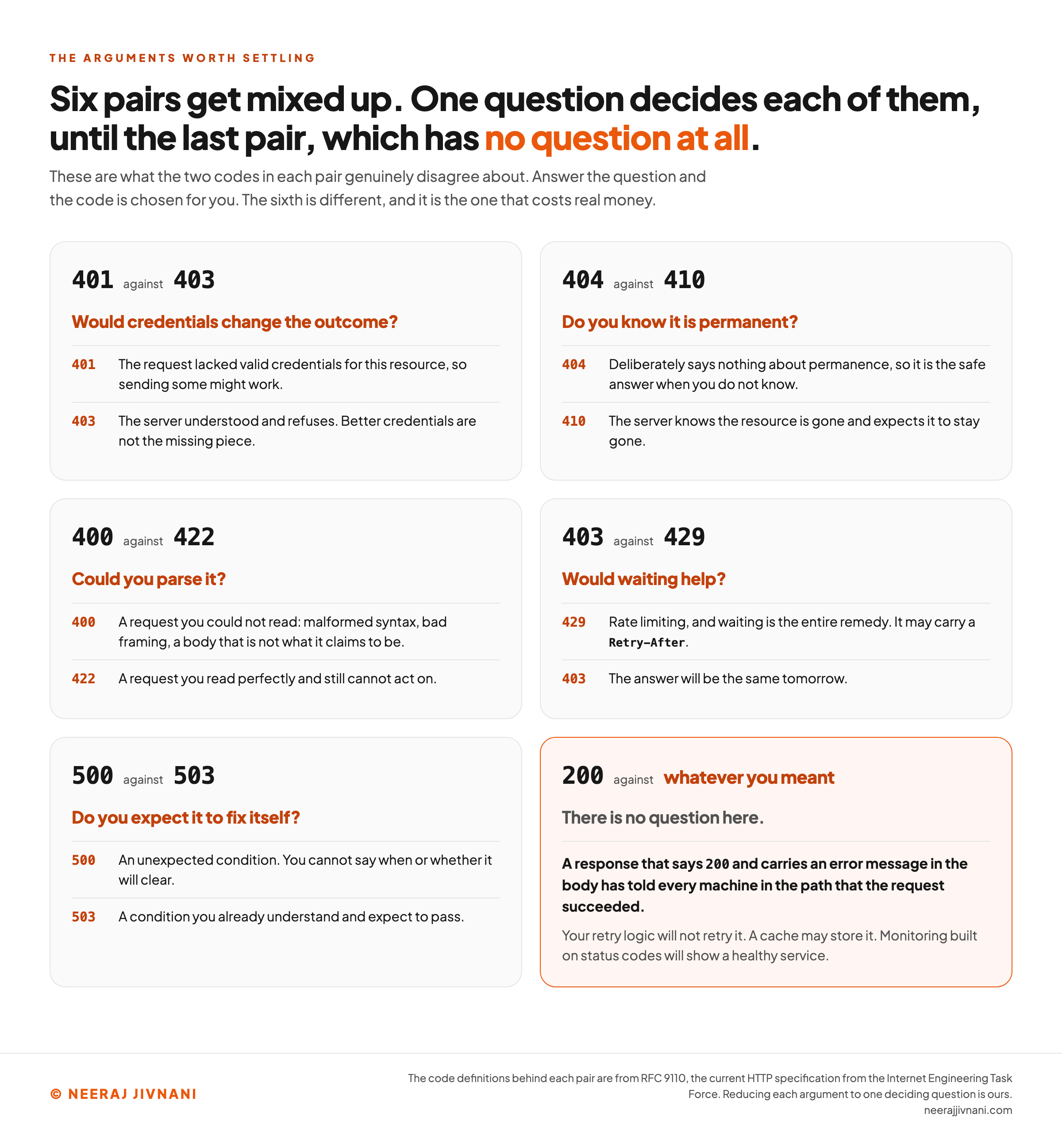
Almost every argument about status codes is one of six, and most of them are settled by asking a single question rather than by re-reading a definition.
The questions below are what the two codes in each pair genuinely disagree about. Answer the question and the code is chosen for you.
The sixth pair is different, and it is the one that costs real money.
Any code reader
Put in any three digit number, including one the registry has never assigned. Both answers resolve on the first digit and do not move again while you type the other two.
Answered on your first digit
4714xx Client error
Your request was the problem.
1. Who has to act
The client, by changing the request.
2. Does retrying help
Usually not, unless you change it.
What the other two digits tell you
Nothing is assigned to 471.
You are not required to recognize it. Treat an unrecognized status code as being equivalent to the x00 status code of its class, so read 471 as 400 Bad Request, and answer it exactly as the two panels above say.
The specification works this example through itself. A client receiving 471 can see from the first digit that there was something wrong with its request, and treat the response as if it had received a 400 Bad Request status code.
This says what the class asks of you. It says nothing about how serious the problem is, because the classes are not sorted by severity: a 403 can be catastrophic for your user, and a 500 can be a null check somebody fixes in a minute.
401 Against 403
Ask whether credentials would change the outcome.
401 says the request lacked valid credentials for this resource, so sending some might work. 403 says the server understood and refuses, and better credentials are not the missing piece.
One wrinkle worth knowing before you audit anybody's 404 rate. A server that wants to hide the existence of a protected resource is explicitly allowed to answer 404 instead of 403, so a 404 does not always mean nothing is there.
404 Against 410
Ask whether you know it is permanent.
404 deliberately says nothing about permanence. 410 is the code for when the server knows the resource is gone and expects it to stay gone, and the specification prefers it in exactly that case.
Both are cacheable without anyone asking. RFC 9110 lists 404, 405, 410, 414 and 501 among the codes that are heuristically cacheable, which means a cache may reuse the answer on its own judgment.
That is the part with teeth. A 404 served by mistake can outlive the bug that caused it, because something downstream kept the answer.
400 Against 422
Ask whether you could parse it.
400 is for a request you could not read: malformed syntax, bad framing, a body that is not what it claims to be. If your parser threw, 400 is correct.
422 is for a request you read perfectly and still cannot act on. The specification describes content whose syntax is correct "but it was unable to process the contained instructions", and its own example is well formed markup that says something impossible.
A third code sits next to these and is often the right one. 415 Unsupported Media Type is for when the format itself is not accepted here, which is a different complaint from either parsing or meaning.
403 Against 429
Ask whether waiting would help.
429 means rate limiting, and waiting is the entire remedy. 403 means the answer will be the same tomorrow.
429 may carry a Retry-After header telling the client how long to hold off, and honoring it is cheaper for both sides than a backoff you invented.
A rate limit does not have to announce itself at all, so a client cannot assume one will.
RFC 6585 (2012) notes that "servers are not required to use the 429 status code" and that when limiting resource usage "it may be more appropriate to just drop connections".
500 Against 503
Ask whether you expect it to fix itself.
500 is an unexpected condition, so you cannot say when or whether it will clear. 503 is a condition you already understand and expect to pass.
Sending 500 for a scheduled maintenance window is the common version of this mistake. It tells every client that your service is defective rather than busy, and it throws away the chance to say when to come back.
200 Against Whatever You Meant
A success code carrying a failure is the expensive habit in this whole subject, and it is the reason to care about any of the others.
A response that says 200 and carries an error message in the body has told every machine in the path that the request succeeded.
Your retry logic will not retry it. A cache may store it. Monitoring built on status codes will show a healthy service.
It happens for ordinary reasons. A framework catches an exception and renders an error template through its normal view path.
An application programming interface (API) wraps every answer in an envelope with its own "status": "error" field. A single page application returns its shell for an address that does not exist.
The fix is not clever. Decide the status code at the point where the failure is known, and make the error template inherit that code rather than reset it.
Use this chart — embed code and citation
<a href="https://neerajjivnani.com/blog/http-status-codes/"><img src="https://neerajjivnani.com/infographics/http-status-codes/six-pairs-one-question-each.png" alt="Six pairs of HTTP status codes that get confused, each reduced to a single question that decides between them. 401 against 403 is decided by asking whether credentials would change the outcome: 401 means the request lacked valid credentials, and 403 means the server understood and refuses. 404 against 410 is decided by asking whether you know the loss is permanent: 404 says nothing about permanence, and 410 is for when the server knows the resource is gone and expects it to stay gone. 400 against 422 is decided by asking whether you could parse it: 400 is for a request that could not be read, and 422 is for one read perfectly that still cannot be acted on. 403 against 429 is decided by asking whether waiting would help: 429 means rate limiting where waiting is the whole remedy, and 403 means the answer will be the same tomorrow. 500 against 503 is decided by asking whether you expect it to fix itself: 500 is an unexpected condition, and 503 is a condition you already understand and expect to pass. The sixth pair is 200 against whatever you meant, highlighted in orange, and it has no question, because a 200 carrying an error tells every machine in the path that the request succeeded. Its card adds what that costs: your retry logic will not retry it, a cache may store it, and monitoring built on status codes will show a healthy service." width="1200"></a>
<p>Chart: <a href="https://neerajjivnani.com/blog/http-status-codes/">Neeraj Jivnani</a></p>Neeraj Jivnani, "HTTP Status Codes: What Every Code Means, and Which One to Send", neerajjivnani.com, https://neerajjivnani.com/blog/http-status-codes/Free to republish with a link back to this page.
Every Status Code in the Registry
The list that decides what counts as a real status code is the HTTP Status Code Registry, kept by the Internet Assigned Numbers Authority.
It is shorter than people expect, and it moves slowly, because new entries arrive only through review by the Internet Engineering Task Force.
Here it is in full, by class, with what each code tells you.
Informational Responses, 100 to 104
An interim response, sent before the real one. A 1xx is terminated by the end of the header section, so it can never carry a body of its own.
You will rarely choose to send one. 103 is the exception, and the only member of this class most site owners will ever set deliberately.
| Code | Name | What it tells you |
|---|---|---|
100 | Continue | Carry on and send the request body; the headers were acceptable |
101 | Switching Protocols | The connection is changing protocol, which is how a websocket handshake ends |
102 | Processing | The request is still being worked on; a WebDAV code, and deprecated |
103 | Early Hints | Start fetching these resources now, before the real response arrives |
104 | Upload Resumption Supported | A resumable upload may continue; a temporary registration, not yet a standard |
Successful Responses, 200 to 226
The request was received, understood and accepted, so nothing here needs retrying. Three of the ten come from extensions rather than the core specification, which is why you will only meet them in distributed authoring or delta encoded traffic.
| Code | Name | What it tells you |
|---|---|---|
200 | OK | It worked, and the body is whatever the method implies |
201 | Created | Something new exists; its address is in Location |
202 | Accepted | Taken for processing, not finished, and you will have to ask elsewhere how it ends |
203 | Non-Authoritative Information | It worked, but a proxy changed the headers on the way |
204 | No Content | It worked and there is nothing to send back |
205 | Reset Content | It worked; clear the form the user just submitted |
206 | Partial Content | Here is the byte range you asked for |
207 | Multi-Status | Several results in one body; a WebDAV code |
208 | Already Reported | This member was already listed; a WebDAV code |
226 | IM Used | The answer is a set of changes rather than the whole resource |
Redirection Responses, 300 to 308
The answer is at another address, or the copy you hold is still good. Only four of these nine replace the address of the same resource; the rest offer a choice, point sideways, say nothing changed, or are no longer in use.
| Code | Name | What it tells you |
|---|---|---|
300 | Multiple Choices | Several representations exist; choose one |
301 | Moved Permanently | That address is finished; this is the replacement |
302 | Found | That address is still standing; this is where to go for now |
303 | See Other | Fetch this other resource instead, with GET |
304 | Not Modified | Your cached copy is current; no body is sent |
305 | Use Proxy | Reach it through a proxy; deprecated and not to be used |
306 | (Unused) | Defined in an earlier version of the specification, and now reserved |
307 | Temporary Redirect | Like 302, and the method and body must not change |
308 | Permanent Redirect | Like 301, and the method and body must not change |
Client Errors, 400 to 451
The request was the problem, so change it, or wait if what needs to change is time.
This is the largest class in the registry by a wide margin, which is the protocol admitting that most of what can go wrong goes wrong in the request.
| Code | Name | What it tells you |
|---|---|---|
400 | Bad Request | Could not be read: syntax, framing or routing |
401 | Unauthorized | No valid credentials; the challenge is in WWW-Authenticate |
402 | Payment Required | Reserved, and used by individual services on their own terms |
403 | Forbidden | Understood and refused; credentials are not the missing piece |
404 | Not Found | No current representation, or none we will admit to |
405 | Method Not Allowed | Known method, wrong resource; the allowed ones are in Allow |
406 | Not Acceptable | Nothing here matches what you said you would accept |
407 | Proxy Authentication Required | Authenticate with the proxy, not with us |
408 | Request Timeout | You were too slow sending it; you may send it again |
409 | Conflict | It clashes with the current state of the resource |
410 | Gone | Deliberately removed, and expected to stay removed |
411 | Length Required | Send a Content-Length |
412 | Precondition Failed | A condition you set on the request was not met |
413 | Content Too Large | The body is bigger than this resource accepts |
414 | URI Too Long | The address is longer than the server will handle |
415 | Unsupported Media Type | The format is not one this resource accepts |
416 | Range Not Satisfiable | The byte range you asked for does not exist |
417 | Expectation Failed | The Expect header could not be met |
418 | (Unused) | Reserved by the registry, with no meaning assigned |
421 | Misdirected Request | This server cannot answer for that host and scheme |
422 | Unprocessable Content | Read perfectly, and the instructions could not be carried out |
423 | Locked | The resource is locked; a WebDAV code |
424 | Failed Dependency | A request this one depended on failed; a WebDAV code |
425 | Too Early | Sent too soon in the handshake, and replaying it is risky |
426 | Upgrade Required | Not over this protocol; the Upgrade header names what is wanted |
428 | Precondition Required | Make it conditional, so you do not overwrite somebody else |
429 | Too Many Requests | Rate limited; Retry-After may say how long |
431 | Request Header Fields Too Large | Your headers are too big, in total or one of them |
451 | Unavailable For Legal Reasons | Withheld because of a legal demand |
Server Errors, 500 to 511
The request was fine and the server failed. Retry with backoff.
| Code | Name | What it tells you |
|---|---|---|
500 | Internal Server Error | An unexpected condition; nothing about your request will fix it |
501 | Not Implemented | This server does not support what the request needs at all |
502 | Bad Gateway | A proxy got an unusable answer from behind it |
503 | Service Unavailable | Temporarily overloaded or down for maintenance |
504 | Gateway Timeout | A proxy waited for something behind it and heard nothing |
505 | HTTP Version Not Supported | That major version of the protocol is refused |
506 | Variant Also Negotiates | A content negotiation loop on the server side |
507 | Insufficient Storage | No room to store what the request would create; a WebDAV code |
508 | Loop Detected | An infinite loop while processing; a WebDAV code |
510 | Not Extended | Obsoleted, and should not appear in new work |
511 | Network Authentication Required | Log in to the network, from a captive portal rather than the site |
Two entries in that table are worth a second look, because they are the registry telling you something.
418 is recorded as (Unused). It is famous as a joke about teapots, and what the registry does with it is reserve the number so nobody can assign it a real meaning.
510 is recorded as obsoleted, which is the registry's way of saying a code can be retired without the number being handed to anything else.
The Codes That Are Not in the Registry
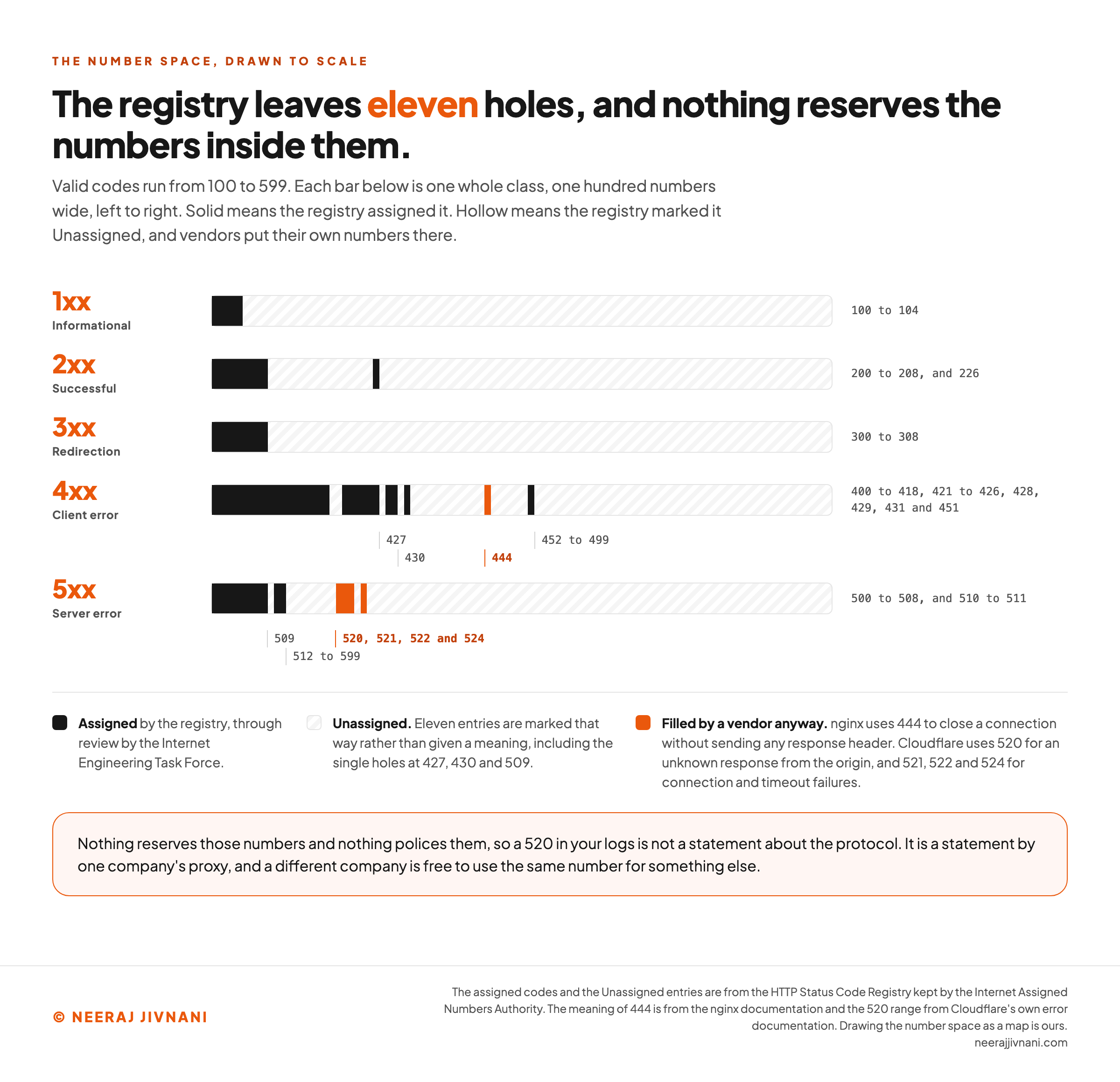
You will meet numbers that are not on that list, and the registry explains why before it explains anything else. Large parts of the number space are deliberately left empty.
Where the Registry Is Empty, and Who Fills It
Eleven entries in it are marked Unassigned rather than given a meaning. They include 452 to 499 in the client range, the whole of 512 to 599 in the server range, and single holes at 427, 430 and 509.
Nothing reserves those numbers and nothing polices them, so vendors use them.
- Cloudflare uses the empty end of the server range for problems between itself and your origin, including
520for an unknown response from the origin and521,522and524for connection and timeout failures. - nginx uses
444in the client gap to close a connection without sending any response header at all, which is a way of dropping a request rather than answering it.
The consequence is worth holding on to. A 520 in your logs is not a statement about the protocol, it is a statement by one company's proxy, and a different company is free to use the same number for something else.
Which brings back the only rule that always works. Read the first digit, apply the class, and treat the rest as vendor detail you look up if you need it.
Numbers That Are Not Status Codes at All
There is one more case the specification covers, and it explains an oddity in most link checkers. Numbers outside 100 to 599 are not status codes of any kind.
RFC 9110 states that "values outside the range 100..599 are invalid", and that a client receiving one "SHOULD process the response as if it had a 5xx (Server Error) status code".
It also names what is going on when you see one: implementations "often use three-digit integer values outside of that range (i.e., 600..999) for internal communication of non-HTTP status (e.g., library errors)".
So a crawler reporting 0 or 999 against a page is usually not quoting your server at all. It is reporting its own failure to get an answer, in a number of its own invention.
Use this chart — embed code and citation
<a href="https://neerajjivnani.com/blog/http-status-codes/"><img src="https://neerajjivnani.com/infographics/http-status-codes/where-the-registry-is-empty.png" alt="A map of the HTTP status code number space, drawn as one horizontal bar per class, each bar one whole class wide, across the valid range of 100 to 599. Solid segments are the codes the registry has assigned: 100 to 104 in the informational class, 200 to 208 and 226 in the successful class, 300 to 308 in the redirection class, 400 to 418, 421 to 426, 428, 429, 431 and 451 in the client error class, and 500 to 508 and 510 to 511 in the server error class. Everything else on each bar is drawn hollow, because the registry marks eleven entries Unassigned rather than giving them a meaning. The hollow stretches the post names are labeled on the bars: the single holes at 427, 430 and 509, and the long empty runs at 452 to 499 and 512 to 599. Two places carry orange marks to show where vendors have filled a gap anyway: 444 in the client error class, which nginx uses to close a connection without sending any response header, and 520, 521, 522 and 524 in the server error class, which Cloudflare uses for an unknown response from the origin and for connection and timeout failures. A line beneath reads that nothing reserves those numbers and nothing polices them, so a 520 in your logs is a statement by one company's proxy rather than a statement about the protocol, and a different company is free to use the same number for something else." width="1200"></a>
<p>Chart: <a href="https://neerajjivnani.com/blog/http-status-codes/">Neeraj Jivnani</a></p>Neeraj Jivnani, "HTTP Status Codes: What Every Code Means, and Which One to Send", neerajjivnani.com, https://neerajjivnani.com/blog/http-status-codes/Free to republish with a link back to this page.
Reading the Status Code Yourself
You cannot tell a page's status code by looking at it. A server can send a beautifully designed error page under 200, or your real content under 500, and the browser window looks the same either way.
There are three places to look, and they answer different questions.
From a terminal is the fastest, and the only one that shows you the raw answer with nothing in between.
``
curl -sS -o /dev/null -w "%{http_code}\n" https://example.com/page
curl -sSI https://example.com/page
curl -sSIL https://example.com/page | grep -i "^HTTP/"
``
The first prints one number. The second prints the response headers with the status line at the top.
The third follows redirects and prints the status line of every hop, which is how you see a chain rather than its destination.
In a browser, open the developer tools, then the network panel, and reload. Each request gets a row with its status.
The thing to watch there is the address bar, which shows you only where you ended up. A page that arrives after two redirects looks identical to one served directly, and the network panel is where the difference is visible.
In your server log, the status is a field on every line. This is the only one of the three that tells you what real visitors and crawlers received rather than what you receive today.
A browser and a terminal both ask once, from one place, as one client. A log has already answered that question thousands of times.
Five Questions About Status Codes
Each of these is settled by the first digit, with one exception that turns on the method instead.
What Are the Five Types of Status Code?
Informational, successful, redirection, client error and server error, named by their first digit from 1 to 5.
Which Status Codes Are Errors?
4xx and 5xx. The 4xx codes say the request was wrong and the 5xx codes say the server failed while handling a request that was fine.
What Does a 200 Status Code Mean?
The request succeeded. What arrives in the body depends on the method that asked for it, which is why a 200 on a DELETE means something different from a 200 on a GET.
Do I Need to Handle Every Status Code?
No. Handle the five classes and the specific codes your own integration cares about, and let the class fallback cover the rest, because that is what the protocol expects a client to do.
Can I Invent My Own Status Code?
You can put any number in the range on the wire, and anything unregistered will be read as the x00 code of its class by anything that follows the specification. That makes a private number safe to send and useless to communicate with.
Read the First Digit
Status codes look like a bigger subject than they are, because a dictionary is the usual way to meet them. Sixty-odd entries, each with a definition, none of which tells you what to do about it.
Read it as a decision and the first digit does nearly all the work. It says whose problem this is, and whether trying again would change anything.
Everything after the first digit is detail, and detail can be looked up on the day it matters.
Choosing a code runs the same way in reverse. If the request that arrived was wrong, answer with a 4xx and be specific about why; if the request was fine and your side broke, answer with a 5xx and let the caller retry.
And whatever else happens, do not say 200 unless it worked.