Link Rot, and Which Broken Links Are Yours to Fix
Some dead links are yours to repair and some never will be. See how to tell them apart, what each one costs you, and where to spend the hour.

/ On this page9 sections
Link rot is what happens when a link that used to work stops working. Some of those dead links are yours to repair and some never will be.
The ones you cannot repair sit on pages you have no way to edit, written by people you will never meet.
Work out which you are holding before you spend anything. One is a list with an end on it; the other never was.
What Link Rot Is
A hyperlink is two things joined together: an address, and the words you click to go there. Link rot is the address half quietly ceasing to lead anywhere while the words stay exactly as they were.
The Society of American Archivists defines it in its dictionary as "the disassociation between web addresses and their content", which is the precise version of the same idea.
You will meet several names for it, and they are not all the same thing.
The dictionary records link decay as a straight synonym and lists dead link beside it, which is the name for a single instance. Two more sit in the same list, and they fail differently enough to be worth keeping apart.
- Reference rot is the term used where the link was a citation. The claim in the citing document is left standing with nothing behind it.
- Content drift is when the address still resolves and the page is no longer what it was. Nothing errors, and the reader has no way to know.
That second one matters more than it sounds.
Why Links Stop Working
Links break for a short list of reasons, and the list is worth sorting by who can do something about it rather than by what technically happened.
Somebody moved the page. A site restructures, a content system changes, a slug gets tidied, and every old address dies unless a redirect was left behind.
This is the most fixable of the five, because the page itself is still somewhere.
Somebody deleted the page. A product was discontinued, a campaign ended, an archive got cleared out.
Worth naming plainly: a page does not fall off a website. Somebody decides to take it down.
Something in the address expired. A login name, a session token or a tracking parameter baked into the URL, and the link stops working the moment that piece stops being valid.
The server changed underneath it. A file extension dropped, a half-finished move from an insecure address to a secure one, a platform that now builds its pages differently.
Nobody is looking after it any more. A personal site, a project that ended, a company that closed.
The page in that last case is not missing. The person who would have moved it has gone.
When the Whole Site Is Gone
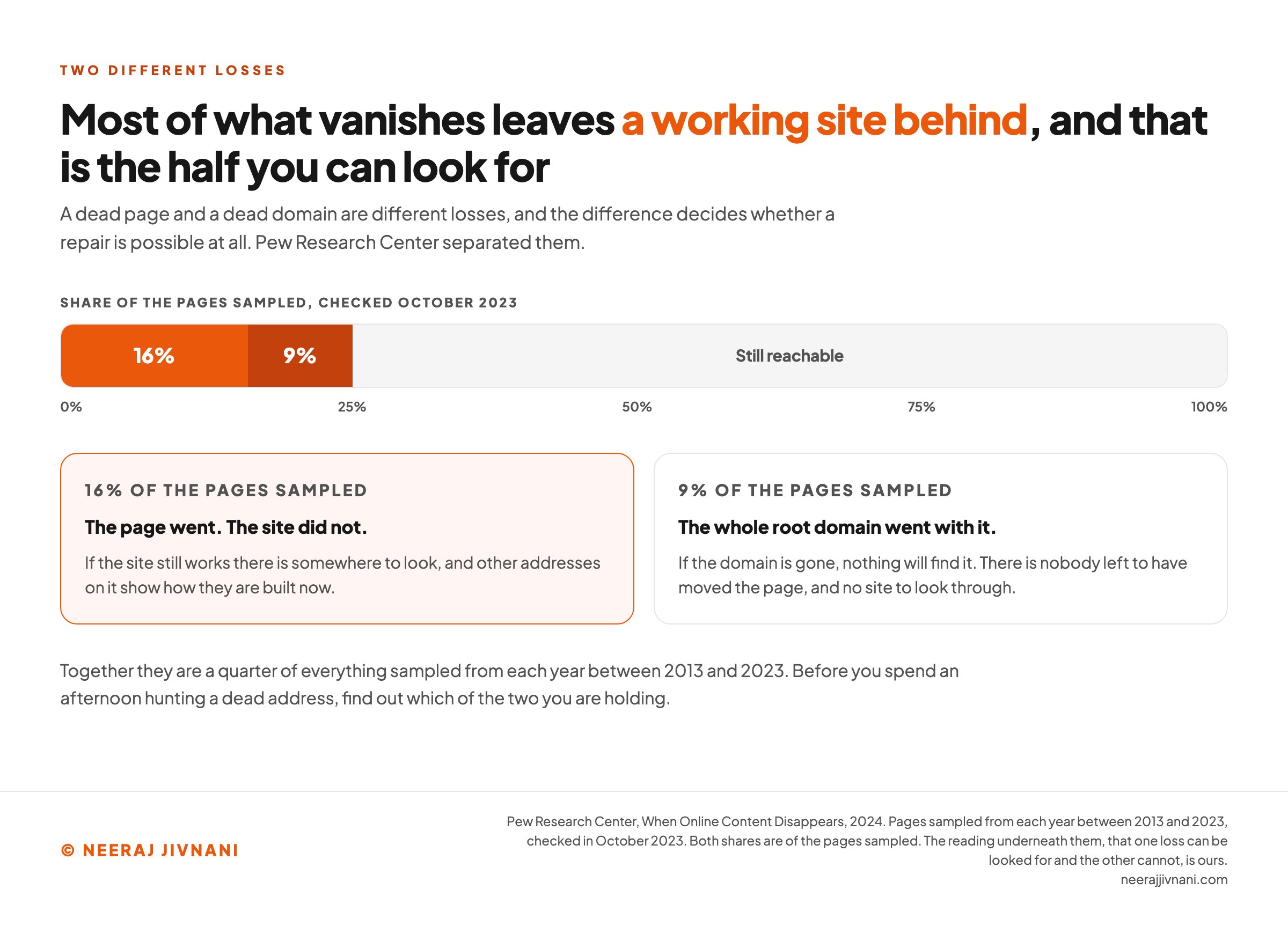
A dead page and a dead domain are different losses, and the difference decides whether a repair is possible at all.
Pew Research Center measured that split directly. Sampling pages from each year between 2013 and 2023, its 2024 analysis found a quarter of them no longer reachable.
It separates the two cases. 16% were pages that had gone from a site still working, and 9% had taken their entire root domain with them.
If the site still works there is somewhere to look, and other addresses on it show how they are built now. If the domain is gone there is nothing left to search.
There is a worse version of a dead domain, and it catches people who are being careful.
When a registration lapses, anybody may buy it, and some names get bought precisely because they still have links pointing at them. So your link goes on working, lands on a page that answers, and shows a reader something you never chose.
A dead link would have been the better outcome there, and that pattern runs through all of this: the failure that looks like success is the worse one.
Use this chart — embed code and citation
<a href="https://neerajjivnani.com/blog/link-rot/"><img src="https://neerajjivnani.com/infographics/link-rot/two-different-losses.png" alt="A single horizontal bar showing the share of pages Pew Research Center sampled from each year between 2013 and 2023 and checked in October 2023. Sixteen percent, in orange, are pages that had gone from a site still working. Nine percent, in a darker orange beside them, are pages that had taken their entire root domain with them. The remaining stretch of the bar is unlabeled by number and marked still reachable. Two cards beneath read the two segments. The highlighted one, sixteen percent of the pages sampled, says the page went and the site did not, and that if the site still works there is somewhere to look because other addresses on it show how they are built now. The second, nine percent of the pages sampled, says the whole root domain went with it, that if the domain is gone nothing will find it, and that there is nobody left to have moved the page and no site to look through. A line beneath says the two together are a quarter of everything sampled, and that before spending an afternoon hunting a dead address you should find out which of the two you are holding." width="1200"></a>
<p>Chart: <a href="https://neerajjivnani.com/blog/link-rot/">Neeraj Jivnani</a></p>Neeraj Jivnani, "Link Rot, and Which Broken Links Are Yours to Fix", neerajjivnani.com, https://neerajjivnani.com/blog/link-rot/Free to republish with a link back to this page.
How Much of It There Actually Is
There is no honest answer to "how long does a link last". It is not for want of measurement: every study is of a different corpus, and corpora decay at wildly different speeds.
Take a share over a stated window instead.
The best one for the open web is Pew's: 38% of the pages it sampled from 2013 were unreachable by October 2023, against 8% of the pages it sampled from 2023.
Read those as a rate rather than a prediction. The share rises with the age of the link, which is why the old pages on your own site are where the dead ones have collected.
The same study looked at the links sitting on pages rather than at the pages themselves, which is closer to what you are holding. On the news pages it sampled, 5% of external links pointed at something no longer reachable, and 23% of those pages carried at least one broken link.
The second number is the one to sit with. A twentieth of the links are dead, and nearly a quarter of the pages have one.
Broken links are not concentrated in neglected corners. They are spread thin across everything, which is why they stay invisible until somebody counts.
Journalist's Resource, the Harvard Kennedy School project, published its own version of that from the inside: with over 10,000 links on the site in September 2014, ten or more could break in a week.
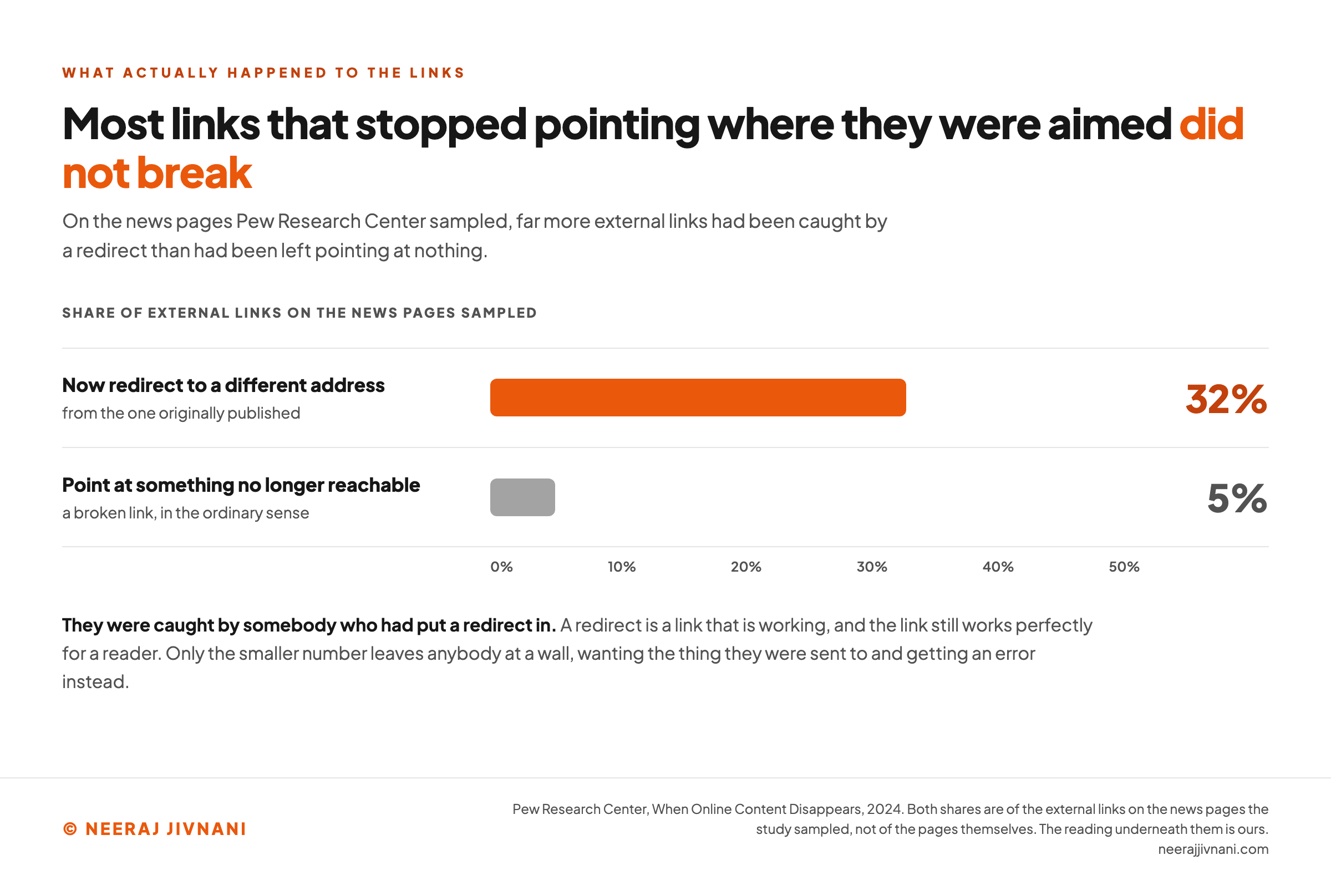
Now the figure from the same Pew analysis that should change what you worry about. On those same news pages, while 5% of links were dead, 32% now redirected to a different address from the one originally published.
Most links that stopped pointing where they were aimed did not break at all. They were caught by somebody who had put a redirect in.
What It Costs You
Three costs, and the one people lead with is not the biggest.
A reader hits a wall. They wanted the thing you sent them to and got an error instead. On a page that was doing the work of convincing somebody, nothing else needs to be said about it.
Your credibility takes it. A page whose links go nowhere reads as unmaintained, and a reader generalizes from that to everything else on it.
The search cost is real and smaller than it sounds. A broken outbound link is a maintenance problem rather than a ranking problem. What genuinely costs you sits on the other side: a page of yours returning an error while other sites still point at it, because whatever those links were worth now arrives nowhere.
That last one is the only piece with money attached, and it lives in the inbound half.
Use this chart — embed code and citation
<a href="https://neerajjivnani.com/blog/link-rot/"><img src="https://neerajjivnani.com/infographics/link-rot/caught-by-a-redirect.png" alt="Two horizontal bars on one scale running from zero to fifty percent, labeled as shares of the external links on the news pages Pew Research Center sampled. The long orange bar, thirty two percent, is links that now redirect to a different address from the one originally published. The short grey bar beneath it, five percent, is links that point at something no longer reachable, a broken link in the ordinary sense. The title states that most links that stopped pointing where they were aimed did not break. A line beneath says they were caught by somebody who had put a redirect in, that a redirect is a link that is working and still works perfectly for a reader, and that only the smaller number leaves anybody at a wall, wanting the thing they were sent to and getting an error instead." width="1200"></a>
<p>Chart: <a href="https://neerajjivnani.com/blog/link-rot/">Neeraj Jivnani</a></p>Neeraj Jivnani, "Link Rot, and Which Broken Links Are Yours to Fix", neerajjivnani.com, https://neerajjivnani.com/blog/link-rot/Free to republish with a link back to this page.
A Link That Answers Is Not a Link That Works
A green report from a link checker is the weakest signal you have about a link, and it is the end of what a check can tell you.
A checker's test is the status code. It requests each address and reads what comes back, so a 404 is a broken link and anything in the 200 range is a working one.
That test is weaker than it looks.
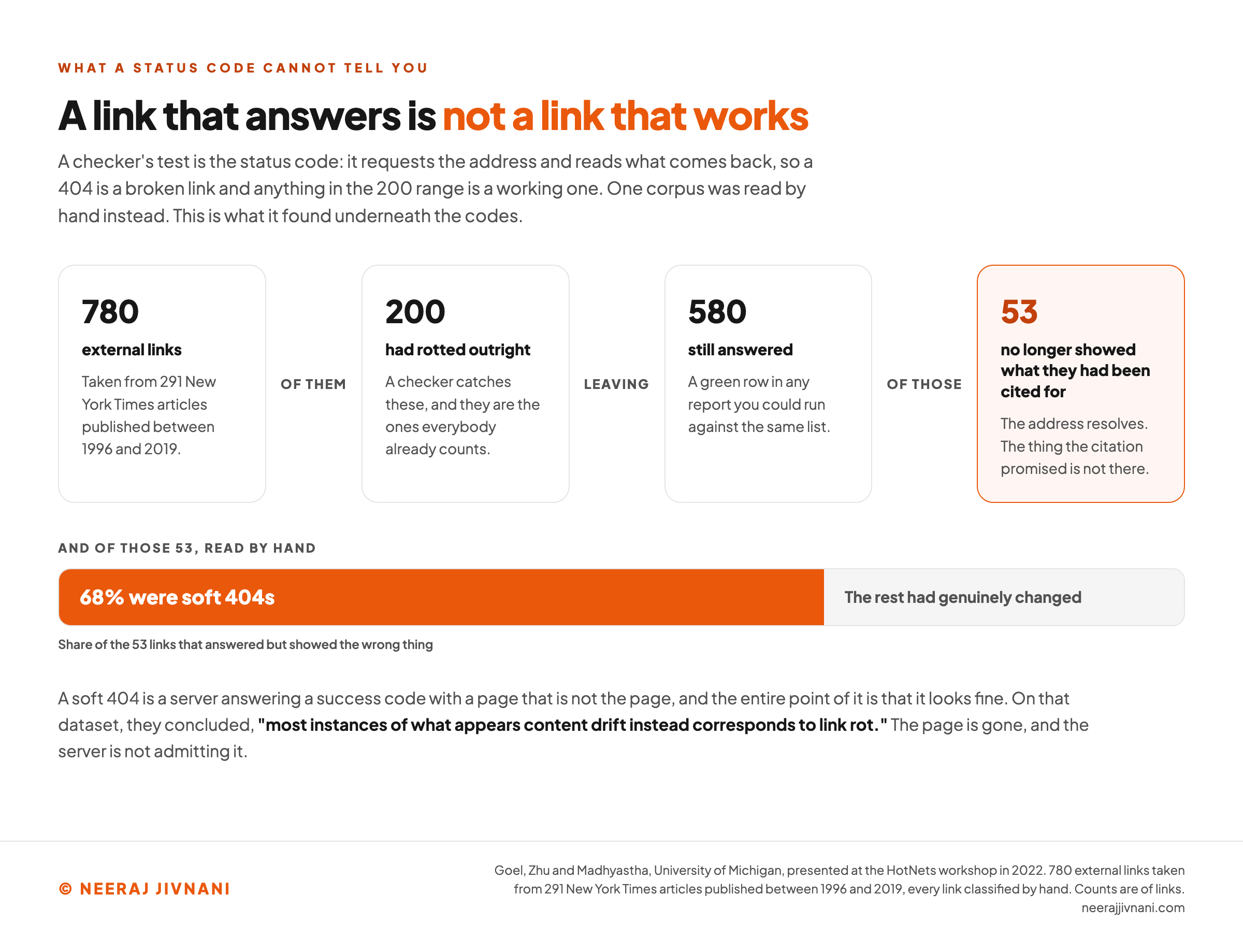
A server is free to answer 200 with a page that is not the page. A site that deletes a product and serves its homepage instead returns a success code, and so does one that catches the error and renders a friendly "we could not find that" template.
The failure has a name. It is a soft 404, and the entire point of it is that it looks fine.
You only see a soft 404 by opening the page it answers with.
Of 780 external links taken from 291 New York Times articles published between 1996 and 2019, two hundred had rotted outright. Of the 580 that still answered, 53 no longer showed what they had been cited for, and 68% of those 53 were soft 404s rather than pages that had genuinely changed.
Those counts are Goel, Zhu and Madhyastha's, at the University of Michigan, presented at the HotNets workshop in 2022.
On that dataset, they concluded, "most instances of what appears content drift instead corresponds to link rot."
When a link looks like it goes somewhere and the destination is wrong, the usual explanation is not that the page changed. The page is gone, and the server is not admitting it.
None of that makes the tool useless. It makes it a first pass.
The handful of links you genuinely depend on, the ones inside the argument of a page that matters, are worth opening by hand once a year. That is a different and much smaller job from running the check over everything.
Finding the Page That Moved
The same paper points at something more useful than the diagnosis, and this part you can act on.
When a site reorganizes, it rarely moves one page. Pages that sat together tend to take the same transformation, so the replacement for a broken address is often findable by applying to it whatever happened to its neighbors.
Their worked examples show the shape.
On one site, every address of the form www.example.com/blog/the-post-name had become blog.example.com/the-post-name. On another, a news archive had replaced numeric article identifiers with the article's own title in the path.
So when you find a dead link, stop looking for that page and start looking for the pattern.
- Open that site's home page. If it lands somewhere else, the whole site has moved, and the address it lands on is the first half of your answer.
- Take another link you have to the same part of that site. If one of those still works and the dead one does not, its address shows you how addresses in that section are built now.
- Apply the same transformation to the one you are holding and try it.
- If that fails, search the site for the page's title rather than its address. You wrote a description of the destination when you made the link, and that is what to search with.
Only when all four fail is the page genuinely gone. That is the point at which an archive becomes the answer, rather than the first thing to reach for.
Use this chart — embed code and citation
<a href="https://neerajjivnani.com/blog/link-rot/"><img src="https://neerajjivnani.com/infographics/link-rot/answers-but-does-not-work.png" alt="Four cards in a row narrowing a hand classified corpus of links, joined by the words of them, leaving, and of those. Seven hundred and eighty external links taken from two hundred and ninety one New York Times articles published between 1996 and 2019. Of them, two hundred had rotted outright, which a checker catches and which are the ones everybody already counts. Leaving five hundred and eighty that still answered, a green row in any report you could run against the same list. Of those, on the highlighted card, fifty three no longer showed what they had been cited for: the address resolves and the thing the citation promised is not there. Beneath the cards a single bar splits those fifty three, with sixty eight percent marked as soft 404s and the rest as pages that had genuinely changed. A line beneath says a soft 404 is a server answering a success code with a page that is not the page and the entire point of it is that it looks fine, gives the researchers' conclusion on that dataset, that most instances of what appears content drift instead corresponds to link rot, and ends that the page is gone and the server is not admitting it." width="1200"></a>
<p>Chart: <a href="https://neerajjivnani.com/blog/link-rot/">Neeraj Jivnani</a></p>Neeraj Jivnani, "Link Rot, and Which Broken Links Are Yours to Fix", neerajjivnani.com, https://neerajjivnani.com/blog/link-rot/Free to republish with a link back to this page.
The Links Going Out of Your Pages
The links going out of your pages are yours, and there are fewer of them than the advice around this suggests.
Your site has as many as it has, so a pass through them ends rather than running forever.
What does not stay finished is the far end of them. The list is fixed until you next publish; the destinations are other people's pages and go on changing underneath it, which is why this is a job that comes round rather than one you complete.
Start where a break costs something. A link a claim rests on, a link a reader has to follow to finish what they came for, a link on a page that sells: open those.
A footer link repeated across the site is one link rather than hundreds, and somebody will tell you about that one.
Then decide, per link, which of three things it is.
- The destination moved. Find the new address using the pattern above and update the link, so the reader gets what you meant.
- The destination is gone and the point still stands. Find another source for the same claim. A citation is a promise about the fact, not about the page.
- The destination is gone and so is the point. Remove the link and the clause that carried it, because a sentence written only to hold a link reads as a dangling reference once the link goes.
Only the third of those changes a sentence. The other two change where the link points and leave the claim standing.
One dead link, on one of your own pages
Bring the ones where a break costs something: a link a claim rests on, a link a reader has to follow to finish what they came for, a link on a page that sells. A footer link repeated across the site is one link rather than hundreds.
Is the destination still somewhere?
Does the point still stand without it?
Three things it can be
The destination moved
Find the new address and update the link, so the reader gets what you meant.
- What changes
- The address, and nothing else.
- What your page keeps
- Every word you wrote, exactly where it was.
The destination is gone and the point still stands
Find another source for the same claim.
A citation is a promise about the fact, not about the page.
- What changes
- The page the claim rests on.
- What your page keeps
- The claim itself.
The destination is gone and so is the point
Remove the link and the clause that carried it.
A sentence written only to hold a link reads as a dangling reference once the link goes.
- What changes
- The sentence.
- What your page keeps
- Less than it had before you started.
Two of these three change an address. The third changes a sentence. Whichever one it is, it is on a page you own, and that list has an end.
Give Your Own URLs a Reason to Survive
You cannot make anybody else's address durable. You can make your own, and it costs nothing at the moment a page is created and a great deal afterwards.
Write addresses out of the things that will not change. The subject of a page will still be its subject in five years; the year, the author, the campaign, the file format and the software that built it will not.
Two habits do most of the work here.
Keep the address clean. Strip tracking parameters, session information and trailing query strings before you publish a link, whether it is yours or somebody else's. Anything after a question mark that the page does not need is a way for the link to die early.
Link to the thing that will still be the thing. Journalist's Resource puts this well in its linking guidance: for a report that gets updated, link the landing page, and for a specific figure, find a source that is both specific and stable.
Its other rule is worth having too. A landing page generally outlives a PDF, because documents get renamed and moved around in a way that pages do not.
The same caution covers a shortened link. A short URL is only as durable as the service behind it, which is one more company that has to keep existing for your link to work.
When the Page Is Gone for Good
Web archives exist for the case where nothing else worked. The Internet Archive's Wayback Machine holds snapshots of much of the public web, and Perma.cc, run out of Harvard's library, exists to give a cited page a permanent address and a stored copy.
An archive link is the right answer when the original is genuinely gone and your reader needs to see what you saw.
It has two limits worth knowing before you reach for it.
A snapshot is not the page, so anything the page did rather than said, a search box, a calculator, a form, does not work in a copy. And a snapshot is frozen at a date, so any correction the original picked up afterwards is missing from it.
That is why an archive is the last move rather than the first. Where the live page still exists, send your reader to the live page.
The Links Pointing At You
The inbound half is not yours to fix, and the only decision you own is where those links land.
Somebody linked to a page of yours. That page has since moved or gone, and their link now arrives at an error on your site.
You cannot edit their page. You can decide what your server says to everyone who follows it, and that is the entire job.
A page that moved gets a redirect to its replacement. The address other people wrote down keeps working, and whatever that link was worth arrives somewhere.
A page that is gone with no replacement returns an honest error. This is the part people get wrong under pressure, usually during a site move, by pointing everything retired at the homepage. A reader who followed a link about one specific thing and landed on your front page has learned nothing except that your site is unreliable.
And a redirect is a thing somebody has to keep running, on a domain somebody has to keep paying for. That is a longer commitment than it feels like on the day.
The strongest version of this rule was written for the Nielsen Norman Group in 1998 and has aged better than almost anything else published about the web that year: "Any URL that has ever been exposed to the Internet should live forever".
We would keep the principle and add the limit.
Forever costs money every year. A redirect you cannot commit to maintaining is worse than an error you can, because it breaks silently a year from now on a page nobody is watching.
What Your Backlink Tool Means by Lost
Look this up in a tool that lists your backlinks and the word you meet is "lost", which does not mean what it sounds like.
Ahrefs published the breakdown from its own index in a study updated in February 2024, covering links to 2,062,173 sampled websites since January 2013.
Of the links it counts as lost, 34.2% are what it calls "link removed", where the linking page is alive and well and no longer links to you. Another 5.99% are 301 or 302 redirects, where the link still works perfectly for a reader.
Neither is a broken link, and they want different responses from you.
A removed link is an editorial decision somebody made on their own page, and there is nothing to repair. A redirect is a link that is working. What is left, the pages dropped from the index or now returning not-found, is where a repair might recover something.
So read that column as a queue to triage rather than a loss to mourn. The rows worth your attention are the ones where a page of yours is the thing that stopped answering.
Finding Them Without Buying Anything
The split decides where to look, because one instrument cannot find both halves. Nothing here needs buying.
- For the inbound half, Google Search Console. Its page indexing report names your own addresses that returned errors, which is the list of places somebody else's link is currently arriving nowhere. Its links report names who is pointing at you and at which pages.
- For the outbound half, a crawler. It walks your pages and lists the links out of them that fail. A free tier covers a small site, and this is a job you do occasionally rather than subscribe to.
- For a single link either way, open it. A checker reads the status code, so a soft 404 on somebody else's page passes it as working. Looking at the page is the only thing that catches one.
A fourth method costs nothing at all and runs while you are doing something else. Put a way to report a broken link on your own error page, and prefill it with the address the visitor was trying to reach.
People do report them. That is a broken link found on the day a reader met it, rather than on the day you next remember to look.
Questions People Ask About Link Rot
Six questions come up most, and half of them turn on the direction the link runs.
What happens if a link is broken? The reader gets an error page instead of the thing they clicked for, and leaves. If it is a link pointing at your site, whatever that link was doing for you stops arriving.
How long do links last? There is no single figure, because the answer depends entirely on what is being counted. For the open web the usable measure is a share over a window: Pew found 38% of the pages it sampled from 2013 gone by late 2023, against 8% of those sampled in 2023.
How do you fix a dead link? It depends which direction it runs. On your own page, find the new address or replace the source. On somebody else's page pointing at you, put a redirect on your end so their link lands on the replacement.
Is a redirect always the right answer? No. A redirect is right where a real replacement exists, and where nothing replaces the page an error is the honest answer. Sending everything retired to your homepage is the version of this that does damage.
Does link rot hurt search engine optimization? Broken links out of your pages are a maintenance problem. Broken pages of yours that other sites still link to are the part with a real cost, because those links now arrive nowhere.
How often should you check? Quarterly, and then out of turn whenever you have retired or renamed a run of your own addresses. Nothing else you do breaks links in bulk.
Where to Spend the Afternoon
Spend the first half of the afternoon on the links pointing at you, because that is where somebody else's work is currently arriving nowhere.
Google Search Console's page indexing report lists the addresses on your own site that return errors. The ones with a real replacement get a redirect.
Then walk your own outbound links, starting with the pages that matter most, and fix or cut what is dead.
That list has an end, which is the unusual and pleasant thing about this whole subject. Reaching the end of it is the reason to start rather than to worry.
After that, stop. Put a quarterly reminder somewhere you will see it, add a report-it control to your error page, and go on writing addresses that carry no date and no campaign name in them.
The rest of it is the web doing what it does, on pages you do not own. Nobody has ever fixed that, and nobody is going to, so the hour goes where your decisions still reach.