What a URL Slug Is, and How to Write One Worth Keeping
Your content system already wrote one from the page title. See what to change before you publish, which rules bind, and what changing it later costs.

/ On this page8 sections
A URL slug is the part of a web address that names one page. Your content system almost certainly wrote this one out of the page title before you ever opened the field.
So the job is rarely writing a slug from nothing. It is reading what the machine produced, changing the two or three things worth changing, and then leaving it alone.
Most of the advice about how to do that is preference dressed as rule.
The Part of the Address That Names One Page
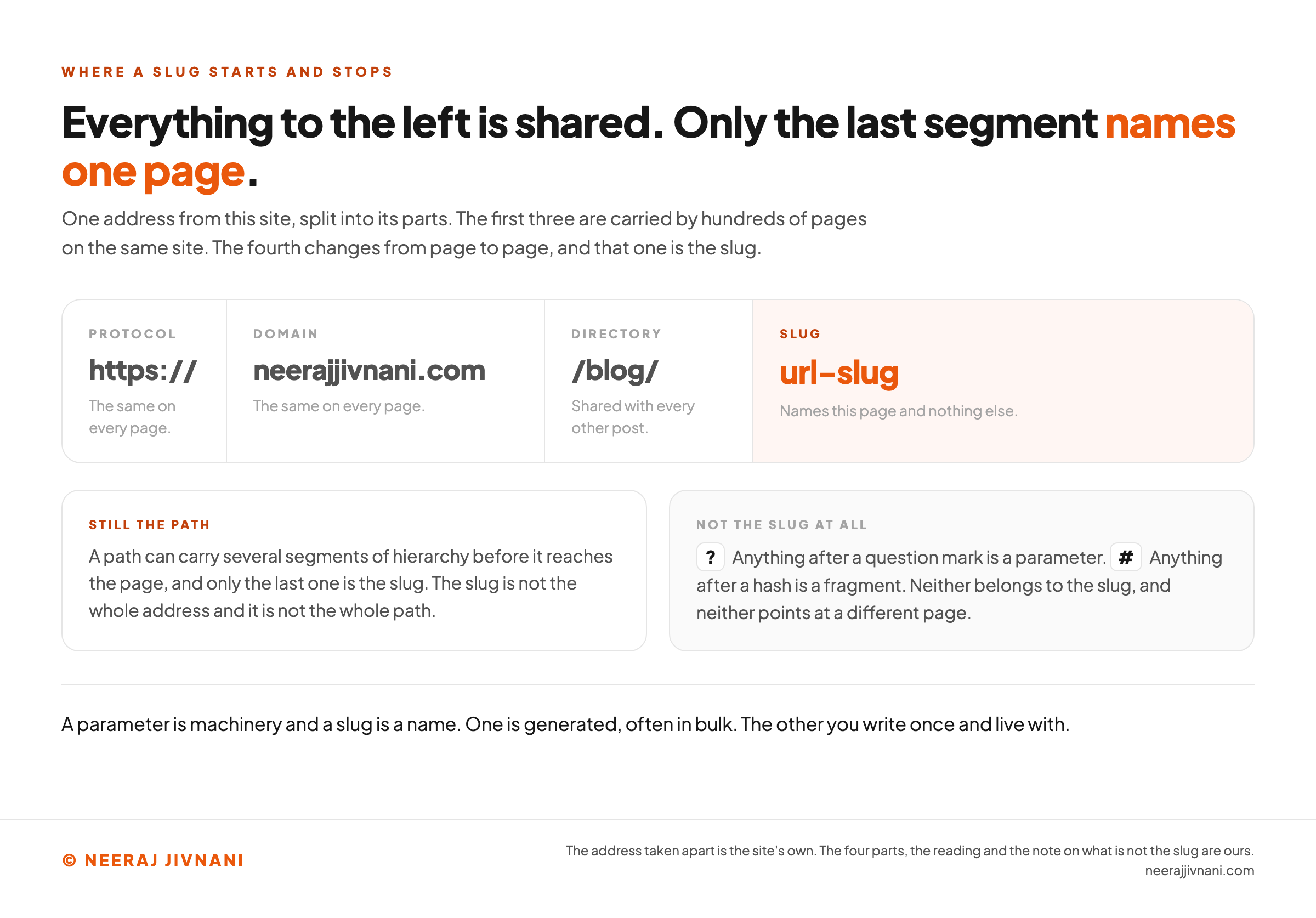
Take the address of the page you are reading. Strip off the protocol and the domain and you are left with a path, and the last segment of that path is the slug.
Here it is, taken apart:
| part | the address you are reading |
|---|---|
| protocol | https:// |
| domain | neerajjivnani.com |
| directory | /blog/ |
| slug | url-slug |
The slug is the piece that changes from page to page. Everything to the left of it is shared with hundreds of other pages on the same site.
It is also not the whole path. A path can carry several segments of hierarchy before it reaches the page, and only the last one is the slug.
What the Slug Is Not
Anything after a question mark is a parameter, and anything after a hash is a fragment. Neither belongs to the slug, and neither points at a different page.
That matters because a parameter is machinery and a slug is a name.
One is generated, often in bulk. The other you write once and live with.
Some documentation systems draw the line further left and treat everything after a fixed prefix as the slug, so a nested page ends up with a slash inside its own slug. That is a local convention rather than a different object.
Where the Word Comes From
The word is newsroom vocabulary. A slug was the short working name a story carried through production, so an editor could ask about the budget-cuts piece without reciting the headline.
Web developers borrowed it for the same job.
Use this chart — embed code and citation
<a href="https://neerajjivnani.com/blog/url-slug/"><img src="https://neerajjivnani.com/infographics/url-slug/only-the-last-segment-names-it.png" alt="One address from this site split into four labeled parts drawn as one row of cards: the protocol https, the domain neerajjivnani.com and the directory slash blog, each marked as shared with hundreds of other pages on the same site, and then the slug url-slug drawn in orange and marked as the piece that names that one page and nothing else. Two panels beneath it record that a path can carry several segments of hierarchy before it reaches the page and only the last one is the slug, and that anything after a question mark is a parameter and anything after a hash is a fragment, neither of which belongs to the slug or points at a different page. A closing line reads that a parameter is machinery and a slug is a name." width="1200"></a>
<p>Chart: <a href="https://neerajjivnani.com/blog/url-slug/">Neeraj Jivnani</a></p>Neeraj Jivnani, "What a URL Slug Is, and How to Write One Worth Keeping", neerajjivnani.com, https://neerajjivnani.com/blog/url-slug/Free to republish with a link back to this page.
What a Slug Does for Search, and What It Does Not
A slug helps a person decide whether to click, and it tells a search engine a little about the page before the page is read. Those are the two jobs, and the first one is much the larger.
A person about to click sees the address. It sits under the title in a result, in a link somebody sent you, and in the browser bar afterwards.
A readable one sets an expectation before the click. A string like /4471 sets none, and the reader's half of this is no more complicated than that.
For the search engine, the effect is real and small. Google's own guidance asks for readable words rather than long identifier numbers, because a URL built out of words says something about the page before anything has been read.
A page does not rank because its slug is well written, and it does not fail because the slug is clumsy.
None of this changes when the answer arrives from an assistant rather than a list of links. Being reachable still counts for more than the wording, and the wording is all these rules can touch.
So each rule below is worth about thirty seconds. None of them is worth rewriting a published address for.
Your Content System Already Wrote One
Something has already made this decision on your behalf. Knowing exactly what it did is the difference between editing a slug and guessing at one.
WordPress
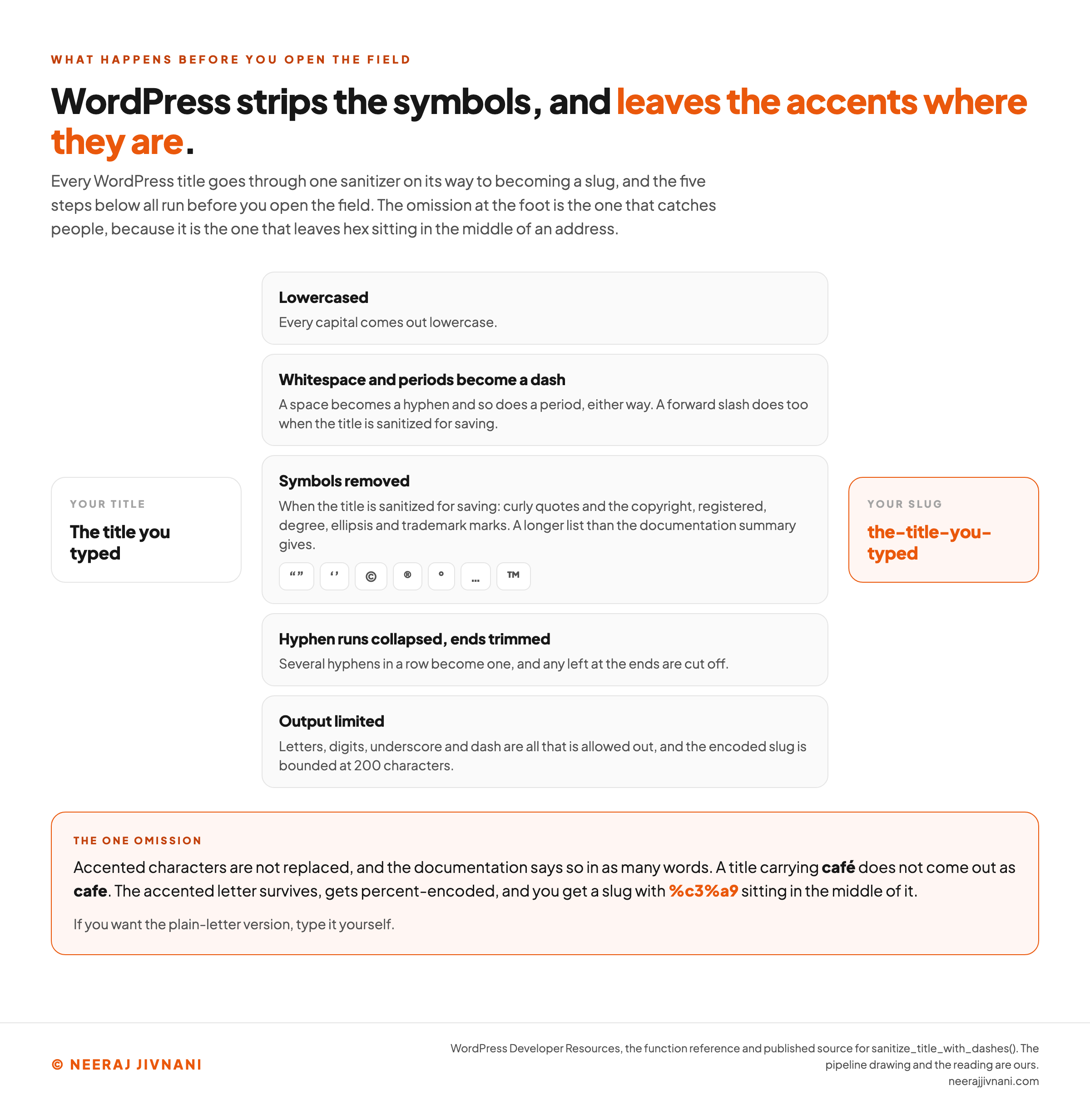
WordPress runs the title through a sanitizer, and its function reference publishes precisely what that does. It lowercases the title, turns whitespace into a dash, and limits what comes out to letters, digits, underscore and dash.
Its published source shows more than that summary does. When the title is sanitized for saving, curly quotes and the copyright, registered, degree, ellipsis and trademark marks are all stripped out, and a forward slash becomes a hyphen.
Periods become hyphens either way, runs of hyphens collapse into one, and any left at the ends are trimmed off.
The encoded result is bounded at 200 characters, a ceiling no readable slug comes close to.
One omission is worth knowing about, because it is the one that catches people. WordPress does not replace accented characters, and its own documentation says so in as many words.
So a title carrying café does not come out as cafe. The accented letter survives, gets percent-encoded, and you get a slug with %c3%a9 sitting in the middle of it.
If you want the plain-letter version, type it yourself.
Squarespace
Squarespace publishes hard numbers, and they are limits rather than advice. Slugs must be between 3 and 250 characters for most pages, and between 3 and 200 for blog posts, events and products.
Case is not a preference there either. Squarespace states that uppercase characters typed into the field automatically change to lowercase, and that a visitor who types a capitalized version gets your 404 page instead.
Two more constraints have nothing to do with wording at all.
A live slug cannot match another live page's, so reusing one means deleting the old page first. And a set of names is reserved outright.
The reserved list includes cart, search, checkout and account, among others. Some of those pages exist on your site whether or not you ever built a store.
It narrows the characters further than the standard does, too. Squarespace states that a slug cannot include special characters other than dashes.
Shopify and Everything Else
Shopify calls the same field a handle. Its own object reference shows the pattern plainly: a page titled "About us" carries the handle about-us.
Most other systems do some version of this, and the shape rarely changes. The field sits beside the title, it is prefilled from the title, and it stays editable until the moment you publish.
Find it before you publish rather than after, because before is free.
Use this chart — embed code and citation
<a href="https://neerajjivnani.com/blog/url-slug/"><img src="https://neerajjivnani.com/infographics/url-slug/what-wordpress-leaves-alone.png" alt="A card reading the title you typed on the left, five stacked steps in the middle, and an orange card holding the finished slug on the right, read from the top step down. The five steps are that the title is lowercased, that whitespace and periods become a dash either way and a forward slash does too on the saving path, that when the title is sanitized for saving, curly quotes and the copyright, registered, degree, ellipsis and trademark marks are removed, shown as a row of those symbols, that runs of hyphens collapse and any left at the ends are trimmed, and that the output is limited to letters, digits, underscore and dash with the encoded slug bounded at 200 characters. An orange panel across the foot is headed the one omission and records that accented characters are not replaced, so a title carrying the word cafe with an accent does not come out as plain cafe: the accented letter survives, gets percent-encoded, and leaves the hex pair %c3%a9 in the middle of the slug." width="1200"></a>
<p>Chart: <a href="https://neerajjivnani.com/blog/url-slug/">Neeraj Jivnani</a></p>Neeraj Jivnani, "What a URL Slug Is, and How to Write One Worth Keeping", neerajjivnani.com, https://neerajjivnani.com/blog/url-slug/Free to republish with a link back to this page.
The Rules Worth Following
Seven of them, in the order they are worth your attention. The first one does most of the work.
Name the Thing, Not the Title
A slug is a name, not a summary. wool-rugs names a page; the-best-wool-rugs-for-a-small-flat summarizes one.
The test is whether somebody reading the address alone could say what is on the page. If they can, it is finished.
Most of what a generated slug gets wrong is this one thing: it copied the headline when it should have named the subject.
Separate the Words With Hyphens
Hyphens, not underscores, and not nothing at all. home-decor-ideas reads at a glance; homedecorideas makes the reader do the work.
The reason for preferring a hyphen is worth getting right. Google's URL structure guidance does recommend hyphens over underscores, and its stated reason is not that a crawler cannot read an underscore.
It is that an underscore already means the opposite thing. Google's wording is that underscores are "commonly used for denoting concepts that should be kept together", and the example it reaches for is the way programming languages name functions, like format_date.
So an underscore joins and a hyphen separates. Both audiences are in the reason Google gives: the hyphen, it says, helps users and search engines "better identify concepts in the URL", and the case against the underscore is a historical one.
An underscore is a small missed opportunity, not a defect.
Keep It Lowercase
Two cases are two addresses, and that comes from the address standard rather than from any search engine. Google says its own handling is case sensitive "like any other HTTP client following IETF STD 66", treating /APPLE and /apple as distinct URLs with their own content.
Write the slug in lowercase and the question never arises.
Some platforms force it for you, which is one fewer thing to remember and one more reason to check the field rather than assume it.
Stick to Characters That Survive
A ban list is the wrong shape for this one. There is a short set of characters a web address leaves alone, and the standard names them.
Web address syntax is defined by an internet standard, Request for Comments 3986, and it calls those characters unreserved: uppercase and lowercase letters, decimal digits, hyphen, period, underscore and tilde.
Google's URL structure guidance says Search supports addresses as defined by that standard, citing it by its Internet Standard number, 66.
Everything else in a path is either a delimiter or gets percent-encoded. That is how a space becomes %20 and how an accented letter becomes a pair of hex codes.
The address still works. It stops being readable, which is the one thing the slug was doing for you.
One thing here is worth stating plainly, because getting it wrong costs some sites their own language. Characters outside ASCII, meaning accented letters and non-Latin scripts, are not forbidden.
Google recommends using words in your audience's language in the URL, and gives its own examples in German and in Japanese. What it asks for is that the link be percent-encoded when you point at it, not that the word be anglicized first.
If your readers search in German, the German word belongs in the slug. Transliteration is a choice about who you are writing for, not a technical requirement.
Leave Out Dates and Counts
A year in a slug is a promise that expires. So is a number: 9-email-templates becomes untrue the day you add a tenth, and then you are choosing between a wrong address and a redirect.
Keep both out and the page can be revised forever without the address going stale.
A slug carrying a count or a year is the one kind that forces its own replacement, because the content moves and the name cannot follow it.
Put the Keyword In If It Fits
If the words a person would search for are also the natural name of the page, they are already in the slug and there is nothing to do.
Do not force it.
Repeating a term to get it in twice is keyword stuffing in a slot nobody reads back, and it leaves you with an address that sounds written for a machine, in exchange for a gain that was small to begin with.
Drop the Small Words, Unless They Carry Meaning
tips-for-effective-studying and effective-studying-tips say the same thing, and the second is shorter. Cutting the articles and prepositions usually costs nothing.
Usually. how-to-file-a-return and how-file-return do not read the same way, and the tidier one is worse.
So this is a preference rather than a rule. Cut a small word when the slug still reads as English afterwards, and keep it when it does not.
What could stop you
Paste the slug your content system generated. Everything below is sorted by one question: is there anything that would refuse it? It opens on the desk lamps example from further up the page.
What the address carries
the-best-wool-rugs-for-a-small-flat
Every character here survives into the address exactly as you typed it.
Enforced. Something refuses it.
Nothing here has anything to say about your slug today.
Nothing to say about your slug: Which characters survive
Letters, digits, hyphen, period, underscore and tilde are left alone. Everything else in a path is a delimiter or gets percent-encoded, and the address still works. It stops being readable, which is the one thing the slug was doing for you.
Nothing to say about your slug: How long your platform lets it be
Squarespace takes 3 to 250 characters on most pages and 3 to 200 on blog posts, events and products. WordPress bounds the encoded slug at 200.
Yours is 35 characters, nowhere near any of them. That is the usual answer, and it is why length is almost never the thing that stops you.
Nothing to say about your slug: Names your platform has taken
Squarespace reserves a set of names outright, and the four this post names are cart, search, checkout and account. Some of those pages exist whether or not you built a store. A live slug also cannot match another live page's.
Nothing to say about your slug: The case you typed it in
Two cases are two addresses: Google treats a capitalized path and a lowercase one as distinct URLs with their own content. Squarespace lowercases the field for you, and serves its 404 page to anyone who types the capitalized version.
Preference. Nothing refuses it.
Worth about thirty seconds before you publish, and worth nothing afterward.
Nothing to say about your slug: Hyphens rather than underscores
Google recommends the hyphen, saying it helps users and search engines better identify concepts in the URL, and it calls the case against the underscore a historical one: an underscore already means the opposite thing, joining what belongs together. So an underscore is a small missed opportunity, not a defect.
Nothing to say about your slug: Nothing in there that can expire
Nothing enforces this, and it is still the one kind of slug that forces its own replacement: a count becomes untrue the day you add another item, and a year expires on its own.
Has something to say about your slug: The small words
Cutting articles and prepositions usually costs nothing. Usually: keep one when the slug stops reading as English without it, which is why this is a preference rather than a rule.
Yours carries "the", "for", "a". Read it back without them and keep whichever the sentence needs.
Nothing to say about your slug: The keyword, if it fits
If the words a person would search for are also the natural name of the page, they are already here and there is nothing to do. Repeating a term to get it in twice reads as though it were written for a machine.
Nothing here can check this one. Only you know the words somebody would type, and whether they are also the natural name of the page.
The part this will not answer for you
Whether it names the page. That is a judgment and there is no count behind it, so read it with the page taken away and ask whether you could say what is on it:
the-best-wool-rugs-for-a-small-flat
If you can, it is finished. If what you are reading is the headline rather than the subject, that is the one thing a generated slug most often gets wrong, and it is the only change here worth making twice.
How Long Should a URL Slug Be
Short enough to read in one pass, which is a judgment and not a number.
What is enforced is a character limit, and it comes from your platform rather than from a search engine.
Your platform's ceiling sits so far above anything readable that it never binds in practice. If you are anywhere near one, the problem is not length: you have put a sentence where a name should be.
The useful version of the rule is a shape rather than a count. A slug is a noun phrase, the way a file on a desk would be labeled, and a noun phrase runs out of words on its own.
Changing a Slug After You Publish
Before publication, changing a slug costs nothing. After publication, it costs everything the old address had.
Every link anyone made, every bookmark, every message with the URL pasted into it, every crawler holding the old address: all of them now point at a page that does not answer.
That is link rot, and you caused this one yourself.
The repair is a permanent redirect from the old address to the new one, a 301, and it goes in immediately.
That repair works. It is still a cost you chose to pay, and it keeps costing for as long as the old address exists anywhere.
The shape of the bill is easy to picture. Rename 9-email-templates to email-templates and every one of those links now travels through a rule somebody has to remember not to delete.
So the arithmetic here runs one way only. Spend the extra moment before you publish, because nothing afterwards is free.
There is one case where the change is worth making. A slug that is genuinely unusable, a string of identifiers nobody can read or retype, is already failing at its only job, and a clean redirect is cheaper than leaving it.
Tidying a slug that is merely imperfect is not that case.
Questions People Ask About URL Slugs
Six come up more than the rest, and the first two are one question about where the slug begins and ends.
Is a Slug the Same as a URL?
No. The URL is the whole address, and the slug is the last part of the path inside it.
In https://example.com/blog/wool-rugs, the URL is the entire string and the slug is wool-rugs.
What Does Slug Mean in a Link?
A slug means the short readable name for that one page.
In a link it is the part carrying the meaning, which is why an address made of words is worth forwarding and a string of identifiers is not.
Can You Give an Example of a URL Slug?
Three, each naming a different kind of page: wool-rugs for a category, how-to-bake-bread for a recipe, about-us for a company page.
Each is lowercase, hyphenated, made of ordinary words, and short enough to read without stopping.
How Do You Make a URL Slug?
In practice you edit one rather than make it. Open the post or page, find the field next to the title, and read what your system generated.
Then fix the three things it usually gets wrong: the small words it kept, the title it copied whole instead of naming the page, and anything in there that will age.
What Is an SEO Slug?
The same object, written deliberately. There is no second kind of slug and nothing separate to configure.
If a plugin marks your slug amber for missing a keyphrase, that is a suggestion about one word, not a requirement.
What Is a Slug in Web Development?
The same object again, described from the database side. It is a field on a record, usually generated from a title and stored beside it, which a route then matches against to find the page.
Two Places Set the Rules, and the Rest Is Taste
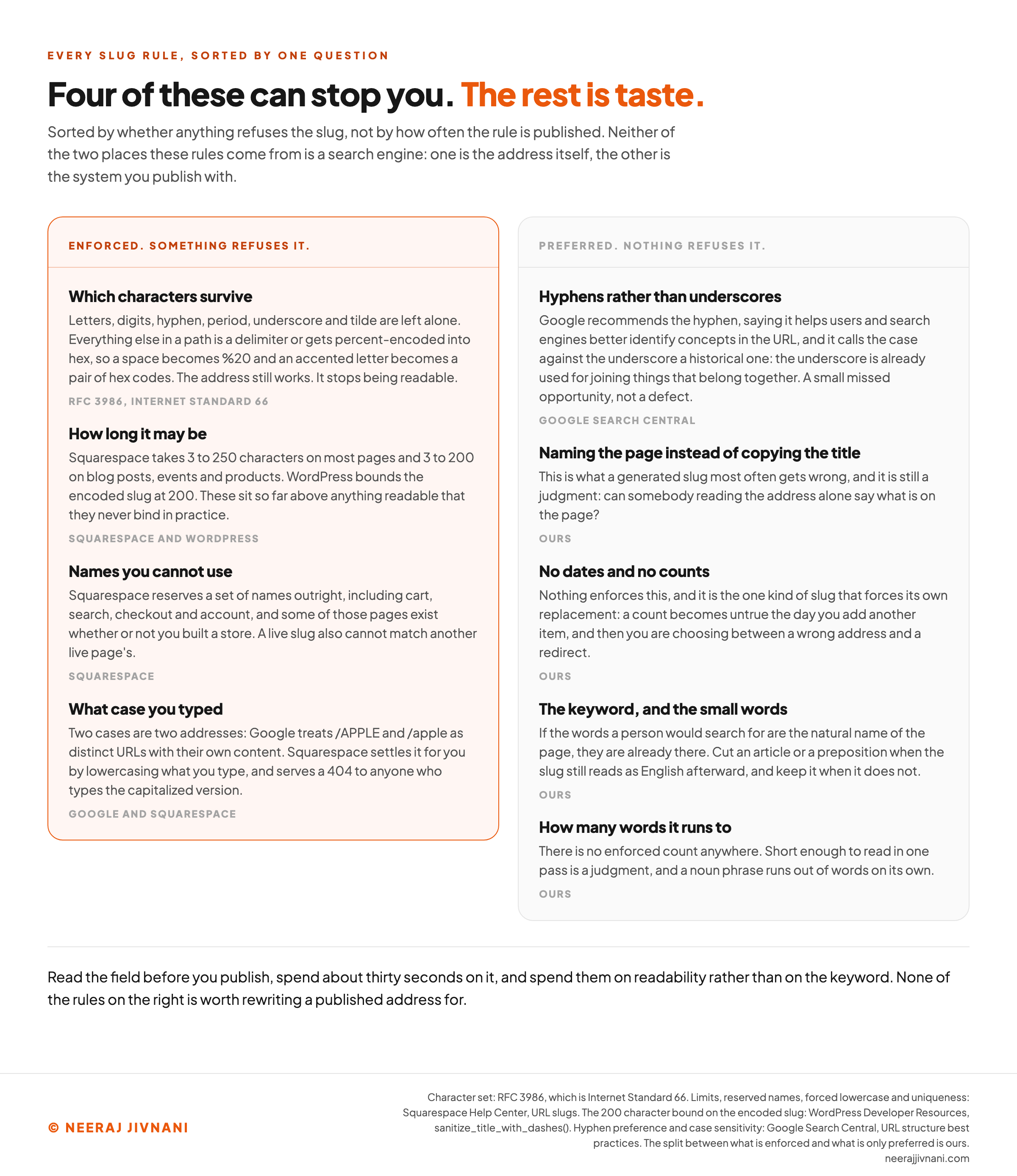
Two places between them set everything that can refuse a slug.
The address standard decides which characters survive without turning into hex, and that a capital letter makes a different address. Your platform sets a length limit and a list of names you cannot use.
Everything above is taste, in service of an address a person can read, which is the only thing a slug was ever for.
Read the field before you publish. Make it lowercase words with hyphens between them, take out anything that can expire, and go and write the page.
Use this chart — embed code and citation
<a href="https://neerajjivnani.com/blog/url-slug/"><img src="https://neerajjivnani.com/infographics/url-slug/four-of-these-can-stop-you.png" alt="A two column reference table headed four of these can stop you, the rest is taste, sorting every published slug rule by whether anything refuses the slug. The orange left column, headed enforced, carries four rows: which characters survive, being letters, digits, hyphen, period, underscore and tilde, with everything else a delimiter or percent-encoded into hex; how long it may be, at 3 to 250 characters on Squarespace and 3 to 200 on blog posts, events and products, with WordPress bounding the encoded slug at 200; names you cannot use, including the reserved cart, search, checkout and account; and what case you typed, since two cases are two addresses. The grey right column, headed preferred and nothing refuses it, carries hyphens rather than underscores, with Google saying the hyphen helps users and search engines better identify concepts in the URL and calling the case against the underscore a historical one, then naming the page instead of copying the title, no dates and no counts, the keyword and the small words, and how many words it runs to. A line across the foot records that neither of the two places these come from is a search engine: one is the address itself and the other is the system you publish with." width="1200"></a>
<p>Chart: <a href="https://neerajjivnani.com/blog/url-slug/">Neeraj Jivnani</a></p>Neeraj Jivnani, "What a URL Slug Is, and How to Write One Worth Keeping", neerajjivnani.com, https://neerajjivnani.com/blog/url-slug/Free to republish with a link back to this page.