What URL Parameters Are, and Which of Yours Need a Decision
Everything after the question mark is a parameter. See what each kind does to your page, how to find the ones your site makes, and which to leave alone.

/ On this page10 sections
Everything after the question mark in a web address is a parameter. Each one either tells the page to do something, or tells a tool where the visit came from.
Your site almost certainly emits more of them than anyone has ever written down. This covers what they are, what the two kinds do, how to find yours, and which ones are worth a decision.
What a URL Parameter Is
A URL parameter is a piece of information added to the end of a web address to tell the page what to do with itself.
It has two halves. A key names the thing, a value sets it, and an equals sign joins them.
Take a category page on a shop:
``
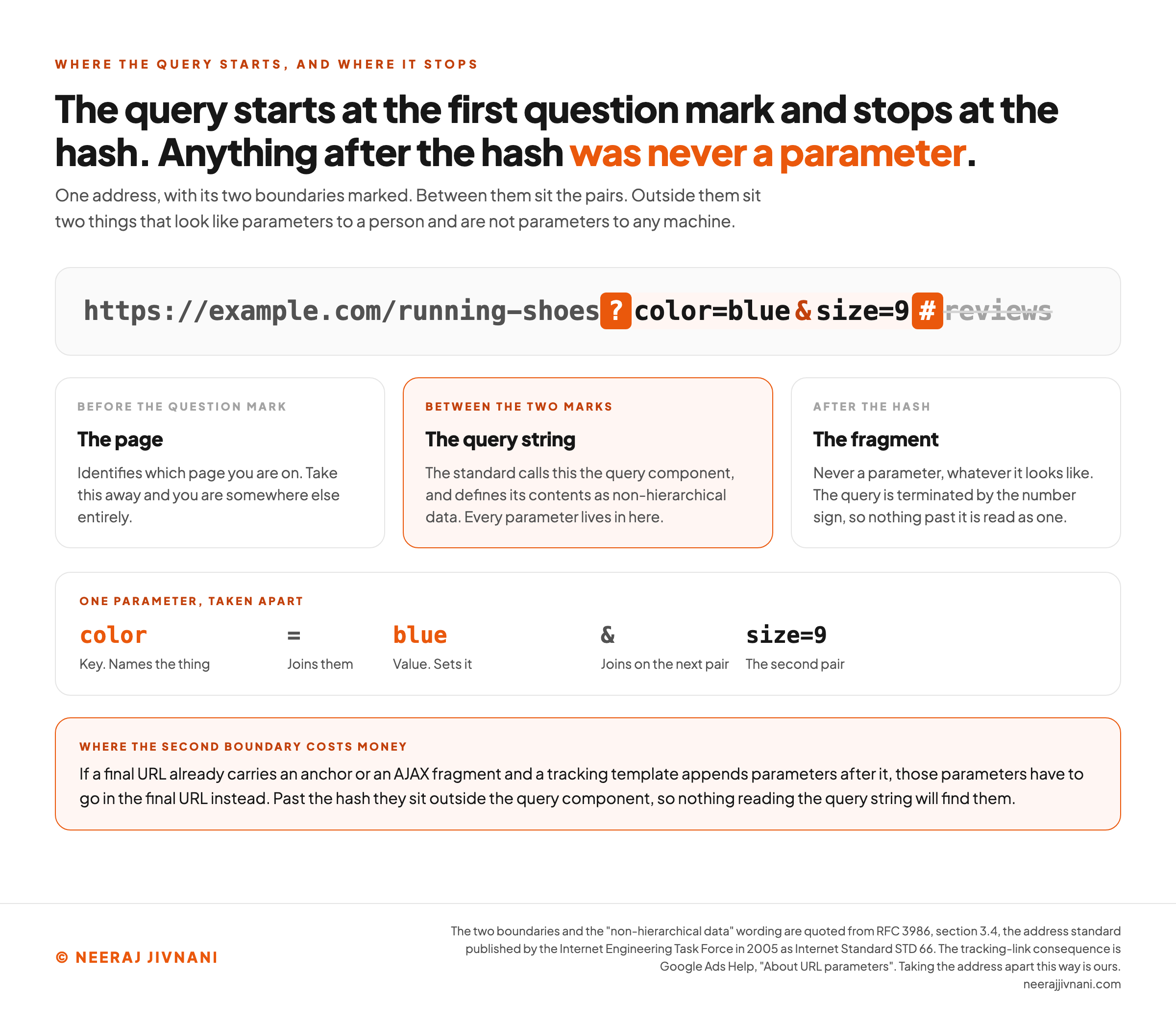
https://example.com/running-shoes?color=blue&size=9
``
The question mark starts the parameters. color is a key, blue is its value, and the ampersand joins on the second pair.
Google Ads Help puts the same rule in one line: parameters are "made of a key and a value separated by an equals sign (=) and joined by an ampersand (&)", and the first one always follows a question mark.
Nothing about that address points at a different page. It is the same page, asked to display a subset.
A Query String, a Parameter, and a Fragment
Query string, parameter and fragment get used as if they were one word, and the difference matters the moment you try to strip something out.
The query string is the whole block: ?color=blue&size=9. A parameter is one pair inside it.
Request for Comments 3986, the standard that defines what a web address may contain, calls that block the query component.
Its wording is that the component is "indicated by the first question mark ("?") character and terminated by a number sign ("#") character or by the end of the URI". A Uniform Resource Identifier (URI) is the general form a web address takes.
That second half is the useful one. Anything after a # is a fragment, and it was never a parameter, whatever it looks like.
Google Ads Help describes what that does to a tracking link. If your final URL carries an anchor or an asynchronous JavaScript (AJAX) fragment and your tracking template appends parameters after it, those parameters have to go in the final URL instead.
There is a fourth term you will meet. A path parameter sits before the question mark, inside the path itself, and it identifies the page rather than modifying it.
In /running-shoes?color=blue, the running-shoes segment is the page. Remove it and you are somewhere else entirely.
Remove ?color=blue and you are on the same page, unfiltered.
The Format Is a Convention
The key=value&key=value shape is an agreement between the programs that read addresses. The address standard does not require it.
RFC 3986 defines the query component as "non-hierarchical data" and then describes the format only in passing, noting that "query components are often used to carry identifying information in the form of "key=value" pairs".
Often used. That is as far as the address standard goes, in the one place it mentions the shape at all.
Google's URL structure guidance treats it the same way, as a recommendation rather than a requirement.
It asks you to "use the following common encoding", an equals sign between key and value and an ampersand between pairs.
Beside it, it prints the shapes it does not want: a colon with square brackets, and an address where single commas separate the pairs and double commas join them.
So the convention holds because every server, browser and crawler agrees to honor it, not because anything checks. Which is why two tools can disagree about your parameters, and why everything below is about deciding rather than about syntax.
Use this chart — embed code and citation
<a href="https://neerajjivnani.com/blog/url-parameters/"><img src="https://neerajjivnani.com/infographics/url-parameters/where-the-query-stops.png" alt="A single web address drawn as one strip with its two boundaries marked in orange, reading https://example.com/running-shoes, then a question mark, then color=blue, then an ampersand, then size=9, then a hash, then the word reviews struck through. Three panels below label the zones. Before the question mark is the page, which identifies which page you are on, and taking it away puts you somewhere else entirely. Between the two marks is the query string, which the standard calls the query component and whose contents it defines as non-hierarchical data, and every parameter lives in there. After the hash is the fragment, which is never a parameter whatever it looks like, because the query is terminated by the number sign. A fourth panel takes one parameter apart into its cells: color is the key that names the thing, the equals sign joins them, blue is the value that sets it, the ampersand joins on the next pair, and size=9 is the second pair. A band across the foot reads that if a final URL already carries an anchor or an AJAX fragment and a tracking template appends parameters after it, those parameters have to go in the final URL instead, because past the hash they sit outside the query component and nothing reading the query string will find them." width="1200"></a>
<p>Chart: <a href="https://neerajjivnani.com/blog/url-parameters/">Neeraj Jivnani</a></p>Neeraj Jivnani, "What URL Parameters Are, and Which of Yours Need a Decision", neerajjivnani.com, https://neerajjivnani.com/blog/url-parameters/Free to republish with a link back to this page.
The Two Kinds, and the Third Nobody Names
Almost every parameter you will meet does one of two jobs, and the split decides everything you do later.
They get called active and passive, and those names are worth keeping because each one names a test rather than a use. The test is one question: strip the parameter out, reload, and does the visitor see something different?
If yes it is active. If no it is passive, and a third answer is possible, which is that nobody can remember what it was for.
The Ones That Change the Page
An active parameter changes what the visitor sees. Strip it out and you get a different page back.
Four cases cover nearly all of them:
- Filtering and sorting.
?color=blue,?sort=price-low. The same set of items, narrowed or reordered. - Pagination.
?page=3. Page three holds items that appear nowhere else in the sequence. - On-site search.
?q=running+shoes. A results set built on demand, one per query typed. - Identifying.
?product=4821. The parameter is the only thing naming which page you are on.
That last one behaves differently from the other three, and the difference comes back later. If the identifier is the page, the address is the page, and nothing here about trimming applies to it.
The Ones That Only Record Something
A passive parameter changes nothing. The visitor sees the same page whether it is there or not, and the value exists so that a tool somewhere can count the visit.
Three cases, again covering nearly all of them:
- Campaign tags.
?utm_source=newsletterand its relatives, written so analytics can attribute the session. - Ad click identifiers. Appended by the ad platform when somebody clicks, usually without you touching the link.
- Affiliate and referral codes.
?ref=partner-name, so the right partner gets credited.
Passive parameters are the ones that multiply fastest, because most of them are added by somebody else. A partner, an ad account, an email tool, a social platform appending its own click identifier on the way through.
You will never be asked to approve any of it.
The Ones That Do Nothing
There is a third bucket, and it is the reason the list is worth making at all.
Somewhere on most sites there is a key that changed something once and changes nothing now.
A session identifier a login system stopped using. A view mode nobody switches. A flag from a campaign that ended.
Each one still generates addresses. None of them earns its keep.
Google's URL structure guidance names this directly and asks you to "use as few parameters as you can", shortening addresses "by trimming unnecessary parameters (meaning, parameters that don't change the content)".
That is a decision about code, not a search tactic, and it is cheaper than any of the search-side instruments. Deleting a key removes every address it ever made, retroactively, without anybody writing a rule about it.
What Sites Use Parameters For
The uses fall out of the two kinds, and they are worth naming, because you are about to go looking for them in your own address bar.
| What the parameter does | A typical key | Which kind |
|---|---|---|
| Narrows or reorders a list | color, sort | Active |
| Picks a page out of a sequence | page | Active |
| Carries a search somebody typed | q, search | Active |
| Names which item to display | product, id | Active |
| Attributes a visit to a campaign | utm_source, utm_medium | Passive |
| Credits a partner | ref, affiliate | Passive |
| Jumps a video to a timestamp | t | Active |
One job on that list is the exception, and it is the one most teams reach for when a site goes international.
Language and country do not belong in a parameter. Google's guidance on multi-regional and multilingual sites lists the pattern site.com?loc=de and marks it "Not recommended", because segmentation by URL becomes difficult and visitors do not recognize the targeting from the address.
A subdirectory, a subdomain or a country domain all do that job better, and all three are things a person can read.
How to Find the Ones Your Own Site Makes
To find the parameters your site makes, build a list of keys, not a list of addresses.
That distinction saves the whole afternoon. A shop with five filters can produce tens of thousands of addresses and still hold about five decisions, because every one of those addresses is a combination of the same handful of keys.
Four places give you keys, and none of them is complete on its own.
- Your own address bar. Use the site. Filter something, sort it, page through it, run a search, share a product, and write down every key that appears. Fifteen minutes here finds most of the active ones.
- Your analytics. Look at the page report with the full path and query string included, then filter the list to rows containing a question mark. That finds the parameters visitors arrive on, including the ones somebody else appended.
- Search Console. The page indexing report shows what Google has and has not indexed. Filtering it for a question mark tells you which parameterized addresses reached the index, which is the one place that question gets a straight answer.
- A crawl. Point a crawler at the site and search the output for a question mark.
Run all four, and understand what the last one cannot do.
Why a Crawl Comes Back Short
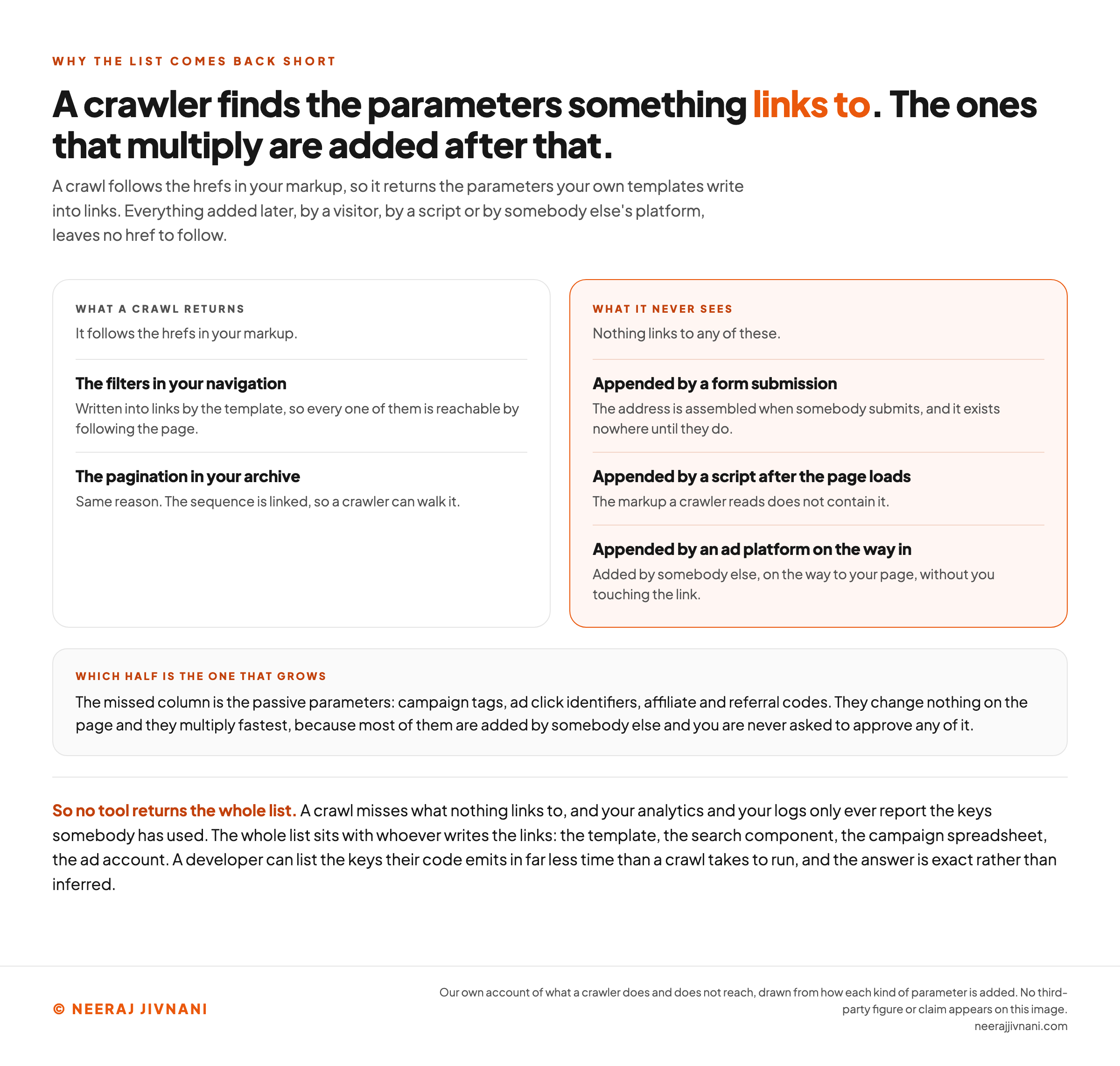
A crawler finds parameters that something links to. It follows the hrefs in your markup, so it sees the filters in your navigation and the pagination in your archive.
It does not see a parameter appended by a form submission, by a script after the page loads, or by an ad platform on the way in. Those are the passive ones, and they are the ones that multiply.
So no tool returns the whole list. A crawl misses what nothing links to, and your analytics and your logs only ever report the keys somebody has used.
The whole list sits with whoever writes the links: the template, the search component, the campaign spreadsheet, the ad account.
Ask for it. A developer can list the keys their code emits in far less time than a crawl takes to run, and the answer is exact rather than inferred.
Use this chart — embed code and citation
<a href="https://neerajjivnani.com/blog/url-parameters/"><img src="https://neerajjivnani.com/infographics/url-parameters/what-a-crawl-cannot-see.png" alt="A two-column comparison of what a crawl of a site returns and what it never reaches. The left column, headed what a crawl returns, notes that it follows the hrefs in your markup, and lists the filters in your navigation, which are written into links by the template so every one is reachable by following the page, and the pagination in your archive, which is linked as a sequence a crawler can walk. The right column, highlighted in orange and headed what it never sees, notes that nothing links to any of these, and lists parameters appended by a form submission, where the address is assembled when somebody submits and exists nowhere until they do; appended by a script after the page loads, where the markup a crawler reads does not contain it; and appended by an ad platform on the way in, added by somebody else on the way to your page without you touching the link. A note below reads that the missed column is the passive parameters, campaign tags, ad click identifiers, affiliate and referral codes, which change nothing on the page and multiply fastest because most of them are added by somebody else and you are never asked to approve any of it. A closing line reads that no tool returns the whole list, because a crawl misses what nothing links to and your analytics and your logs only ever report the keys somebody has used, so the whole list sits with whoever writes the links, the template, the search component, the campaign spreadsheet, the ad account, and a developer can list the keys their code emits in far less time than a crawl takes to run." width="1200"></a>
<p>Chart: <a href="https://neerajjivnani.com/blog/url-parameters/">Neeraj Jivnani</a></p>Neeraj Jivnani, "What URL Parameters Are, and Which of Yours Need a Decision", neerajjivnani.com, https://neerajjivnani.com/blog/url-parameters/Free to republish with a link back to this page.
How to Read One Out of an Address
Reading a parameter by eye takes three rules and no tools at all.
Find the first ?. Everything before it is the page.
Everything after it, up to a # or the end of the address, is the query string.
Split that on & to get the pairs, then split each pair on the first = to get the key and the value. In ?q=blue+shoes&page=2, the keys are q and page.
In code, the browser gives you this. URLSearchParams takes a query string and hands back the pairs, and Mozilla's developer documentation, MDN, records it as available across browsers since April 2018.
Two of its published behaviors are worth knowing before you write the first line, and both cost real money when they catch a marketer rather than a developer.
A repeated key reads back as one value. MDN's own example takes foo=bar&foo=baz and notes that get() returns "bar, only returns the first value".
The second value is still in the address, and still counted separately by anything that compares addresses. It is invisible only to the first line of code anybody writes.
The parser does not accept a whole address. MDN states plainly that the constructor "does not parse full URLs". Hand it https://example.com/search?query=x and the key it finds is the entire string up to the =.
Both of those are reasons to give one key one job and keep it there.
A Space Is Not Always a Space
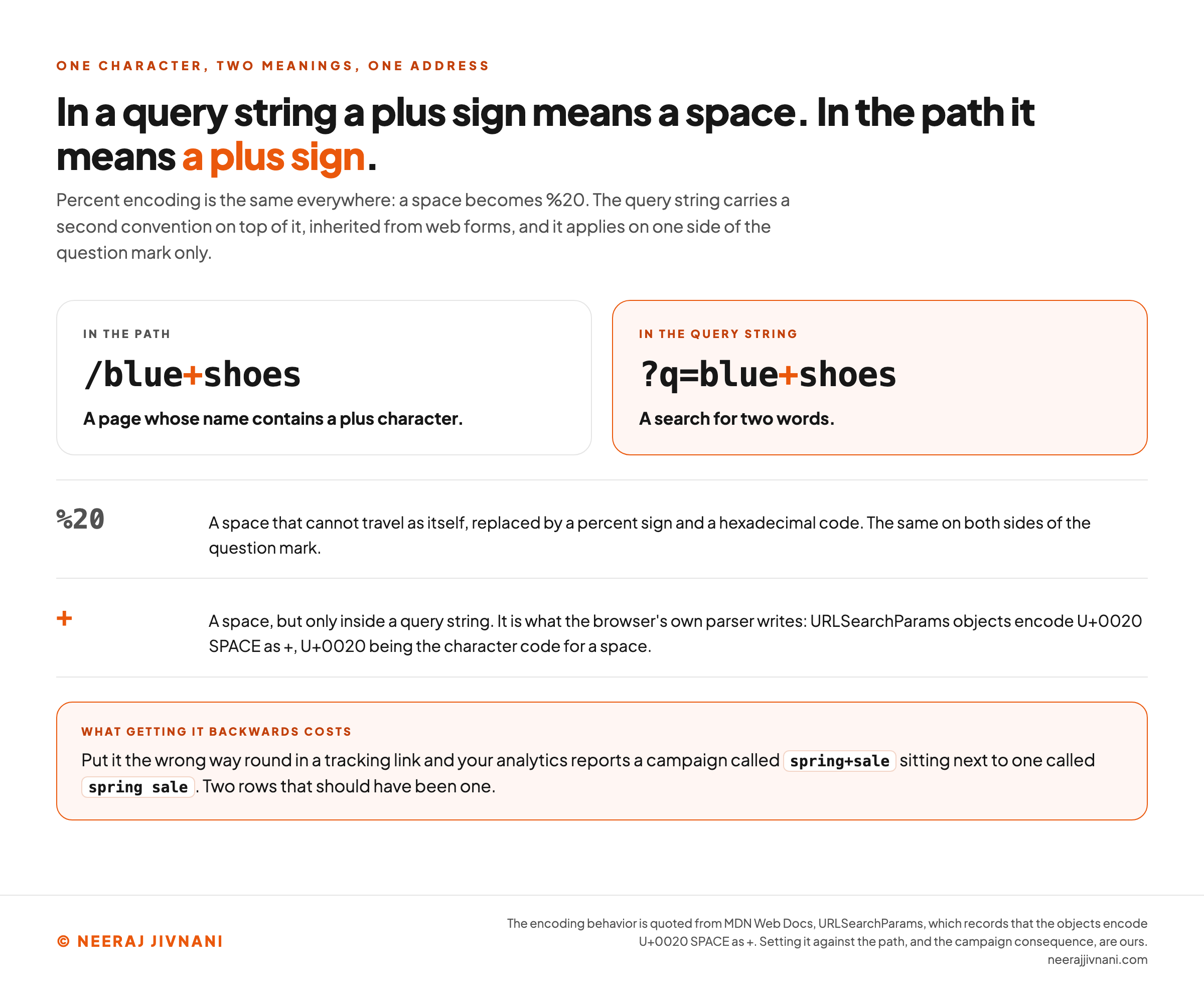
Some characters cannot travel in an address as themselves, so they get replaced by a percent sign and a hexadecimal code. A space becomes %20, and that much is the same everywhere.
The query string has a second convention on top of it, inherited from web forms, and this is the one that catches everybody once.
In a query string, a plus sign means a space. MDN records that URLSearchParams will "encode U+0020 SPACE as +" when it writes a query string out, U+0020 being the character code for a space.
In the path, a plus sign is a literal plus. So /blue+shoes is a page whose name contains a plus character, while ?q=blue+shoes is a search for two words.
Get it backwards in a tracking link and your analytics reports a campaign called spring+sale sitting next to one called spring sale, which are two rows that should have been one.
Use this chart — embed code and citation
<a href="https://neerajjivnani.com/blog/url-parameters/"><img src="https://neerajjivnani.com/infographics/url-parameters/a-plus-is-a-space-only-here.png" alt="A comparison of what a plus sign means on each side of a question mark. On the left, in the path, the address fragment /blue+shoes is read as a page whose name contains a plus character. On the right, highlighted in orange, in the query string, ?q=blue+shoes is read as a search for two words. Two rows beneath set the two encodings against each other. Percent twenty is a space that cannot travel as itself, replaced by a percent sign and a hexadecimal code, and it means the same on both sides of the question mark. A plus sign is a space, but only inside a query string, and it is what the browser's own parser writes, because URLSearchParams objects encode U+0020 SPACE as a plus, U+0020 being the character code for a space. A band across the foot reads that putting it the wrong way round in a tracking link makes your analytics report a campaign called spring plus sale sitting next to one called spring space sale, two rows that should have been one." width="1200"></a>
<p>Chart: <a href="https://neerajjivnani.com/blog/url-parameters/">Neeraj Jivnani</a></p>Neeraj Jivnani, "What URL Parameters Are, and Which of Yours Need a Decision", neerajjivnani.com, https://neerajjivnani.com/blog/url-parameters/Free to republish with a link back to this page.
How to Set One Up Without Making Three Addresses
Setting up a parameter is mostly about not letting the same page arrive at two addresses by accident. Six rules cover it, and every one is a decision made once, in the code that builds the link.
- Use the shape Google asks for, set out in the convention section above. Anything else is legal in an address and leaves every tool downstream guessing.
- Fix the order and never vary it. Decide that
coloralways precedessize, then have the code enforce it.?color=blue&size=9and?size=9&color=blueare different strings, and RFC 3986 settles equivalence by comparing strings, so they are two addresses serving one page. - One key, one job. A key that carries a filter on Tuesday and a tracking value on Thursday cannot be given a rule, and the repeated-key behavior above means the second value may never be read.
- Never emit an empty value.
?color=&size=9is a different address from?size=9, and it serves the same page. If there is no value, leave the key out. - Pick a case and hold it. Keys and values are compared character by character, so
?Color=Blueand?color=blueare two addresses. Lower case throughout is the convention worth adopting, because it is the one everybody types. - Keep personal data out. An address is written to your server logs, your analytics, the visitor's browser history, and any third-party script on the page. An email address in a parameter ends up in all four.
Where Parameters Start Costing You in Search
Parameters become a search problem for one reason: to a crawler, a new address is a new page, and it has no way to know otherwise before fetching it.
That has three consequences, and they get worse in order.
- One page arrives at many addresses. Your category page, the same page sorted by price, the same page with a newsletter tag on it. Same content, three addresses, and a search engine has to work out that they are one thing.
- Crawlers spend their time on addresses nobody wanted. Google's own word for this is overcrawling, and its crawling documentation describes filters based on parameters as able to "generate infinite URL spaces". A crawler cannot tell a useless combination from a useful one without fetching it first.
- Links land on several versions of one page. Somebody shares the tagged address, somebody else links the sorted one. Whatever those links are worth arrives split.
The same guidance asks for one thing that gets forgotten: return a 404 when a filter combination has no results, rather than a page politely saying nothing matched. A soft answer keeps an empty address alive and crawlable.
None of this is a penalty. It is a search engine spending effort on your site inefficiently, and then guessing which address you meant.
Then Pick the Instrument the Key Has Earned
Three instruments exist, they do different things, and reaching for a familiar one is what produces a site with all three pointed at the same key.
You already have the sorting that decides this. It is the active, passive and does-nothing split from earlier, applied one key at a time.
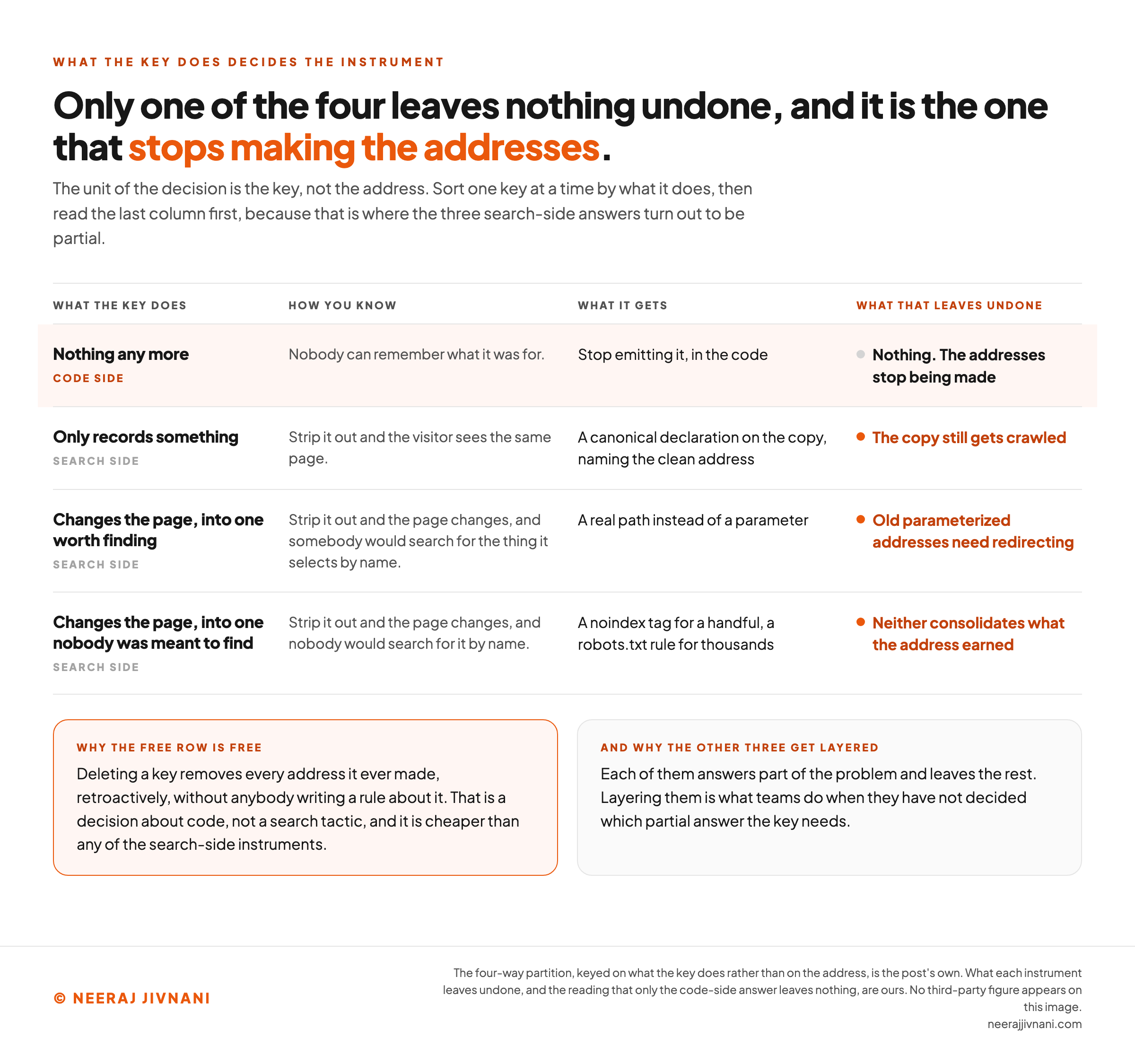
| What the key does | What it gets | What that leaves undone |
|---|---|---|
| Nothing any more | Stop emitting it, in the code | Nothing. The addresses stop being made |
| Only records something | A canonical declaration on the copy, naming the clean address | The copy still gets crawled |
| Changes the page, into one worth finding | A real path instead of a parameter | Old parameterized addresses need redirecting |
| Changes the page, into one nobody was meant to find | A noindex tag for a handful, a robots.txt rule for thousands | Neither consolidates what the address earned |
Read the third column first. Only the first row leaves nothing undone, and layering the other three is what teams do when they have not decided which partial answer the key needs.
Two rows are worth dwelling on, because they are where the mistakes happen.
A passive key is the easy one and it is still worth doing deliberately. The tagged address serves the identical page, so a canonical declaration on it is honest and costs one line in a template.
An active key splits into two, and the split is the whole call. A color filter somebody searches for by name makes a page worth having. The twelfth combination of four filters, sorted by price, on page three, does not.
And one combination cancels itself outright. A robots.txt rule stops the address being fetched at all, while a noindex tag lives inside the page, so blocking the address means nothing ever reads the tag. Pick one.
Which Active Keys Deserve a Real Path
The test is whether the thing the key selects is a page in its own right, and it has a plain version: would somebody search for it by name?
A product, a category, a color or a brand somebody types into a search box: those want /running-shoes/blue. That address is worth ranking, and a person can read it.
A sort order, a page number, an on-site search query and an unnamed filter combination all fail that test. Moved into the path they give you the same duplicate addresses with tidier spelling.
On-site search is the worst of the four. In the path, every phrase anybody ever types becomes a permanent page.
So convert the keys that name something. Leave the rest as parameters and give each one the row it earned above.
One row per key
Paste the addresses you already have, from your analytics or your address bar. The addresses are thrown away and the keys are kept, because a site with five filters can carry tens of thousands of addresses and about five real decisions.
Read by the same three rules you would use by eye. Cut at the first question mark, stop at a hash or the end of the address, split on the ampersands, then split each pair at its first equals sign.
The one test this cannot run for you
Strip the key out, reload, and does the visitor see something different? A third answer is possible, which is that nobody can remember what it was for.
Undecided. The four above are the four things a key can be doing, and the instrument follows from which one it is.
Undecided. The four above are the four things a key can be doing, and the instrument follows from which one it is.
Undecided. The four above are the four things a key can be doing, and the instrument follows from which one it is.
Undecided. The four above are the four things a key can be doing, and the instrument follows from which one it is.
Undecided. The four above are the four things a key can be doing, and the instrument follows from which one it is.
Undecided. The four above are the four things a key can be doing, and the instrument follows from which one it is.
Undecided. The four above are the four things a key can be doing, and the instrument follows from which one it is.
Undecided. The four above are the four things a key can be doing, and the instrument follows from which one it is.
Read off your own addresses, without asking you
- Two spellings of one key. color and Color. Keys and values are compared character by character, so those are two addresses. Pick a case and hold it.
- An empty value. color appears with nothing after the equals sign. An empty value is a different address from leaving the key out, and it serves the same page. If there is no value, leave the key out.
- The same keys in a different order. color then size against size then color. Those are different strings, and equivalence is settled by comparing strings, so they are two addresses serving one page. Fix the order and never vary it.
- One key, twice in one address. color appears more than once in a single address. A repeated key reads back as one value: the browser parser returns the first and stops. The second is still in the address, and still counted separately by anything that compares addresses.
- Something after a hash. 1 of these addresses carries a fragment. Anything after a hash was never a parameter, whatever it looks like, so nothing here has read it as one.
- A plus sign in a value. q carries a plus sign. In a query string a plus sign means a space. In the path it means a plus sign, which is the one that catches everybody once.
That is the list. One row per key, what it does, and which of the four rows it belongs in. The address bar shows you combinations, and the decisions are about keys, which is why there are fewer of them than the export suggests.
Use this chart — embed code and citation
<a href="https://neerajjivnani.com/blog/url-parameters/"><img src="https://neerajjivnani.com/infographics/url-parameters/only-one-leaves-nothing-undone.png" alt="A four-row partition of what a URL parameter key can be doing, with the instrument each one earns and what that instrument leaves undone. The first row, highlighted in orange, is a key that does nothing any more, known because nobody can remember what it was for; it is a code-side answer, it gets stopped at source in the code, and the last column reads nothing, the addresses stop being made. The second row is a key that only records something, known because stripping it out leaves the visitor seeing the same page; it gets a canonical declaration on the copy naming the clean address, and it leaves the copy still getting crawled. The third row is a key that changes the page into one worth finding, known because stripping it out changes the page and somebody would search for the thing it selects by name; it gets a real path instead of a parameter, and it leaves old parameterized addresses needing redirecting. The fourth row is a key that changes the page into one nobody was meant to find, known because stripping it out changes the page and nobody would search for it by name; it gets a noindex tag for a handful of addresses or a robots.txt rule for thousands, and neither of those consolidates what the address earned. The last three rows carry an orange mark against their undone column and the first does not. Two notes below explain the split: deleting a key removes every address it ever made, retroactively, without anybody writing a rule about it, which is a decision about code rather than a search tactic and is cheaper than any of the search-side instruments; and each of the other three answers part of the problem and leaves the rest, which is why layering them is what teams do when they have not decided which partial answer the key needs." width="1200"></a>
<p>Chart: <a href="https://neerajjivnani.com/blog/url-parameters/">Neeraj Jivnani</a></p>Neeraj Jivnani, "What URL Parameters Are, and Which of Yours Need a Decision", neerajjivnani.com, https://neerajjivnani.com/blog/url-parameters/Free to republish with a link back to this page.
Parameter Questions With Short Answers
Most of what gets asked about parameters is settled in a line or two, so here are the ones worth having settled.
What Is a URL Parameter?
A URL parameter is an instruction bolted onto the end of an address, written as a name and a setting. The page reads it and shows something specific, or a measurement tool reads it and files the visit under a campaign.
What Is the Difference Between a URL Parameter and a Query String?
One is the container, the other is what sits in it. Everything from the question mark onward is the query string, and each name-and-setting pair inside is a parameter.
In conversation the two words get swapped freely and nothing breaks.
How Do I Find the URL Parameters on My Site?
Four places to look, none complete alone: click around the site yourself, filter your analytics to rows containing a question mark, do the same in Search Console, and run a crawl.
Then ask whoever writes the links what the code emits. That is the only exact answer.
How Do I Get a Parameter Out of a URL?
By hand, cut at the first ?, then at every &, then at the first = in each piece. In code, hand the query string to URLSearchParams and read the value you want back, remembering that it will not take a whole address.
Are URL Parameters Bad for SEO?
No. Parameters are how filtering, pagination and campaign tracking work. What hurts is publishing thousands of addresses that serve the same page and giving a search engine no instruction about any of them.
Can I Still Tell Google to Ignore a Parameter?
Not directly. The Search Console control that once did that was retired, and Google's announcement named two ordinary levers for when you need more control: robots.txt rules, noting that "you can specify parameter orders in an allow rule", and hreflang for language variations.
One Line per Key, and You Are Done
The work here is smaller than it looks from the address bar, because the address bar shows you combinations and the decisions are about keys.
Write the list. One row per key, what it does, and which of the four rows above it belongs in.
Most rows will be short. The tracking tags stay and point a canonical declaration at the clean address.
The filters split. The two or three somebody would search for by name earn a path of their own, and the rest stay parameters and stay out of the index.
A few keys turn out to do nothing, and those come out of the code entirely.
And the list keeps working, because the next person who wants to add a parameter has somewhere to add a row.