Canonical Tags: What to Write, and How to Tell If It Worked
Your page can name the address you want indexed in one line. See exactly what to put there, where it goes, and whether Google agreed.


/ On this page10 sections
Put one line in a page's head and you have named the address you want indexed. That line is a canonical tag.
Writing it is a request, not a switch. Google weighs it against everything else your site says about the same content, then decides for itself.
Both halves are below: what to put in the line and where it goes, and the check that tells you whether Google agreed.
The Line Itself
A canonical tag is a <link> element carrying rel="canonical", and it names the address you prefer.
``html
<link rel="canonical" href="https://example.com/dresses/green-dresses" />
``
Two halves do the work. rel="canonical" says what kind of relationship this link describes, and href names the address at the other end of it.
Every copy of that content carries the same line, pointing at the same place.
The element is not a Google invention, and that matters when you are deciding what it can be asked to do.
It is a registered link relation, and its definition runs to one line: the preferred version of a resource. The registration sits in a numbered internet specification, a Request for Comments document known as RFC 6596, published by the Internet Engineering Task Force in 2012.
It Only Counts Inside the Head
Put the line between <head> and </head>. Anywhere else and it does nothing.
The element is only accepted in the head, and Google's canonical URL documentation adds the clause that catches people out: at least the head section has to be valid HTML.
That second clause is where the failures come from. Nobody types a canonical into the body of a page on purpose.
What happens instead is that something upstream closes the head early while the page is assembled. An unclosed tag, an iframe, a script injecting markup.
The line sat in the right place in your file and ended up in the body of the document a crawler read.
So opening your own template is not the same as seeing what a crawler got.
Write the Whole Address
Use the full address, protocol and host included. Not /blog/canonical-tags on its own.
Relative paths are supported. Google's documentation says so and recommends against them anyway, and the reason it gives is the one worth carrying: a staging copy of the site that gets crawled by accident resolves every relative canonical to itself.
At which point the copy has announced, in your own markup, that it is the original.
One Per Page
One canonical per page. Two is not twice the signal, it is a contradiction with nothing on the page to settle it.
The specification asks for one for the same reason. More than one authoritative address is not a preference.
A second line is what you get when a plugin emits one and the theme emits another, each doing its job.
Your platform may already emit a self-referencing canonical without being asked, so the first question before adding anything is whether yours does.
That is also the answer to how you set one in a content management system. Where the platform does not emit one, the field for it sits wherever that platform keeps the head of a page.
Reading the rendered source is the answer that survives a redesign, in a way that a written-out click path through an admin menu does not.
What Declaring a Canonical Buys You
Four things, and a ranking boost is not among them:
- Which address appears in results. If one page is reachable at a clean address and at a long parameterized one, the declaration says which of them you want shown.
- Signals landing in one place. Links, and whatever else has accumulated against the copies, get consolidated onto the address you named.
- Simpler measurement. One piece of content reporting under one address instead of four.
- Less crawling of copies. Google's canonicalization documentation says the canonical page is crawled most regularly and duplicates less often.
That last one earns its keep on a large catalog and almost nowhere else.
You Do Not Have to Declare One
A canonical preference is not required, and that is Google's own position: none of the canonicalization methods are required, and a site will likely do fine without specifying one. Say nothing and Google identifies a version itself.
Our advice is to declare one anyway, everywhere.
Not because a page falls out of search without it, but because it costs one line in a template and it covers a case you cannot see coming.
Point Every Page at Itself
Give every indexable page a canonical naming its own address.
The copies worth worrying about do not exist yet.
Somebody appends a tracking parameter to your URL and shares it. A session id gets stuck on the end. An aggregator republishes you with a query string attached.
None of those is an address you can put a tag on, because you did not create it.
But every one of them serves your page, with your head section, carrying your canonical. The copy arrives already labeled, without anyone doing anything.
That is the argument for doing it everywhere rather than only where a duplicate is visible today. The specification lists a self-referential target as explicitly permitted, not as a trick.
One line, and the addresses it answers for
The copies worth worrying about are the ones that do not exist yet. None of them is an address you can put a tag on, because you did not create it.
That is the whole of the line, and it goes in that page's head:
<link rel="canonical" href="https://example.com/shoes" />
Now the addresses your page gets reached at
Somebody appends a tracking parameter to your URL and shares it. A session id gets stuck on the end. An aggregator republishes you with a query string attached. Paste the ones you have actually seen.
Already answered, by the line you wrote once
1 address on this list is a copy of the page you published.
Every one of them serves your page, with your head section, carrying the same line pointing at the same place. Nobody did anything to make that happen, and the line has not changed.
https://example.com/shoes?color=blue
A copy you did not createYou did not create this address, so you could never have put a tag on it. It serves your page, with your head section, carrying the line above. The copy arrives already labeled.
This list has no end, which is the argument for declaring one everywhere rather than only where a duplicate is visible today. And it says which addresses carry your line, not which one Google chose: writing it is a request, weighed against everything else your site says about the same content.
The One Rule That Makes a Canonical Legitimate
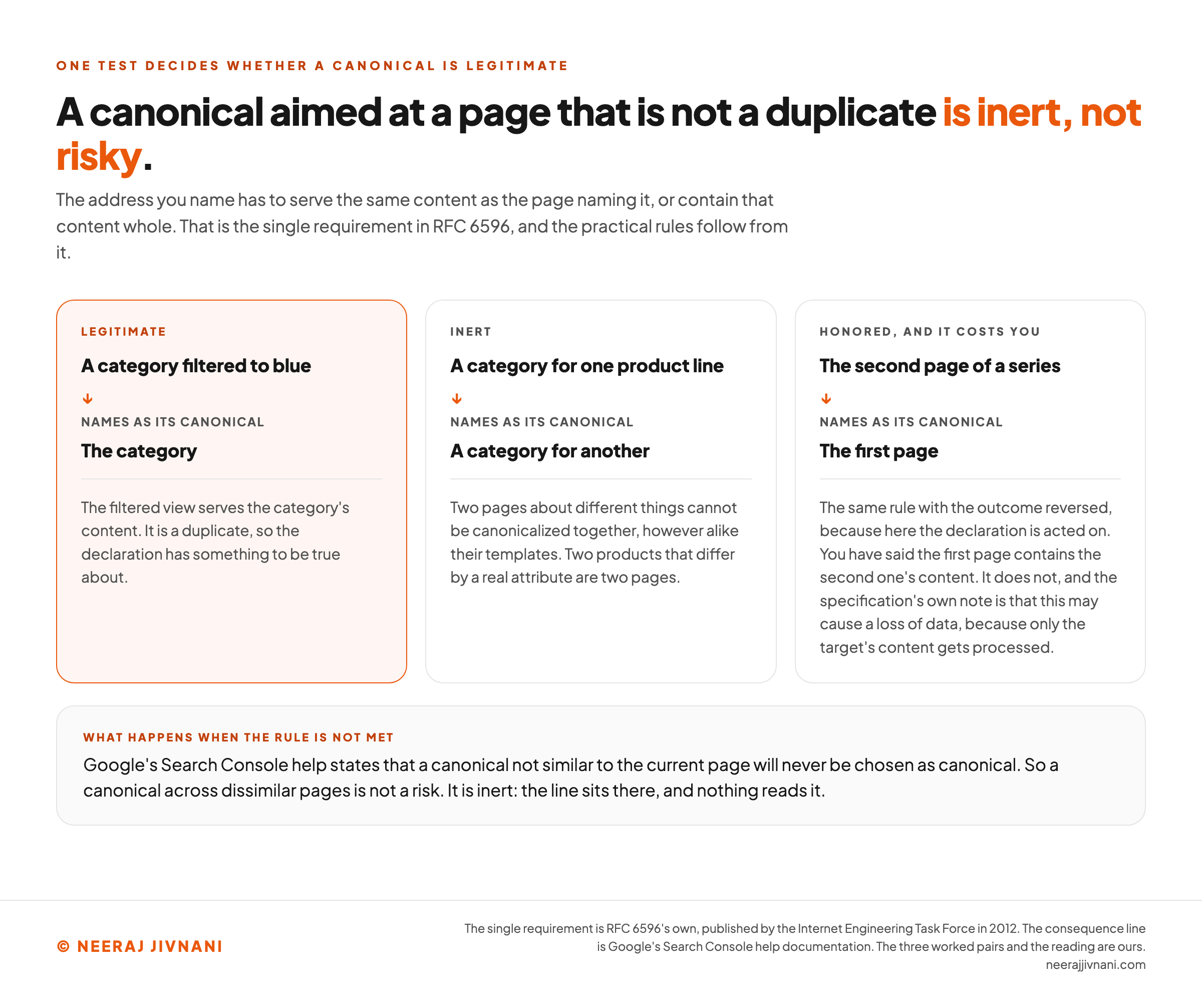
The address you name has to serve the same content as the page naming it, or contain that content whole.
That is the single requirement in RFC 6596, and the practical rules follow from it.
Two pages about different things cannot be canonicalized together, however alike their templates.
Two products that differ by a real attribute are two pages. A category filtered to blue is a duplicate of the category; a category for a different product line is not.
Google puts the consequence plainly. If the canonical you declared is not similar to the current page, its Search Console help says, Google will never choose that URL as canonical.
So a canonical across dissimilar pages is not a risk. It is inert.
The paginated case is the same rule with the outcome reversed, because here the declaration is acted on. If the second page of a series names the first as its canonical, you have said the first page contains the second one's content.
It does not, and the specification's own note is that this may cause a loss of data, because only the target's content gets processed.
Use this chart — embed code and citation
<a href="https://neerajjivnani.com/blog/canonical-tags/"><img src="https://neerajjivnani.com/infographics/canonical-tags/duplicate-or-inert.png" alt="Three worked pairs setting out the single rule that decides whether a canonical declaration is legitimate, which is that the address you name has to serve the same content as the page naming it or contain that content whole, the single requirement in RFC 6596. The first pair, highlighted in orange and marked legitimate, is a category filtered to blue naming the category as its canonical, because the filtered view serves the category's content, so it is a duplicate and the declaration has something to be true about. The second pair, marked inert, is a category for one product line naming a category for another, because two pages about different things cannot be canonicalized together however alike their templates, and two products that differ by a real attribute are two pages. The third pair, marked honored and it costs you, is the same rule with the outcome reversed because here the declaration is acted on, and it is the second page of a series naming the first page, because you have said the first page contains the second one's content, it does not, and the specification's own note is that this may cause a loss of data since only the target's content gets processed. A band at the foot carries the consequence: Google's Search Console help states that a canonical not similar to the current page will never be chosen as canonical, so a canonical across dissimilar pages is not a risk, it is inert." width="1200"></a>
<p>Chart: <a href="https://neerajjivnani.com/blog/canonical-tags/">Neeraj Jivnani</a></p>Neeraj Jivnani, "Canonical Tags: What to Write, and How to Tell If It Worked", neerajjivnani.com, https://neerajjivnani.com/blog/canonical-tags/Free to republish with a link back to this page.
The Other Two Ways to Declare One
Two other declaration methods exist, and each has one situation it exists for.
Neither is a substitute for the tag on an ordinary HTML page. Each exists for a case the tag cannot reach: a file with no markup to put it in, and a site large enough that maintaining the mapping page by page stops being realistic.
The Canonical HTTP Header
A PDF has no head section. Neither does a spreadsheet, or an image, or anything else you serve that is not HTML.
For those, the declaration moves into the response itself, in the header block a server sends ahead of the file. The web's transfer protocol, HTTP, is what carries it:
``
HTTP/1.1 200 OK
Content-Type: application/pdf
Link: <https://example.com/downloads/white-paper.pdf>; rel="canonical"
``
Same statement, different envelope. Google supports the header for web search results only, and applies the same absolute-address rule to it.
Use one or the other on a given page, not both. Google's stated reason is that using both is more error prone, which is easy to believe when the header and the element are edited by different people in different files.
A Sitemap Entry
Listing a URL in your sitemap is a canonical suggestion too, and of the three it carries the least weight: Google's documentation ranks the declaration methods by strength and puts sitemap inclusion last, behind redirects and behind the link annotations.
It names the limitation as well. Google still has to work out which pages are duplicates of the ones you listed.
Worth doing regardless. The sitemap exists already, and keeping non-canonical addresses out of it costs nothing.
When a Redirect Is the Right Tool Instead
Before you write a canonical, ask whether a permanent redirect would do the job.
That is not a preference. It is the second of the three checks RFC 6596 recommends running before the relation is added at all: verify that a permanent redirect could not be implemented in its place.
Google's own ordering agrees, listing redirects above the link element in strength and describing the canonical methods as what you reach for when the duplicate page has to stay.
The difference is what each one leaves behind:
| what happens to the old address | when it is right | |
|---|---|---|
| Permanent redirect | Nobody reaches it. Browsers and crawlers are sent to the other address. | You never need that address to work again. |
| Canonical tag | It still loads, for anyone holding the link. | Both addresses have a job: a filtered view, a tracking link, a printable copy. |
So the question is not which is stronger. It is whether the duplicate still has to work for somebody.
Six Ways a Canonical Quietly Does Nothing
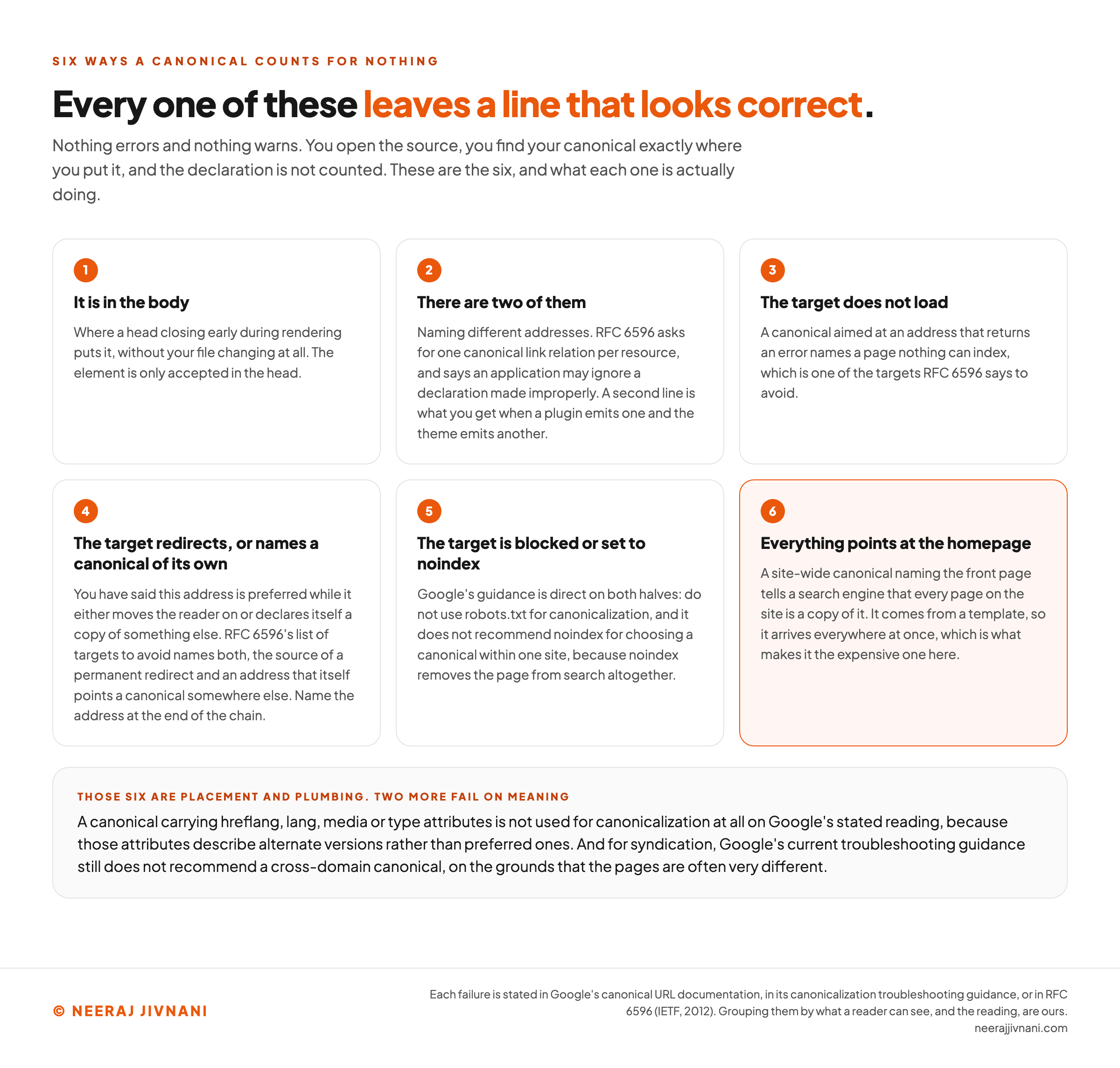
Each of these leaves a line in your source that looks correct. Nothing errors, nothing warns, and the declaration is not counted.
- It is in the body, which is where a head closing early during rendering puts it, without your file changing at all.
- There are two of them, naming different addresses. RFC 6596 asks for one canonical link relation per resource, and says an application may ignore a declaration made improperly.
- The target does not load. A canonical aimed at an address that returns an error names a page nothing can index, which is one of the targets RFC 6596 says to avoid.
- The target redirects, or names a canonical of its own. You have said this address is preferred while it either moves the reader on or declares itself a copy of something else. RFC 6596's list of targets to avoid names both, the source of a permanent redirect and an address that itself points a canonical somewhere else. Name the address at the end of the chain.
- The target is blocked or set to noindex. Google's guidance is direct on both halves: do not use robots.txt for canonicalization, and it does not recommend noindex for choosing a canonical within one site, because noindex removes the page from search altogether.
- Everything points at the homepage. A site-wide canonical naming the front page tells a search engine that every page on the site is a copy of it. It comes from a template, so it arrives everywhere at once, which is what makes it the expensive one here.
Two More That Fail for Their Own Reasons
The six above are placement and plumbing. Two further cases fail on meaning instead, and each is worth its own sentence.
A canonical carrying hreflang, lang, media or type attributes is not used for canonicalization at all, on Google's stated reading, because those attributes describe alternate versions rather than preferred ones.
Pointing one language version at another has the same effect as any other wrong target: you have declared a translation to be a duplicate, and one language leaves search.
Syndication is the other. A cross-domain canonical, sending a partner's copy back to your original, is permitted and the element supports it.
Google's current troubleshooting guidance still does not recommend it, on the grounds that the pages are "often very different", and suggests partners block indexing instead.
Use this chart — embed code and citation
<a href="https://neerajjivnani.com/blog/canonical-tags/"><img src="https://neerajjivnani.com/infographics/canonical-tags/looks-correct-counts-for-nothing.png" alt="Six numbered cells naming the ways a canonical tag stops counting while leaving a line in the source that looks correct, since nothing errors and nothing warns. One, it is in the body, which is where a head closing early during rendering puts it without your file changing at all, and the element is only accepted in the head. Two, there are two of them naming different addresses, where RFC 6596 asks for one canonical link relation per resource and says an application may ignore a declaration made improperly, and a second line is what you get when a plugin emits one and the theme emits another. Three, the target does not load, because a canonical aimed at an address that returns an error names a page nothing can index, one of the targets RFC 6596 says to avoid. Four, the target redirects or names a canonical of its own, so you have said this address is preferred while it either moves the reader on or declares itself a copy of something else, and RFC 6596's list of targets to avoid names both the source of a permanent redirect and an address that itself points a canonical somewhere else, which makes the address to name the one at the end of the chain. Five, the target is blocked or set to noindex, where Google's guidance is direct on both halves, namely do not use robots.txt for canonicalization and it does not recommend noindex for choosing a canonical within one site because noindex removes the page from search altogether. Six, highlighted in orange, everything points at the homepage, where a site-wide canonical naming the front page tells a search engine that every page on the site is a copy of it, and because it comes from a template it arrives everywhere at once. A band at the foot adds the two that fail on meaning rather than placement: a canonical carrying hreflang, lang, media or type attributes, which Google does not use for canonicalization at all, and a cross-domain canonical for syndication, which its current troubleshooting guidance still does not recommend because the pages are often very different." width="1200"></a>
<p>Chart: <a href="https://neerajjivnani.com/blog/canonical-tags/">Neeraj Jivnani</a></p>Neeraj Jivnani, "Canonical Tags: What to Write, and How to Tell If It Worked", neerajjivnani.com, https://neerajjivnani.com/blog/canonical-tags/Free to republish with a link back to this page.
How to Tell Whether Google Agreed
Two checks, answering two different questions.
What you declared. View source on the page, search for canonical, and read the address. That tells you what the file says. It does not tell you what was assembled after scripts ran, so a page built in the browser needs the rendered source rather than the file.
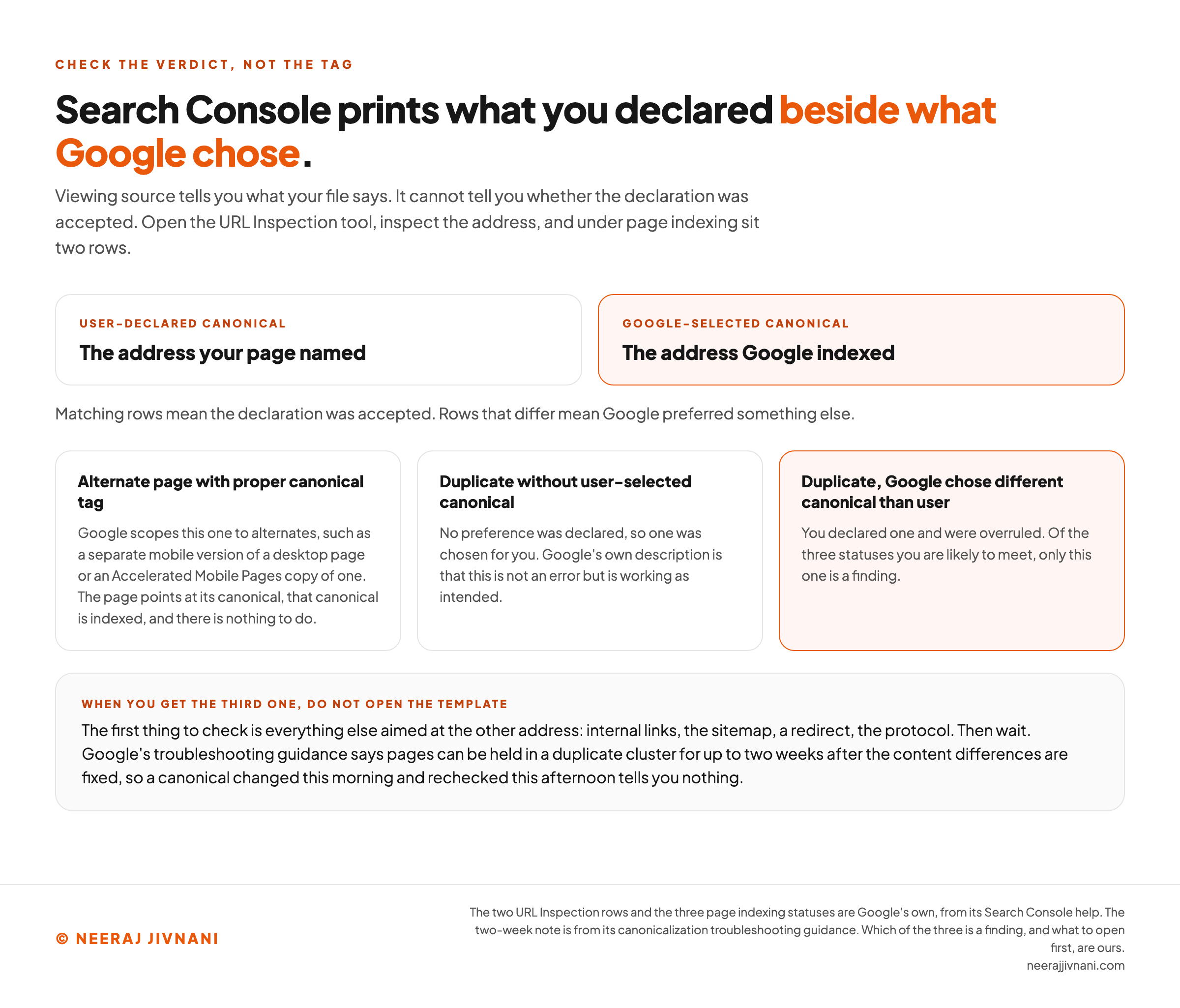
What Google chose. Open the URL Inspection tool in Search Console and inspect the address. Under page indexing sit two rows: the user-declared canonical and the Google-selected canonical.
Matching rows mean the declaration was accepted. Rows that differ mean Google preferred something else.
What the Three Report Rows Mean
The page indexing report names the three outcomes you are likely to meet:
- Alternate page with proper canonical tag. Google scopes this one to alternates, such as a separate mobile version of a desktop page or an Accelerated Mobile Pages copy of one. The page points at its canonical, that canonical is indexed, and there is nothing to do.
- Duplicate without user-selected canonical. No preference was declared, so one was chosen for you. Google's own description is that this is not an error but is working as intended.
- Duplicate, Google chose different canonical than user. You declared one and were overruled.
Only the third is a finding.
When you get it, the first thing to check is not the tag. It is everything else aimed at the other address: internal links, the sitemap, a redirect, the protocol.
Then wait. Google's troubleshooting guidance says pages can be held in a duplicate cluster for up to two weeks after the content differences are fixed.
A canonical changed this morning and rechecked this afternoon tells you nothing.
Use this chart — embed code and citation
<a href="https://neerajjivnani.com/blog/canonical-tags/"><img src="https://neerajjivnani.com/infographics/canonical-tags/declared-beside-chosen.png" alt="A two-part readout of the Search Console check that says whether a canonical declaration was accepted, since viewing source tells you only what your own file says. At the top sit the two rows the URL Inspection tool prints under page indexing: the user-declared canonical, which is the address your page named, and the Google-selected canonical, highlighted in orange, which is the address Google indexed. Matching rows mean the declaration was accepted and rows that differ mean Google preferred something else. Below them are the three page indexing statuses a reader is likely to meet. Alternate page with proper canonical tag is scoped by Google to alternates, such as a separate mobile version of a desktop page or an Accelerated Mobile Pages copy of one, where the page points at its canonical, that canonical is indexed, and there is nothing to do. Duplicate without user-selected canonical means no preference was declared so one was chosen instead, which Google's own description calls not an error but working as intended. Duplicate, Google chose different canonical than user, highlighted in orange, means you declared one and were overruled, and of the three it is the only one that is a finding. A band at the foot says what to do with it: check everything else aimed at the other address first, namely internal links, the sitemap, a redirect and the protocol, then wait, because Google's troubleshooting guidance says pages can be held in a duplicate cluster for up to two weeks after the content differences are fixed." width="1200"></a>
<p>Chart: <a href="https://neerajjivnani.com/blog/canonical-tags/">Neeraj Jivnani</a></p>Neeraj Jivnani, "Canonical Tags: What to Write, and How to Tell If It Worked", neerajjivnani.com, https://neerajjivnani.com/blog/canonical-tags/Free to republish with a link back to this page.
Canonical Tag Questions, Answered
What is a canonical tag example?
<link rel="canonical" href="https://example.com/shoes" />, placed in the head of https://example.com/shoes and of https://example.com/shoes?color=blue. Both addresses then name the clean one.
What is the purpose of a canonical tag?
To name which of several addresses serving the same content you want indexed, so signals land on one page instead of splitting across copies.
Do canonical tags affect search engine optimization (SEO)?
Indirectly. A canonical raises nothing on its own. What it does is consolidate the links and other signals aimed at duplicate addresses onto one page, and decide which address is shown, and both of those can change how that page performs.
Should every page have one?
Yes, naming itself. It is not required, but one line in a template covers every parameterized copy of that page anybody creates later.
What happens if Google ignores it?
Nothing breaks. A different address may be the one indexed and shown. Search Console reports which, and the cause is usually another signal on your own site disagreeing with the tag.
The Line Is the Cheap Half
Write the line, on every page, naming itself. That is ten minutes in a template, and it is the whole of the cheap half.
What it buys is not control over which address gets indexed. It is coverage, for addresses that arrive later and were never yours to tag.
Which is why one line in a template is worth more than a careful audit of the duplicates you can see today.
The duplicates you can see are the ones you could have fixed anyway.