What an XML Sitemap Is, and What Yours Should Be Listing
Your site almost certainly publishes one already. See where to find yours, what belongs in it, and which of its tags actually do anything.

/ On this page13 sections
An XML sitemap is a file your site publishes for crawlers rather than for people, naming the pages you want turning up in search results. Your site almost certainly publishes one already, without anyone having decided to.
So the useful question is rarely how to build one. It is whether the one you have is listing the right pages, and that takes about two minutes to answer.
What an XML Sitemap Is
An XML sitemap sits at a public address on your own site, written in Extensible Markup Language so a crawler can parse it without guessing. Each entry holds one URL, and may hold the date that URL last changed.
Nothing more happens. A crawler reads the file, learns that those addresses exist, and adds them to the pile of things it might go and look at.
Three tags are required. Everything else is optional:
- `<urlset>` wraps the file and names the protocol it follows.
- `<url>` wraps one entry.
- `<loc>` holds the address itself, written out in full, including
https://.
What the File Looks Like
A minimal file with one page in it looks like this:
``xml
<?xml version="1.0" encoding="UTF-8"?>
<urlset xmlns="http://www.sitemaps.org/schemas/sitemap/0.9">
<url>
<loc>https://example.com/about/</loc>
<lastmod>2026-08-14</lastmod>
</url>
</urlset>
``
The xmlns value is on http and not https, and that is not a mistake to correct. It is an identifier for parsers rather than an address anything fetches.
Enough people have tried to fix it that Google asked them to stop, in a 2023 post on its Search Central blog: "Please don't file more documentation feedback about this."
Change it and you have quietly invented a namespace nothing recognizes.
What It Is Not
An XML sitemap is not an HTML sitemap. An HTML sitemap is a page of links for visitors, usually a big index somewhere in the footer. The two share a name and nothing else.
And a sitemap is not an instruction. Listing a URL asks a crawler to look; it does not oblige anyone to index the page, and it has no effect on where the page ranks once indexed.
Whether You Still Need One
Yes, and the reason is narrower than the usual one. A crawler's first preference is to follow links.
A sitemap earns its place wherever links do not reach: a page nothing on your site links to, a section added faster than anyone updates the navigation, a new site nobody has linked to yet.
On a small, tightly linked site, the file is close to decorative. A ten-page brochure site with every page in the navigation gains almost nothing from one.
On everything larger, it is the one place you get to nominate pages rather than hope they are found.
The question comes up now in a newer form. Does any of this still matter when answers are assembled by AI rather than listed?
It does, for an unglamorous reason. Those answers are drawn from the same search index, so a page still has to be discovered and indexed before it can be used in one.
A sitemap's job in that chain has not changed. It helps with discovery, and nothing after discovery is a sitemap question.
Where Yours Already Is
Your sitemap is almost always at your domain followed by /sitemap.xml. Type that into a browser.
On most sites something comes back.
If nothing does, try these, in this order:
- `/sitemap_index.xml` is where the common WordPress search optimization plugins put theirs.
- `/wp-sitemap.xml` is the WordPress default, published by the software itself with no plugin involved.
- `/robots.txt` will usually name the real location on a line beginning
Sitemap:, whatever the file is called.
Google's own guidance on this is blunt. If you use a content management system, or CMS, it says, "it's likely that your CMS has already made a sitemap available to search engines and you don't have to do anything."
That is true far more often than it is acted on.
What comes back may be a plain list of pages, or an index pointing at several smaller files split by content type. A WordPress site running Yoast usually answers with an index listing posts, pages and categories separately.
Either is normal.
Now read it. Everything below is what to read it for.
What Belongs In It, and What Does Not
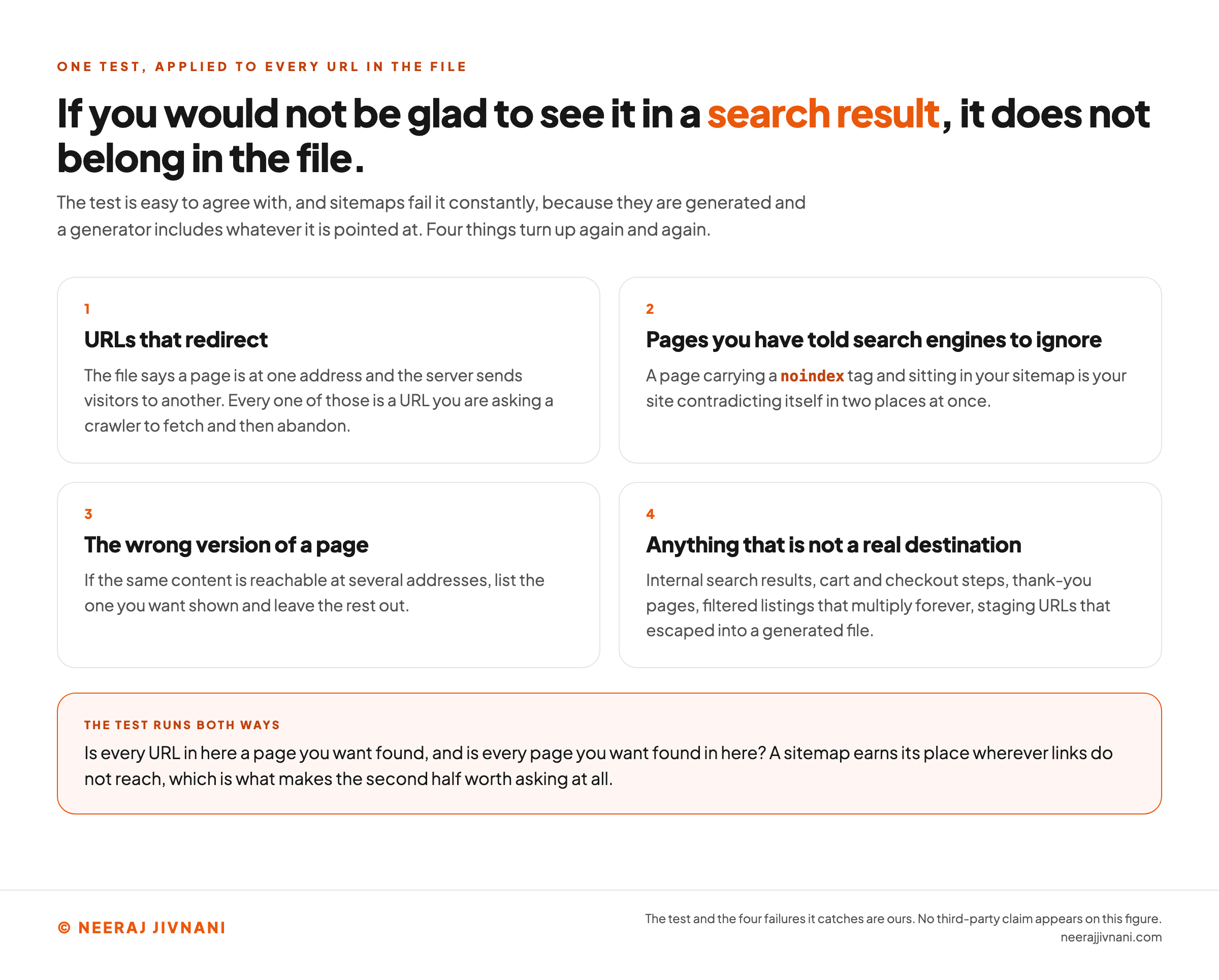
One test decides what belongs: would you be glad if someone landed on that URL from a search result?
If the answer is no, the URL does not belong in the file, whatever else is true about it.
The Four Things That Should Not Be There
Nobody disagrees with the test, and sitemaps fail it constantly, because they are generated and a generator includes whatever it is pointed at. Four things turn up again and again.
URLs that redirect. The file says a page is at one address and the server sends visitors to another. Every one of those is a URL you are asking a crawler to fetch and then abandon.
Pages you have told search engines to ignore. A page carrying a noindex tag and sitting in your sitemap is your site contradicting itself in two places at once.
The wrong version of a page. If the same content is reachable at several addresses, list the one you want shown and leave the rest out.
Anything that is not a real destination. Internal search results, cart and checkout steps, thank-you pages, filtered listings that multiply forever, staging URLs that escaped into a generated file.
Two Rules Underneath All of It
Two mechanical rules sit underneath all of that.
Addresses go in whole, including the protocol, because a crawler will try to fetch exactly what you wrote. A relative path is not a URL.
And any character that means something to XML has to be escaped, so an ampersand in a query string is written &.
This is the best argument for letting software generate the file. A person writing entries by hand gets it wrong, and one unescaped character can break the parse for everything after it.
Use this chart — embed code and citation
<a href="https://neerajjivnani.com/blog/xml-sitemap/"><img src="https://neerajjivnani.com/infographics/xml-sitemap/one-question-decides-what-belongs.png" alt="A headline and four numbered cards setting out the one test that decides what belongs in a sitemap. The headline reads that if you would not be glad to see it in a search result, it does not belong in the file, and a line beneath adds that the test is easy to agree with and that sitemaps fail it constantly, because they are generated and a generator includes whatever it is pointed at. Card one, URLs that redirect, says the file names one address while the server sends visitors to another, so every one of those is a URL you are asking a crawler to fetch and then abandon. Card two, pages you have told search engines to ignore, says a page carrying a noindex tag and sitting in your sitemap is your site contradicting itself in two places at once. Card three, the wrong version of a page, says that if the same content is reachable at several addresses you should list the one you want shown and leave the rest out. Card four, anything that is not a real destination, names internal search results, cart and checkout steps, thank-you pages, filtered listings that multiply forever, and staging URLs that escaped into a generated file. An orange band underneath, headed the test runs both ways, asks whether every URL in the file is a page you want found and whether every page you want found is in the file, and notes that a sitemap earns its place wherever links do not reach." width="1200"></a>
<p>Chart: <a href="https://neerajjivnani.com/blog/xml-sitemap/">Neeraj Jivnani</a></p>Neeraj Jivnani, "What an XML Sitemap Is, and What Yours Should Be Listing", neerajjivnani.com, https://neerajjivnani.com/blog/xml-sitemap/Free to republish with a link back to this page.
The Three Optional Tags, and the One That Earns Its Place
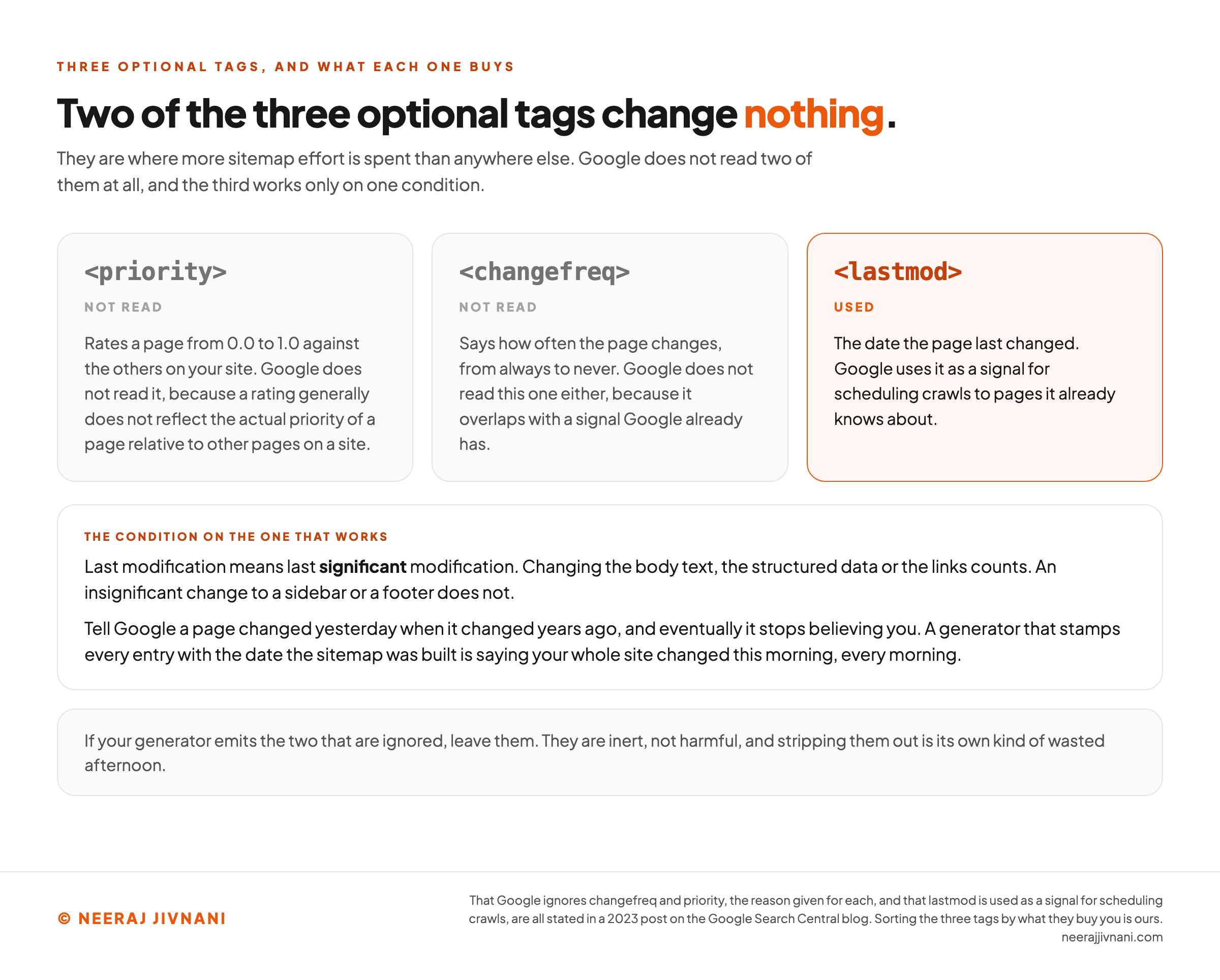
Three optional tags can sit inside a <url> entry, and they are where more sitemap effort is spent than anywhere else. Two of them are wasted.
The Two That Are Ignored
`<priority>` lets you rate a page from 0.0 to 1.0 against the others on your site. `<changefreq>` lets you say how often it changes, from always to never.
Google does not read either one. Its position is stated flatly rather than hedged, in a 2023 post on the Search Central blog: "Google still doesn't use the changefreq or priority elements at all."
The same post gives the reasons. changefreq overlaps with a signal Google already has, and priority "generally doesn't accurately reflect the actual priority of a page relative to other pages on a site."
Which is fair. Nobody rates their own pages low.
If your generator emits them, leave them. They are inert, not harmful, and stripping them out is its own kind of wasted afternoon.
The One That Works
`<lastmod>` is the tag that does something. Google uses it to decide when to come back to a page it already knows about.
The same 2023 post that dismissed the other two calls it "useful in many cases and we're using it as a signal for scheduling crawls."
It comes with a condition, and the condition is the whole game.
The date has to mean what it says. In Google's words, "last modification" means last significant modification.
An insignificant change to a sidebar or a footer does not count. Changing the body text, the structured data or the links does.
Get that wrong and you lose the signal rather than gaming it. The same post puts the failure plainly.
Tell Google a page changed yesterday when it changed years ago, and "eventually we're not going to believe you anymore".
That is the practical danger with a badly configured generator. Some stamp every entry with the date the sitemap was built, which tells a crawler your whole site changed this morning. Every morning, forever.
If yours does that, turning <lastmod> off is better than leaving it lying.
Use this chart — embed code and citation
<a href="https://neerajjivnani.com/blog/xml-sitemap/"><img src="https://neerajjivnani.com/infographics/xml-sitemap/two-of-three-do-nothing.png" alt="Three cards comparing the optional tags a sitemap entry may carry, with two greyed out and the third picked out in orange. The headline reads that two of the three optional tags change nothing, and a line beneath says they are where more sitemap effort is spent than anywhere else, that Google does not read two of them at all, and that the third works only on one condition. The first card, priority, is marked not read: it rates a page from 0.0 to 1.0 against the others on your site, and Google does not read it, because a rating generally does not reflect the actual priority of a page relative to other pages on a site. The second card, changefreq, is also marked not read: it says how often the page changes, from always to never, and Google does not read this one either, because it overlaps with a signal Google already has. The third card, lastmod, is marked used and highlighted in orange: it is the date the page last changed, and Google uses it as a signal for scheduling crawls to pages it already knows about. A panel below, headed the condition on the one that works, says last modification means last significant modification, that changing the body text, the structured data or the links counts while an insignificant change to a sidebar or a footer does not, and that telling Google a page changed yesterday when it changed years ago ends with it not believing you, as happens with a generator that stamps every entry with the date the sitemap was built. A closing note says that if your generator emits the two that are ignored you should leave them, because they are inert, not harmful." width="1200"></a>
<p>Chart: <a href="https://neerajjivnani.com/blog/xml-sitemap/">Neeraj Jivnani</a></p>Neeraj Jivnani, "What an XML Sitemap Is, and What Yours Should Be Listing", neerajjivnani.com, https://neerajjivnani.com/blog/xml-sitemap/Free to republish with a link back to this page.
The Two Limits, and the Index File
A single sitemap holds 50,000 URLs or 50MB uncompressed, whichever you hit first. Both numbers come from the sitemaps protocol and both are enforced.
Compressing the file with gzip is allowed and often sensible, and the limit applies to it uncompressed. A 50MB file that gzips down to 4MB is still a 50MB file as far as the rules are concerned.
The Index File
Most sites never approach either. If you do, you split the file into several and write one more file that lists them, called a sitemap index.
An index is the same file with two tags renamed. Keep the declaration and the namespace exactly as they are, then urlset becomes sitemapindex, url becomes sitemap, and each loc holds the address of a sitemap instead of a page:
``xml
<sitemap>
<loc>https://example.com/sitemap-posts.xml</loc>
<lastmod>2026-08-14</lastmod>
</sitemap>
``
lastmod here means the date that sitemap file changed, not the date any page inside it did. It is worth setting, because it lets a crawler skip the parts of a large site that have not moved.
You submit the index and the crawler works its way down.
Plenty of sites use one well below the limits, to keep things separate. That is why a modest WordPress site often has one.
Three Rules About Indexes
Three rules about indexes are easy to break and quiet when you do.
An index cannot contain another index. Google's documentation on managing sitemaps with an index file states that sitemap is "the only direct child of the sitemapindex tag." Nesting one inside another produces a file that parses and does nothing.
The files it names have to sit at or below its own directory. An index at https://example.com/public/sitemap_index.xml can only point at sitemaps in /public/ or deeper.
There is a ceiling on indexes too. The same documentation allows "up to 500 sitemap index files for each site in your Search Console account," and each index may list 50,000 sitemaps.
Where the File Sits, and What It May Cover
A sitemap's location decides what it is allowed to cover, and this is the rule most likely to be new to you. Get it wrong and a correct file does nothing.
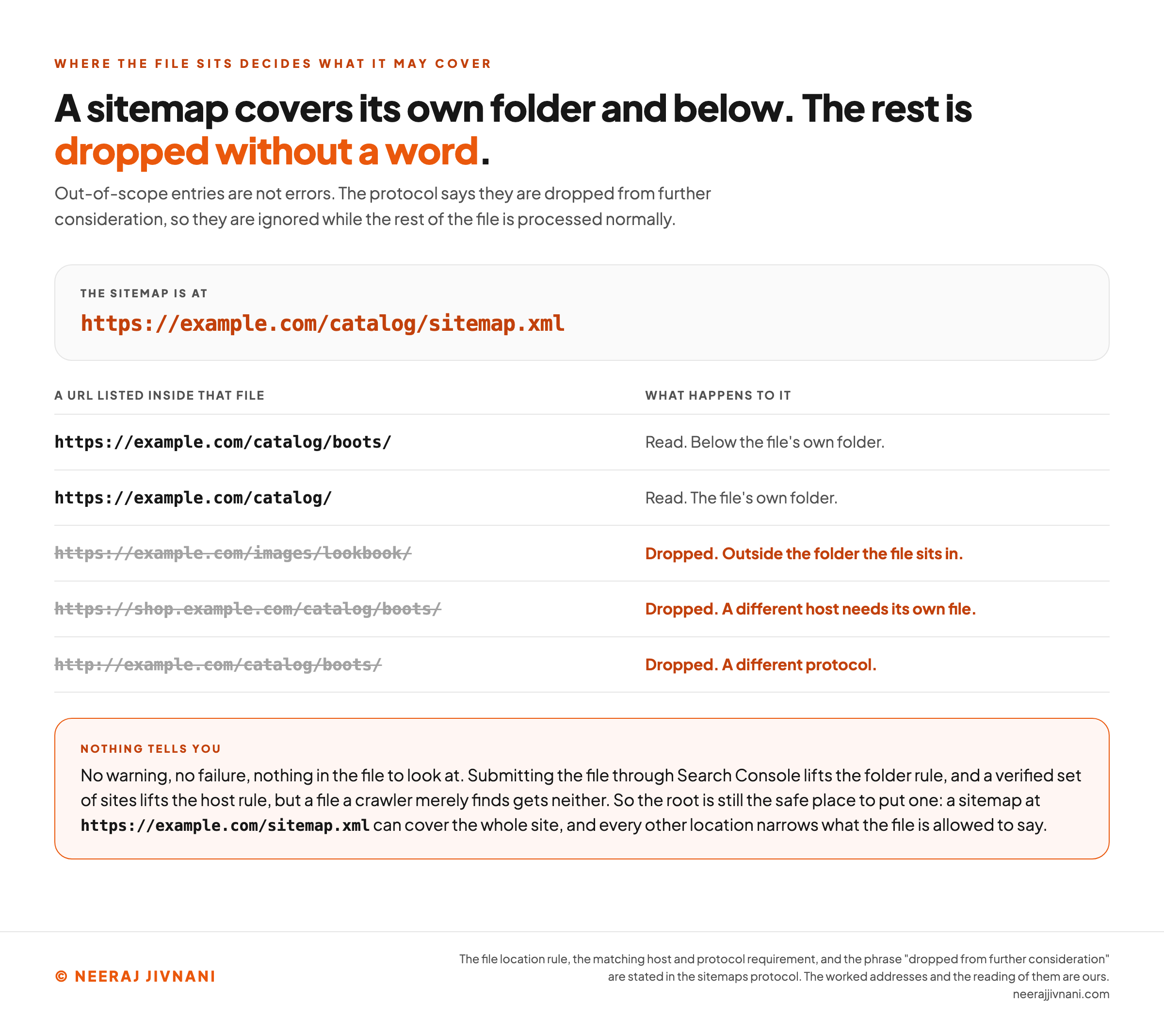
A sitemap can only cover URLs at or below its own location. The protocol is explicit about it: a file at http://example.com/catalog/sitemap.xml can include anything under /catalog/, and cannot include anything under /images/.
The reasoning is ownership. Whoever can write a file into a directory is assumed to speak for that directory, and nothing above it.
The Host and the Protocol Have to Match
The same logic covers hosts and protocols. Every URL in a sitemap has to sit on the same host as the sitemap, so a file at www.example.com cannot list pages on shop.example.com, and each subdomain needs its own file.
The protocol has to match too. A sitemap served over https cannot cover http addresses, which is worth knowing on a site that moved to HTTPS and left a generator pointed at the old scheme.
And here is the part that costs people time: the protocol does not say those URLs produce an error. It says they "are dropped from further consideration."
No warning, no failure, nothing in the file to look at. The entries are ignored while the rest of the file is processed normally.
The One Way Out of Both
Both rules have one documented way out. Submit the file through Search Console and Google stops holding it to its own folder, and a single file may list URLs across several hosts once you have verified those sites there.
A file a crawler merely finds gets no such license.
So the root is still the safe place to put one. A sitemap at https://example.com/sitemap.xml can cover the whole site, and every other location narrows what the file is allowed to say.
If a large part of your site is missing from search and the sitemap looks fine, check where the file lives before you check anything in it.
Use this chart — embed code and citation
<a href="https://neerajjivnani.com/blog/xml-sitemap/"><img src="https://neerajjivnani.com/infographics/xml-sitemap/outside-its-own-folder-is-dropped.png" alt="A worked table showing which addresses a sitemap sitting in a subfolder is allowed to cover. The headline reads that a sitemap covers its own folder and below and the rest is dropped without a word, and a line beneath says out-of-scope entries are not errors, that the protocol says they are dropped from further consideration, and that they are ignored while the rest of the file is processed normally. A panel names the sitemap's own location as https://example.com/catalog/sitemap.xml. Five addresses follow. The address https://example.com/catalog/boots/ is read, below the file's own folder. The address https://example.com/catalog/ is read, the file's own folder. Three more are struck through and marked in orange: https://example.com/images/lookbook/ is dropped for sitting outside the folder the file is in, https://shop.example.com/catalog/boots/ is dropped because another host needs its own file unless cross-site submission has been set up, and http://example.com/catalog/boots/ is dropped for using a different protocol. An orange band underneath, headed nothing tells you, says there is no warning, no failure and nothing in the file to look at, that submitting the file through Search Console lifts the folder rule and a verified set of sites lifts the host rule while a file a crawler merely finds gets neither, and that the root is therefore still the safe place to put one, because a sitemap at https://example.com/sitemap.xml can cover the whole site while every other location narrows what the file is allowed to say." width="1200"></a>
<p>Chart: <a href="https://neerajjivnani.com/blog/xml-sitemap/">Neeraj Jivnani</a></p>Neeraj Jivnani, "What an XML Sitemap Is, and What Yours Should Be Listing", neerajjivnani.com, https://neerajjivnani.com/blog/xml-sitemap/Free to republish with a link back to this page.
How to Submit It
Two ways to submit a sitemap still work, and you should use both.
Search Console is the one that gives you something back. Submit the file under Sitemaps and you get the date it was last read, the parsing status with any errors, and a count of the URLs it found in the file.
Nothing else on this list reports anything.
A line in robots.txt tells every crawler at once rather than Google's alone. It goes anywhere in the file and looks like this:
``
Sitemap: https://www.example.com/sitemap.xml
``
If you have an index, name only the index. There is no need to list the files underneath it.
The Route That Stopped Working
There is a third route in wide circulation that no longer does anything, and it is worth knowing because you will meet it.
It is a web request to a ping address, usually written as /ping?sitemap= followed by your file's URL. It turns up in old tutorials, in plugin settings screens and in the sitemaps protocol document itself.
Both major engines have switched it off, and for the same reason. Anonymous submission turned out to be a spam channel.
Bing removed it in May 2022, calling it "often subject to misuse by spammers". Google deprecated its own endpoint in June 2023, gave it six months, and noted that "the vast majority of the submissions lead to spam".
Google's address now returns a 404.
Neither deprecation breaks anything. Google's announcement is reassuring on exactly this point: existing code or plugins using the endpoint "will not cause problems for Google Search; you don't need to make any changes."
The ping does nothing, quietly, wherever it is still configured. If a plugin of yours reports a successful ping, that report is about the plugin, not about search engines.
When You Do Have to Build One Yourself
Four routes build a sitemap, and they are listed here in the order they are usually the right answer. You are reading this section because the file genuinely does not exist, or exists and is wrong in a way no setting will fix.
Turn on what your platform already has. Most content management systems either publish a sitemap by default or offer one behind a setting. Check this first, because a platform-generated file updates itself when you publish and every other option makes that your problem.
Use a search optimization plugin. On WordPress and its equivalents, these replace the built-in file with one you can control: which content types appear, which taxonomies are excluded, how the index is split.
Run a crawler. A desktop crawler walks your site and exports a sitemap from what it finds, which is useful when you need control the platform will not give you, or when you want to see what a crawler sees. The output is a snapshot. It goes stale the moment you publish, so this suits a one-off audit rather than ongoing maintenance.
Write it by hand. Reasonable only for a genuinely small, stable site, a few dozen pages at most. You are taking on the escaping, the validity and the updates yourself, and the updates are what break.
Whichever route you take, there is a limit on each entry that hand-written files hit and generators do not: the protocol requires the value in <loc> to be under 2,048 characters.
The Other Sitemap Formats
A search engine will also accept a plain text file or a feed, and both are simpler than people expect.
A plain text file with one URL per line is a valid sitemap. No tags, no structure, nothing but addresses. It carries no metadata at all, which is why it is easy to maintain on a large site.
An RSS or Atom feed also works, and if your platform publishes one you can submit it as-is. The difference is what it covers. A sitemap describes your whole set of pages; a feed describes whatever changed recently.
That distinction decides how to use them. A feed is a good supplement and a poor replacement, because a crawler reading only your feed learns about this month and nothing about the rest of the site.
For nearly everyone the answer is that XML is already there and the alternatives solve a problem you do not have.
Specialized Sitemaps, and When They Are Worth It
Beyond the basic file, sitemaps can be extended to describe particular kinds of content. All four are needed less often than their coverage suggests, and it is useful to be able to rule each one out.
- Image sitemaps name the images on a page, which can surface pictures a crawler would otherwise miss. Worth it when images are the product: a portfolio, a product catalog, a stock library.
- Video sitemaps carry the title, description, thumbnail and running time of a video, and matter most when the video is hosted somewhere else and embedded on your page.
- News sitemaps are for sites that publish news, and there is nothing to apply for. If news is not what you publish, this one does nothing for you.
- Language annotations let a sitemap say which pages are translations of each other. This is the one that scales, because declaring those relationships on the pages themselves gets unmanageable across a few hundred pages and several languages.
The honest default is that a small or mid-sized site needs none of these, and that reaching for one before the basic file is right is effort spent in the wrong place.
How to Tell Whether Yours Is Working
The sitemap report in Search Console tells you whether the file is working, and one comparison is worth more than the rest.
Discovered against indexed. The Sitemaps report gives you the first number, as discovered pages.
The second is one click away, in the page indexing report filtered to that sitemap. A gap between them is normal.
A large, persistent gap is the site telling you that the pages you are nominating are not the pages being kept, and that is a content or quality question rather than a sitemap one.
The Errors Worth Reading
Errors on the file itself are usually blunt and quick to fix. A sitemap that cannot be fetched, XML that will not parse because a tag is unclosed or a character is unescaped, a file that has grown past the limits.
Two reported problems are worth reading carefully, because both are the sitemap disagreeing with the rest of the site rather than being broken.
A submitted URL marked noindex means your file nominates a page your own tags exclude. One of the two is wrong and you have to decide which.
A submitted URL blocked by robots.txt means you are asking a crawler to fetch something you have also told it not to fetch. Same shape, same decision.
There is one more check no tool will run for you. Open the file, pick five or six URLs at random, and load them.
If any redirects, errors, or takes you somewhere you did not expect, the file is describing a site that no longer exists.
Read against one question
Open your sitemap, paste what it lists, and name the pages you would be glad to see in a search result. The comparison runs in your browser. Nothing is sent anywhere.
Optional, and it is the input that earns its place. A file can only cover addresses at or below its own location, on the same host, and out-of-scope entries are ignored without a word. Leave it blank and that half of the check is skipped.
Paste at least what the file lists. The question runs in two directions and the second one leaves no line to read, so it has something to say only once both of your own lists are in front of it together.
This reads addresses and nothing else. It cannot tell you whether a URL redirects, whether the page carries a noindex tag, or whether it is the version you want shown, because all three need the page fetched. That check is still yours: open the file, pick five or six URLs at random, and load them.
What to Do With Yours
Most sites end up in the same place, and it is a smaller place than the topic suggests. An XML sitemap is not a project. It is a file that already exists, generated by software, quietly listing whatever it was pointed at.
That leaves you one job.
Read it once against a single question, and be willing to act on the answer. Is every URL in here a page you want found, and is every page you want found in here?
Everything else in this is detail. The limits matter at scale, the location rule matters when it bites, and the three optional tags matter far less than the effort spent on them suggests.
Go and open yours.