What 301 Redirects Do, and What It Takes to Keep One Working
A 301 says your old address is finished for good. See when that is the right call, what it quietly breaks, and why you cannot take it back.


/ On this page8 sections
A 301 is the redirect that says the old address is finished and this is its replacement, permanently. Use it whenever the old URL is never coming back, and leave it alone for years rather than weeks.
The part nobody warns you about is what it breaks on the way. It rewrites what a form submits, and it is remembered on machines you do not control.
Taking one back is far harder than putting one in.
What 301 Redirects Do
301 redirects answer a request with an address instead of a page. The number means moved permanently, and it arrives with the location of wherever the thing went.
Every response your server sends carries one of these status codes. They are how the web's transfer protocol, HTTP, says what happened: 200 for a page that loaded, 404 for one that does not exist.
A 301 sits between those two. The thing exists, it is somewhere else now, and the move is not going to be undone.
What the Server Sends
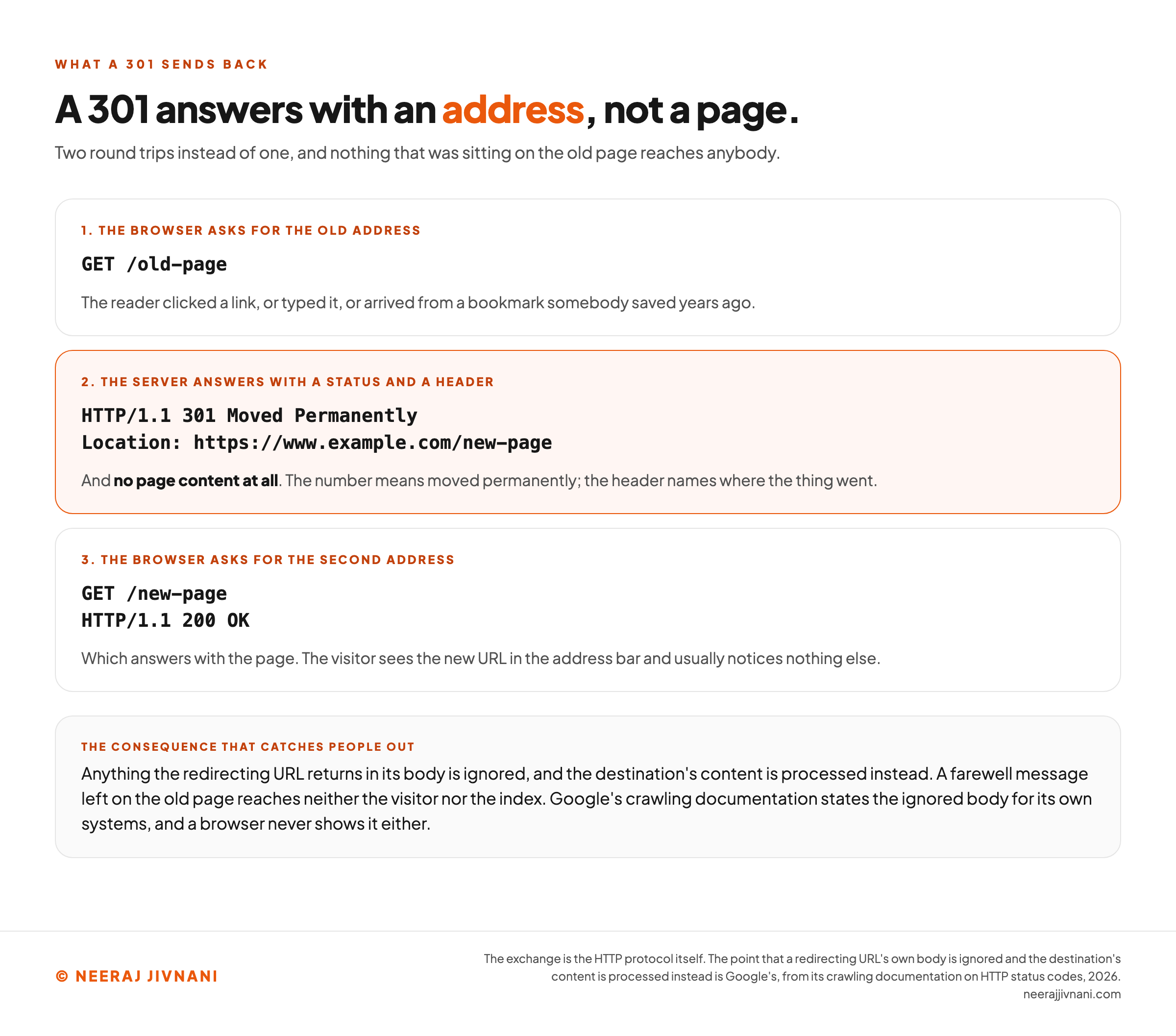
There is less to the mechanism than the name suggests. The server answers with the status and a Location header naming the new URL, and sends no page content at all.
``
HTTP/1.1 301 Moved Permanently
Location: https://www.example.com/new-page
``
The browser reads that and requests the second address, which answers with a 200 and the page.
Your visitor sees the new URL in the address bar and usually notices nothing else. Two round trips instead of one, and a header doing the work.
What a Search Engine Does With It
A crawler follows it the way a browser does, then draws a conclusion from the number. It reads a 301 as a "strong signal" that the redirect target should be processed and a 302 as a "weak signal", which is Google's own wording in its crawling documentation.
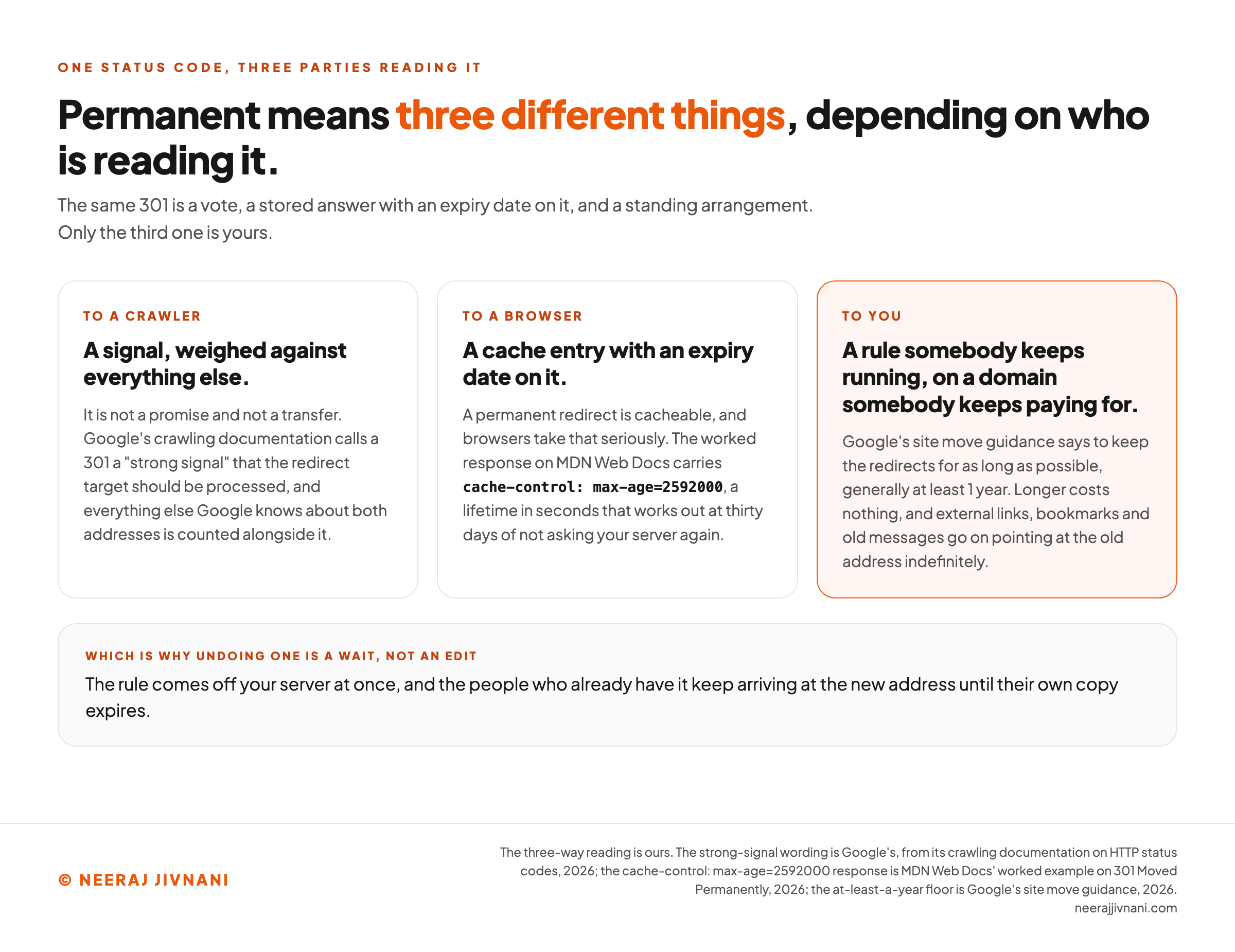
Strong signal is the phrase to hold on to. It is not a promise and not a transfer, it is a vote, and everything else Google knows about both addresses is counted alongside it.
One consequence catches people out. Anything the redirecting URL returns in its body is ignored and the destination's content is processed instead, so a farewell message left on the old page reaches neither the visitor nor the index.
Use this chart — embed code and citation
<a href="https://neerajjivnani.com/blog/301-redirects/"><img src="https://neerajjivnani.com/infographics/301-redirects/an-address-not-a-page.png" alt="A three-step diagram of the exchange a 301 produces on the wire. Step one shows the browser asking for the old address, GET /old-page, after a click, a typed address or a bookmark somebody saved years ago. Step two, highlighted in orange, shows what the server sends back: the status line HTTP/1.1 301 Moved Permanently and a Location header naming https://www.example.com/new-page, and no page content at all, because the number means moved permanently and the header names where the thing went. Step three shows the browser asking for the second address, GET /new-page, which answers HTTP/1.1 200 OK and the page, so the visitor sees the new URL in the address bar and usually notices nothing else. A band underneath carries the consequence that catches people out: anything the redirecting URL returns in its body is ignored and the destination's content is processed instead, so a farewell message left on the old page reaches neither the visitor nor the index. Google's crawling documentation states this for its own systems, and a browser never shows the body either." width="1200"></a>
<p>Chart: <a href="https://neerajjivnani.com/blog/301-redirects/">Neeraj Jivnani</a></p>Neeraj Jivnani, "What 301 Redirects Do, and What It Takes to Keep One Working", neerajjivnani.com, https://neerajjivnani.com/blog/301-redirects/Free to republish with a link back to this page.
When a 301 Is the Right Call
The test is short. If the old URL is never going to serve content again, a 301 is the right code.
Four situations cover most of the work.
A page moved. You renamed a slug, fixed a typo in it, or shifted a post into a different section. The content is the same and its address is not.
A whole site moved. A rebrand, a new domain, a platform change, or the jump from an insecure address to a secure one. Every old URL gets pointed at its counterpart, one by one.
That second case has a bill attached. The redirect is served by the old domain, so it lasts exactly as long as that registration does.
Sworn evidence filed in a dispute with ICANN, the body that oversees domain names, states the consequence plainly: an effective 301 "requires that you have the old domain permanently pointing to the new domain, which would require you to continue to purchase the old domain."
One address was chosen out of several that worked. A site reachable with and without the www prefix, with and without a trailing slash, or with mixed capitals, is several addresses for one page. Pick one as the canonical URL and send the rest to it.
Two pages became one. Where two of your own pages answer the same question, the weaker one is retired and its URL points at the survivor.
And When It Is Not
Three situations look like a 301 and are not.
If the change is temporary, so is the code. A 302 is the temporary equivalent, and choosing between a 301 and a 302 is a decision with its own trade-offs.
If the page is gone and nothing replaces it, let it return a 404. A 410 says gone rather than missing, and Google's guidance accepts either.
An honest error beats a redirect to something the reader never asked for.
And if the URL receives a form, a 301 is the wrong instrument. The reason is in the failure modes below, and the fix is a different code.
How to Set One Up
A redirect can live in three places and they are not equally good. The server is the best of them, your content management system is the usual compromise, and the page itself is the last resort.
Take them in that order and stop at the first one you can use.
On the Server
Server side fires before any page content loads, and it is the kind of redirect Google's documentation ranks highest for being interpreted correctly, ahead of a meta refresh or a JavaScript change of location.
On Apache, the simple form lives in the server configuration or an .htaccess file:
``
Redirect permanent "/old" "https://example.com/new"
``
On Nginx, it goes in the server block:
``
location = /service {
return 301 $scheme://example.com/about/service
}
``
In PHP, the header has to be set before anything is written to the screen:
``
header('Location: https://www.example.com/new-page', true, 301);
exit();
``
One warning about .htaccess is worth more than the syntax. That file configures the live server and a broken line in it can take the whole site down, so copy it somewhere safe before you touch it.
If You Cannot Touch the Server
Most content management systems have redirects built in, and on WordPress it is usually a plugin. That is a reasonable trade: slightly slower, one more thing to keep updated, and no risk of taking the site down with a typo.
It has a limit worth knowing before you rely on it.
A plugin only sees requests the system handles, so an old .html file still sitting on disk gets served by the server before the plugin is ever consulted.
Where neither is available, two fallbacks still count as permanent: a meta refresh set to zero seconds, and a JavaScript change of the page location, both listed that way in Google's redirect documentation.
Both are worse, and both are a last resort rather than a choice. Each loads the original page first, and neither can carry a status code of its own.
Check It Before You Walk Away
Open the old URL and confirm three things.
- The status is 301.
- The
Locationheader names the address you meant. - The second request lands on a real page rather than another redirect.
Do that from the command line, or in a browser you have not already used to visit that URL.
A browser that has followed the redirect once stops asking your server for it.
What It Does to Your Rankings
Rankings survive a 301, as long as the destination genuinely replaces the original. This is the code search engines are built to handle, and the worry around it is about timing rather than damage.
What that strong signal buys is consolidation: the destination becomes the address in the index, and what the old one had earned counts toward it.
How Long the Swap Takes
The swap is not instant. Search engines have to recrawl the old URL, see the redirect and reprocess the destination, and on a page that is crawled rarely that takes a while.
One thing that looks like a failure afterwards is not one. Both addresses stay on file, one as the canonical and the other as what Google's redirect documentation calls an alternate name.
Those alternate names can still surface. After a move to a new domain, Google's documentation says "it's very likely that Google will continue to occasionally show the old URLs in the results, even though the new URLs are already indexed", and that they fade away without you doing anything.
Expect movement in your reporting for a few weeks after a migration, and do not diagnose a problem from the first fortnight of it.
How Long to Leave It Up
The one number worth acting on is how long to leave it up. As long as possible, and generally at least 1 year, which is Google's site move guidance and a minimum rather than a plan.
Longer is free. External links, bookmarks and old messages keep pointing at the old address indefinitely. AI tools trained on what the web used to look like can go on citing URLs you retired years ago.
The Ways a 301 Stops Being True
Three things work quietly against a redirect once it is live: the browsers that stop asking, the requests it alters on the way through, and the rule that outlasts whoever wrote it.
None of them announces itself, and none of them shows up in the configuration file. A redirect is a state somebody maintains, not a job with a completion date.
The Browser Already Knows the Answer
A 301 can tell the browser how long to remember it. MDN's own worked 301 response, from Mozilla's web documentation, carries cache-control: max-age=2592000, a lifetime in seconds that works out at thirty days of not asking your server again.
That is a feature for your visitors and a trap for you.
It is why a redirect you deleted this morning still works in your own browser this afternoon, and why clearing the cache fixes a redirect that looks broken when nothing on the server has changed.
It also means undoing one is a wait rather than an edit. The rule comes off your server at once, and the people who already have it keep arriving at the new address until their own copy expires.
It Turns a Form Submission Into a Page View
A 301 can change the request method. When a browser receives one in reply to a form submission, MDN notes that it sends the next request as a GET, which the specification permits.
The visitor's data does not come along, so they see your new page, the form looks like it worked, and nothing arrived.
This is what 308 exists for. It means the same permanent move and forbids the method being altered, so the submission survives the hop.
The Rule Outlives the Reason for It
Redirects accumulate. Every restructure adds a few, nobody audits them, and after three years the file is a list of decisions nobody present remembers making.
The destinations drift as well, so a redirect pointing at a page somebody has since deleted sends visitors from one dead end to another while looking perfectly healthy in the configuration.
So the upkeep is small and real. Before you delete a page, check whether anything redirects to it.
Four Ways People Get This Wrong
The four below are the ones you can find by looking. Every one sits in your redirect rules, your own links or your sitemap, and each takes minutes to fix once you know its name.
Everything to the Homepage
Sending every retired URL to the homepage is the tempting move during a migration, because it makes the errors disappear.
It does not work.
Google's site move guidance is direct about it: "Don't redirect many old URLs to one irrelevant single URL destination, such as the home page of the new site. This can confuse users and might be treated as a soft 404 error."
Your Own Links, Left Behind
A redirect exists for links you do not control. Your navigation and your internal links should point straight at the destination.
Take the redirected URLs out of your sitemap as well, and put the destinations in. A sitemap is a list of pages you want crawled, and a redirecting URL is not one of those.
An address of yours that bounces is a cost you have chosen to pay.
Chains
Page A points at B, which points at C. Go straight to the final destination instead. Googlebot can follow up to 10 hops, and where a chain cannot be avoided, Google's site move guidance puts the ceiling at "no more than 3 and fewer than 5".
A chain is also the easiest of these to leave in place for years, because every hop in it was correct on the day somebody wrote it. When you add a redirect, check whether something already points at the URL you are retiring, and repoint that at the end of the chain.
Loops
Two rules that point at each other produce an infinite cycle and a browser error about too many redirects.
A loop is usually two rules written months apart by people who did not know about each other.
So the fix is to find the second rule rather than the error. Look in the same file, and then in the layer above or below it, because a plugin and a server configuration can each be doing half of it.
Where each one lands
Type the redirects you already have, plus the one you are about to add. Nothing is sent anywhere; the rows are followed here, in your browser.
The retired address
Where the rule sends it
Capitals, a trailing slash, the scheme and a leading www are ignored when one rule's destination is matched against another rule's address, because those are several addresses for one page.
Fill in both halves of at least one rule. A chain is not visible in any single line, so this only has something to say once two of your rules meet.
The one thing this cannot follow is a destination that has since been deleted, which looks perfectly healthy here and in your configuration file. Before you delete a page, check whether anything redirects to it.
Questions People Ask About 301 Redirects
Four questions come up around 301 redirects more than anything else, and the last one is worth slowing down for, because permanent turns out to mean three different things depending on who is reading it.
What Is a 301 Redirection?
A 301 redirection is a server response meaning the page has moved permanently, sent with the new address in a Location header. Browsers follow it immediately, and search engines treat it as a clear statement that the new URL is the one to keep.
Are 301 Redirects Bad for SEO?
No, and this is the code search engines are built to consolidate around. Google's crawling documentation calls it a strong signal toward the destination.
What gets mistaken for damage is usually the wait while the index catches up, or a redirect pointing somewhere that does not answer the original page's question.
What Is the Difference Between 301 and 302 Redirects?
A 301 says permanent and a 302 says temporary, and search engines act on the difference: the permanent one is a strong signal that the destination should take over, the temporary one a weak signal that leaves the original in place.
Choose on whether the old URL will ever serve content again. If it will, a 302 redirect is the correct one, and that decision is worth its own look.
Are 301 Redirects Permanent?
Permanent means three different things here and they are worth separating.
To a crawler it is a signal, strong but weighed against everything else. To a browser it is a cache entry with an expiry date on it. To you it is a rule somebody keeps running, on a domain somebody keeps paying for.
Use this chart — embed code and citation
<a href="https://neerajjivnani.com/blog/301-redirects/"><img src="https://neerajjivnani.com/infographics/301-redirects/three-meanings-of-permanent.png" alt="Three cards setting out what permanent means to each party reading the same 301. The first card, to a crawler, says it is a signal weighed against everything else: not a promise and not a transfer, with Google's crawling documentation calling a 301 a strong signal that the redirect target should be processed, and everything else Google knows about both addresses counted alongside it. The second card, to a browser, says it is a cache entry with an expiry date on it, because a permanent redirect is cacheable and browsers take that seriously, and the worked response on MDN Web Docs carries cache-control: max-age=2592000, a lifetime in seconds that works out at thirty days of not asking your server again. The third card, highlighted in orange, says that to you it is a rule somebody keeps running on a domain somebody keeps paying for, with Google's site move guidance saying to keep the redirects for as long as possible, generally at least 1 year, and noting that longer costs nothing while external links, bookmarks and old messages go on pointing at the old address indefinitely. A band underneath gives the reason undoing one is a wait rather than an edit: the rule comes off your server at once, and the people who already have it keep arriving at the new address until their own copy expires." width="1200"></a>
<p>Chart: <a href="https://neerajjivnani.com/blog/301-redirects/">Neeraj Jivnani</a></p>Neeraj Jivnani, "What 301 Redirects Do, and What It Takes to Keep One Working", neerajjivnani.com, https://neerajjivnani.com/blog/301-redirects/Free to republish with a link back to this page.
Where That Leaves You
A 301 is the redirect to reach for by default, and the one that asks the most of you afterwards.
Treat it as infrastructure rather than a task. Write down what points where. Keep the old domain renewed, and leave the rule alone long after it has stopped feeling necessary.
And if you cannot commit to keeping that old address alive, a clean 404 beats a redirect that breaks quietly a year from now.
The decision that matters comes first, though, and it is short. If you might ever want that address back, this is not the code.