When a 302 Redirect Is the Right Call, and When to Take It Down
A 302 tells search engines your original page is coming back. See how to tell when that is true, and what to do the day it stops being true.

/ On this page9 sections
A 302 redirect tells search engines your original page is coming back. That is the whole meaning of the code, and it is the test that decides whether you should be using one.
So the useful question is a date rather than a category, and a page that moved with no date bringing it back has moved for good.
The damage almost never happens on the day a 302 goes up. It happens in month seven, on a page that was replaced in March while the redirect stayed where it was.
What a 302 Redirect Does
A 302 is a three digit answer your server gives instead of a page, and it means the thing you asked for is somewhere else for now.
The specification for HTTP (Hypertext Transfer Protocol) is unusually clear about what "for now" implies. RFC 9110, the current edition, says a 302 indicates the target resource "resides temporarily under a different URI" (Uniform Resource Identifier), which is its term for a web address.
It adds that "the client ought to continue to use the target URI for future requests".
Read that second half twice. The client is meant to keep asking the original address every time.
What Goes Over the Wire
Ask for a page that has one, and the exchange is two requests instead of one.
``
GET /pricing HTTP/1.1
Host: www.example.com
``
``
HTTP/1.1 302 Found
Location: https://www.example.com/spring-offer
``
There is no page in that answer.
A number, and a Location header naming where to go. That is all, and the browser goes there, gets a 200, and renders the real page.
No flicker, no notice, and no way to tell a temporary redirect from a permanent one by looking at the address bar.
Found, or Moved Temporarily
The code answers to two names and you will meet both. Older servers and older documentation call it Moved Temporarily; the current specification calls it Found.
They are the same code. If a report says one and your server says the other, nothing is wrong.
It sits in the 3xx family, the block of responses that all mean go somewhere else. The permanent code most people reach for is the 301, and the difference between the two is intent rather than mechanism.
What Search Engines Do With a 302
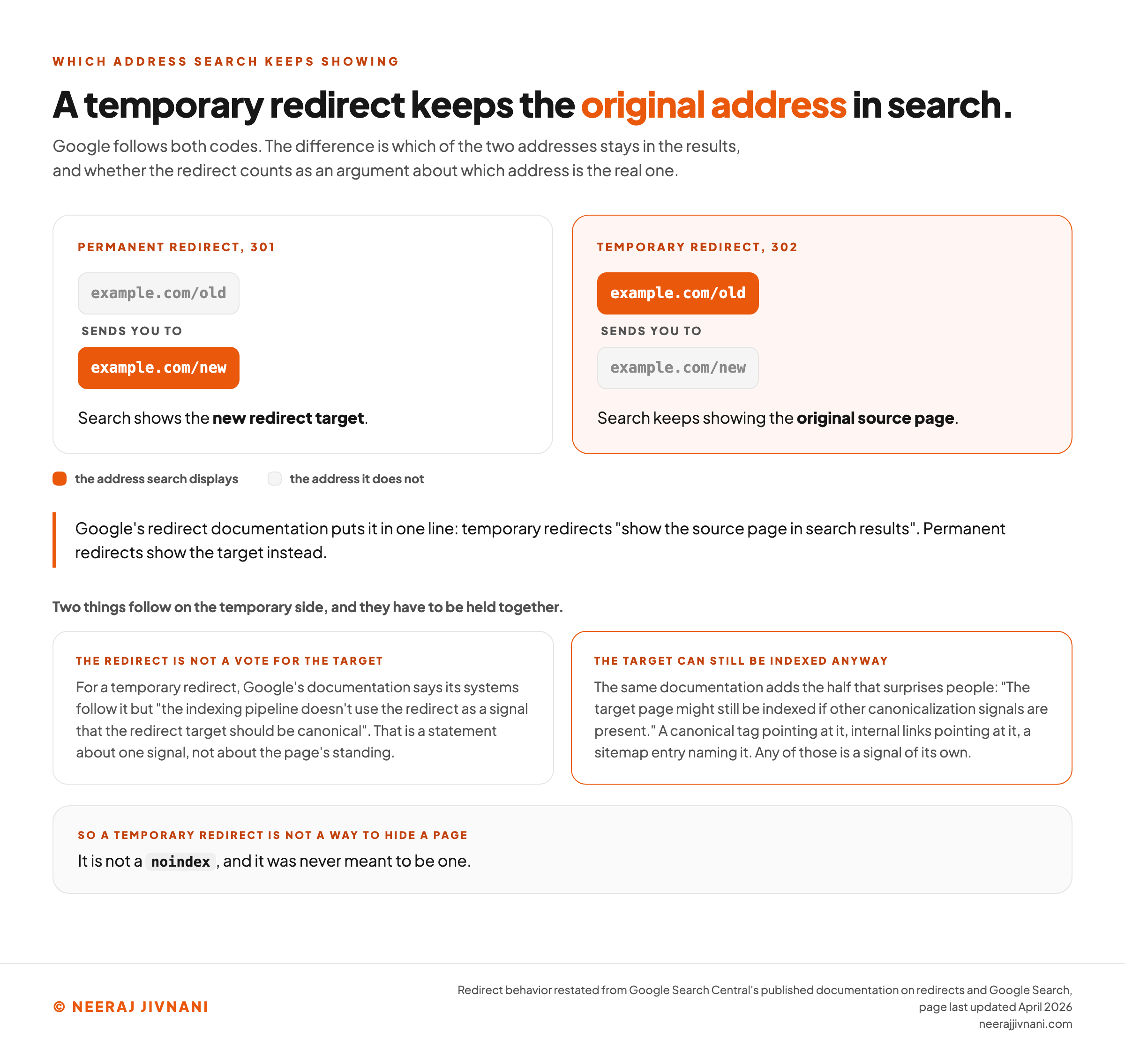
The original URL keeps its place in search results while the redirect is live. That is the behavior, and it follows from what the code means.
Google's redirect documentation states it in one line: temporary redirects "show the source page in search results", against permanent redirects, which show the target.
Two things follow from that, and they have to be held together.
The Redirect Is Not a Vote for the Destination
Google's documentation says that for a temporary redirect its systems follow it, but "the indexing pipeline doesn't use the redirect as a signal that the redirect target should be canonical".
That is a statement about one signal, not about your page's standing.
Nothing is lost and nothing is destroyed. The redirect does not count as an argument that the new address should replace the old one.
The Destination Can Still Get Indexed Anyway
The same documentation adds the half that surprises people: "The target page might still be indexed if other canonicalization signals are present."
A canonical tag pointing at it, internal links pointing at it, a sitemap entry naming it. Any of those is a signal, and the redirect not voting does not stop the others from voting.
Which is worth knowing before you assume a temporary redirect is hiding a page. It is not a noindex, and it was never meant to be one.
What This Means for a Page You Are Redirecting
While the 302 is up, the original stays the address search is showing, and taking the redirect off does not change that.
What changes is where a visitor lands, and during a genuine short term change that is the whole point.
The failure state is the slow one. A redirect left long enough stops describing anything true, and search is then holding an address that no longer matches your site.
Use this chart — embed code and citation
<a href="https://neerajjivnani.com/blog/302-redirect/"><img src="https://neerajjivnani.com/infographics/302-redirect/what-search-shows.png" alt="Diagram of what a search engine does with a temporary redirect compared with a permanent one, showing that a permanent redirect makes search display the new target address while a temporary redirect keeps displaying the original source address, and then opening out the temporary side into its two halves held together: that Googlebot follows the redirect but the indexing pipeline does not treat it as a signal that the redirect target should be canonical, and separately that the target page can still be indexed anyway if other canonicalization signals such as a canonical tag, internal links or a sitemap entry point at it, so a temporary redirect is not a way to keep a page out of an index." width="1200"></a>
<p>Chart: <a href="https://neerajjivnani.com/blog/302-redirect/">Neeraj Jivnani</a></p>Neeraj Jivnani, "When a 302 Redirect Is the Right Call, and When to Take It Down", neerajjivnani.com, https://neerajjivnani.com/blog/302-redirect/Free to republish with a link back to this page.
When a Temporary Redirect Is the Right Tool
One question decides it. Is the original address coming back, and can you say roughly when?
Answer yes to both and a temporary redirect is the right tool. That is a better instrument than a list of scenarios, because your situation may not be on anybody's list.
Where the Answer Is Usually Yes
The situations below are the ones where a temporary redirect usually answers both halves of that question.
- You are testing a second version of a page. Some visitors go to the variant, the original stays the address of record, and search keeps showing it while you are still deciding.
- The page is down for work. A repair, a deploy, a redesign. Send people somewhere useful, and the original is the address search was showing the whole time.
- A seasonal or campaign page is taking over for a few weeks. The evergreen address points at the sale, then stops pointing at it.
- A product is temporarily out of stock. Route to the category or the nearest alternative rather than a dead end, because the product page is coming back.
- You are routing by country, language or device. Nothing moved here. The original address is still the one of record and the destination depends on who is asking, which is the other shape this code is for.
- The real page is not built yet. A holding page behind a live address claims the address without announcing that the final page has moved.
- You are shedding load or staging a rollout. Traffic goes somewhere else while the thing settles, by design and for a while.
Every one of those either has a date on it or has nothing that moved. That is what they have in common, and it is the only thing they have in common.
When a 302 Is the Wrong Tool
Use the permanent code any time the original is not coming back.
The move is permanent whatever it felt like at the time, and a temporary code describes it falsely.
Google's documentation gives the same test from its own side, advising a permanent redirect "when you're sure that the redirect won't be reverted".
The ones below come up most.
- A domain change. The old domain is not returning, and a temporary code keeps it as the address search shows.
- A URL structure you cleaned up. New paths are the real paths now. The old ones should stop being the ones in the index.
- Two pages merged into one. The point of merging is to end up with one address, and a temporary redirect keeps both alive.
- A rebrand. The old names are being retired on purpose, which is the definition of not coming back.
- A page you deleted and replaced. If the replacement is the answer from now on, say so with the permanent code.
The permanent equivalent is the 301, and everything on that list wants one. A 302 is the wrong tool for every move on it, however temporary it felt.
Nothing about this throws an error. What happens instead is a page that never fully takes over, indefinitely, with nothing in any report telling you why.
The 302 You Did Not Ask For
Plenty of people meet this code without ever having chosen it. A page they expected to load returns a 302, and no redirect was configured that they know about.
Usually nobody did choose it. The temporary code is what every common way of writing a redirect sends when you leave the status out.
Read the Status Yourself First
Before touching anything, get the answer from the server rather than from a crawl report. One request does it.
``
curl -sSI https://www.example.com/pricing
``
The first line carries the code and a Location line carries the destination. Your browser's developer tools give you the same thing in the network panel, where the request shows up with its status beside it.
Check the exact address you are worried about rather than the homepage, and check it without a trailing slash as well as with one.
The Five Lines That Send One Without Asking
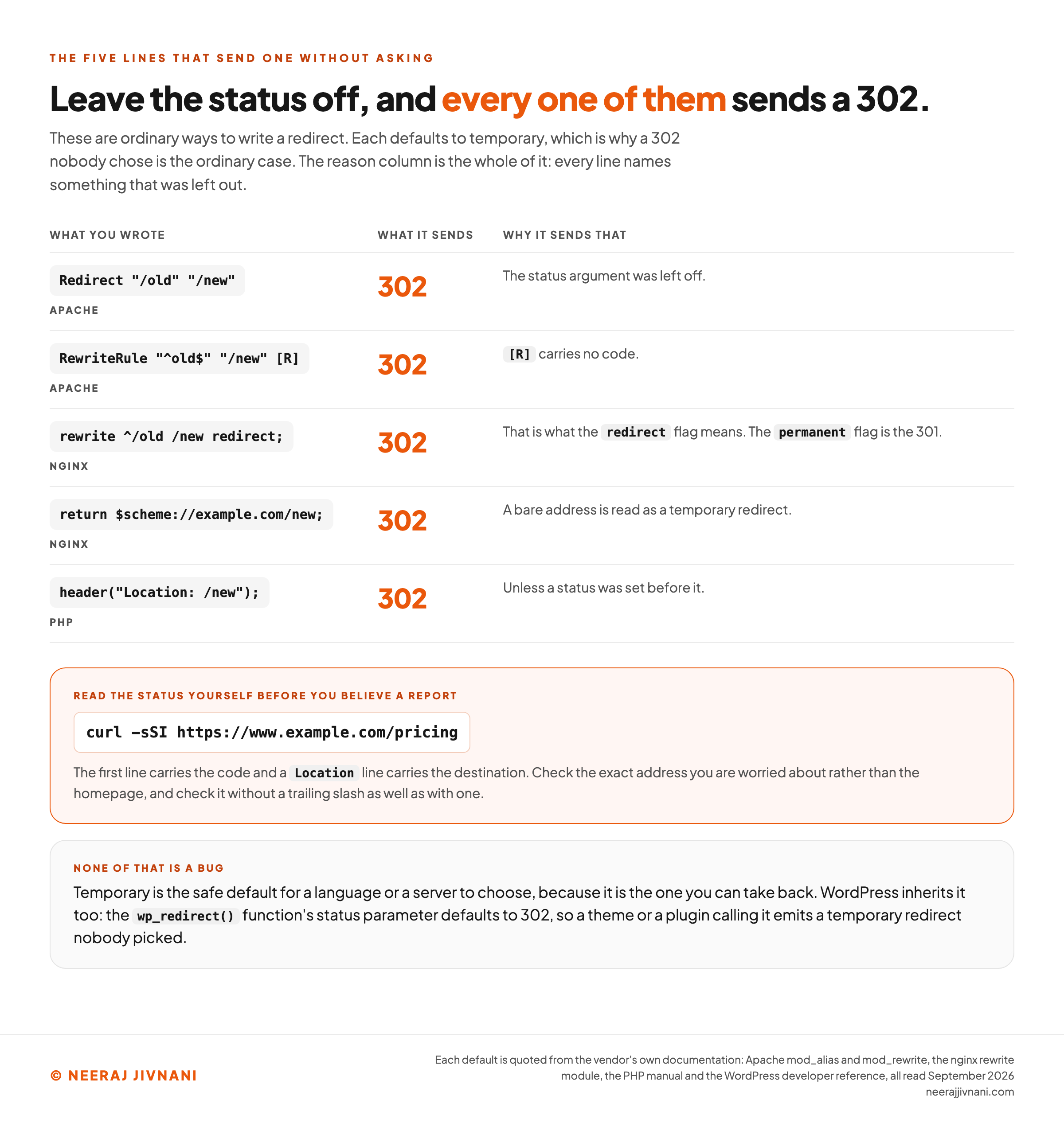
Each of these is an ordinary way to write a redirect, and each defaults to temporary.
| What you wrote | What it sends |
|---|---|
Redirect "/old" "/new" in Apache | 302, because the status argument was left off |
RewriteRule "^old$" "/new" [R] in Apache | 302, because [R] carries no code |
rewrite ^/old /new redirect; in nginx | 302, which is what the redirect flag means |
return $scheme://example.com/new; in nginx | 302, because a bare address is read as a temporary redirect |
header("Location: /new"); in PHP | 302, unless a status was set before it |
Apache's own documentation for mod_alias is explicit: "If no status argument is given, the redirect will be 'temporary' (HTTP status 302)." Its rewrite flag reference says the same of a bare [R], that "a 302 status code being used by default if none is specified".
nginx documents its redirect flag as returning "a temporary redirect with the 302 code" and permanent as returning "a permanent redirect with the 301 code".
Its return directive treats a lone address as "a URL for temporary redirect with the code 302", and that address may carry the scheme spelled out or nginx's own $scheme variable.
The PHP manual is the same story. A Location header "returns a REDIRECT (302) status code to the browser unless the 201 or a 3xx status code has already been set".
WordPress inherits it. The wp_redirect() function's status parameter defaults to 302, so a theme or a plugin calling it emits a temporary redirect nobody picked.
None of that is a bug. Temporary is the safe default for a language or a server to choose, because it is the one you can take back.
The Delayed Refresh Counts Too
One more source of a temporary redirect nobody set. A meta refresh with a delay on it is read as one.
Google's documentation splits them by timing: an instant meta refresh is interpreted as a permanent redirect, and a delayed one "after an arbitrary number of seconds set by the site owner" is interpreted as temporary.
So a five second holding page put up years ago is still telling search that the original is coming back.
What this line sends, and whether that is what you meant
Knowing the code your server sends is not the same as knowing whether it is the right one. Find the line you actually have, then answer the one question that decides it.
Which of these looks like the line you have
Is the original address coming back, and can you say roughly when
What that line sends
302
The status argument was left off.
What your move needs
Not decided yet
One question decides it, and it is the question above. The code is right or wrong for a situation rather than good or bad in itself.
Not sure which of them you have? Ask the server rather than a crawl report. One request does it: curl -sSI against the exact address you are worried about. The first line carries the code and a Location line carries the destination.
Use this chart — embed code and citation
<a href="https://neerajjivnani.com/blog/302-redirect/"><img src="https://neerajjivnani.com/infographics/302-redirect/the-default-is-temporary.png" alt="Reference table of the five ordinary ways a redirect gets written on a web server and what status code each one sends when the status is left out, showing that the Apache Redirect directive with no status argument sends 302, that an Apache RewriteRule ending in a bare bracket R sends 302, that an nginx rewrite carrying the redirect flag sends 302 while the permanent flag sends 301, that an nginx return directive given only an address sends 302, and that a PHP Location header sends 302 unless a status was already set, with the reason each one defaults to temporary printed beside it, every reason naming the thing that was left out, plus the single command that reads the status back off a server and a note that the WordPress wp_redirect function also defaults to 302." width="1200"></a>
<p>Chart: <a href="https://neerajjivnani.com/blog/302-redirect/">Neeraj Jivnani</a></p>Neeraj Jivnani, "When a 302 Redirect Is the Right Call, and When to Take It Down", neerajjivnani.com, https://neerajjivnani.com/blog/302-redirect/Free to republish with a link back to this page.
Chains, Loops and Internal Links
Two failures show up once a site has more than a handful of redirects, and a temporary one is how the first of them usually starts.
A chain is one redirect pointing at an address that redirects again. Every hop is another round trip before anything renders, and a reader on a slow connection pays for all of them.
They grow out of ordinary work rather than carelessness.
Say /pricing already sends people to /plans, and a promotion starts. Somebody adds a temporary redirect from /plans to /spring-offer rather than editing the first rule, because touching a working redirect looks riskier than adding one.
Now anybody who follows an old link to /pricing makes three requests to see one page.
The fix is not another redirect. Point the first address straight at the final destination and delete what was in between.
A loop is the same mistake closed into a circle: two addresses point at each other, nothing resolves, and Chrome gives up with ERR_TOO_MANY_REDIRECTS.
And point your internal links at the address you want indexed, which while a 302 is live is still the original.
302, 307 and the Request Method
Use a 307 in front of anything that submits data, and a 302 for everything else. There is a second temporary redirect because the two handle the request method differently.
A 302 may change the request method on the way. RFC 9110 records that "for historical reasons, a user agent MAY change the request method from POST to GET for the subsequent request".
That matters exactly when something is being submitted.
A form post, a call to an application programming interface, anything carrying a body. The redirect can arrive at the destination as an ordinary page request with the body gone.
The 307 was defined to close that. The specification says a user agent "MUST NOT change the request method" when it follows one.
The 303 is the third member and it changes the method on purpose, to turn the result of a submission into a plain page you can bookmark.
The permanent twin of the 307 is the 308, which keeps the method and says the move is final.
Questions People Ask About 302 Redirects
Is a 302 redirect bad? No. It is right or wrong for a situation rather than good or bad in itself, and it is the correct code any time the original address is returning. What makes one harmful is leaving it on a move that turned out to be permanent, because search then keeps showing an address that no longer matches your site.
What is the difference between 301 and 302 redirects? Intent. A 301 says the original is finished and the new address replaces it; a 302 says the original is coming back and should keep its place. Search follows both and treats only the permanent one as an argument about which address is the real one.
Why am I getting a 302 instead of a 200? Because something in front of that page is forwarding the request, and the thing doing it probably never specified a code. Apache, nginx, PHP and WordPress all send a temporary redirect when the status is left off, so any redirect line in your configuration with no status on it is the first place to look.
What does a 307 or 308 redirect mean? A 307 is a temporary redirect that is not allowed to change the request method, which makes it the right one in front of anything that submits data. A 308 is its permanent counterpart: the move is final and the method is preserved.
Give Every 302 an End Date
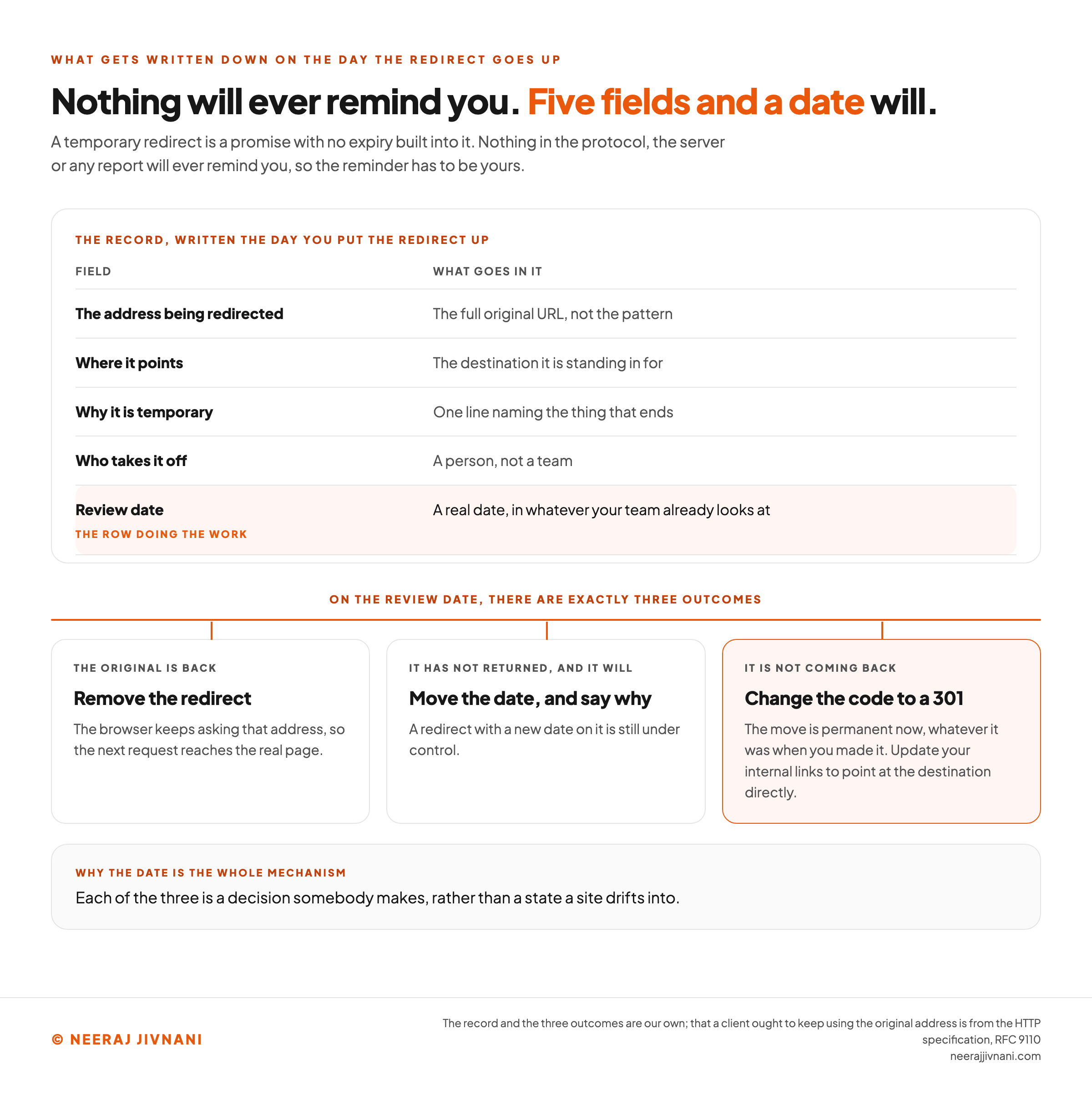
Write down who removes the redirect and when, on the day you put it up. Nothing in the protocol, the server or any report will ever remind you, so the reminder has to be yours.
A temporary redirect is a promise with no expiry built into it. Five fields are enough to give it one.
| Field | What goes in it |
|---|---|
| The address being redirected | The full original URL, not the pattern |
| Where it points | The destination it is standing in for |
| Why it is temporary | One line naming the thing that ends |
| Who takes it off | A person, not a team |
| Review date | A real date, in whatever your team already looks at |
The review date is the row doing the work.
A team calendar entry or a ticket with a due date is enough, and it is the only part that survives the person who set the redirect leaving.
The Three Outcomes on the Review Date
There are exactly three, and each is a decision somebody makes rather than a state a site drifts into.
- The original is back. Remove the redirect. The browser keeps asking that address, so the next request gets the real page.
- It still has not returned, and it will. Move the review date and say why. A redirect with a new date on it is still under control.
- It is not coming back. The move is permanent now, whatever it was in March. Change the code to a 301 and update your internal links to point at the destination directly.
The Ones Already There
For redirects nobody wrote down, work backwards.
Crawl the site or read the server configuration, list every address returning a 302, and put each one through the same question. Is the original coming back, and when.
Anything with no answer is a permanent move wearing the wrong code, and changing it takes one word on one line.
The redirect itself was never the hard part. Deciding it ends, and writing down who ends it, is.
Use this chart — embed code and citation
<a href="https://neerajjivnani.com/blog/302-redirect/"><img src="https://neerajjivnani.com/infographics/302-redirect/the-end-date-record.png" alt="Reference card for the five field record kept for a temporary redirect on the day it is created, showing what goes in each field: the full original address being redirected rather than a pattern, the destination it is standing in for, one line naming the thing that ends and therefore why the change is temporary, a named person rather than a team who takes the redirect off, and a real review date placed in whatever calendar or tracker the team already looks at, with the review date marked as the row doing the work. Beneath the record, the three outcomes available on the review date are drawn as three branches: the original is back so the redirect is removed and the next request reaches the real page, because the browser keeps asking the original address, the original has not returned yet so the review date moves and the reason is recorded, or the move has become permanent so the code changes to 301 and internal links are repointed at the destination." width="1200"></a>
<p>Chart: <a href="https://neerajjivnani.com/blog/302-redirect/">Neeraj Jivnani</a></p>Neeraj Jivnani, "When a 302 Redirect Is the Right Call, and When to Take It Down", neerajjivnani.com, https://neerajjivnani.com/blog/302-redirect/Free to republish with a link back to this page.