Technical SEO: What It Covers, and What Your Site Can Skip
Your page can be missing from search while looking perfect to every visitor. See which settings decide that, and which parts of the list you can skip.

/ On this page13 sections
A page can be missing from search while looking perfect to every visitor who opens it.
Technical SEO is the part of search engine optimization (SEO) that makes sure a search engine can reach your pages, read what is on them, and pick the right version of each one.
A few of those settings decide whether a page appears at all. Much of the rest is scoped to sites far larger than yours.
Below is the whole list, sorted into which is which.
What Technical SEO Covers
What it covers is everything underneath a page rather than anything written on it. That is what makes it a precondition before it is a contest.
That is why it feels disproportionate. A one-line file can cost you the content of every page on the site, and a month of writing cannot get any of it back while the line is there.
What Is Inside the Boundary, and What Is Not
The boundary is worth drawing, because plenty of things get filed here that do not belong.
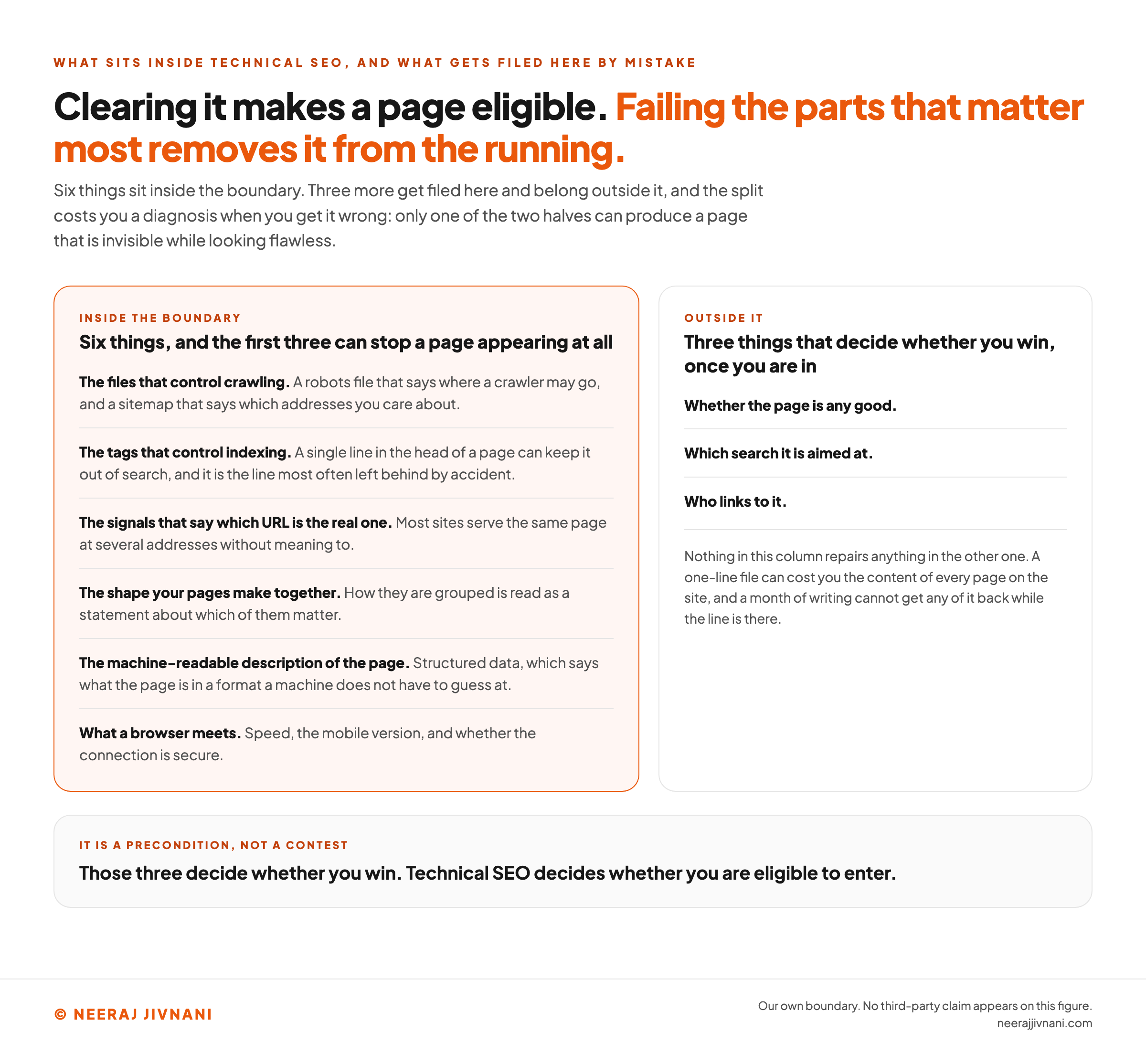
Six things sit inside it, and what follows takes them in order:
- The files that control crawling. A robots file that says where a crawler may go, and a sitemap that says which addresses you care about.
- The tags that control indexing. A single line in the head of a page can keep it out of search, and it is the line most often left behind by accident.
- The signals that say which URL is the real one. Most sites serve the same page at several addresses without meaning to.
- The shape your pages make together. How they are grouped is read as a statement about which of them matter.
- The machine-readable description of the page. Structured data, which says what the page is in a format a machine does not have to guess at.
- What a browser meets. Speed, the mobile version, and whether the connection is secure.
Outside it: whether the page is any good, which search it is aimed at, and who links to it.
Those three decide whether you win. Technical SEO decides whether you are eligible to enter.
Merging the two costs you a diagnosis. When a page will not rank, only one of the two halves can have produced a page that is invisible while looking flawless.
You want to know which you are dealing with before you spend a month on the wrong one.
Use this chart — embed code and citation
<a href="https://neerajjivnani.com/blog/technical-seo/"><img src="https://neerajjivnani.com/infographics/technical-seo/eligible-not-winning.png" alt="Two columns drawing the boundary of technical SEO, with a verdict beneath them. The left column, highlighted in orange and headed inside the boundary, carries six things and says the first three of them can stop a page appearing at all: the files that control crawling, meaning a robots file that says where a crawler may go and a sitemap that says which addresses you care about; the tags that control indexing, where a single line in the head of a page can keep it out of search and is the line most often left behind by accident; the signals that say which URL is the real one, since most sites serve the same page at several addresses without meaning to; the shape your pages make together, because how they are grouped is read as a statement about which of them matter; the machine-readable description of the page, meaning structured data, which says what the page is in a format a machine does not have to guess at; and what a browser meets, meaning speed, the mobile version, and whether the connection is secure. The right column, headed outside it, carries three things that decide whether you win once you are in: whether the page is any good, which search it is aimed at, and who links to it. A note under that column says nothing in it repairs anything in the other one, because a one-line file can cost you the content of every page on the site and a month of writing cannot get any of it back while the line is there. The figure's headline states that clearing technical SEO makes a page eligible, while failing the parts that matter most removes it from the running. A band at the foot gives the verdict: those three decide whether you win, and technical SEO decides whether you are eligible to enter." width="1200"></a>
<p>Chart: <a href="https://neerajjivnani.com/blog/technical-seo/">Neeraj Jivnani</a></p>Neeraj Jivnani, "Technical SEO: What It Covers, and What Your Site Can Skip", neerajjivnani.com, https://neerajjivnani.com/blog/technical-seo/Free to republish with a link back to this page.
What Lets a Crawler In, and What Keeps a Page Out
Two mechanisms decide whether a page can be fetched and kept, and they are routinely confused with each other.
One is a file at the root of your site that says where crawlers may go. The other is a line inside a page that says whether it may be stored in the index.
They are not interchangeable, and the difference is the single most expensive misunderstanding in this whole subject.
Robots.txt Is Not a Way to Hide a Page
A robots file lives at your domain with /robots.txt on the end, and it lists the paths crawlers should stay out of. Open yours in a browser right now; every site has one, whether anybody wrote it or not.
What it does is manage crawl traffic. What it does not do is keep anything secret.
Google's own introduction to the file is unambiguous about this: it "is used mainly to avoid overloading your site with requests; it is not a mechanism for keeping a web page out of Google."
What follows from that catches almost everybody. The same page states that a URL disallowed in robots.txt "can still be indexed if linked to from other sites".
Google can learn an address and its anchor text from somebody else's page without ever fetching yours.
So a disallowed page can appear in results as a bare URL with no description.
If you want a page gone from search, blocking the crawler is the wrong instrument. It is like locking the door and leaving the address on the gate.
Noindex, and Where It Gets Left Behind
The instrument that removes a page is a robots meta tag in the head of that page, carrying noindex.
It has one requirement that catches everybody. The crawler has to be allowed to fetch the page before it can read the instruction.
So a page that is both disallowed in robots.txt and marked noindex can keep the tag a secret indefinitely. The block stops the crawler from ever seeing the removal request.
Blocking and hiding are opposite settings. Pick one.
The commonest real failure here is not a decision at all. It gets set by a site builder, a plugin default or a staging environment, nobody takes it off at launch, and every visitor since has had a perfectly good experience of the page.
That failure is worth naming, because its shape repeats across this whole subject.
There is nothing on the page to see. The problem lives in the source, or in a report nobody opened.
Set the two controls on your own page against what you want for it, and watch which of the answers moves.
Take a page you have in mind, set its two settings below, and watch which of the two answers moves.
What a visitor gets
The page opens.
- The text is all there and none of it is wrong.
- There is nothing on it for anybody to notice.
This side does not move. Change anything above and a person opening the page still gets exactly this, which is why these checks belong in the calendar.
What search gets
The crawler may fetch it, and nothing tells the engine to keep it out.
- The page is eligible to appear in results in the ordinary way.
- Whether it does is a different question, and not one these two settings answer.
Against what you wanted
Nothing in these two settings is keeping it out.
If the page is missing anyway, the cause is somewhere else: the status code your server returns for it, the mobile version of the page, or the page indexing report.
These two settings only. A page that should be live and answers with a server error is removed from search just as surely, and that one shows up in the page indexing report. Whichever way this comes out, Search Console’s URL inspection tool hands back Google’s own record of one address: whether it is indexed, when it was last crawled, and what stopped it if it is not.
What a Sitemap Is For, and When You Need One
An XML (extensible markup language) sitemap is a machine-readable list of the addresses you want found. In practice it is a file your site generates rather than one you write.
The pairing with robots.txt is the useful way to hold it. Google puts it in one line: "Use robots.txt rules to prevent crawling, and sitemaps to encourage crawling."
Encourage is the honest verb. Google also states that it "won't limit crawling to pages listed in your sitemaps", but that it "will prioritize crawling these pages", so a sitemap is a hint about importance rather than a request for indexing.
Here is where the applicability question starts, and Google answers it directly.
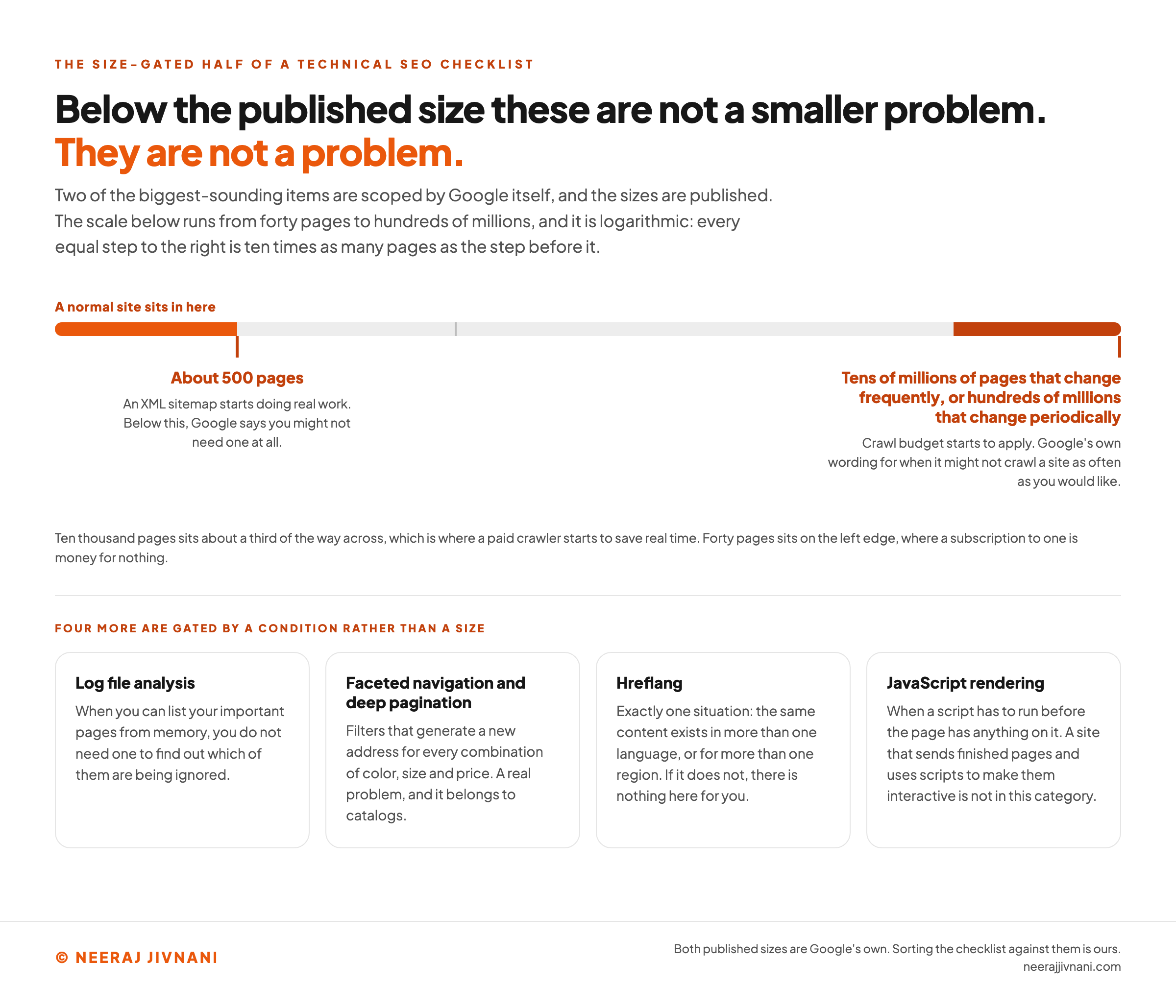
Its sitemaps documentation says you might not need one if your site is "small", and then defines the word as "about 500 pages or fewer on your site".
The other two conditions are that your site is comprehensively linked internally, so a crawler can reach everything by following links from the homepage, and that you have no media or news files you want shown in search.
Below that line a sitemap is harmless and close to pointless. Above it, or on a site with orphaned sections, rich media or almost no inbound links, it starts doing real work.
Most content management systems generate one automatically, which is why this is rarely worth building by hand.
If your site is past that line, the job is to confirm it lists live addresses rather than retired ones, and to submit it once in Search Console. If it is not, leaving the generated file alone is a complete answer.
The New Names in an Old File
The assistants people search with now arrive as ordinary web requests, from crawlers with names, and the file that decides what they may fetch is the one already at your root.
Two of those names are OpenAI's. Its crawler documentation says the company "uses OAI-SearchBot and GPTBot robots.txt tags to enable webmasters to manage how their sites and content work with AI".
The pair is worth separating, because the two settings are independent and OpenAI says so. A site can "allow OAI-SearchBot in order to appear in search results while disallowing GPTBot to indicate that crawled content should not be used for training".
Google splits the same decision its own way. Its crawler documentation lists Google-Extended as a robots.txt token with no user agent string of its own, used purely as a control over what its AI products may use.
So nothing structural has changed. There are more names in the file, and each of them is a business decision rather than a technical one.
Telling a Search Engine Which URL Is the Real One
Almost every site serves the same page at more than one address, and almost nobody does it on purpose.
Four shapes account for most of it:
- The trailing slash and the version without it. Two addresses, one page, and most servers answer both.
- The `www` version and the bare domain. Same again, decided years ago by whoever set up the hosting.
- A filtered or sorted variant of a category. The same products in a different order, at a longer address.
- A tracking parameter. One newsletter URL creates a copy of the page that will outlive the campaign.
Each of those is a separate address as far as a crawler is concerned. Left alone, the engine picks one itself, and it may not pick yours.
What a Canonical Tag Does
A canonical tag is a line in the head of a page naming the address you would like treated as the original. It is how you answer the question before it gets answered for you.
Put one on every page, pointing at itself. That sounds redundant and it is the cheapest insurance available, because a parameterized copy of the page then carries an instruction back to the clean version.
It is a strong hint rather than a command. If your internal links, your sitemap and your canonical tags disagree about which address is real, the engine weighs all three and picks, so the point is to make them agree.
Duplicate Content Is a Sorting Problem
The phrase sounds like an accusation and is not one. Two addresses serving similar text do not attract a penalty; they split the signals that would otherwise have gone to one page.
That is worth being clear about because the penalty framing makes people delete things they should have consolidated.
The fix is to decide which address is the real one and make everything point at it. A redirect retires the old address outright, and a canonical tag keeps both live while naming the preferred one.
The Status Code Is the Answer to a Different Question
Every request your server answers carries a code, and a page that should be live returning an error is a page removed from search as surely as a noindex tag.
The one to look for is not a missing page you deleted on purpose. It is a working page that intermittently returns a server error, or a template that answers with a success code for addresses that do not exist.
Both look fine in a browser at the moment you check. Search Console's page indexing report is where they show up.
The Shape Your Pages Make Together
Site structure is the shape your pages make when you draw the connections between them, and a search engine reads that shape as a statement about what matters.
The arrangement is doing two jobs at once. It is how anything gets discovered, and it is how importance gets expressed.
Structure Is an Argument About Priority
Group related pages under the section they belong to, and the grouping itself says they are related. Put a page a single step from the homepage and that placement says it matters.
Neither claim needs stating anywhere, which is what makes structure worth getting right early. It is also why a site that grew by accident reads as a site with no priorities.
The instinct to hold is that a menu is not the structure. A menu is one route through it, and the structure is every route.
Breadcrumbs Say Where a Page Sits
Breadcrumbs are the trail at the top of a page showing the sections it is inside. They are worth having because they are made of real anchors, so a category page ends up reachable from every page beneath it.
Most platforms produce them from the structure you already have.
The Address Is Part of the Structure
A readable URL does a similar job in a different register. It tells a person what they are about to open, and it still means something when somebody pastes it somewhere else.
Group the path the way you grouped the pages and the address says the same thing the structure does.
Neither breadcrumbs nor a tidy path buys you much on its own. Both are close to free when the page is created, and awkward afterwards.
Structured Data, and What It Is For
Structured data is a block of code that states what the page is, in a vocabulary machines already share.
It usually sits in the page as JSON-LD (JavaScript object notation for linked data), which writes that vocabulary out as plain data rather than as markup wrapped around your text.
Schema markup is the same thing under a different name. You will meet both.
Its job is to remove guessing. A price, a rating, an author, an event date and a recipe's cooking time are all things a machine can infer from a page and get wrong, and structured data says them outright.
What it buys is eligibility for a richer result, not a ranking. That is the whole of the practical case for it.
One rule decides whether any of it works, and Google states it plainly in its structured data policies: "Don't mark up content that is not visible to readers of the page."
That is not a technicality. Markup describing a rating the page does not show, or stock that is not in stock, can stop the page's structured data being used for a rich result at all.
The instinct to keep is to mark up what is there, not what you wish were there.
Most platforms generate the common types for you. Adding more types than your page genuinely contains is the usual mistake, and it is worse than adding none.
Speed and Mobile, With the Numbers That Are Published
Speed and the mobile experience are one thing to the person having them, and they are measured together.
Google's published position is not that speed wins rankings. Its own guidance puts it as a component of a wider goal: "Providing a good user experience should be your site's top goal, and a good user experience is a ranking factor."
Read that as a tie-breaker rather than a lever. A slow page with the best answer still beats a fast page with a worse one, and between two comparable pages the faster one has the advantage.
The Three Metrics and Their Thresholds
The measurements have names, and unlike most of this subject the targets are published rather than inferred. Google's Core Web Vitals set three:
- Largest Contentful Paint measures loading. The target is that the biggest visible element appears within 2.5 seconds of the page starting to load.
- Interaction to Next Paint measures responsiveness, or how quickly the page reacts when somebody taps something. The target is 200 milliseconds or less.
- Cumulative Layout Shift measures whether things move around while the page loads. The target is 0.1 or less.
One detail decides whether you pass, and it is the detail people miss. Google's documentation calls the 75th percentile of page loads "a good threshold to measure", "segmented across mobile and desktop devices".
So passing is not about your own experience of the page on your own laptop. Three quarters of real loads have to clear the bar, and mobile and desktop are measured separately.
The common causes are dull, and that is good news.
A hero photograph shipped at four times the size it displays at. A chat widget that loads on every page whether anybody opens it or not. A web font the layout sits and waits for.
Mobile Is the Version That Counts
Mobile is not a variant of your site. It is the version being measured.
Google states it directly: "Google now uses a mobile crawler as the default crawler for websites." The mobile version of your page is the version being indexed and ranked, whatever your desktop layout looks like.
What follows from that is a requirement rather than a preference. Google's mobile-first documentation says to "make sure that your mobile site contains the same content as your desktop site", and that if the mobile version has less, you should bring it up to match.
Hiding content behind an accordion or a tab is fine, because it is still in the page. Dropping it from the mobile template is not, because as far as the index is concerned it does not exist.
HTTPS, and the Gap a Half-Migration Leaves
HTTP (hypertext transfer protocol) is the set of rules a browser follows to fetch your site, and HTTPS (hypertext transfer protocol secure) is the same thing with the connection encrypted.
Google recommends it "rather than HTTP, to improve user and site security", noting that sites still on HTTP "can be marked as 'not secure' in the Chrome browser".
Getting a certificate is no longer the hard part. Most hosts issue one automatically and free ones are available.
The failure that is left is the half-done migration.
A site is secure on its homepage and an old subdomain still answers over HTTP.
A certificate on the main domain expires while nobody is watching. A secure page loads an image or a script over the insecure protocol, which browsers either block or flag.
The first of those leaves you with two versions of the same address, which is the duplicate URL problem again, arriving through the security door. The other two cost you the page a different way, by making a browser distrust it.
The check takes a minute. Type your own address with http:// on the front, press enter, and see where you end up.
If the bar shows https:// when the page settles, that redirect is doing its job. Repeat it for anything on a subdomain, a shop on Shopify or a help center on Zendesk, because those are where a stray certificate goes unnoticed longest.
The Parts Most Sites Are Too Small to Need
Several of the biggest-sounding items in technical SEO are scoped by the platforms themselves to sites of a certain size.
Below that size they are not a lighter version of a problem. They are not a problem.
That is worth knowing before you spend an afternoon on one, because the sizes are published and they are larger than people expect.
Crawl Budget
Crawl budget is the idea that a search engine will only fetch so much of your site in a given period, so you should spend it on the pages that matter.
It is real, and the size at which it starts to apply is published.
Google's wording: "If your site is particularly large (hundreds of millions of pages that change periodically, or perhaps tens of millions of pages that change frequently), Google might not be able to crawl your entire site as often as you'd like."
Those numbers are worth reading twice. If your site is not in that league, nothing you do about crawl budget will change anything, and the hour goes instead to the settings that can remove a page.
Log File Analysis
Reading your server logs tells you what crawlers fetched, as opposed to what a crawl of your own site says they could fetch. It is the most accurate instrument available.
It is also an instrument for a question small sites do not have. When you can list your important pages from memory, you do not need a log analysis to find out which ones are being ignored.
Faceted Navigation and Deep Pagination
Filters that generate a new address for every combination of color, size and price can produce more addresses than your site has products. That is a real problem and it belongs to catalogs.
Pagination is the same shape. Making sure a crawler can walk from the front of an archive to its fortieth page matters when a fortieth page exists and holds something nothing else links to.
Hreflang
Hreflang tags tell a search engine which language or regional version of a page to show to whom.
They are fiddly to get right, and they apply in exactly one situation: the same content exists in more than one language, or for more than one region.
If it does not, there is nothing here for you.
JavaScript Rendering
If your pages are built by scripts in the browser rather than sent complete by the server, there is a whole layer of this subject underneath the one described here.
The test is whether a script has to run before the page has anything on it. A site that sends finished pages and uses scripts to make them interactive is not in this category.
Use this chart — embed code and citation
<a href="https://neerajjivnani.com/blog/technical-seo/"><img src="https://neerajjivnani.com/infographics/technical-seo/what-switches-on-when.png" alt="A logarithmic scale of site size running from forty pages to hundreds of millions, with the two published thresholds marked on it and four condition-gated items beneath. An orange segment at the left edge, labeled a normal site sits in here, covers everything below about 500 pages. A mark at about 500 pages says an XML sitemap starts doing real work there, and that below it Google says you might not need one at all. A darker band at the right end, labeled tens of millions of pages that change frequently or hundreds of millions that change periodically, says crawl budget starts to apply there, in Google's own wording for when it might not crawl a site as often as you would like. A caption notes that ten thousand pages sits about a third of the way across, which is where a paid crawler starts to save real time, and that forty pages sits on the left edge, where a subscription to one is money for nothing. Below the scale, four cards cover the items gated by a condition rather than a size: log file analysis, which you do not need while you can list your important pages from memory; faceted navigation and deep pagination, which belong to catalogs whose filters generate a new address for every combination of color, size and price; hreflang, which applies in exactly one situation, where the same content exists in more than one language or for more than one region; and JavaScript rendering, which applies when a script has to run before the page has anything on it, a site that sends finished pages and uses scripts to make them interactive being outside the category." width="1200"></a>
<p>Chart: <a href="https://neerajjivnani.com/blog/technical-seo/">Neeraj Jivnani</a></p>Neeraj Jivnani, "Technical SEO: What It Covers, and What Your Site Can Skip", neerajjivnani.com, https://neerajjivnani.com/blog/technical-seo/Free to republish with a link back to this page.
The Order to Do This In, and When to Stop
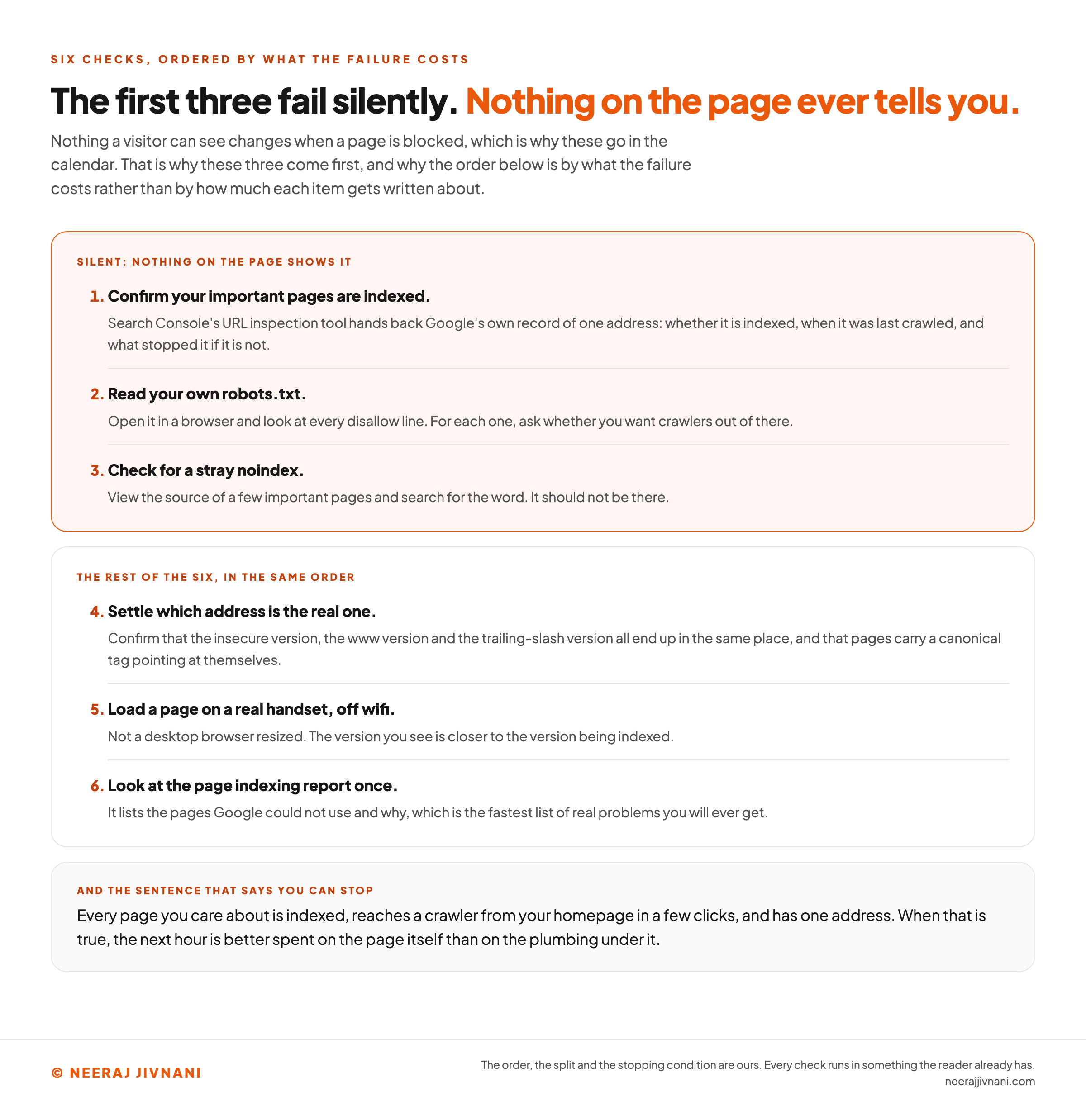
Start with the three checks whose failures are silent, because those are the only ones you cannot find by looking at your own site.
The order below is by what the failure costs, not by how much each item gets written about.
When to stop is the second question, and it has a clean answer rather than an open-ended one.
The Six, in Order
Each of the six finishes in an afternoon, and the first three are the ones nothing on your site will ever prompt you to run.
- Confirm your important pages are indexed. Search Console's URL inspection tool hands back Google's own record of one address: whether it is indexed, when it was last crawled, and what stopped it if it is not. Nothing else can find a page that is invisible while looking perfect.
- Read your own robots.txt. Open it in a browser and look at every disallow line. For each one, ask whether you want crawlers out of there.
- Check for a stray noindex. View the source of a few important pages and search for the word. It should not be there.
- Settle which address is the real one. Confirm that the insecure version, the
wwwversion and the trailing-slash version all end up in the same place, and that pages carry a canonical tag pointing at themselves. - Load a page on a real handset, off wifi. Not a desktop browser narrowed to a phone's width. What appears is much closer to the version being indexed.
- Look at the page indexing report once. It lists the pages Google could not use and why, which is the fastest list of real problems you will ever get.
Steps one to three are the ones with silent failures, which is why they come first.
How Far to Go Before You Stop
Go as far as one sentence, then stop.
Every page you care about is indexed, reaches a crawler from your homepage in a few clicks, and has one address. When that is true, the next hour is better spent on the page itself than on the plumbing under it.
The stopping condition is deliberately not a score and not an empty issues list. A crawler will always find something to report, so a clean report is not a state you can reach.
After that it is maintenance rather than a project.
Once a quarter is enough for most sites, plus a check after anything structural: a redesign, a platform change, a migration, or a sudden drop you cannot explain.
Use this chart — embed code and citation
<a href="https://neerajjivnani.com/blog/technical-seo/"><img src="https://neerajjivnani.com/infographics/technical-seo/the-three-silent-ones.png" alt="Six technical SEO checks in order, split into two groups by whether the failure is visible. The figure's headline states that the first three fail silently and nothing on the page ever tells you. The first group, highlighted in orange and headed silent, nothing on the page shows it, carries three numbered checks: confirm your important pages are indexed, using Search Console's URL inspection tool, which hands back Google's own record of one address, namely whether it is indexed, when it was last crawled, and what stopped it if it is not; read your own robots.txt, by opening it in a browser and looking at every disallow line and asking of each one whether you want crawlers out of there; and check for a stray noindex, by viewing the source of a few important pages and searching for the word, which should not be there. The second group, headed the rest of the six in the same order, carries checks four to six: settle which address is the real one, by confirming that the insecure version, the www version and the trailing-slash version all end up in the same place and that pages carry a canonical tag pointing at themselves; load a page on a real handset off wifi rather than a desktop browser narrowed to a phone's width, since what appears is much closer to the version being indexed; and look at the page indexing report once, since it lists the pages Google could not use and why. A band at the foot carries the stopping condition: every page you care about is indexed, reaches a crawler from your homepage in a few clicks, and has one address, and when that is true the next hour is better spent on the page itself than on the plumbing under it." width="1200"></a>
<p>Chart: <a href="https://neerajjivnani.com/blog/technical-seo/">Neeraj Jivnani</a></p>Neeraj Jivnani, "Technical SEO: What It Covers, and What Your Site Can Skip", neerajjivnani.com, https://neerajjivnani.com/blog/technical-seo/Free to republish with a link back to this page.
Checking It Without Buying a Tool
Every check above can be run with tools you already have, and none of it needs buying.
The table below pairs each question with the cheapest place to answer it.
| What you want to know | Where to look |
|---|---|
| Is a given page indexed, and if not why | Search Console, URL inspection |
| Which pages Google could not use | Search Console, page indexing report |
| What my robots file says | yourdomain.com/robots.txt in a browser |
| Whether a page carries a noindex tag | View source, search for noindex |
| What my sitemap lists | yourdomain.com/sitemap.xml in a browser |
| Whether the canonical is right | View source, search for canonical |
| How the page performs for real visitors | PageSpeed Insights |
| What a page looks like on a phone | A phone |
Search Console is free and takes one verification step to set up. It is the only one of these that reports what the engine did with your site rather than what your site contains, which is why it answers the questions that matter most.
Paid crawlers earn their money on scale. They fetch every page on a large site and list everything wrong at once, which is a genuine time saving when there are ten thousand pages and an unaffordable subscription when there are forty of them.
What a Technical SEO Audit Does Not Include
A technical SEO audit is a diagnosis, and the word is doing more work than it looks.
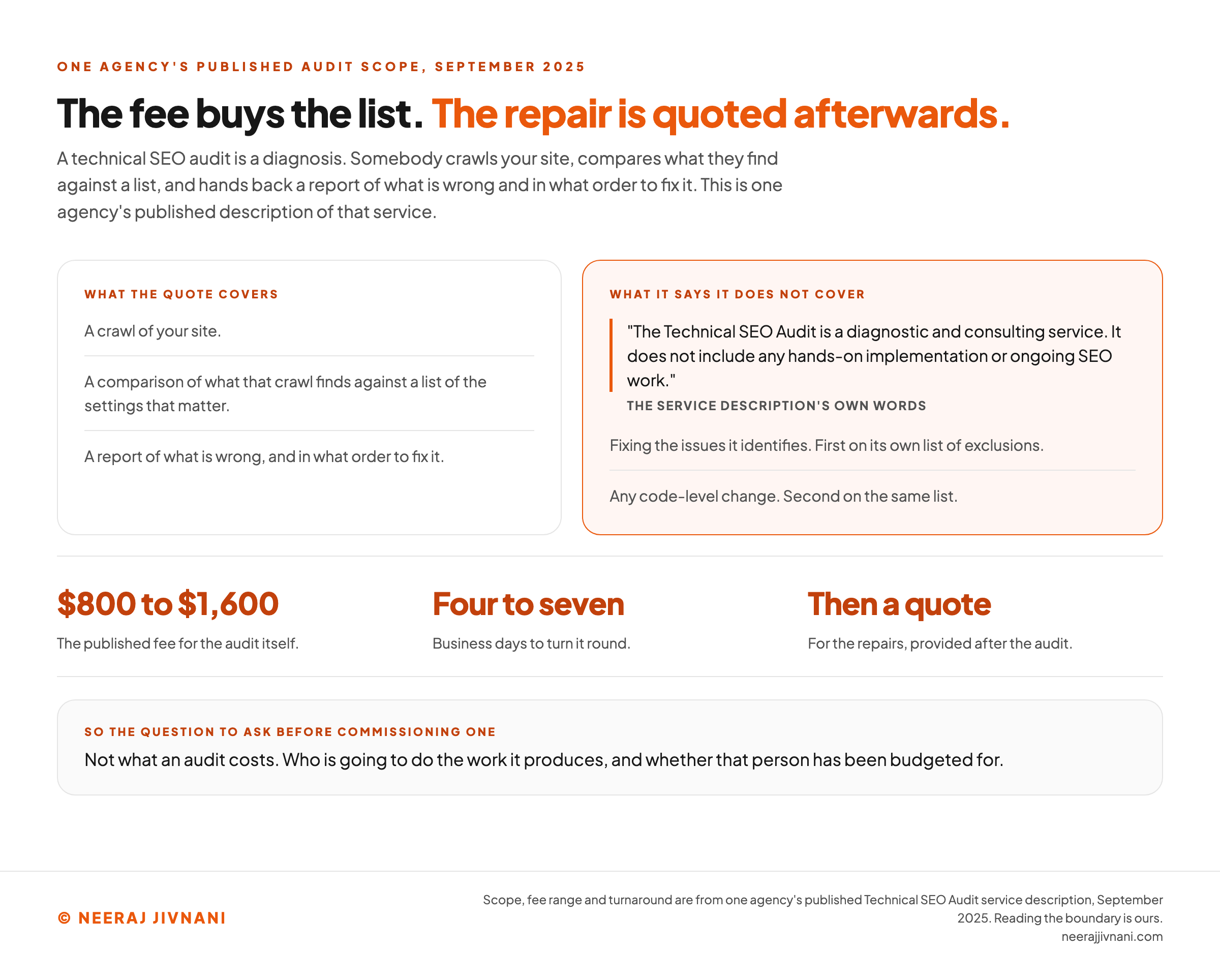
Somebody crawls your site, compares what they find against a list like the one above, and hands back a report of what is wrong and in what order to fix it.
What an audit is not is the fixing.
What the Quote Buys
One agency's published service description states the boundary about as plainly as it can be stated: "The Technical SEO Audit is a diagnostic and consulting service. It does not include any hands-on implementation or ongoing SEO work."
The first two items on its own list of exclusions are fixing the issues identified and any code-level change.
The same document prices that audit between $800 and $1,600, turns it round in four to seven business days, and says a quote for the repairs follows afterwards.
None of that is a criticism of the arrangement. An audit is a diagnosis and this one is priced as one, which is fine as long as you know that the number you were quoted buys the list rather than the outcome.
The Question to Ask Before Commissioning One
The useful question is not what an audit costs. It is who is going to do the work it produces, and whether that person has been budgeted for.
On a small site the honest answer is often that an audit is premature.
The six checks below will find the failures that matter, and they need nothing you do not already have. Much of the rest of any report will be items scoped to a site far larger than yours.
Use this chart — embed code and citation
<a href="https://neerajjivnani.com/blog/technical-seo/"><img src="https://neerajjivnani.com/infographics/technical-seo/what-the-quote-buys.png" alt="Two columns setting out what one agency's published technical SEO audit includes and what it says it excludes, with the published fee and turnaround beneath. The left column, headed what the quote covers, lists a crawl of your site, a comparison of what that crawl finds against a list of the settings that matter, and a report of what is wrong and in what order to fix it. The right column, highlighted in orange and headed what it says it does not cover, quotes the service description directly, that the Technical SEO Audit is a diagnostic and consulting service and does not include any hands-on implementation or ongoing SEO work. Beneath the quotation it names the first two items on that document's own list of exclusions, which are fixing the issues it identifies and any code-level change. A strip across the figure carries three published facts: a fee of $800 to $1,600 for the audit itself, four to seven business days to turn it round, and a quote for the repairs provided after the audit. A band at the foot gives the question to ask before commissioning one, which is not what an audit costs but who is going to do the work it produces and whether that person has been budgeted for." width="1200"></a>
<p>Chart: <a href="https://neerajjivnani.com/blog/technical-seo/">Neeraj Jivnani</a></p>Neeraj Jivnani, "Technical SEO: What It Covers, and What Your Site Can Skip", neerajjivnani.com, https://neerajjivnani.com/blog/technical-seo/Free to republish with a link back to this page.
Questions People Ask About Technical SEO
Three of these four have a settled answer. The fourth gets a broader one than it deserves, and the narrow version is more useful.
What Is Technical SEO?
Technical SEO is everything about a site's setup that decides whether its pages are eligible to appear in search at all, as distinct from whether they deserve to win once they are.
In practice that is six things: the files that control crawling, the tags that control indexing, the signals naming which address is real, the shape your pages make together, structured data, and what a browser meets in speed, mobile and security.
What Are the Four Types of SEO?
Most lists give three: on-page, off-page and technical. The fourth, where people count one, is usually local SEO, and sometimes content is split out from on-page.
The distinction worth keeping is not how many there are. It is that technical SEO is a precondition while the others are a contest.
What Are Some Examples of Technical SEO?
Eight, at least one from each part of the job:
- A robots.txt file that lets crawlers reach the pages you want found.
- An XML sitemap listing the pages you want discovered.
- A noindex tag removed from a page that went live carrying one.
- A canonical tag naming which of several addresses is the real one.
- A page grouped under the section it belongs to rather than stranded on its own.
- Structured data describing what is on the page, and nothing that is not.
- A mobile version carrying the same content as the desktop one.
- A secure connection with no insecure leftovers behind it.
Is SEO Dead Now With AI?
Not in any way that changes this list.
Every setting above is about whether a machine can fetch a page and work out what it is. An assistant answering somebody's question has exactly that problem, and solves it the same way.
What is new is a decision rather than a technique. More crawlers have names now, and you choose in the same file which of them you let in.
The Two Checks Worth Making Tonight
Tonight, run two checks and leave the rest. Take three pages you would be sorry to lose and put each through Search Console's URL inspection tool.
Then open your robots file and read it, line by line, asking of each one whether you meant it.
Everything else here is an improvement you can schedule.
If both come back clean, you have ruled out the failures that cannot be seen any other way, and the rest can wait for a quiet week.
If either does not come back clean, you have found the reason a page has been missing from search while looking completely fine to everyone who visits it.