What JSON-LD Is, How to Read One, and Why a Valid Block Can Do Nothing
Find out what each line of your markup does, where the tag belongs on the page, who should be writing it, and what quietly stops it working.

/ On this page11 sections
Every line of a JSON-LD block does one specific job, and there are fewer kinds of line than the syntax suggests.
Read them in order and the format stops being mysterious. The tag can sit in either the head or the body, and almost nobody should be typing one by hand.
The part that costs the most time is none of that. It is the handful of things that stop a correct-looking block from working at all.
What JSON-LD Is
JSON-LD is a script tag holding a small JSON object that names the things a page contains and what each one is.
The full name is JavaScript Object Notation for Linked Data. Read it as JSON with a few extra keys that give ordinary values a meaning other systems already agree on.
Here is a complete one. It describes an article.
``html
<script type="application/ld+json">
{
"@context": "https://schema.org",
"@type": "Article",
"headline": "How We Pick a Supplier",
"datePublished": "2026-04-02",
"author": {
"@type": "Person",
"name": "Ada Blake"
}
}
</script>
``
That is the whole shape. A tag, a pair of braces, and a set of keys and values.
The Vocabulary and the Format Are Two Things
The vocabulary and the format get run together constantly, and separating them makes everything after it simple.
Schema.org is the vocabulary. It decides that a thing can be an Article, that an article can have a headline, and what a headline means.
JSON-LD is one way of writing that vocabulary down. Schema.org says so in its own getting-started guide: you use the schema.org vocabulary along with the Microdata, RDFa, or JSON-LD formats to add information to your web content.
So there are two separate questions. What you want to say about a page is a vocabulary question, and how you write it into the HTML is a format question with three answers.
JSON-LD and Plain JSON
A JSON-LD block is plain JSON. There is no second parser and no relaxed syntax.
The W3C specification puts it in one sentence: a JSON-LD document is always a valid JSON document. It adds that JSON-LD is 100% compatible with JSON, which is why every JSON library already reads it.
What JSON-LD adds is a handful of reserved keys beginning with @.
Anything that does not understand those keys ignores them. Anything that does understand them sees the difference between a bag of values and a description of a thing.
Reading a Block, Line by Line
Four kinds of line make up every block: the tag that holds it, the key that names the vocabulary, the key that names the thing, and the properties that describe it.
The example above has all four. Take it apart in the order a parser meets it.
The Script Tag
<script type="application/ld+json"> is what marks the block as data rather than code.
Nothing executes. The type attribute tells the browser not to run it, and tells anything looking for structured data exactly where to look.
Misspell that attribute and the block becomes invisible. Everything renders exactly as it did before, which is what makes the mistake so hard to spot.
The Context Key
"@context": "https://schema.org" names the vocabulary the rest of the block is written in.
Without it, headline is a word. With it, headline resolves to a property in a vocabulary the major search engines all understand, and schema.org names them: Google, Microsoft, Yandex and Yahoo.
Use the https form of the address. That is what current documentation and examples use.
The Type Key
"@type": "Article" says what kind of thing is being described. It has to be a type the vocabulary defines, spelled exactly as the vocabulary spells it.
Article works. article does not.
That is not pedantry, it is the specification: all keys, keywords and values in JSON-LD are case-sensitive, in the W3C's own words.
The Keys and Values
Everything after @type is a property of the thing.
String values are wrapped in double quotation marks. Numbers can go either way, though quoting one makes it a string and some properties care about that.
A property with several values takes an array, in square brackets.
A property whose value is itself a thing takes another set of braces with its own @type. That is what author does in the example above, and it is the mechanism the shape section below is built on.
Commas separate entries and never trail the last one.
Use this chart — embed code and citation
<a href="https://neerajjivnani.com/blog/json-ld/"><img src="https://neerajjivnani.com/infographics/json-ld/one-fact-three-formats.png" alt="Side-by-side comparison of the same single fact written in all three structured data formats Google supports. The headline states that the three formats say the identical thing and that Google treats them as equally fine, so the choice between them is about maintenance rather than search. The first column, highlighted in orange and labeled JSON-LD and marked as recommended by Google, shows a script tag of type application ld plus json containing a JSON object with an at context of https schema.org, an at type of Article, and a headline property reading How We Pick a Supplier; a note records that the data sits apart from the visible HTML and can be generated from the same place the page content comes from. The second column, labeled Microdata, shows the same fact woven through the page markup as a div carrying itemscope and an itemtype of https schema.org Article with a span carrying an itemprop of headline wrapped around the visible words; a note records that it lives inside the HTML and that changing the design can break the markup. The third column, labeled RDFa, shows the same fact as a div carrying vocab and typeof attributes with a span carrying a property attribute; a note records that it is an HTML5 extension using tag attributes and is commonly used in both the head and the body. A band across the foot carries Google's own sentence that all three formats are equally fine as long as the markup is valid and properly implemented per the feature's documentation." width="1200"></a>
<p>Chart: <a href="https://neerajjivnani.com/blog/json-ld/">Neeraj Jivnani</a></p>Neeraj Jivnani, "What JSON-LD Is, How to Read One, and Why a Valid Block Can Do Nothing", neerajjivnani.com, https://neerajjivnani.com/blog/json-ld/Free to republish with a link back to this page.
Where the Block Goes
Either <head> or <body> will do, and Google's documentation names both as supported without preferring one.
Templates usually decide this for you. Where they do not, keeping every description of the page in one place is the habit that stays readable a year later.
Three things about placement matter more than which of the two you pick.
A page can carry as many blocks as it needs. There is no limit and no penalty, which is worth knowing before anyone squeezes unrelated things into one object to keep the count down.
The tag has to be on the page it describes. A hub that links to fifty products is not the place to describe those fifty products.
Markup written by a script after load still counts. Google states that it reads JSON-LD when it is dynamically injected into the page's contents, and that one sentence is what makes tag managers and client-rendered frameworks viable at all. What a crawler ends up with on a page built that way is a JavaScript SEO question.
One Block or Several
Most pages have more than one thing on them. A recipe page has the recipe, a video, a rating and a trail of links back up to the section it lives in.
There are two shapes for that, and Google's structured data guidelines describe both.
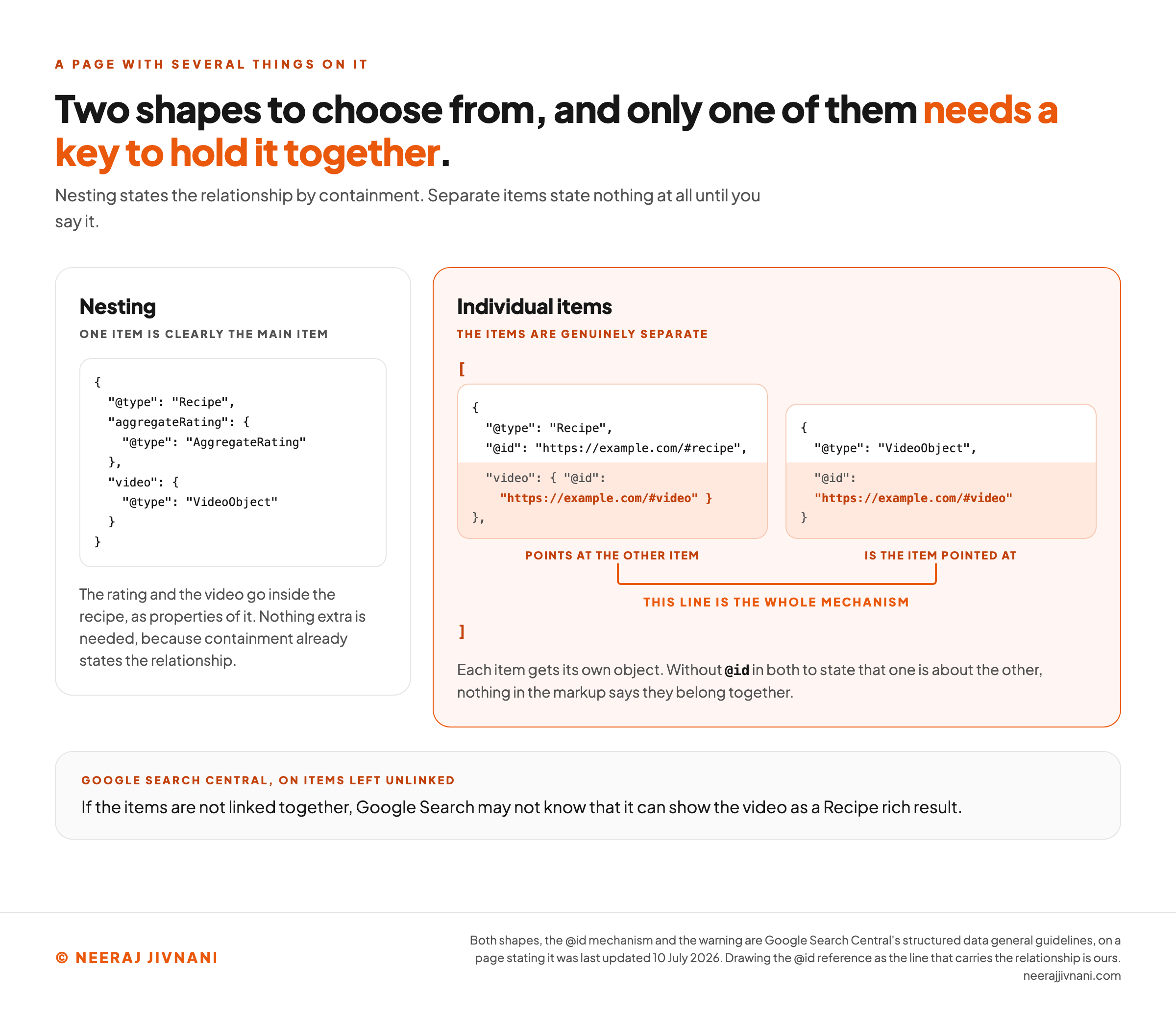
Nesting is for when one thing is clearly the main thing and the others belong to it. The rating and the video go inside the recipe, as properties of it.
Individual items is for when the things are genuinely separate. Each gets its own object, and the objects sit side by side in an array or in separate script tags.
The second shape has a catch, and it is the part that gets skipped.
The Key That Links Two Separate Items
If two separate items belong together, nothing in the markup says so unless you say it.
Google's guidance is specific. Use @id in both items to state that one is about the other.
Its own example is a video and a recipe, and it warns that without that link, Google Search may not know it can show the video as a recipe rich result.
The mechanism is a reference, not a duplicate. An @id uniquely identifies the item it sits on, and an object containing nothing but an @id is a pointer to the item that carries that address, which is how the W3C specification defines it.
So @id is not decoration. It is an address, and one object naming another by its address is how a page made of several blocks reads as a single description rather than a pile of unrelated claims.
Use this chart — embed code and citation
<a href="https://neerajjivnani.com/blog/json-ld/"><img src="https://neerajjivnani.com/infographics/json-ld/two-shapes-one-page.png" alt="Diagram of the two shapes a page carrying more than one item can take in JSON-LD, drawn as two panels with a verdict beneath. The headline states that a page with several things on it has two shapes to choose from and that only one of them needs a key to hold it together. The left panel, headed nesting, shows a single outer object typed as Recipe containing two inner objects drawn inside its braces, one typed as AggregateRating and one typed as VideoObject, with a caption reading that this is the shape for when one item is clearly the main item and the others are properties of it, and that nothing extra is needed because containment already states the relationship. The right panel, highlighted in orange and headed individual items, shows two separate objects side by side inside one array. The first is typed as Recipe, carries an at id of https example.com hash recipe, and carries a video property whose value is an object containing nothing but an at id of https example.com hash video; it is labeled points at the other item. The second is typed as VideoObject and carries an at id of https example.com hash video; it is labeled is the item pointed at. An orange line runs from the first object's reference to the second object's own at id and is labeled this line is the whole mechanism. Its caption reads that each item gets its own object, and that without at id in both to state that one is about the other, nothing in the markup says they belong together. A band across the foot carries Google's own warning that if the items are not linked together, Google Search may not know that it can show the video as a Recipe rich result." width="1200"></a>
<p>Chart: <a href="https://neerajjivnani.com/blog/json-ld/">Neeraj Jivnani</a></p>Neeraj Jivnani, "What JSON-LD Is, How to Read One, and Why a Valid Block Can Do Nothing", neerajjivnani.com, https://neerajjivnani.com/blog/json-ld/Free to republish with a link back to this page.
JSON-LD, Microdata and RDFa
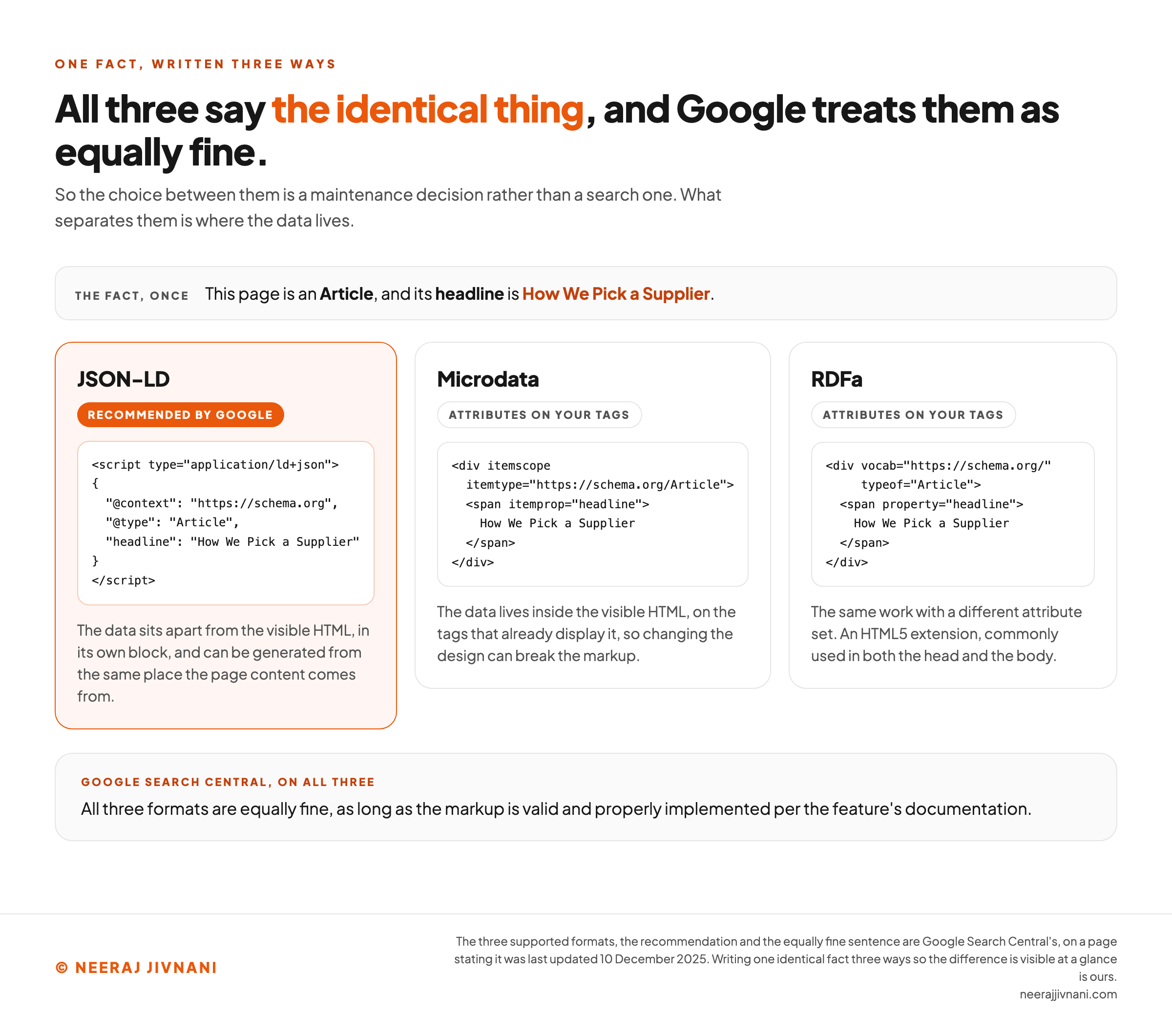
All three express the same thing, and Google treats them as equally fine.
Google's own documentation says all three formats are acceptable as long as the markup is valid and properly implemented, and it recommends JSON-LD on the grounds that it is easiest to maintain.
What separates them is where the data lives.
- Microdata puts the data inside your visible HTML, as attributes on the tags that already display it. The markup and the design become the same object.
- RDFa does the same work with a different attribute set, and is an HTML5 extension rather than a separate specification.
- JSON-LD keeps the data in its own block, away from the visible markup. The page and its description stay two separate things.
That separation is the whole argument for it.
A design change cannot break markup it does not touch, and a block that lives apart can be generated from the same data that renders the page.
The cost is that nothing forces the two to agree. With Microdata, the marked-up text is the text on screen; with JSON-LD, the two can drift apart, and keeping them in step is now your job.
When Microdata Is Still the Right Call
There is one case, and it is a permissions problem rather than a technical one: you cannot edit the head or add a script tag, but you can edit a template that already wraps the content.
Some hosted store builders and older content systems sit in exactly that position.
If yours does, use Microdata and stop worrying about it. The result is identical.
Who Should Be Producing the Block
Whatever already holds your page's data should be the thing producing the block.
Markup generated from that data survives, and markup somebody typed rots. That is the only durable distinction here, and it decides the route.
A price that lives in one database field and reaches both the page and the block stays true by construction. A price typed into a script tag stays true until somebody changes it somewhere else.
The Three Places It Can Be Produced
Google's guidance on generating structured data with JavaScript names the two routes people reach for most: a tag manager, or custom JavaScript in the site's own code. A third exists and is usually the best of them.
- The template that already renders the page. The values are right there, so the block and the page cannot disagree. Best when someone on the team can ship a template change.
- A tag manager. Suits a marketing team that cannot ship template changes. The cost is that the block now lives in a second system, fed by rules that can fall out of step with the page.
- A script in the front-end code. Suits an application whose data arrives from an interface at render time, which is the ordinary case in a modern framework.
None of the three is better for search. The choice is about who has to keep it correct in a year, and it should be decided on that basis rather than on whichever is quickest this afternoon.
Which Documentation to Follow
Read both, for different reasons.
Schema.org defines more than Google Search requires. Google says plainly that its own documentation is definitive for Google Search behavior, rather than schema.org's.
Schema.org tells you what the vocabulary can express. Google's documentation tells you which parts of it Google will do anything with.
Adding a valid property that Google ignores costs nothing and breaks nothing. The expensive mistake runs the other way: assuming that because schema.org lists a property, something will be done with it.
Work out the shape for one page
Which shape does your page need?
Name the things this one page describes, one at a time. The shape follows from what is on it, and only you can see that.
Step one
What does this page describe?
Start with what this page is actually about. A recipe page has the recipe, a video, a rating and a trail of links back up to the section it lives in.
Nothing named yet
There are two shapes, and they are not interchangeable. Which one you need is decided by the page rather than by the format.
When Valid JSON Still Fails
A block can be syntactically perfect and still do nothing. Four causes account for almost all of it, and only the first is obvious.
Case. A type or property whose capitals do not match the vocabulary is not a variant of it. It is a name the vocabulary does not define.
Smart quotes. A word processor silently replaces straight quotes with curly ones, and the two look identical in a document. Paste that in and the parse fails on a character you cannot see.
Trailing commas. One comma between entries, none before a closing brace or bracket. A trailing comma is legal in JavaScript and illegal in JSON, which catches out people who write JavaScript every day.
The Fourth Cause Is Not a JSON Problem
The fourth cause is not a JSON problem at all, and it is why a block that passes a validator can still break the page around it.
HTML reads the script tag before any JSON parser sees it.
So a string value containing something that looks like the end of a script is treated as the end of the script, and the rest of your data spills out as page content.
The W3C specification states the restriction directly. Authors should avoid character sequences inside a script that can be confused with a comment-open, script-open, comment-close or script-close.
Its fix is to escape them as HTML entities, and its own worked example escapes a closing script tag inside a description string. The same treatment applies to the ampersand, the angle brackets, the double quote and the apostrophe.
This only bites when your data contains markup. Which is exactly what happens the first time someone marks up an article body, a product description or a support answer that quotes some HTML.
Two Validators, Two Questions
There are two validators, and the questions they answer are different enough that a green result in one proves nothing about the other.
The Schema Markup Validator, at schema.org, checks the markup. It confirms you are using real types and real properties, in any vocabulary, whether or not a search engine does anything with them.
The Rich Results Test, at Google, checks eligibility. It confirms that a specific Google feature could use what you wrote.
The split is deliberate and dated.
Google announced in December 2020 that its old Structured Data Testing Tool was being refocused and moved to the schema.org community, that its purpose would be syntax and compliance with schema.org standards, and that it would no longer check for Google Search rich result types.
So valid schema.org markup for a type Google has no feature for is correct and will produce no rich result. That is not a bug in either tool, it is the two questions being different.
What Types You Can Use
The supported-types question comes up constantly, and the answer has two halves that get mixed together.
At the format level, there is no list. JSON-LD can express any type in any vocabulary you point @context at. Schema.org is the usual one because search engines share it, but the format itself does not care.
At the search level, the list is much shorter. Only some types produce a visible result, that set is Google's to decide, and it changes.
Conflating the two produces a single wrong answer: that JSON-LD supports a fixed set of types.
It does not. Your platform supports a set, and Google acts on a set, and neither of those is a property of the format.
In practice you can mark up anything true about the page without waiting for permission. The sensible order is to get the types your site already emits right first, because those are the ones already being read.
The Half of JSON-LD That Has Nothing to Do With Search
JSON-LD was not built for search, which is why it looks over-engineered for the job.
It is a W3C standard, and the W3C published JSON-LD 1.1 as a Recommendation in July 2020. Its purpose is linked data: describing things so that separate systems can refer to the same thing and agree they are talking about it.
That is what @id is for. An address for a thing, so two datasets in different places can point at it, which matters far more outside a web page than on one.
The format carries other work with no connection to rankings. W3C's Verifiable Credentials Data Model, a Recommendation since May 2025, is built on it, and a conforming credential is a JSON-LD document.
Knowing this changes one practical thing. The block on your page is readable by anything that reads JSON, not only by a search crawler, and that does not depend on any particular search feature existing.
The Decision Is Smaller Than It Looks
The format decision takes about a minute.
The three formats say the same thing, Google treats them the same way, and JSON-LD wins on the one ground that matters over time: the data sits apart from the page, so the design cannot break it and one source can generate both.
Everything after that is where the work is.
Whether the block parses. Whether it survives being embedded in HTML.
And whether it describes the page it is sitting on rather than the page you wish it were.
Get those three right and the format question never comes up again.