What a Rich Snippet Is, and Which Ones Your Site Can Qualify For
See which rich results your pages can qualify for, where the markup goes, and why a page that passes Google's test can still show nothing.


/ On this page9 sections
A rich snippet is the extra detail Google adds to your search result. A star rating, a price, a photograph of the dish.
Which of them your pages can qualify for is decided by a list Google publishes, and that list is shorter than most advice about it suggests.
Below is the list, the markup that gets you onto it, and the reason a page that passes Google's own test can still show nothing.
What a Rich Snippet Is
A rich snippet is a search result with more in it than the three things every result has.
Those three are the title, the address underneath it, and the couple of lines of description. That is the whole of an ordinary listing.
A rich snippet keeps all three and adds something: stars and a review count, a price, a thumbnail, an event date, a job's salary band.
Search for a recipe, for example, and the results carry cook times and photographs of the dish. Those are rich snippets.
The extra detail does not come from your description. It comes from code on the page that names each piece for what it is: this string is a price, this one is a rating, this date is when the event starts.
One naming note, and it is practical rather than historical. Google's own documentation calls these rich results.
Search its help pages for "rich snippet" and you will find less than you should. Search for "rich result" and you will find the requirements, the gallery and the test.
Rich Snippet, Rich Result, Featured Snippet
Three terms get used as though they were interchangeable, and two of them are.
Rich snippet and rich result mean the same thing. One is the older name and one is the name Google uses now. Both describe your own listing, enhanced, in the position it already held.
A featured snippet is a different mechanism. Google lifts a passage out of a page and promotes it to the top of the results as a direct answer. You do not mark up for one, there are no requirements to meet, and no amount of structured data will produce one.
A search engine results page feature, or SERP feature, is the umbrella term for anything on a results page that is not a plain listing. That includes rich results, and it also includes knowledge panels, image packs and local maps, most of which are not yours and cannot be earned by marking anything up.
The distinction that matters in practice: a rich result is something you can apply for. The other two happen to you.
Which Ones You Can Get
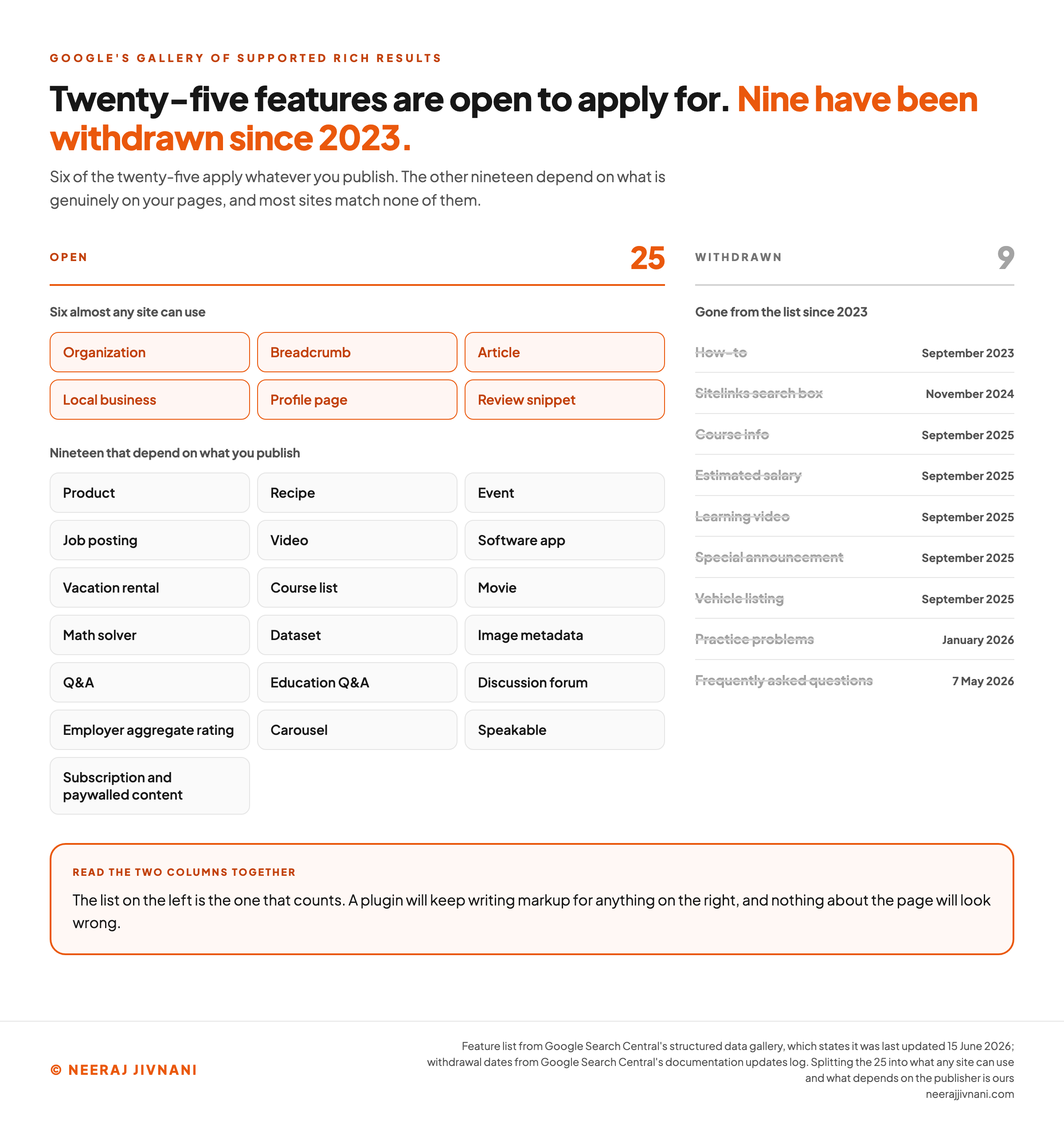
Google's gallery of supported features runs to 25 items, and that is the list that counts.
Start there rather than with the markup. The list decides what is available to you before any effort does.
Schema.org, the shared vocabulary the markup is written in, describes far more than that. Google's own guidance is to treat its documentation as definitive for what Google Search does, rather than schema.org's.
The list also gets shorter.
Google withdrew the how-to result in September 2023 and the sitelinks search box in November 2024.
In September 2025 it removed the documentation for course info, estimated salary, learning video, special announcement and vehicle listing markup, saying those types are no longer shown in Google Search results.
Practice problems went the same way, deprecated in November 2025 and gone from the documentation in January 2026. The frequently asked questions result stopped appearing on 7 May 2026.
That churn is why a plugin's list of schema types and Google's list of rich results are not the same object. A plugin will keep writing markup for a feature switched off two years ago, and nothing about the page will look wrong.
So the first thing worth doing is boring and takes ten minutes: open the gallery, read the 25, and find your row.
The Ones Almost Any Site Can Use
Six of them do not depend on what you sell, though three carry a condition worth reading before you claim one.
- Organization. Your name, logo, contact details and social profiles, declared once and used across your brand results. The closest thing on the list to a default.
- Breadcrumb. Replaces the raw address under your title with the path a reader would have walked to reach the page. Cheap, and the most visible change most sites will get.
- Article. Publisher, headline and a thumbnail for blog posts and news. If you publish anything on a schedule, this is yours.
- Local business. Hours, address, phone number and directions. Only if you have somewhere a person can go.
- Profile page. Identifies who wrote something, which matters on sites where the author is part of the reason to trust the page.
- Review snippet. The stars. It attaches to a fixed set of content types, and the exclusion worth knowing before you build anything is narrow: where a business controls the reviews about itself, its Local business or Organization markup is ineligible for the star feature.
The Ones That Depend on What You Publish
The rest of the list is conditional, and most sites match none of it.
- Product, with price, availability and rating. The richer shopping placements draw on the same markup.
- Recipe, with cook time, calories and the picture.
- Event, with date and venue, for events the public can book and attend in a physical place.
- Job posting, for a site that lists its own vacancies.
- Video, including the key moments a viewer can jump to.
- Software app, with platform, rating and price.
- Vacation rental, course list, movie, math solver, dataset, image metadata, Q&A, education Q&A, discussion forum, employer aggregate rating, carousel, speakable, and subscription and paywalled content.
Read that second list honestly. A consultancy, an agency, a law firm, a bookkeeping practice: none of them has a row in it.
Find your row before you write any markup
Work one page at a time, and answer for what a visitor actually sees on it. Mark up only what the page genuinely shows, because that is the rule that voids everything else you did.
Six almost any site can use
These six do not depend on what you sell, though three carry a condition worth reading before you claim one. Claim the ones this page genuinely carries.
Six that depend on what you publish
The rest of the list is conditional, and most sites match none of it. Claim one only if the page genuinely shows what its description names.
Thirteen more, to finish the twenty-five
Read this second list honestly. A consultancy, an agency, a local trade, a software company selling one product: none of them has a row in it.
Nine that are no longer on the list
A plugin will keep writing markup for every one of these. Claim any that describe this page, and see what comes back.
Nothing claimed yet. Open the list above, read the twenty-five, and stop at the rows this page genuinely has. It takes about ten minutes and it is the first thing worth doing.
Use this chart — embed code and citation
<a href="https://neerajjivnani.com/blog/rich-snippets/"><img src="https://neerajjivnani.com/infographics/rich-snippets/the-list-and-the-losses.png" alt="Two-part diagram of Google's supported rich result features. On the left, the 25 features in its structured data gallery, split into six that almost any site can use (organization, breadcrumb, article, local business, profile page, review snippet) and nineteen that depend on what the site publishes (product, recipe, event, job posting, video, software app, vacation rental, course list, movie, math solver, dataset, image metadata, Q and A, education Q and A, discussion forum, employer aggregate rating, carousel, speakable, and subscription and paywalled content). On the right, a dated column of features Google has withdrawn since 2023, each struck through with the month it went: how-to in September 2023, the sitelinks search box in November 2024, course info and estimated salary and learning video and special announcement and vehicle listing in September 2025, practice problems in January 2026, and the frequently asked questions result on 7 May 2026. A footer band reads that the list on the left is the one that counts, and that a plugin will keep writing markup for anything on the right and nothing about the page will look wrong." width="1200"></a>
<p>Chart: <a href="https://neerajjivnani.com/blog/rich-snippets/">Neeraj Jivnani</a></p>Neeraj Jivnani, "What a Rich Snippet Is, and Which Ones Your Site Can Qualify For", neerajjivnani.com, https://neerajjivnani.com/blog/rich-snippets/Free to republish with a link back to this page.
Where the Extra Detail Comes From
The extra detail comes from a block of labeled code on the page, and that code is called structured data.
The rich result is the output, and it is Google's to decide.
Keeping those two apart saves a lot of confusion later. You control the input completely, and you do not control the output at all.
Google supports three formats and recommends JSON-LD.
It is a block of labeled data in a script tag, sitting apart from your visible HTML rather than being woven through it.
``html
<script type="application/ld+json">
{
"@context": "https://schema.org",
"@type": "Organization",
"name": "Example Co",
"url": "https://example.com/",
"logo": "https://example.com/logo.png"
}
</script>
``
That block goes in the head or the body of the page it describes, and either is fine.
Two rules about where it lives are easy to get wrong.
Put the markup on the page it is about, not on a hub page that links to it. And if the same content sits at more than one address, put the same markup on every copy rather than only on the preferred one.
Putting It on a Page
Three moves, in order: pick a type off Google's list, get the markup onto the page, and make sure the page shows what the markup claims.
Nothing here needs a developer for the common types. Putting valid markup on a page is a plugin field for most sites, and a twenty-line block for the rest.
Let the Platform Write It
Check what you already have before you write anything.
Most content management systems produce some of this already. WordPress with almost any search engine optimization plugin, Shopify themes, Wix and Squarespace all emit Organization and Article markup without being asked, and often more.
A plugin's schema panel is the right place to start for Organization, Article, Local business, Breadcrumb and Product. You fill in fields and it writes valid JSON-LD.
What a plugin will not do is tell you that the type you selected no longer produces anything.
Writing It Yourself
Hand-writing is for the types your platform does not cover, and for sites where the data is already in a database.
The pattern is the same either way: open Google's page for the type you want, take its required properties, fill them from what is genuinely on the page, and leave the optional ones alone until the required ones are right.
Completeness beats coverage here, and Google says so in its guidelines: fewer complete and accurate properties are worth more than every possible property filled in badly.
One thing to avoid at the start: do not paste a template and leave the example values in it. A page claiming to be a product called Example Product has told Google something untrue about itself.
Mark Up What the Page Shows
Marking up content the visitor cannot see is the rule that voids everything else, and it is the one most often broken.
The markup has to describe what is on the page. If the JSON-LD names a performer, the page has to name that performer.
If it declares a four-star average, the page has to show the reviews behind it.
Marking up a rating the page never displays, or stock you do not have, is not a shortcut.
It is what makes correct-looking markup produce nothing, and at the far end it earns a manual action.
Describe the page. Do not improve it.
Testing It
Testing is one tool and two minutes. Google's Rich Results Test takes the page's address and reports which rich result types it found, and whether they are valid.
You can paste raw code instead of an address, which is how you check a block before it goes near the site.
Google's help page for the tool lists 31 supported types in full. It defaults to testing as a smartphone, which is the right default and occasionally surprising if your mobile template differs from your desktop one.
It needs to be able to reach the page as an anonymous visitor. Anything behind a login, a firewall or a robots.txt rule cannot be tested, because the tool fetches the page as Google rather than as you.
Two smaller things are worth knowing. Test results are saved for about 90 days, and the share link works for anyone who has it without needing permission, so a link to a staging test is a link anybody can open.
What the Test Does Not Check
A green result answers a narrow question: does this parse, and are the required properties present.
It does not check the things that decide whether a rich result appears.
Google divides its guidelines into technical ones, which the test catches most of, and quality ones, which it says are not easily testable by an automated tool. Breaking a quality guideline can stop syntactically correct markup from ever being displayed.
There is also one place where the tool is more forgiving than the real world. It ignores comments inside a JSON-LD block, and the JSON-LD standard does not, which Google's own documentation warns might cause errors in actual usage.
So a block with a helpful // remember to update this in it can pass the test cleanly and break everywhere else. Strip comments before the code ships.
Why a Valid Page Still Shows Nothing
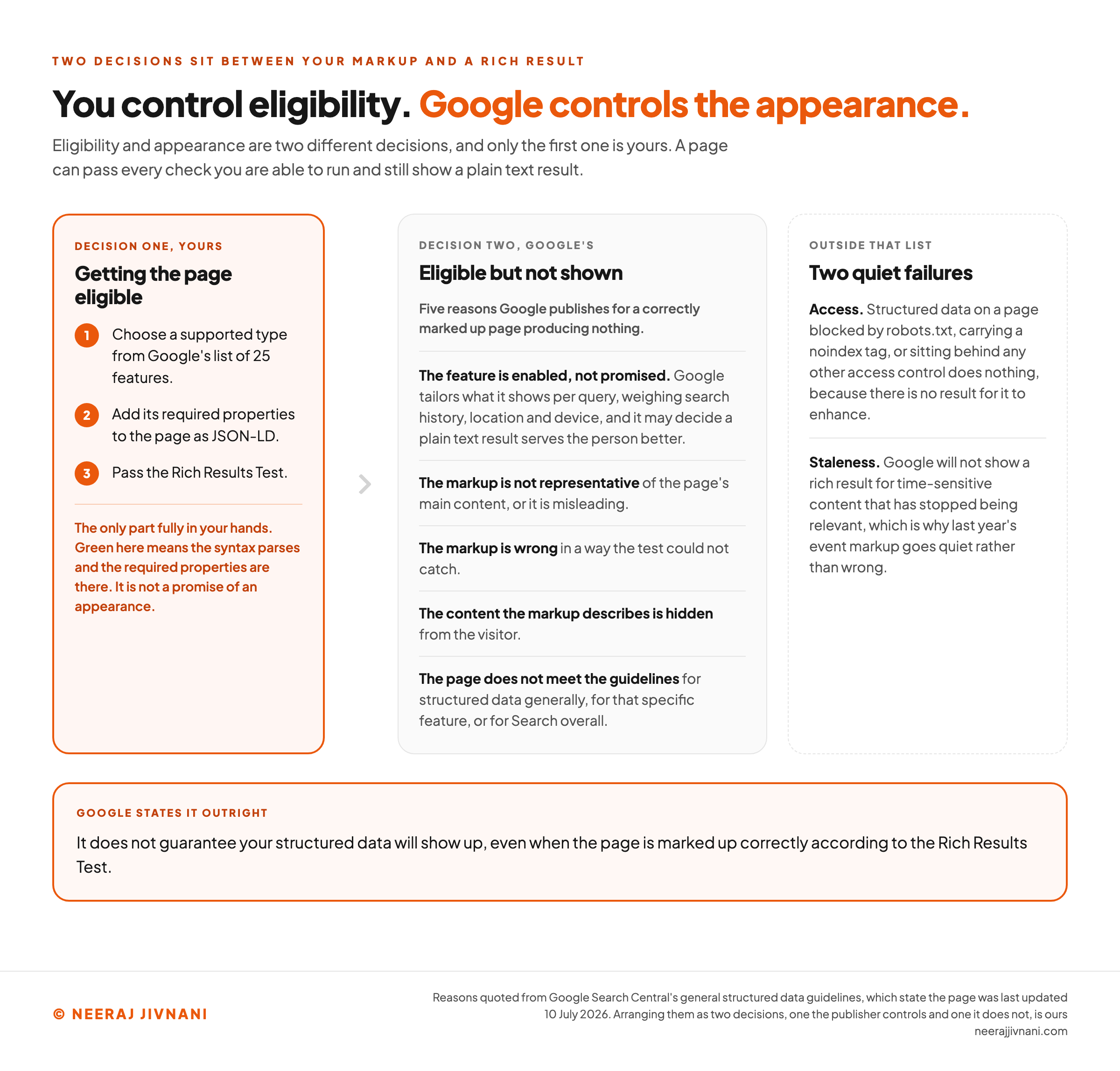
Because eligibility and appearance are two different decisions, and only the first one is yours.
Google states this outright: it does not guarantee your structured data will show up, even when the page is marked up correctly according to the Rich Results Test. Then it names why.
- The feature is enabled, not promised. Google tailors what it shows per query, weighing search history, location and device, and it may decide a plain text result serves the person better.
- The markup is not representative of the page's main content, or it is misleading.
- The markup is wrong in a way the test could not catch.
- The content the markup describes is hidden from the visitor.
- The page does not meet the guidelines for structured data generally, for that specific feature, or for Search overall.
Two more causes sit outside that list and account for a lot of quiet failures.
Access is one. Structured data on a page blocked by robots.txt, carrying a noindex tag, or sitting behind any other access control does nothing, because there is no result for it to enhance.
Staleness is the other. Google will not show a rich result for time-sensitive content that has stopped being relevant, which is why last year's event markup goes quiet rather than wrong.
Where Breakage Shows Up
Search Console has a rich result report for each type it finds on your site, and that is where a problem surfaces after deployment rather than before.
This is worth checking on a schedule rather than once. Test during development and read the reports afterwards, because pages break after they ship through templating and serving issues, which is Google's own advice.
The failure looks the same every time: a template change ships, a required property stops being written, and the rich results fade out over the following weeks with nothing on the page looking any different.
What They Are Worth
Not a ranking. A structured data manual action costs a page its eligibility for a rich result and does not change how it ranks in Google web search, which Google's guidelines state plainly in the context of penalties.
Read that the right way round. Even the penalty is scoped to the rich result, which is where the whole feature lives and where its effects stop.
What it can change is the clickthrough rate of a position you already hold.
Where the Numbers Come From
Four case studies sit in Google's own introduction to structured data, and they are the source of the figures below.
Rotten Tomatoes measured a 25% higher clickthrough rate across 100,000 marked-up pages. Nestle measured 82% higher on pages shown as rich results.
Food Network reported a 35% increase in visits after converting 80% of its pages, and Rakuten found 1.5 times the time on page.
Read them for what they are: a vendor's published customer results rather than an independent study. Treat the size of the numbers accordingly.
Our own read is narrower and easier to act on.
A rich result makes a listing you already have easier to choose. So it is worth most where somebody is comparing several similar options, and least where they are looking for you by name.
Set against that, the cost is usually an afternoon and a plugin field.
For the six types almost any site can use, a modest and uncertain gain against an afternoon is still a good trade. For a type that needs a data feed and ongoing maintenance, it is a project, and it should be justified like one.
Use this chart — embed code and citation
<a href="https://neerajjivnani.com/blog/rich-snippets/"><img src="https://neerajjivnani.com/infographics/rich-snippets/eligible-is-not-shown.png" alt="Flow diagram of the two decisions between markup and a rich result appearing. The first column is what the site controls: choose a supported type, add the required properties, and pass the Rich Results Test, marked as the only part fully in the publisher's hands, with a note that a green test means the syntax parses and the required properties are there and is not a promise of an appearance. The second column is the gap, labeled eligible but not shown, listing Google's five published reasons a correctly marked up page produces nothing: the feature is enabled rather than promised and Google tailors results per query; the markup is not representative of the page's main content or is misleading; the markup is wrong in a way the test could not catch; the content described is hidden from the visitor; and the page does not meet the guidelines for structured data, the feature, or Search overall. A third column adds two causes outside that list: a page blocked by robots.txt, a noindex tag or any other access control, which produces nothing because there is no result to enhance, and time-sensitive content that has gone stale. A footer band carries Google's own sentence that it does not guarantee structured data will show up even when the page is marked up correctly according to the Rich Results Test." width="1200"></a>
<p>Chart: <a href="https://neerajjivnani.com/blog/rich-snippets/">Neeraj Jivnani</a></p>Neeraj Jivnani, "What a Rich Snippet Is, and Which Ones Your Site Can Qualify For", neerajjivnani.com, https://neerajjivnani.com/blog/rich-snippets/Free to republish with a link back to this page.
The Questions That Keep Coming Up
Four questions come with this subject, and they are short to answer.
What is a rich snippet? A search result with more in it than the usual title, address and description, built from labeled code on your page.
How do you get one? Pick a type from Google's list of 25 supported features, add its required properties to the page as JSON-LD, make sure the page visibly shows what the markup claims, and check it in the Rich Results Test.
Can you give an example? A star rating and review count sitting under a product listing. Or a recipe result carrying cook time, calories and a photograph of the dish.
How do you test one? Paste the page's address, or the raw code, into Google's Rich Results Test. It reports which types it found and whether the required properties are there.
Most Sites Have One or Two of These
The honest answer for a great many sites is Organization, Breadcrumb, and nothing else.
That is not a failure to optimize. Twenty-five features exist because Google has twenty-five kinds of result to build, and a consultancy is not a recipe, a job board or a shop.
The work worth doing is short. Find your rows on the list, get the required properties right on the pages that genuinely have that content, check them, and then check them again in three months when a template change has quietly dropped one.
The work not worth doing is everything that follows from treating this as a lever.
It is not one. All it does is make a result you already earned easier to pick out.