What FAQ Schema Is Worth Now, and What to Do With Yours
The markup no longer changes how your page looks in search results. Find out what it is still worth, and what to do about the block already on your site.

/ On this page10 sections
FAQ schema no longer changes how your page looks in a Google result. Nothing you add to the markup will produce anything a searcher can see.
What it is still worth is small, and small is not the same as nothing, so it is worth saying precisely.
The decision about the block already sitting on your site takes about ten minutes, which happens to be the right budget for it.
What FAQ Schema Is
FAQ schema labels a list of frequently asked questions and their answers so that a machine can tell which part is the question and which part is the answer.
It changes nothing a visitor sees.
The questions and answers are already on the page in ordinary HTML. The markup sits beside them in a separate block of code, describing them.
Say a delivery page answers "How long does delivery take?" in a line of text underneath. The markup names that line as the question and the sentence below it as the answer, and both stay exactly where they were.
The type itself belongs to schema.org, the shared vocabulary that search engines and other software agree on. Its definition is one line: a FAQPage is a web page presenting one or more frequently asked questions.
That ownership explains something that confuses people later on.
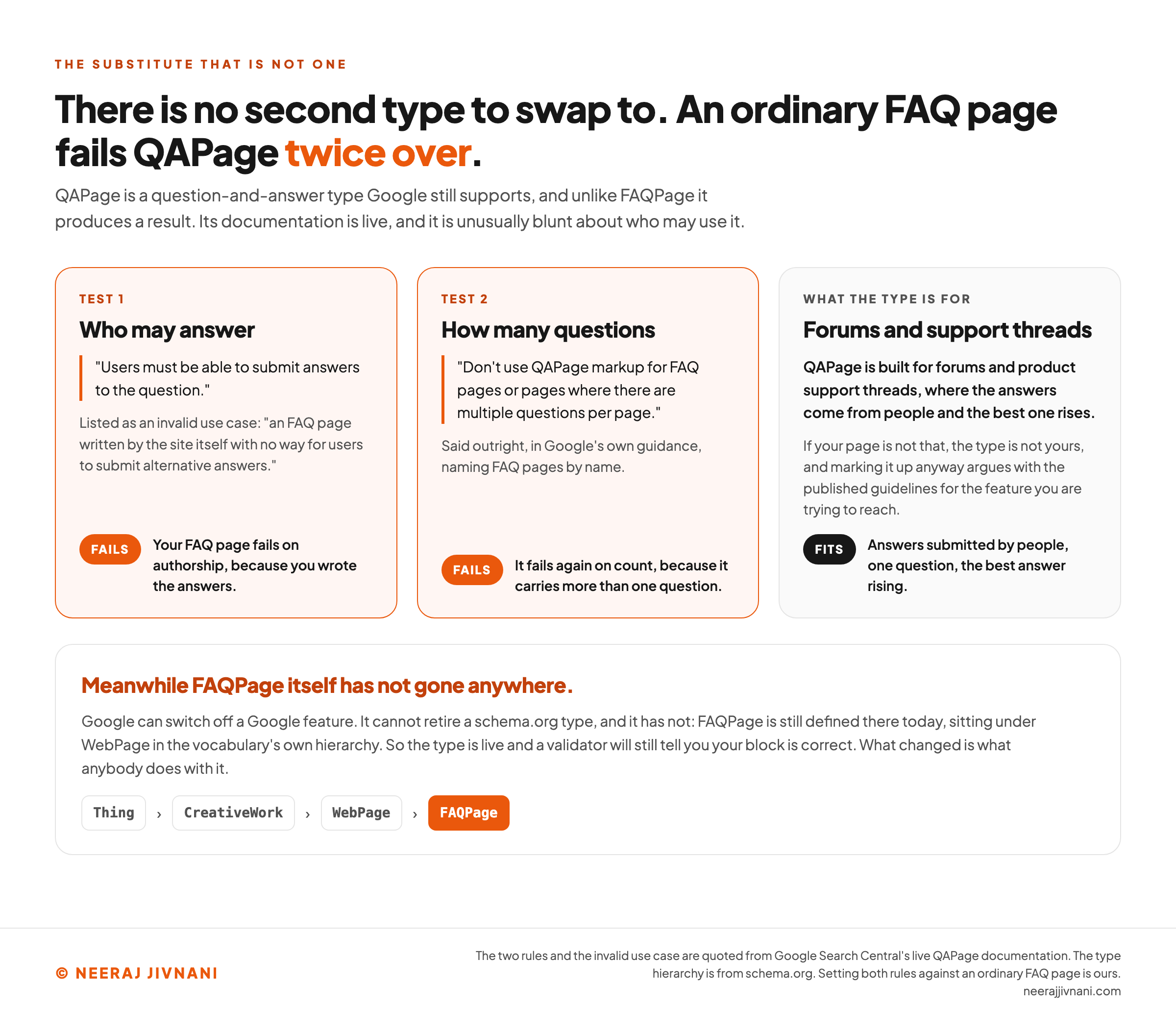
Google can switch off a Google feature. It cannot retire a schema.org type, and it has not: FAQPage is still defined there today, sitting under WebPage in the vocabulary's own hierarchy.
So the type is live and a validator will still tell you your block is correct. What changed is what anybody does with it.
What It Does in Google Now
Nothing you can see. There is no FAQ rich result in Google Search, for any site, in any country.
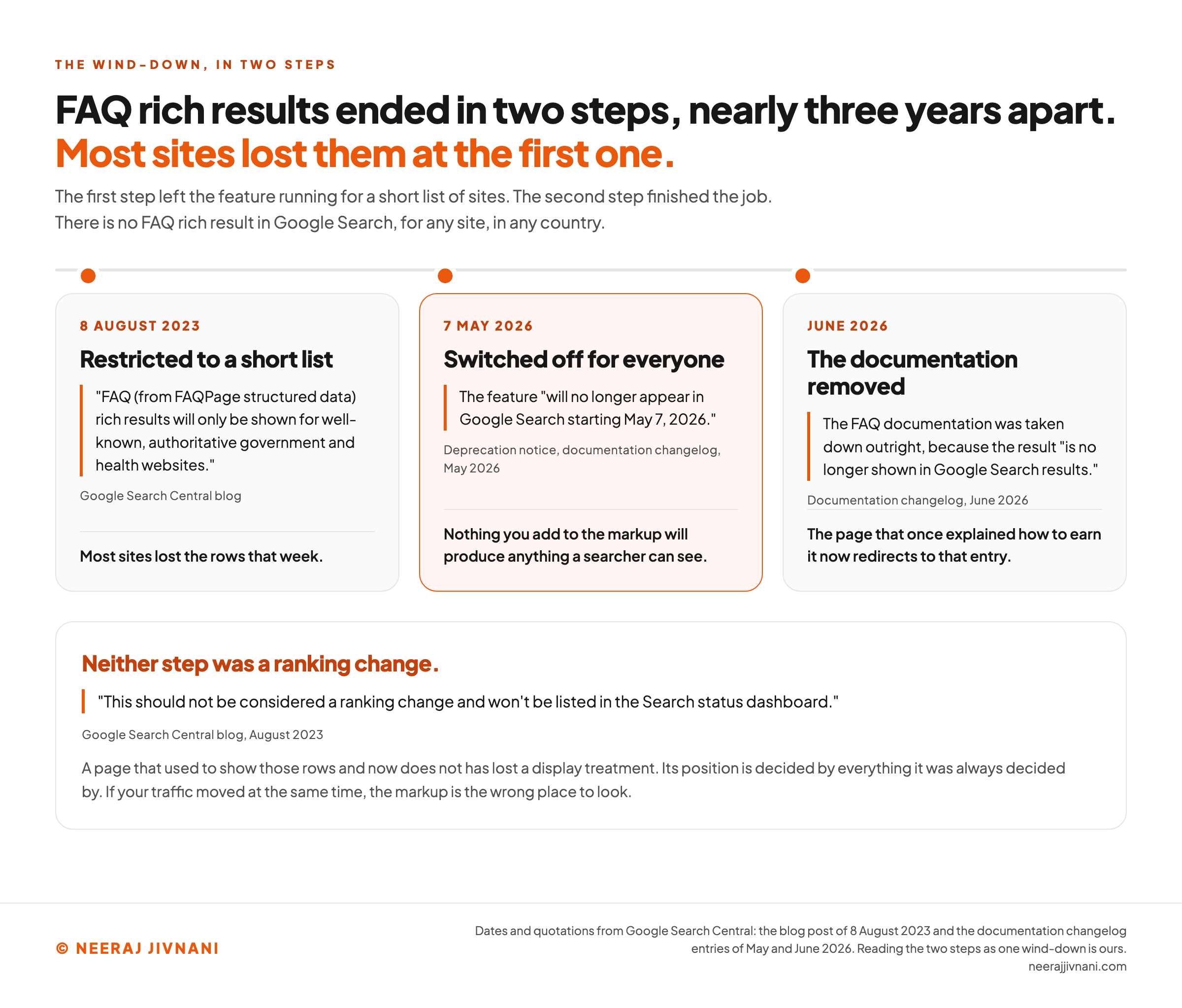
The wind-down happened in two steps, and they were nearly three years apart.
The first was announced on 8 August 2023, when Google wrote that "FAQ (from FAQPage structured data) rich results will only be shown for well-known, authoritative government and health websites." Most sites lost the rows that week.
The second step finished the job.
Google's documentation changelog records a deprecation notice added in May 2026. The reason it gives is flat: the feature "will no longer appear in Google Search starting May 7, 2026."
The following month the same changelog logged the FAQ documentation being removed outright, because the result "is no longer shown in Google Search results." The page that once explained how to earn it now redirects to that entry.
Losing the Feature Was Not a Ranking Change
Losing a visible feature feels like losing rank, and on this one the two are separable.
The 2023 announcement addresses it directly: the change "should not be considered a ranking change and won't be listed in the Search status dashboard."
So a page that used to show those rows and now does not has lost a display treatment. Its position is decided by everything it was always decided by.
If your traffic moved at the same time, the markup is the wrong place to look.
Use this chart — embed code and citation
<a href="https://neerajjivnani.com/blog/faq-schema/"><img src="https://neerajjivnani.com/infographics/faq-schema/two-steps-nearly-three-years-apart.png" alt="A timeline of three cards headed The Wind-Down, In Two Steps, showing that most sites lost FAQ rich results in 2023 rather than 2026. Two of the cards are the two steps of the wind-down and the third records the documentation coming down afterwards. The first card, dated 8 August 2023 and headed Restricted to a short list, quotes Google Search Central's blog saying that FAQ rich results from FAQPage structured data will only be shown for well-known, authoritative government and health websites, and its foot notes that most sites lost the rows that week. The second card, highlighted in orange and dated 7 May 2026, is headed Switched off for everyone and quotes the deprecation notice in Google's documentation changelog saying the feature will no longer appear in Google Search starting May 7, 2026, with a foot noting that nothing you add to the markup will produce anything a searcher can see. The third card, dated June 2026 and headed The documentation removed, records the same changelog logging the FAQ documentation taken down because the result is no longer shown in Google Search results, and notes that the page which once explained how to earn it now redirects to that entry. A band across the foot reads that neither step was a ranking change, quoting Google that this should not be considered a ranking change and won't be listed in the Search status dashboard, and adding that a page which used to show those rows has lost a display treatment while its position is decided by everything it was always decided by." width="1200"></a>
<p>Chart: <a href="https://neerajjivnani.com/blog/faq-schema/">Neeraj Jivnani</a></p>Neeraj Jivnani, "What FAQ Schema Is Worth Now, and What to Do With Yours", neerajjivnani.com, https://neerajjivnani.com/blog/faq-schema/Free to republish with a link back to this page.
What It Still Does
Three things, and they are all small.
- It is still a machine-readable label. Anything reading your page can tell, without guessing, that this text is a question and that text is its answer.
- It still validates. Paste a block into the Schema Markup Validator and you get a clean report, because the type exists and your syntax is either right or wrong independently of what Google chooses to display.
- It still costs nothing to leave in place. That is not nothing when the alternative is a deletion project across a few hundred pages.
Here is what it does not do.
It does not produce a search feature, and it does not make an otherwise unhelpful page more likely to be found.
A label is only worth what the thing reading it does with it. So treat "it helps machines understand your content" the way you would treat any benefit stated without a machine named and an outcome attached.
FAQ Schema and AI Answers
There is one published measurement on this, it is suggestive, and it is weaker than the headline reading of it.
A 2026 study by Peter Schanbacher in the Journal of Advance Research in Business, Management and Accounting looked at 1,508 real estate agents in Germany. It asked which website features predicted whether ChatGPT could describe the business.
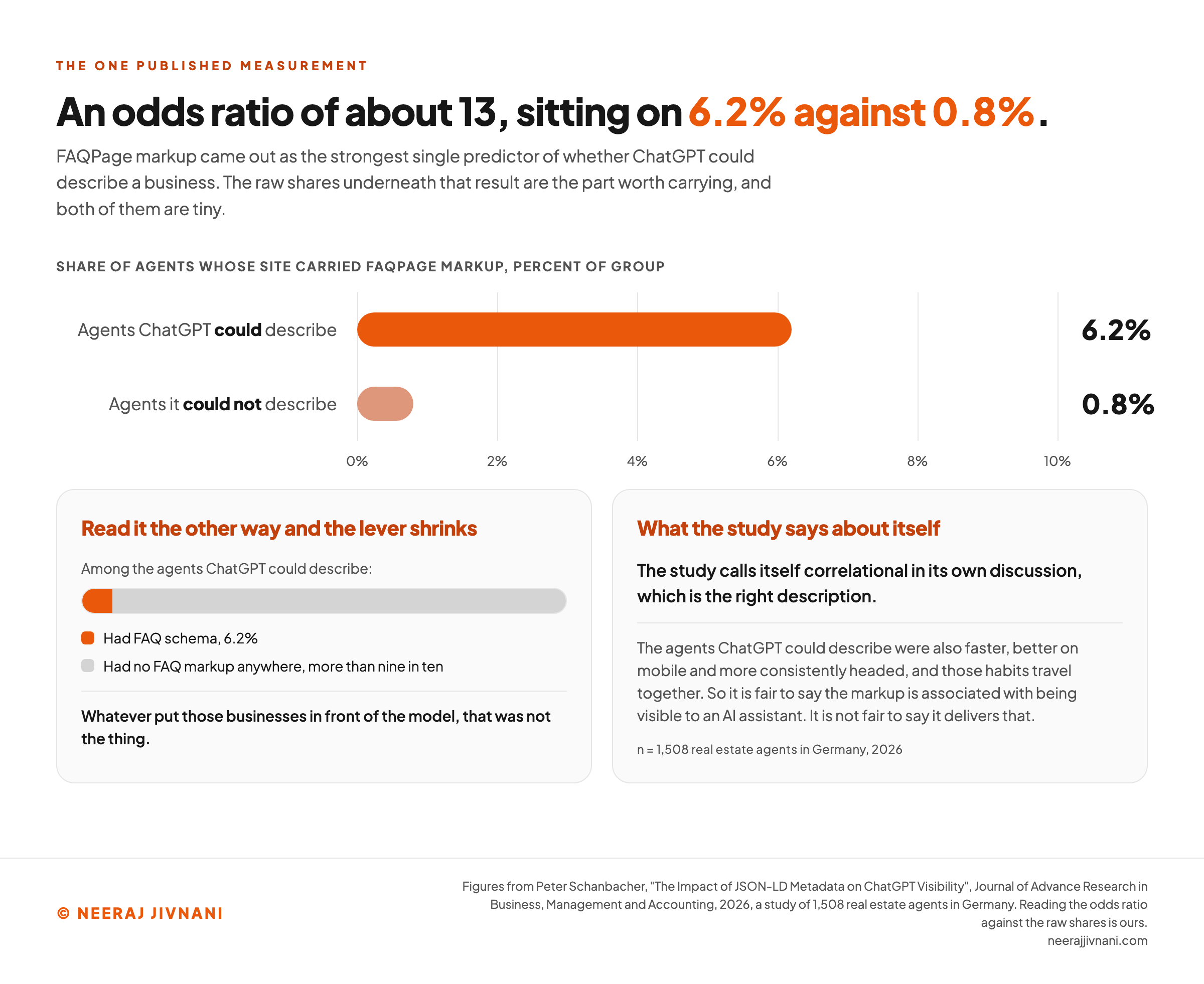
FAQPage markup came out as the strongest single predictor in the model, at an odds ratio of about 13.
That sounds decisive. The raw shares underneath it are the part worth carrying.
Among the agents ChatGPT could describe, 6.2% had FAQ schema on their site, against 0.8% of the ones it could not. Both numbers are tiny.
Read it the other way and the lever shrinks.
More than nine in ten of the businesses the model knew about had no FAQ markup anywhere. Whatever put them in front of it, that was not the thing.
The study calls itself correlational in its own discussion, which is the right description. The agents ChatGPT could describe were also faster, better on mobile and more consistently headed, and those habits travel together.
So it is fair to say the markup is associated with being visible to an AI assistant.
It is not fair to say it delivers that. What a language model can definitely read is the visible question and the visible answer, in the page text, where they have to be anyway.
Use this chart — embed code and citation
<a href="https://neerajjivnani.com/blog/faq-schema/"><img src="https://neerajjivnani.com/infographics/faq-schema/an-odds-ratio-of-13-on-tiny-shares.png" alt="A bar chart and two panels reading one study's headline result against the shares underneath it. The chart is titled share of agents whose site carried FAQPage markup, percent of group, on a scale running from zero to ten percent. The agents ChatGPT could describe sit at 6.2 percent and the agents it could not describe sit at 0.8 percent, so both bars are short and the whole gap between them is under six percentage points. The left panel, headed read it the other way and the lever shrinks, shows one proportion bar for the agents ChatGPT could describe: a small orange segment for the 6.2 percent that had FAQ schema, and a long grey segment for the more than nine in ten that had no FAQ markup anywhere, under a line reading that whatever put those businesses in front of the model, that was not the thing. The right panel, headed what the study says about itself, records that the study calls itself correlational in its own discussion, that the agents ChatGPT could describe were also faster, better on mobile and more consistently headed, and that it is fair to say the markup is associated with being visible to an AI assistant but not fair to say it delivers that. The sample is 1,508 real estate agents in Germany, 2026." width="1200"></a>
<p>Chart: <a href="https://neerajjivnani.com/blog/faq-schema/">Neeraj Jivnani</a></p>Neeraj Jivnani, "What FAQ Schema Is Worth Now, and What to Do With Yours", neerajjivnani.com, https://neerajjivnani.com/blog/faq-schema/Free to republish with a link back to this page.
Why QAPage Is Not a Substitute
QAPage is where people look next, and it is explicitly closed to an ordinary FAQ page.
There is no second type to swap to.
QAPage is a question-and-answer type Google still supports, and unlike FAQPage it produces a result. Its documentation is live, and it is unusually blunt about who may use it.
The rule is that users must be able to submit answers to the question.
Google's guidance lists "an FAQ page written by the site itself with no way for users to submit alternative answers" as an invalid use case. It then says it outright: "Don't use QAPage markup for FAQ pages or pages where there are multiple questions per page."
That closes both routes at once. An ordinary FAQ page fails on authorship, because you wrote the answers, and fails again on count, because it carries more than one question.
QAPage is built for forums and product support threads, where the answers come from people and the best one rises.
If your page is not that, the type is not yours, and marking it up anyway argues with the published guidelines for the feature you are trying to reach. Knowing that before you start saves an afternoon.
Use this chart — embed code and citation
<a href="https://neerajjivnani.com/blog/faq-schema/"><img src="https://neerajjivnani.com/infographics/faq-schema/qapage-fails-an-faq-page-twice.png" alt="Three cards testing an ordinary FAQ page against Google's published rules for QAPage, where the page fails both tests. The first card, test one, is headed who may answer and quotes Google's rule that users must be able to submit answers to the question, alongside the invalid use case naming an FAQ page written by the site itself with no way for users to submit alternative answers; its badge reads fails, because you wrote the answers. The second card, test two, is headed how many questions and quotes Google saying don't use QAPage markup for FAQ pages or pages where there are multiple questions per page; its badge also reads fails, because the page carries more than one question. The third card, in grey, describes what the type is actually for, forums and product support threads where the answers come from people and the best one rises, and its badge reads fits. A band across the foot notes that FAQPage itself has not gone anywhere, showing the schema.org hierarchy Thing, CreativeWork, WebPage, FAQPage, and stating that Google can switch off a Google feature but cannot retire a schema.org type." width="1200"></a>
<p>Chart: <a href="https://neerajjivnani.com/blog/faq-schema/">Neeraj Jivnani</a></p>Neeraj Jivnani, "What FAQ Schema Is Worth Now, and What to Do With Yours", neerajjivnani.com, https://neerajjivnani.com/blog/faq-schema/Free to republish with a link back to this page.
What the Markup Actually Is
Four pieces of markup, and once you have seen them the rest is typing.
The page is a FAQPage. Its mainEntity holds the list of questions.
Each item is a Question with a name, which is the question text, and an acceptedAnswer, which is an Answer with a text.
The four properties are mainEntity, name, acceptedAnswer and text. Everything else is the type names holding them.
It is written in JSON-LD and goes in a script tag. That is one of three formats the same vocabulary can be written in, and the one search engines recommend.
``html
<script type="application/ld+json">
{
"@context": "https://schema.org",
"@type": "FAQPage",
"mainEntity": [{
"@type": "Question",
"name": "How long does delivery take?",
"acceptedAnswer": {
"@type": "Answer",
"text": "Two to four business days."
}
}]
}
</script>
``
One note on the word "required", which is still attached to these four properties in a lot of tool documentation.
In Google's structured data pages, a required property is one you must include "for your content to be eligible for display as a rich result."
Requirements of that kind are requirements for eligibility. With nothing left to be eligible for, what remains is whether the block is well-formed, and that is a question for a validator rather than for a guideline.
The Markup Already on Your Site
The markup on your site was probably put there by a plugin rather than by a person, and that is the first thing to establish.
It matters more than the removal question, because it decides whether removing anything would even work.
Most mainstream search plugins, and several theme-level FAQ blocks, emit FAQPage markup on their own, from whatever accordion you built in the editor. Nobody has to switch it on.
Finding Out What Is There
Open one page that has a questions section, view the source, and search it for FAQPage.
If it appears and you never wrote it, a plugin is writing it, and it will keep writing it after any manual deletion. The setting, not the page, is where that gets turned off.
When to Leave It, and the Two Times Not To
Leave it alone. Google's guidance on exactly this point is unambiguous: "While you can drop this structured data from your site, there's no need to proactively remove it," because "structured data that's not being used does not cause problems for Search."
Two cases are worth acting on, and neither of them is about the retirement.
Remove it where a hand-written block no longer matches the page. A plugin regenerates its block from whatever is in the editor, so that one stays in step on its own. A block somebody pasted in by hand does not.
A pasted block still describing prices or a policy you changed last year is a machine-readable statement that has become false, and the structured data guidelines say plainly that you should not mark up content that is not visible to readers of the page.
Remove it where the questions were written for the feature rather than for a person.
Some FAQ blocks exist entirely because somebody wanted the rows, and they read like it. Those were weak pages while the rows were still showing.
Everything else stays. A deletion project across every page on a site, to remove something that costs nothing, is the most expensive possible answer to this question.
What your page contains after the next render
Who wrote the block decides what your next move actually does. Open one page that has a questions section, view the source, search it for FAQPage, and start from what came back.
What the search returned
A plugin is writing it, and it will keep writing it.
- This is the answerLeave it alone
FAQPage (the plugin's)
Google's guidance on exactly this point is unambiguous: there is no need to proactively remove it, because structured data that is not being used does not cause problems for Search.
- Does nothingDelete the block in the page editor
FAQPage (the plugin's)
The block comes back. A plugin will keep writing it after any manual deletion, so the source contains exactly what it contained before you started.
- Costs you somethingPaste a block of your own in as well
FAQPage (the plugin's)
FAQPage (yours)
Two FAQPage declarations on one page, which is a conflict rather than a doubling. This is the one way this markup can actively cost you something.
- It worksTurn the plugin's setting off
no FAQPage in the source
This is the one move that removes it, because the setting, not the page, is where that gets turned off. It also buys you nothing, since leaving it cost you nothing.
And the block itself, against the page today
Then leave it alone.
Google's guidance on exactly this point is unambiguous: while you can drop this structured data from your site, there is no need to proactively remove it, because structured data that is not being used does not cause problems for Search. It also has no visible effect, which is the other half of the same sentence.
In a Google result, every row above reads the same
FAQ schema no longer changes how your page looks in a Google result, and nothing you add to the markup will produce anything a searcher can see. That line does not move for any combination on this panel, which is why ten minutes is the right budget for the whole question.
If You Are Adding It Now
The case for adding it today is thin but not zero: you get a clean label on content a machine may read, and it takes ten minutes.
Spend them in this order.
- Check whether your site already writes it. This is first because it is the only step that can cause damage if you skip it. A hand-pasted block on top of a plugin's gives the page two
FAQPagedeclarations, which is a conflict rather than a doubling. - Write the questions and answers on the page first. Real ones, visible, in the HTML. The markup describes what is there; it is not a place to put content you did not publish.
- Generate the block rather than typing it. Any of the free generators will produce correct JSON-LD from a list of questions, and hand-written JSON is where the bracket errors come from.
- Decide who owns the block before you paste it. A hand-written block does not update itself. The moment somebody edits an answer in the page editor, the visible text and the markup disagree, and nothing warns anybody. If no one is going to keep the two in step, a plugin that generates the block from the page is the safer choice than a better-written block nobody maintains.
- Validate it once. A validator will tell you whether the syntax is right, which is now the only thing it can tell you.
How Many Questions, and What to Skip
Keep it small. A short page carries three to five questions comfortably and a long guide can carry more, but a list running past ten is usually a page that needed restructuring rather than marking up.
One step is worth dropping from the routine: opening Search Console afterwards and requesting indexing so the markup gets picked up faster.
That was a way of making a result appear sooner. There is no longer a result to wait for, and the page will be recrawled on its own schedule like every other page.
What People Still Ask About FAQ Schema
The questions that follow this one sort into two kinds: what the thing is, and whether it is over.
Is FAQ schema still relevant? Not for search visibility. It produces no rich result for any site, and when Google restricted the feature it said in writing that this was not a ranking change. It is still a valid schema.org type and still a clean label for machine readers, which is a much smaller claim than the one it used to carry.
What are the three types of schema? The question usually means the three formats rather than three kinds of content: JSON-LD, Microdata and RDFa. All three write the same schema.org vocabulary into a page, and JSON-LD is the one search engines recommend.
How to check for FAQ schema? For your own pages, view the source and search for FAQPage, which tells you whether anything is emitting it, including a plugin you had forgotten about. To check that a block is well-formed, paste the page address or the code itself into schema.org's validator.
What is a FAQ format? Here it means a shape rather than a style: one question, one answer written by the site, both visible on the page, with no way for a visitor to add a competing answer. That shape is what FAQPage describes, and it is also what disqualifies the page from QAPage.
Ten Minutes of Work, at Most
FAQ schema stopped being a decision worth much thought on 7 May 2026, and the honest version of it is short.
If you have the markup, leave it, unless it describes something the page no longer says.
If you do not have it, add it where your page genuinely has questions and answers on it, and give the job ten minutes rather than a sprint.
Then go and look at the questions themselves.
Whether somebody finds your answer, and whether they are satisfied when they do, was always decided by what the answer says rather than by the label wrapped around it.
That was true while the rows were showing, and what the answer says is the whole of it now they are gone.