FAQ Pages: The Questions That Belong on One, and the Ones That Do Not
Most FAQ pages answer questions nobody asked. Find the ones your customers actually ask, write answers that finish the job, and know when to skip it.

/ On this page9 sections
Most FAQ pages answer questions nobody asked. FAQ, short for frequently asked questions, puts all of its weight on the first word.
The fix is a shorter list of the questions people genuinely put to you, answered so completely that nobody has to look twice.
Get that right and the page earns its place. Get it wrong and you have built a second website that somebody has to maintain.
What an FAQ Page Is For
An FAQ page removes the wait between a question and its answer.
Every business gets the same handful of questions over and over:
- Where do you ship, and what does it cost?
- What happens if it does not fit?
- How long before somebody replies?
- Can I cancel, and by when?
Answering those one at a time is slow and expensive. Answering them once, in public, is cheap, and the answer comes out the same every time.
The page does a second job that is easy to miss. People read these pages before they buy, not only after, and what they find tells them what you are like to deal with.
A page that names the awkward parts reads as honest. A page that dodges them reads as a company that will dodge them later too.
That makes it one of the few places on a site where admitting a limitation is the thing that sells.
There is a third job, and it belongs to you rather than the reader. The questions that keep arriving are a standing report on what your site, your product or your policies have failed to make clear.
FAQ Page, Help Center, or Knowledge Base
An FAQ page, a help center and a knowledge base get used as synonyms and describe three different objects.
- An FAQ page is one page, a short list, answering the questions almost everybody has.
- A help center is a searchable hub with categories, contact routes and an index.
- A knowledge base is a library of full articles, closer to documentation than to a conversation.
The difference that matters is size. An FAQ page works because it is short enough to scan in one pass.
So the moment it needs its own search box and its own navigation, it has stopped being an FAQ page.
It is a help center with the wrong name on it.
Most sites need the small thing. If you are answering hundreds of distinct questions across several products, you need the larger thing, and calling it an FAQ will not make it easier to use.
Which Questions Belong on the Page
A question belongs on your FAQ page when somebody outside your company has asked it, and the answer still makes sense to a stranger who arrives on it cold from a search result.
Both halves carry weight. A real question answered in a way that only works in context is useless.
And a beautifully self-contained answer to a question nobody asks is worse than useless, because it takes the space a real one needed.
That combination is rarer than it sounds. Across 1,176 questions pulled from 170 real FAQ pages in the mental counseling and dental health fields, only 18% managed both, in a 2021 count by researchers at the University of California, Riverside.
Their two tests are the ones to steal.
A question is general if it is not tied to the specific page hosting it.
It is self-contained if it carries no references to other things on that page and no missing words that leave it ambiguous.
"What are the working hours?" fails the first test. Whose hours?
"How to control the symptoms of the disease?" fails the second. Which disease?
Both read fine sitting on the page they were written for.
Both are dead on arrival for the person who lands on them from search.
Where the Real Questions Are
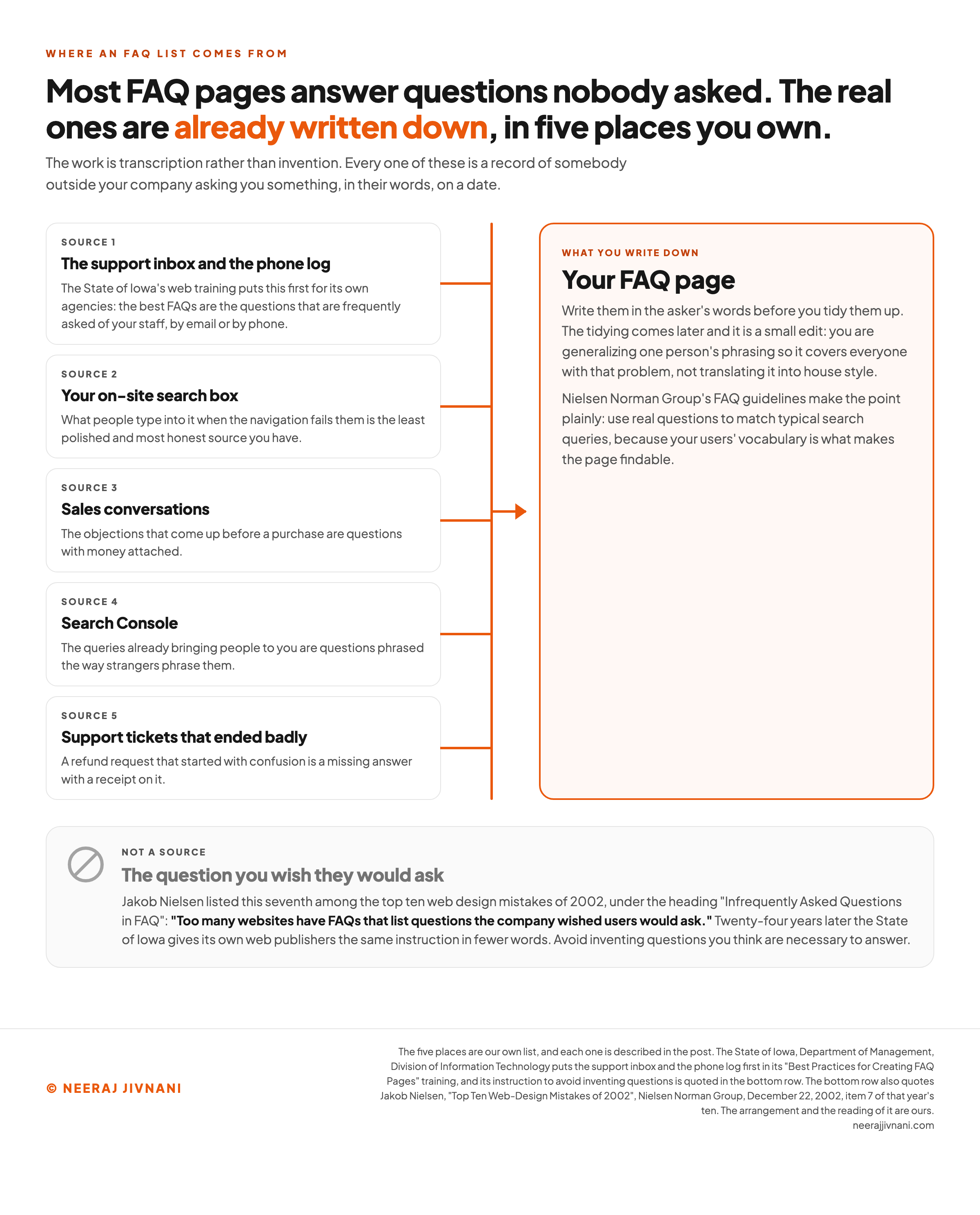
You already have the list. It is sitting wherever people ask you things, and the work is transcription rather than invention.
- The support inbox and the phone log. Whatever your team answers over and over, by email and on the phone, is the list. Start there before you look anywhere else.
- Your on-site search box. What people type into it when the navigation fails them is the least polished and most honest source you have.
- Sales conversations. The objections that come up before a purchase are questions with money attached.
- Search Console. The queries already bringing people to you are questions phrased the way strangers phrase them.
- Support tickets that ended badly. A refund request that started with confusion is a missing answer with a receipt on it.
Write them down in the asker's words before you tidy them up. Their words are what make the page findable, because those are the words they will type into a search box next time.
The tidying comes later and it is a small edit. You are generalizing one person's phrasing so it covers everyone with that problem, not translating it into house style.
The Questions to Leave Off
Four kinds of question look like they belong and do not.
The one you wish they would ask. This is the oldest failure in the format and it carries a date. Jakob Nielsen listed it seventh among the top ten web design mistakes of 2002, under the heading "Infrequently Asked Questions in FAQ".
His description reads as though it were written this morning: "Too many websites have FAQs that list questions the company wished users would ask."
Twenty-four years later the State of Iowa gives its own web publishers the same instruction in fewer words. Avoid inventing questions you think are necessary to answer.
The one that should be its own page. If the answer runs past a few short paragraphs, or somebody would want to link to it on its own, it is an article. The FAQ entry is then a summary of something you have not written yet.
The one that is a bug. When people keep asking how to find something, the finding is broken, and the fix is the navigation rather than an entry explaining it.
The duplicate. If the answer already sits on another page, do not write it a second time here. A shipping FAQ restating your shipping page is the common version.
Two pages answering one question compete with each other in search results.
Take your draft list apart, one question at a time
A question belongs when somebody outside your company has asked it, and the answer still makes sense to a stranger who arrives on it cold. The checks below run in that order, and the first one a question fails is the reason it comes off.
Put them in one at a time, in the asker's words. The tidying is a small edit and it comes later.
Nothing on the list yet. Put the first question in above, and what survives the checks is the page.
Use this chart — embed code and citation
<a href="https://neerajjivnani.com/blog/faq-pages/"><img src="https://neerajjivnani.com/infographics/faq-pages/where-the-questions-are.png" alt="Diagram of where an FAQ list comes from, showing five sources you already own feeding into one page: the support inbox and phone log, your on-site search box, sales conversations, Search Console, and support tickets that ended badly, each with the reason it is worth reading, all flowing into a panel that says to write the questions in the asker's words before tidying them up; below them, dimmed and marked as not a source, sits the question you wish they would ask, with Jakob Nielsen's 2002 complaint that too many websites have FAQs listing questions the company wished users would ask." width="1200"></a>
<p>Chart: <a href="https://neerajjivnani.com/blog/faq-pages/">Neeraj Jivnani</a></p>Neeraj Jivnani, "FAQ Pages: The Questions That Belong on One, and the Ones That Do Not", neerajjivnani.com, https://neerajjivnani.com/blog/faq-pages/Free to republish with a link back to this page.
A Starter Set When You Have No Data Yet
New sites have the same problem: no support inbox, no search logs, nothing to transcribe. Start with the questions that stop a purchase rather than the ones that describe the product.
Almost every buying question is one of four worries, and naming them is faster than staring at a blank page.
- Money. What does it cost, what is extra, and when am I charged?
- Time. How long does it take, when does it arrive, when does it start?
- Risk. What if it goes wrong, can I undo it, and who do I talk to?
- Fit. Does it work with what I already have, and is it meant for somebody like me?
Two questions in each of those is eight, and eight is plenty for a first version.
Resist thirty. A long first draft is mostly guesswork, and guesswork is the thing you are trying to replace with evidence.
Then treat the whole set as a hypothesis with an expiry date. Put a review in the calendar for a month out, and by then the inbox will have told you which four were right and which four nobody ever asked.
The starter set is scaffolding. Every question that survives contact with real customers stays, and the rest come down.
Writing an Answer That Finishes the Job
An answer is finished when the reader does not need to do anything else to understand it.
That sounds obvious and it is routinely broken by answers that end in a link. Sending somebody to another page to finish the answer is the same failure as no answer, with a click attached.
Start closed questions with the word that closes them. If somebody asks whether you ship to Canada, the first word is yes or no, which is the State of Iowa's rule for its state agencies.
Then give the detail that changes what they do next. Yes, and it takes about a week. No, but here is what people in Canada do instead.
Keep the answer as short as the question allows and no shorter.
Where a list will do the job, do not write a paragraph. That rule comes from Nielsen Norman Group's 2012 FAQ guidelines, and it is the fastest way to shorten an answer without losing anything from it.
Write every entry as though the reader arrived on it directly.
That rules out anything pointing backward: no "see the section on returns", and no pronoun whose antecedent sits three questions up the page.
Say the difficult part out loud. If the return window is short, or the setup takes two weeks, or the thing does not work on older phones, this is the best place on your site to say so.
Putting the Page in Order
The order that works is a handful of named categories with the questions grouped under them. That one decision does more for the page than any design choice you make afterwards.
Shipping. Returns. Billing. Account. Whatever your version of those is.
A reader scanning categories rules out three quarters of the page in a second, which is the entire point of having them.
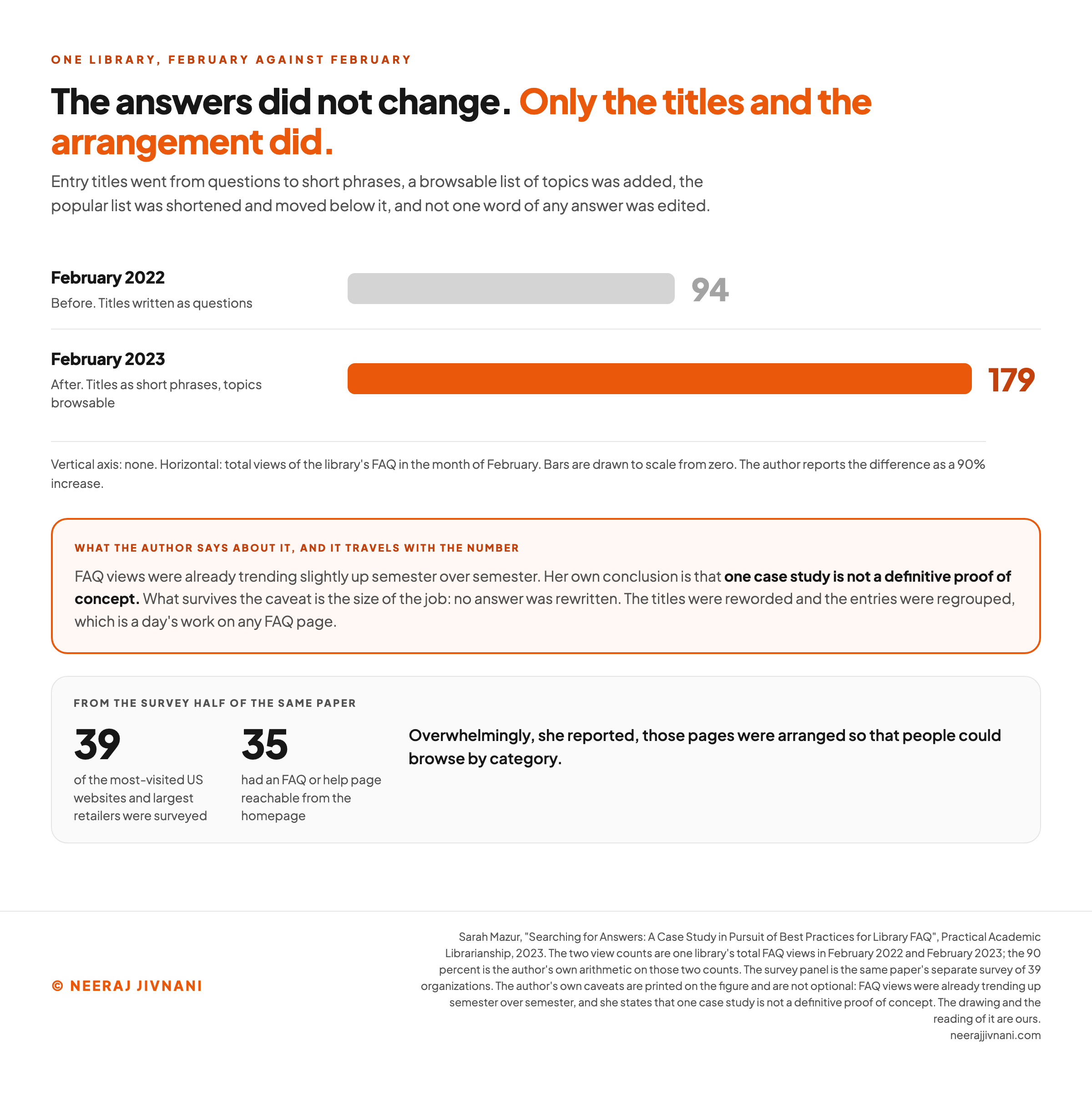
This is what real sites converge on. Of 39 of the most-visited US websites and largest retailers, 35 had an FAQ or help page reachable straight from the homepage, in Sarah Mazur's 2023 survey for Practical Academic Librarianship.
Overwhelmingly, those pages were arranged so people could browse by category.
The alternative arrangement is a list of popular entries, and it has a trap in it.
Popular entries are often popular because they sit at the top, so the list ends up measuring its own placement and quietly burying anything new.
Titles People Can Scan
Write the question the way a person asks it, then title the entry with the phrase that answers it.
Those are two jobs and both are real. The question form is what a search engine matches, so it is what makes the entry findable at all.
The title is what somebody scans on your page.
A column of entries all beginning "How do I" is a column with the useful words pushed to the right.
You do not have to choose between the two. Put the phrase in the heading, and let the question itself open the entry underneath it, in the asker's own words.
The published advice genuinely splits here. Mazur recommends avoiding question construction in FAQ titles, while Nielsen Norman Group's guidelines want real questions so they match what people type.
They are measuring different things, a reader scanning a column against a query matching a string, and one page can serve both as long as the question is not the heading.
There is one real piece of evidence either way and it is a small one. Mazur's library changed its entry titles from questions to short phrases, added a browsable list of topics, and edited not one word of any answer.
Views in February went from 94 the year before to 179, which she reports as a 90% increase.
She is careful about it and so should we be. Engagement was already climbing semester over semester, and her own conclusion is that one case study is not a definitive proof of concept.
What survives the caveat is the size of the job. Nobody rewrote an answer. The titles were reworded and the entries were regrouped, which is a day's work on any FAQ page.
The Controls on the Page
Keep the controls boring.
An FAQ page is not the place to be interesting about interaction design. Four decisions cover almost all of it.
- Accordions. If you use them, make the whole heading clickable rather than a small arrow, and let people open as many as they like without one closing another.
- An expand-all control. Put it where they can find it. Anyone using find-on-page needs the answers open to find anything at all.
- A search box. Think hard before adding one. A list short enough to scan does not need it, and a list that genuinely does has outgrown the format rather than the layout.
- The phone. Check the page on one before you publish. Long answers in narrow columns are where FAQ pages become unreadable, and a heading that wraps to four lines has stopped being scannable.
Use this chart — embed code and citation
<a href="https://neerajjivnani.com/blog/faq-pages/"><img src="https://neerajjivnani.com/infographics/faq-pages/titles-changed-nothing-else.png" alt="Two horizontal bars comparing total views of one library's FAQ in February 2022 and February 2023, 94 views before and 179 views after, drawn to scale from zero, where the changes were entry titles moving from questions to short phrases, a browsable list of topics being added, and the popular list being shortened and moved below it, while not one word of any answer was edited; a caveat panel below them carries the author's own hedge that FAQ views were already trending slightly up semester over semester and that one case study is not a definitive proof of concept, and a lower panel reports her separate survey of 39 of the most-visited US websites and largest retailers, 35 of which had an FAQ or help page reachable from the homepage, overwhelmingly arranged so people could browse by category." width="1200"></a>
<p>Chart: <a href="https://neerajjivnani.com/blog/faq-pages/">Neeraj Jivnani</a></p>Neeraj Jivnani, "FAQ Pages: The Questions That Belong on One, and the Ones That Do Not", neerajjivnani.com, https://neerajjivnani.com/blog/faq-pages/Free to republish with a link back to this page.
Where the Page Lives
Put the link in the footer, on every page.
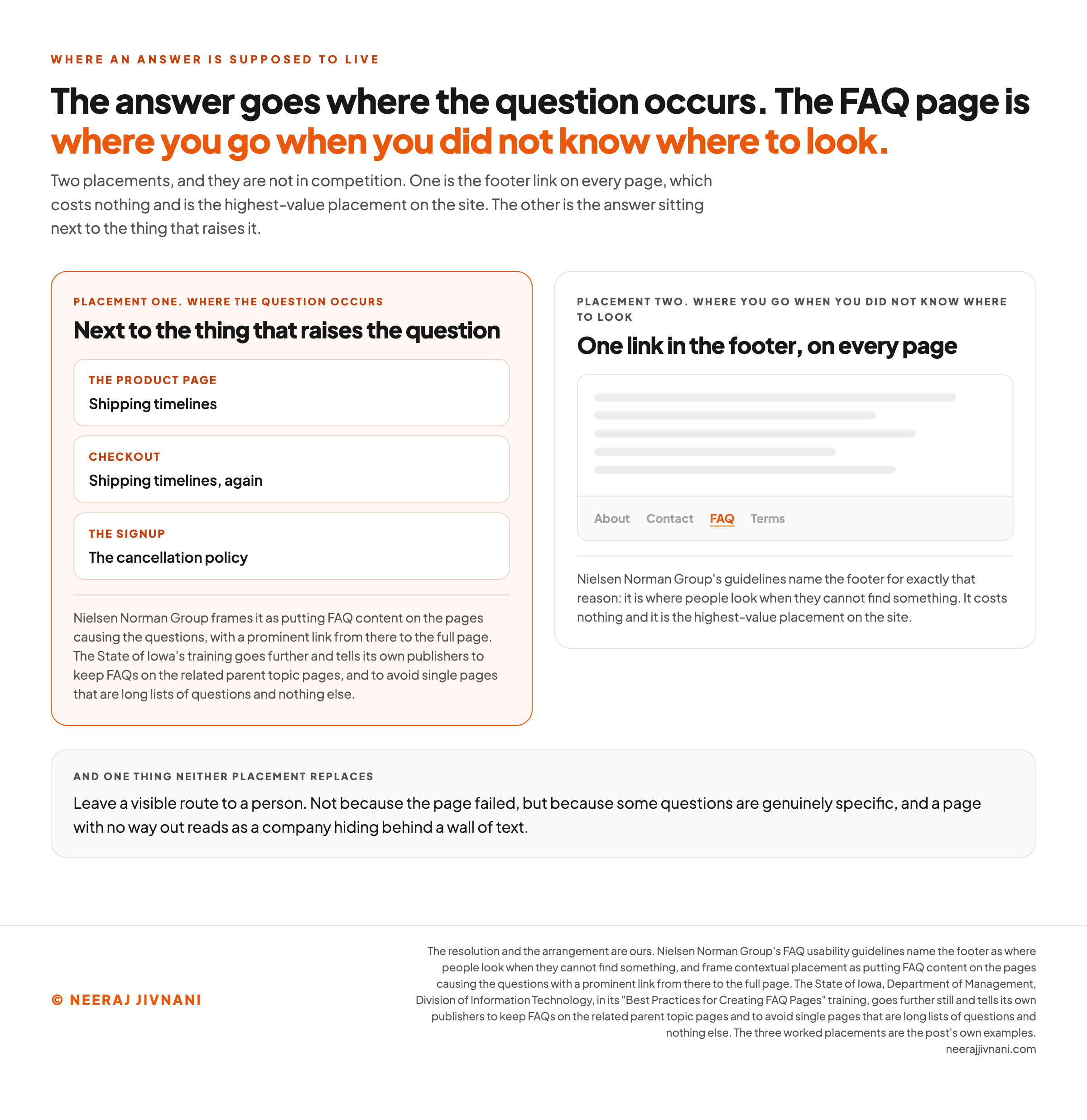
That is the first place anyone checks once the navigation has failed them. It costs nothing and it is the highest-value placement on the site.
Then break that rule deliberately in one place. Put the answer next to the thing that raises the question: shipping timelines on the product page and at checkout, the cancellation policy where somebody signs up.
The State of Iowa's training goes further. It tells its own publishers to keep FAQs on the related parent topic pages, and to avoid single pages that are long lists of questions and nothing else.
Moving every question onto a parent page and having no FAQ page at all is further than we would go, and the resolution is simple.
The answer goes where the question occurs, and the FAQ page is where you go when you did not know where to look.
Leave a visible route to a person.
Not because the page failed, but because some questions are genuinely specific, and a page with no way out reads as a company hiding behind a wall of text.
Use this chart — embed code and citation
<a href="https://neerajjivnani.com/blog/faq-pages/"><img src="https://neerajjivnani.com/infographics/faq-pages/where-the-answer-goes.png" alt="Diagram of the two places an FAQ answer belongs, side by side: on the left, the answer sitting next to the thing that raises the question, with shipping timelines on the product page and again at checkout and the cancellation policy at the signup; on the right, a page mockup with one FAQ link highlighted in the footer navigation, named as where people look when they cannot find something; underneath both, a band saying to leave a visible route to a person, because a page with no way out reads as a company hiding behind a wall of text." width="1200"></a>
<p>Chart: <a href="https://neerajjivnani.com/blog/faq-pages/">Neeraj Jivnani</a></p>Neeraj Jivnani, "FAQ Pages: The Questions That Belong on One, and the Ones That Do Not", neerajjivnani.com, https://neerajjivnani.com/blog/faq-pages/Free to republish with a link back to this page.
What an FAQ Page Does for Search
People type questions into search engines, and a page built out of questions matches them.
That is the whole search argument and it is a good one. It works because the questions are phrased the way the asker phrases them, which is the same reason the page works for humans.
People do not search for your solution, they search for their problem. Nielsen Norman Group wrote that line about FAQ pages and it has not aged.
What Changed, and What Did Not
FAQ schema no longer earns you anything in Google.
Those expandable question and answer blocks that used to sit under a search result, built out of FAQPage structured data, are gone. Google narrowed them to well-known government and health sites in August 2023, then switched the feature off for everyone on May 7, 2026.
The documentation for it came down the following month.
You do not need to strip the markup out of your pages. Unused structured data does not cause problems in Search, which is what Google said when it first cut the feature back.
So the visible bonus is gone, and nothing else about the page changed.
The reason to build one was never the decoration under the result. It was that somebody typed a question and you had answered it.
The same logic carries into answers written by AI. A question with a complete, self-contained answer under it is easy for a machine to lift, and the writing that makes an entry liftable is the writing that makes it useful to a person.
When Not to Build One
Do not build one when the answers already live somewhere else on your site.
The test is not whether an FAQ page would be useful. It is whether it would say one thing your shipping page and your returns page do not already say.
Do not build one when the list would run to dozens of entries in a single long accordion.
That page is a filing cabinet with the drawers welded shut, and the State of Iowa's web training warns its own agencies off that exact shape.
Do not build one when the real problem is the product or the site. If the answer is that the button is hard to find, move the button.
An FAQ that exists to explain a confusing interface makes the confusion permanent by making it survivable.
And do not build one you cannot maintain. An FAQ page needs monitoring, and an out-of-date one confuses people more than no page at all.
That is not a reason to avoid the work.
It is a reason to be straight with yourself about whether anyone will do it.
What is left after all four of those is usually a short, genuinely useful page, which is the right size for one.
Keeping It Honest
An FAQ page rots faster than the rest of your site, because it describes the things that change most: prices, timelines, policies, what you do and do not support.
So put a name against it and a date in the calendar. Twice a year is enough for most sites, and any change to shipping, pricing or policy should trigger a pass immediately.
Prune as much as you add. Outdated answers have to come off the page or duplication creeps in, and the pruning is the part everybody skips.
What to Watch
Watch which answers get opened. That number tells you two things at once.
It tells you which questions are genuinely frequent. It also tells you, by omission, which entries you wrote for yourself.
Three other signals are worth more than they cost:
- On-site searches that return nothing. Every one is a question you have not answered, phrased by the person who wanted it.
- The questions still arriving by email. After the page exists, these are the ones it failed to answer.
- Entries that get opened and then followed by a support ticket anyway. The answer was found and it did not finish the job.
Page views are the one number to ignore. A page can be visited constantly because it is the only place on the site where anyone can find anything, and that tells you the navigation is broken.
Then close the loop. What the inbox is still asking is the next version of the page, and it arrives written for you.
An honest FAQ page is never finished, and that is a feature rather than a fault. It is the only page on your site whose edits get handed to you by the people using it.