What Search Engine Optimization Is, and How to Do It Yourself for Free
Only three things decide whether a page ranks. You can do almost all of it yourself, free: what they are, how long it takes, and what you cannot control.


/ On this page14 sections
Search engine optimization (SEO) turns on exactly three questions: whether a page can be reached, whether it can be understood, and whether it deserves to be there.
Only those three decide whether a page ranks. Every technique and every tool with a name is one change to one of them.
You can do almost all of it alone, with free tools, on a site you already control.
What Search Engine Optimization Is
Search engine optimization, usually shortened to SEO, covers every change you make to a page so that a search engine will show it in the unpaid results for the searches it should answer.
The word that matters there is unpaid.
A results page carries two kinds of listing: placements somebody bought, and results the engine chose. SEO is entirely about the second kind. You are not buying position, you are trying to deserve it.
The bought half has its own vocabulary. Search engine marketing (SEM) usually means the paid side today, and pay-per-click (PPC) names how the ads are billed. Bought and earned run on the same results page and share almost nothing else, which is why the skills rarely sit with the same person.
Say a shop sells one specific spare part. Somebody types the part number, the shop's page is the best answer to it, and the result appears without anybody paying for the placement. That is the whole of it.
Ranking for something nobody wanted is not a win. A page can rank, look successful in a report, and do nothing at all.
Why SEO Is Important
SEO is important because search is how people reach a page they did not already know existed.
More than 60% of the web traffic to one US Department of Energy office comes from search engine referrals, the department states.
That is one office, and it is the shape of the thing rather than a benchmark for yours. A place in the unpaid results is earned rather than rented, so it is slow to get, and it does not vanish the month a budget does.
That is the whole case, and it has a limit worth saying out loud. None of it pays on a page nobody is searching for.
How Search Engines Work
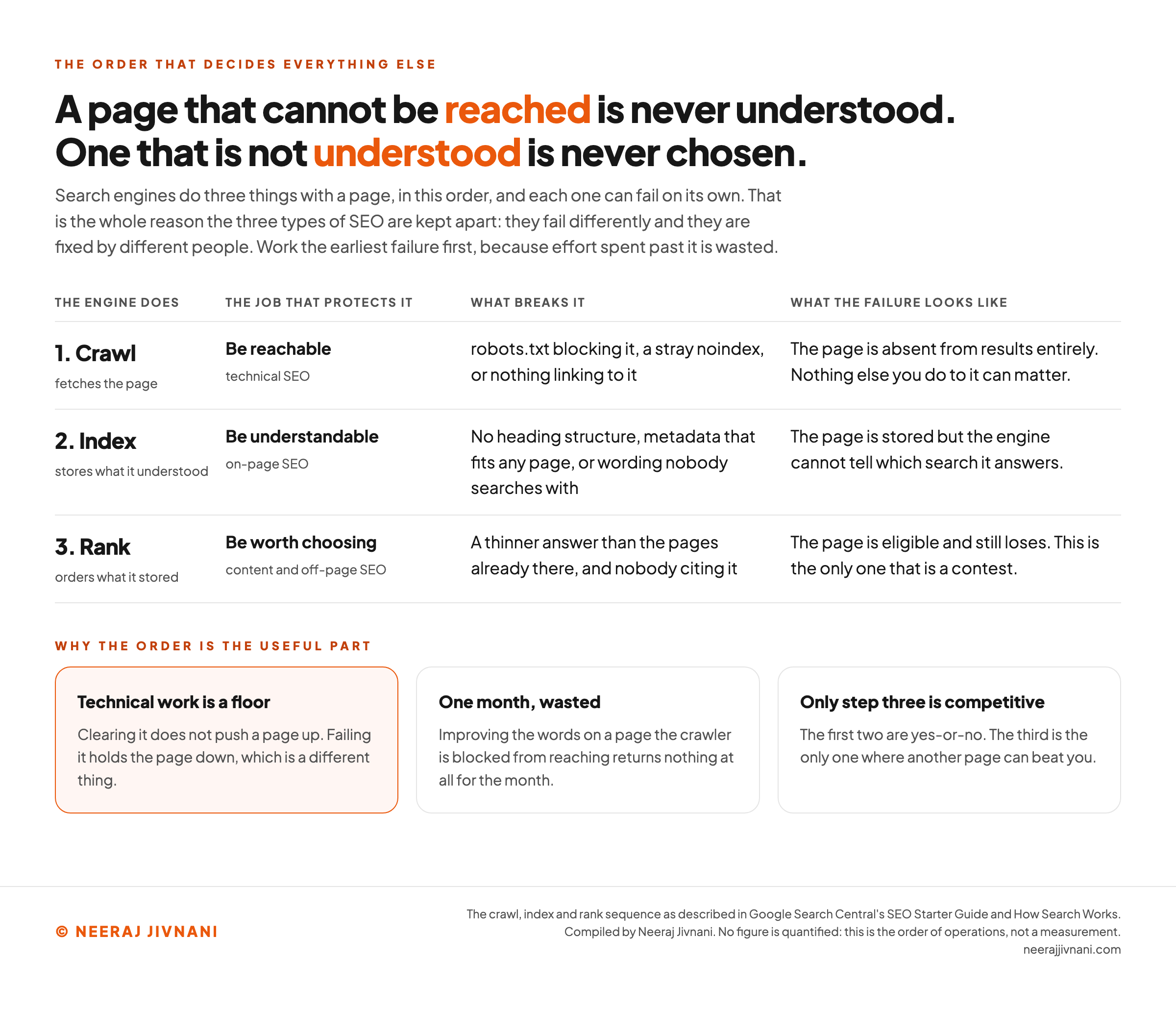
A search engine crawls a page, indexes it, then ranks it, and each of those three can fail on its own.
- Crawling. Programs follow links around the web and fetch pages they find. A page nothing links to, or one that blocks the crawler, may never be fetched at all.
- Indexing. What was fetched gets processed and stored. The engine works out what the page is about and whether it is a duplicate of something it already holds.
- Ranking. For a given search, the engine orders what it has stored and shows a page of results.
The order matters more than the list does. A page that cannot be reached is never understood, and a page that is not understood is never chosen, so work spent on the last step while an earlier one is broken returns nothing at all.
Use this chart — embed code and citation
<a href="https://neerajjivnani.com/blog/search-engine-optimization/"><img src="https://neerajjivnani.com/infographics/search-engine-optimization/three-jobs.png" alt="A table of the three things a search engine does with a page in order, crawl then index then rank, each paired with the job that protects it, what breaks that step, and what the failure looks like: a blocked or unlinked page is never fetched and is absent from results, a page with no heading structure or generic metadata is stored but cannot be matched to a search, and a page thinner than those already ranking is eligible and still loses. Three cards explain that technical work is a floor rather than a lever, that improving words on an unreachable page returns nothing, and that only the third step is a contest." width="1200"></a>
<p>Chart: <a href="https://neerajjivnani.com/blog/search-engine-optimization/">Neeraj Jivnani</a></p>Neeraj Jivnani, "What Search Engine Optimization Is, and How to Do It Yourself for Free", neerajjivnani.com, https://neerajjivnani.com/blog/search-engine-optimization/Free to republish with a link back to this page.
The Three Types of SEO
The three types of SEO are named for where the work happens, not for how advanced it is.
- On-page SEO is what sits on the page: the words, the headings, the title, the images and how they are described.
- Off-page SEO is what the rest of the web says about the page, which in practice mostly means who links to it.
- Technical SEO is whether the page can be reached, fetched and understood at all.
Say you run a five-page site. On-page work is rewriting those five pages, and technical work is making sure a crawler can reach all five.
Off-page is who mentions you, and it is the only one of the three that is not yours to do.
They fail differently and they are usually fixed by different people, which is the practical reason to keep them apart.
Start with the parts you can move. A title, a heading structure and a description are yours to change today. Who links to you is not yours to change at all.
Keywords, and What They Are For
Keywords are what somebody typed. Keyword research is working out which of those phrases you could answer better than the pages currently answering them.
The useful output is not a list of words to sprinkle into a page. It is a decision about what a page is for.
One page, one job, expressed in the words people use rather than the words your organization uses internally.
Writing in the reader's language instead of the institution's is not a style preference. It decides whether the page matches what was typed.
What Content Has to Do
Content is what the engine has to understand and what the reader has to find useful, and it has to be both at once.
A page that answers the search fully has an advantage no technique replaces, because the engine's whole job is to pick the page that answers best.
Depth counts more than frequency. Covering the question properly beats repeating the phrase, and Google's Starter Guide is blunt about the alternative: "Excessively repeating the same words over and over (even in variations) is tiring for users, and keyword stuffing is against Google's spam policies."
The Technical Floor
Technical SEO is a floor rather than a lever. Clearing it does not push you up; failing it holds you down.
The list is short, and it has barely changed in a decade:
- Reachability. The crawler must be able to fetch the page. A
robots.txtfile that blocks it, or anoindextag left on by accident, removes the page from consideration entirely. - A sitemap. An XML (machine-readable) sitemap lists the URLs you want found, which helps on a large or poorly linked site.
- Headings. One
H1per page, used as the page title, thenH2andH3to structure what follows. Headings are structure, not styling. - Descriptive metadata. A title and description written for that page specifically, so the engine and the reader can both tell what it is before they open it.
- Speed and mobile. A page that is slow or unusable on a phone loses readers before ranking is the problem.
- Site organization and URLs. Group related pages in directories, and use URLs that describe the page rather than an identifier.
None of that is secret and none of it is clever. It is a maintenance list, and the reason it keeps getting sold as a strategy is that it is easier to sell than the third job.
What a Government Has to Do
A government works from the same short list you do, and in the United States it does so by law.
The 21st Century Integrated Digital Experience Act (IDEA) requires federal websites and digital services to have information and services that are, in the Department of Energy's summary of it, "discoverable and optimized for search".
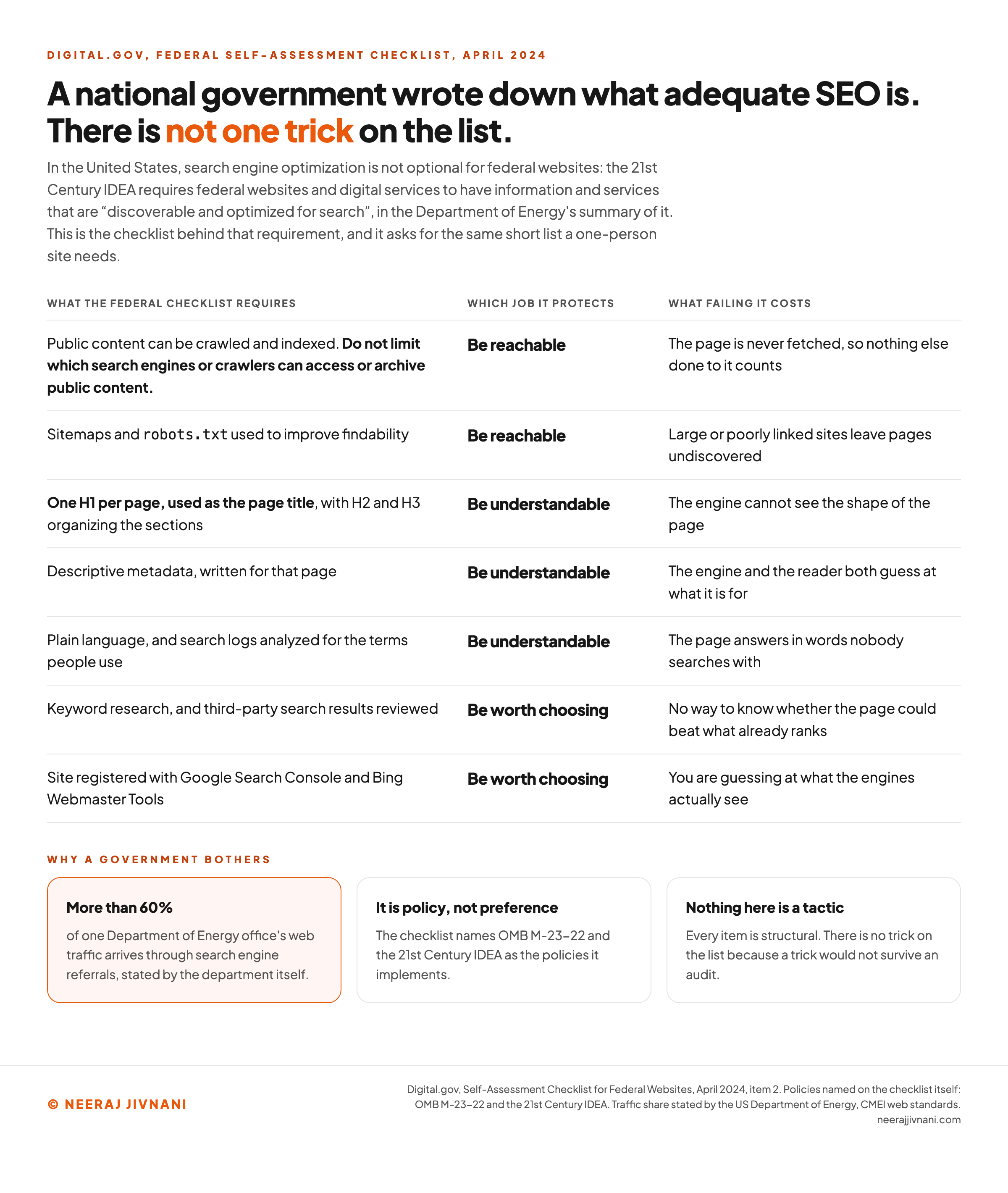
The operational half is published. Search engine optimization is item 2 on the April 2024 edition of Digital.gov's Self-Assessment Checklist for Federal Websites, and the checklist names an Office of Management and Budget (OMB) memo, M-23-22, as the policy behind it.
Almost every item on the list above is on the federal one. Descriptive URL structure is the one thing that is not.
It adds three things worth copying. Write in plain language, read your own search logs for the words people used, and verify the site with the engines so you can see the data they already hold about it.
On crawling the checklist is unusually direct. Do not limit which search engines or crawlers can access or archive public content.
There is not a trick on the list. A government writing rules for thousands of public sites arrived at the same short list a one-page site needs, and that is the strongest evidence we know of that the floor is this short.
Use this chart — embed code and citation
<a href="https://neerajjivnani.com/blog/search-engine-optimization/"><img src="https://neerajjivnani.com/infographics/search-engine-optimization/government-checklist.png" alt="A table of the seven search engine optimization items the US federal website self-assessment checklist requires, each mapped to one of the three jobs it protects and to what failing it costs: public content crawlable and indexable and no limiting of which crawlers may access it, sitemaps and robots.txt, one H1 per page used as the page title with H2 and H3 beneath, descriptive metadata written for that page, plain language with search logs analyzed, keyword research with third-party results reviewed, and the site registered with Google Search Console and Bing Webmaster Tools, alongside the Department of Energy's statement that more than 60 percent of one office's web traffic arrives through search referrals." width="1200"></a>
<p>Chart: <a href="https://neerajjivnani.com/blog/search-engine-optimization/">Neeraj Jivnani</a></p>Neeraj Jivnani, "What Search Engine Optimization Is, and How to Do It Yourself for Free", neerajjivnani.com, https://neerajjivnani.com/blog/search-engine-optimization/Free to republish with a link back to this page.
How Long It Takes
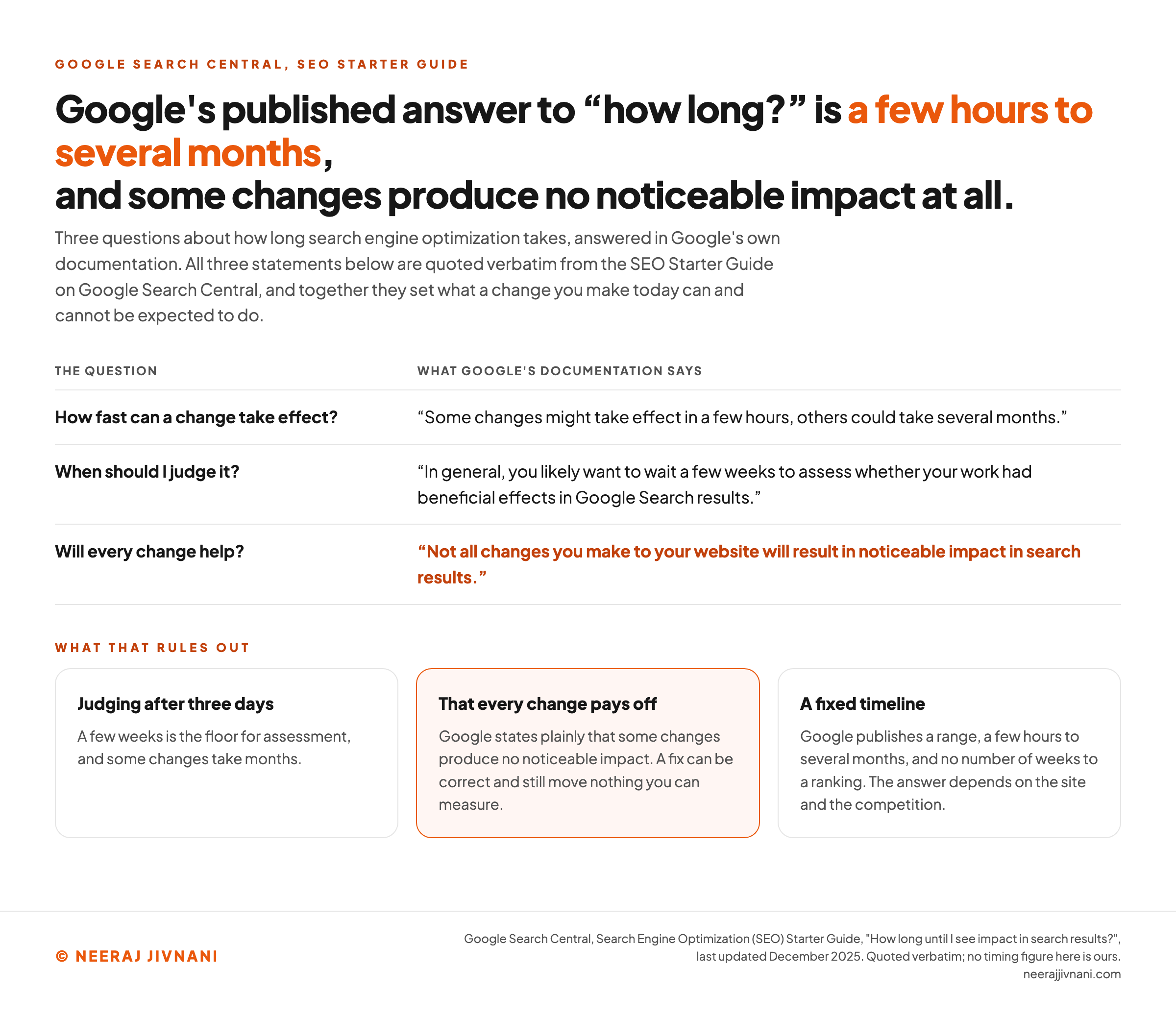
How long SEO takes is a few hours to several months, and Google says so itself.
In general you want to wait a few weeks before assessing whether a change helped.
Some of what you do will show nothing at all, and that is not a sign you did it wrong. Google's Starter Guide says it plainly: "Not all changes you make to your website will result in noticeable impact in search results."
That is the honest shape of the work. It rules out judging a change after three days, it rules out the promise that every fix pays, and it rules out any fixed timeline to a ranking.
Plan for it rather than resenting it. Make a batch of changes, leave them alone for a few weeks, and spend that time fixing another page instead of refreshing a rank.
Use this chart — embed code and citation
<a href="https://neerajjivnani.com/blog/search-engine-optimization/"><img src="https://neerajjivnani.com/infographics/search-engine-optimization/how-long-google-says.png" alt="Three questions about SEO timing answered with verbatim quotations from Google's SEO Starter Guide: that some changes might take effect in a few hours while others could take several months, that you likely want to wait a few weeks before assessing whether the work had beneficial effects, and that not all changes you make to your website will result in noticeable impact in search results. Three cards set out what those statements rule out: judging a change after three days, that every change pays off, and any fixed timeline to a ranking." width="1200"></a>
<p>Chart: <a href="https://neerajjivnani.com/blog/search-engine-optimization/">Neeraj Jivnani</a></p>Neeraj Jivnani, "What Search Engine Optimization Is, and How to Do It Yourself for Free", neerajjivnani.com, https://neerajjivnani.com/blog/search-engine-optimization/Free to republish with a link back to this page.
How to Tell If It Is Working
A ranking will not tell you whether the work is working. A position moves for reasons that have nothing to do with you, it differs by person and by place, and it says nothing about whether anybody clicked.
The engines will tell you.
Google Search Console and Bing Webmaster Tools are free, and once the site is verified they report which queries your pages appear for, how often those results are clicked, and which pages they could not use at all.
Read the third of those first. A page the engine could not use is not in the contest, and that report is where you find out.
The other two tell you what to change.
Say a page shows up all month and never gets clicked. It is not losing a ranking contest. It is losing on its title and its description, and both are yours to rewrite this afternoon.
Traffic from AI features is not broken out. Google folds it into the Performance report under the "Web" search type, so there is no separate number to chase.
Clicks from results pages carrying an AI Overview are "higher quality", Google says, meaning those visitors are more likely to spend longer on the site.
That is a claim about the quality of the visit, not about the number of them. Watch what happens after the click, not only the count.
SEO and AI Search
Search results now carry answers written by AI, and the useful question is what it changes about the work.
Google calls these features AI Overviews and AI Mode. An overview gets you to the gist of a topic with links to explore further; AI Mode handles questions that would once have taken several searches, such as comparing options.
Both may use what Google calls a "query fan-out" technique: issuing multiple related searches across subtopics, then assembling an answer from what comes back.
AI Overviews do not appear on every search. Google says they are shown only when its systems judge them additive to classic search, and that they "often don't trigger".
What You Have to Do Differently
Almost nothing.
Google's guidance, last updated in December 2025, is explicit: "There are no additional requirements to appear in AI Overviews or AI Mode, nor other special optimizations necessary."
You do not need to build anything new for them either. Google names what you can skip: "You don't need to create new machine readable files, AI text files, or markup to appear in these features. There's also no special schema.org structured data that you need to add."
To be shown as a supporting link, a page has to be indexed and eligible to appear in Search with a snippet.
So the checklist does not change. Let the crawler in, keep important content in real text, link to your own pages so they can be found, and make your structured data match what the page visibly says.
Whether It Needs a New Name
The practice has a name, Generative Engine Optimization (GEO), sometimes answer engine optimization instead.
It is not a settled idea. Wikipedia's article on the term still carries an editorial warning that it may be a neologism.
It is not a replacement for SEO. The Department of Energy puts GEO alongside it: "Most traditional SEO methods will also help your pages earn citations in AI overviews."
A page cited in AI overviews and answers is now, in the department's words, "as important as having it rank well in search results".
Our reading is that the name is worth knowing and the separate discipline is not.
If the technical requirements are identical and the methods are the same methods, then what changed is the prize, not the work. Anyone selling you a new field is selling you the old one twice.
How to Do SEO Yourself
You can do SEO yourself. Most of it needs one person and no budget, and the tools that matter are free.
- Register the site with Google Search Console and Bing Webmaster Tools. Both are free and both show you what the engines see.
- Check you are reachable. Confirm nothing in
robots.txtor a straynoindexis blocking the pages you want found. - Pick one page and one question it should answer, in the words a searcher would use, not your own.
- Fix that page's structure. One
H1that says what the page is,H2s for its sections, a title and description written for that page alone. - Come back in a few weeks, not in three days, and improve a page you already appear for before you write a new one.
- Repeat on the next page. Depth on a few pages beats shallow edits across all of them.
The limits are worth stating. One person cannot force a result, manufacture a genuine citation, or fix a platform that blocks the crawler without help from whoever controls it.
If you do nothing else here, do the first two.
An unreachable page is the one failure that makes every other hour worth nothing, and it is the one nobody notices. A page that was never fetched looks exactly like a page that has not ranked yet.
Run your page against the checklist below to see which of the three jobs is blocked.
Which of the three jobs is blocking your page
Tick what your page already does. It reports which of the three jobs is blocked, never a score. The first two are a floor: clearing them does not push you up, failing them holds you down. The third is the contest. Several of the items are the ones the US federal website checklist requires.
7 items outstanding, and 3 jobs are blocked: be reachable, be understandable, be worth choosing. Work the earliest one first: a page that cannot be reached is never understood, and a page that is not understood is never chosen.
The Questions Beginners Ask
Five questions, and the short answers.
How to do SEO for beginners? Register with Search Console, check nothing is blocking the crawler, pick one page, give it one clear job and a proper heading structure, then read the search data after a few weeks.
What are search engine optimizations? The plural usually means the individual changes: a clearer title, a heading structure, an unblocked page, a description written for that page, a link earned from a relevant site.
Is SEO still worth it in 2026? Yes for anything people search for by name or by need, with the caveat that questions with short factual answers now get answered on the results page more often.
How can you do SEO by yourself? Almost all of it, using free tools. The exceptions are forcing a ranking, manufacturing links, and fixing a platform you do not control.
Does social media help SEO? Not directly. Posts do not rank your pages, though they can put a page in front of someone who then links to it.