Search Engine Marketing Runs on an Auction You Enter Every Time Somebody Searches
Ads on a results page are auctioned, not bought. See what decides whether yours shows, what one click charges you, and how far a daily budget goes.


/ On this page12 sections
Search engine marketing (SEM) is paying to appear on a search results page. You choose the searches you want to show up for, you write an ad, and you are charged when somebody clicks it.
What you cannot do is buy the position.
Every one of those slots is auctioned in the moment the search happens, against everybody else who wanted the same one.
What Search Engine Marketing Is
The term covers every ad you can buy on a results page: the text lines above the links, the ones underneath, and the row of products with prices on a shopping search. Google labels each one Sponsored.
Three things have to be set before any of them can run. The search terms you want to appear for, the most you will pay for one click, and the ad itself.
Then you are charged per click, not per appearance. Your ad can show a thousand times and cost nothing if nobody chooses it.
Say a plumber wants the search "emergency plumber near me" in their own city.
They bid on that term, their ad shows to people typing it, and every click costs them money whether or not the phone rings.
The Word Means Two Different Things
The term has two definitions in circulation and the gap between them causes real confusion.
Originally SEM covered everything you did to appear on a results page, paid placements and unpaid rankings together. That is still the strict reading.
In practice it has narrowed. When somebody in a meeting says SEM today, they almost always mean paid search advertising, and the unpaid half has its own name.
Our rule is short. If money is being split between the two disciplines, ask which one is meant, because the answer decides who does the work and what it costs.
Everywhere else, assume they mean the ads.
SEM and SEO, and Which Question You Are Asking
One is bought and one is earned, and that single fact produces every other difference between SEO and SEM.
Search engine optimization, or SEO, is the work of getting into the unpaid results Google chooses. There is no price on those at any budget.
The obvious difference is speed. The more useful one is reach: an ad buys access to searches you would otherwise have no route to at all.
Our plumber can have a Sponsored line above "emergency plumber near me" within a day of setting the campaign up. Reaching the unpaid results underneath it is a different project on a different clock.
That makes the two questions genuinely different. Paid search asks whether you can be in front of a search this week; SEO asks whether you can still be there in a year without paying.
Neither one repairs a weak offer. An auction will sell you clicks on a page nobody was going to buy from, and it will keep selling them for as long as you keep paying.
What You Are Buying
You are buying the right to compete, once, for one search. Nothing you won a minute ago carries into the next one.
Two people typing the same words a minute apart can be shown different ads, in a different order, and neither result was decided in advance.
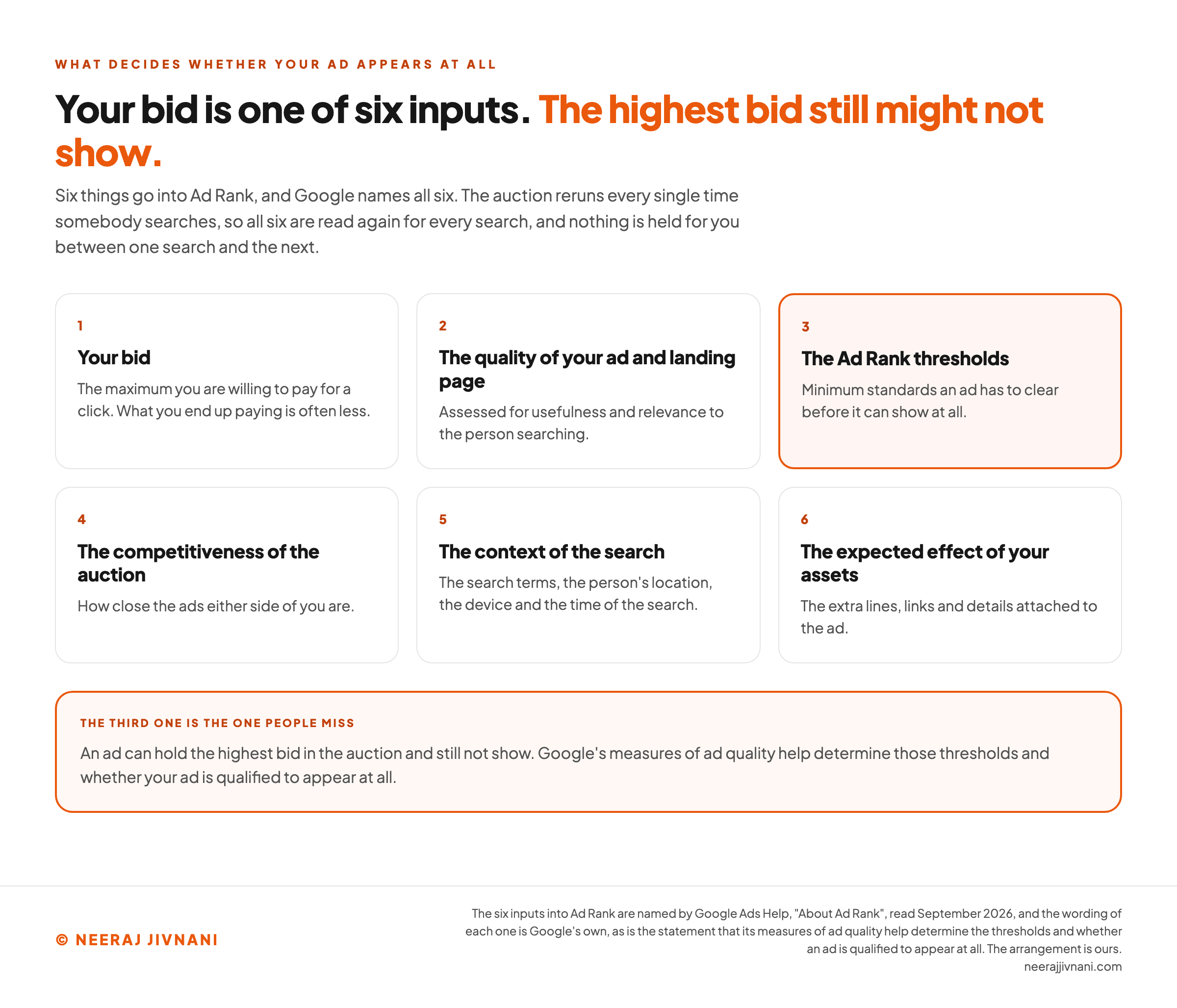
What decides the outcome is called Ad Rank, and it is more than the bid. Six things go into it, and Google names all six:
- Your bid, the maximum you are willing to pay for a click. What you end up paying is often less.
- The quality of your ad and landing page, assessed for usefulness and relevance to the person searching.
- The Ad Rank thresholds, which are minimum standards an ad has to clear before it can show at all.
- The competitiveness of the auction, meaning how close the ads either side of you are.
- The context of the search, among them the search terms, the person's location, the device and the time of the search.
- The expected effect of your assets, the extra lines, links and details attached to the ad.
The third one is the one people miss.
An ad can hold the highest bid in the auction and still not show. Ad quality feeds those thresholds, and the thresholds decide whether an ad is qualified to appear at all.
The fifth is where most arguments about position come from. You are not competing in one national contest; you are competing in a fresh contest per search, per place, per device, per hour.
So checking your own ad by searching for it tells you almost nothing. You are one location on one device at one moment, and you are also spending a competitor's impression to look at yourself.
How to Read Your Quality Score
Quality Score is the one to ten number sitting against each keyword in your account, and it is a diagnostic rather than a grade to raise.
Read the three parts under it instead: expected click-through rate, ad relevance, and landing page experience. Each is reported as Below Average, Average or Above Average.
If expected click-through rate is the low one, the ad is not earning the click, and the headline is where that shows first.
If ad relevance is the low one, the keyword and the ad do not match.
If landing page experience is the low one, the page is the problem and rewriting the ad will not fix it.
The score itself does not reach the auction. Google says Quality Score is "not an input in the ad auction".
What does reach the auction is the quality it reports on, which is the second of the six Ad Rank inputs. The score is the readout, not the lever.
Microsoft says the same of its own score: an evaluation based on past auctions, not used at auction time to determine ad rank, and no effect on cost or spend.
Google publishes the scale but not what a given band means. Microsoft Advertising runs the same idea on Bing and does publish its bands.
Its documentation puts 1 to 5 as underperforming, 6 as competitive but no better than average, and 7 to 10 as the band where click-through runs above the average for that traffic.
Either way the move is the same. Fix whichever of the three parts came back Below Average, and leave the number alone.
Use this chart — embed code and citation
<a href="https://neerajjivnani.com/blog/search-engine-marketing/"><img src="https://neerajjivnani.com/infographics/search-engine-marketing/six-inputs.png" alt="Six numbered cards laid out three across and two down, one for each input into Ad Rank: your bid, described as the maximum you are willing to pay for a click with the note that what you end up paying is often less; the quality of your ad and landing page, assessed for usefulness and relevance to the person searching; the Ad Rank thresholds, drawn in the brand orange as the highlighted card and described as minimum standards an ad has to clear before it can show at all; the competitiveness of the auction, meaning how close the ads either side of you are; the context of the search, naming the search terms, the person's location, the device and the time of the search; and the expected effect of your assets, the extra lines, links and details attached to the ad. A band across the foot says the third one is the one people miss, that an ad can hold the highest bid in the auction and still not show, and that Google's measures of ad quality help determine those thresholds and whether your ad is qualified to appear at all." width="1200"></a>
<p>Chart: <a href="https://neerajjivnani.com/blog/search-engine-marketing/">Neeraj Jivnani</a></p>Neeraj Jivnani, "Search Engine Marketing Runs on an Auction You Enter Every Time Somebody Searches", neerajjivnani.com, https://neerajjivnani.com/blog/search-engine-marketing/Free to republish with a link back to this page.
What a Click Costs
A click costs you the smallest amount that was needed to win it, which is normally less than the maximum you set.
Two rules do all the work here, and Google Ads Help states both.
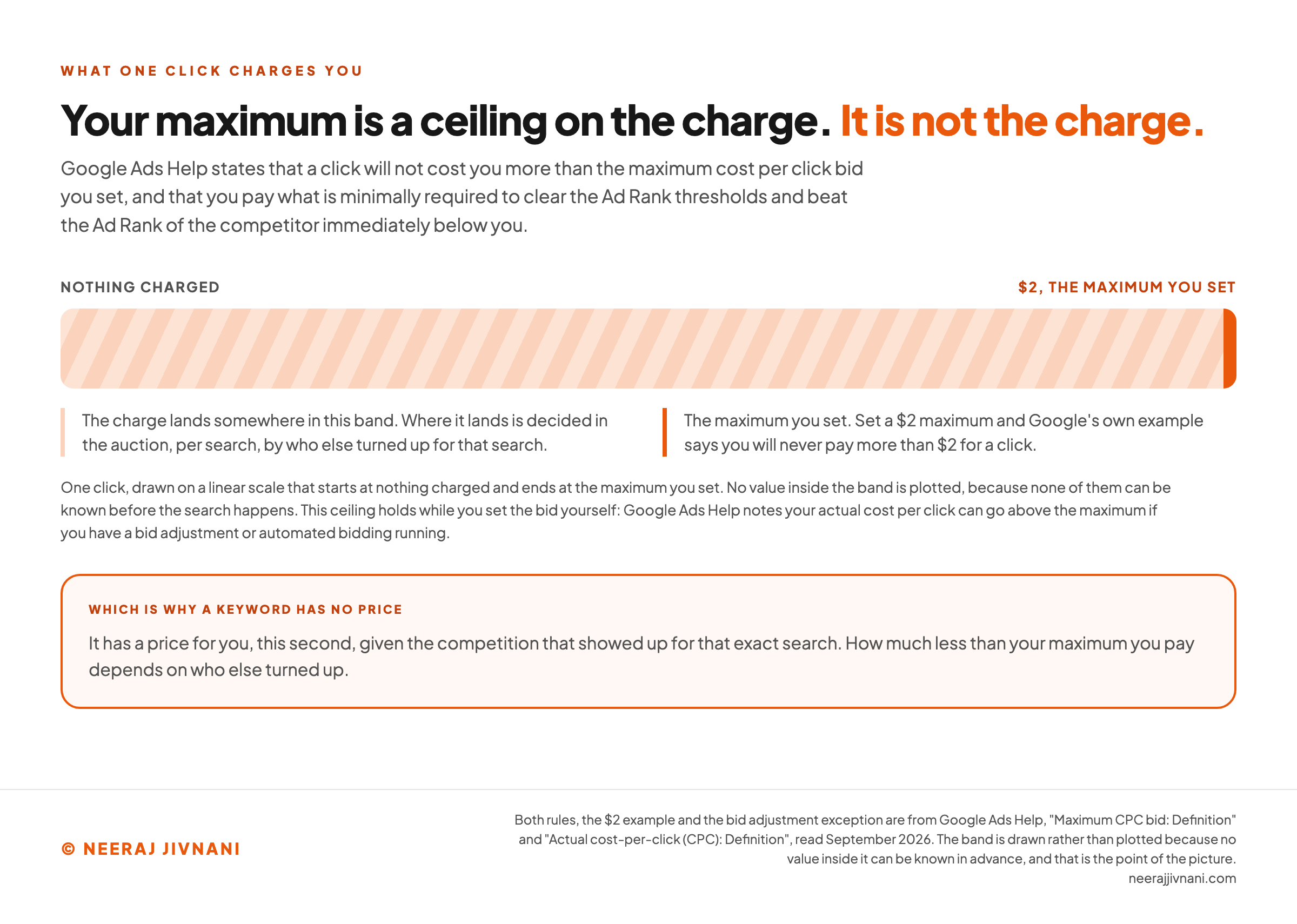
A click "won't cost you more than the maximum cost-per-click bid" you set, and you pay "what's minimally required to clear the Ad Rank thresholds and beat the Ad Rank of the competitor immediately below you".
Set a $2 maximum and you will never pay more than $2 for a click, which is Google's own worked example. How much less than $2 you pay depends on who else turned up.
That ceiling holds while you set the bid yourself. Turn on a bid adjustment or automated bidding and your actual cost per click can go above the maximum.
Which is why a keyword has no price.
It has a price for you, this second, given the competition that showed up for that exact search.
The Cost Figure Worth Planning Against
An average cost per click cannot tell you what a click will cost you, and there is a better number you can work out in a minute.
Start from what a customer is worth and how many clicks it takes to win one.
Say one click in twenty becomes a customer. Then twenty clicks have to cost you less than one customer is worth, which puts your ceiling per click at a twentieth of that value.
Now compare that ceiling with what the auction is charging.
If the market clears well above it, this is not a keyword you can win profitably, and no amount of ad writing changes that arithmetic.
It is also the number you can improve. A better conversion rate raises your ceiling without raising your bid.
What a click can be worth to you
Nobody can tell you what a click on your keyword costs, because the auction decides that in the moment the search happens. The number you can work out in a minute is the other one, and it comes out of your business rather than out of the results page.
1. The two numbers your ceiling is made of
Your ceiling per click
?
There is no published average that can stand in for the first box. Put in what one customer is worth to you and the rest of this is arithmetic.
2. Now the number you came here to set
Your maximum is the most you are willing to pay for a click. What you end up paying is often less, and how much less depends on who else turned up for that search.
This box reads against your ceiling, so it says nothing until the two boxes above are filled in. On its own it is a number with no test attached.
3. The half of this you can move
Fill in the two boxes above and this reads back what changes your ceiling and what does not.
Use this chart — embed code and citation
<a href="https://neerajjivnani.com/blog/search-engine-marketing/"><img src="https://neerajjivnani.com/infographics/search-engine-marketing/cap-not-the-charge.png" alt="One click drawn on a single horizontal scale that starts at nothing charged on the left and ends at $2, the maximum you set, on the right. The whole width of the track is filled with a hatched band labeled as the range the charge lands in, with the note that where it lands is decided in the auction, per search, by who else turned up. A solid orange stop closes the right hand end, labeled as the maximum you set, because Google's own example says a $2 maximum means you will never pay more than $2 for a click. No value inside the band is plotted, because none of them can be known before the search happens, and the small print adds that this ceiling holds while you set the bid yourself, because Google Ads Help notes your actual cost per click can go above the maximum if you have a bid adjustment or automated bidding running. A band across the foot says a keyword has no price, it has a price for you, this second, given the competition that showed up for that exact search." width="1200"></a>
<p>Chart: <a href="https://neerajjivnani.com/blog/search-engine-marketing/">Neeraj Jivnani</a></p>Neeraj Jivnani, "Search Engine Marketing Runs on an Auction You Enter Every Time Somebody Searches", neerajjivnani.com, https://neerajjivnani.com/blog/search-engine-marketing/Free to republish with a link back to this page.
Setting a Budget That Cannot Surprise You
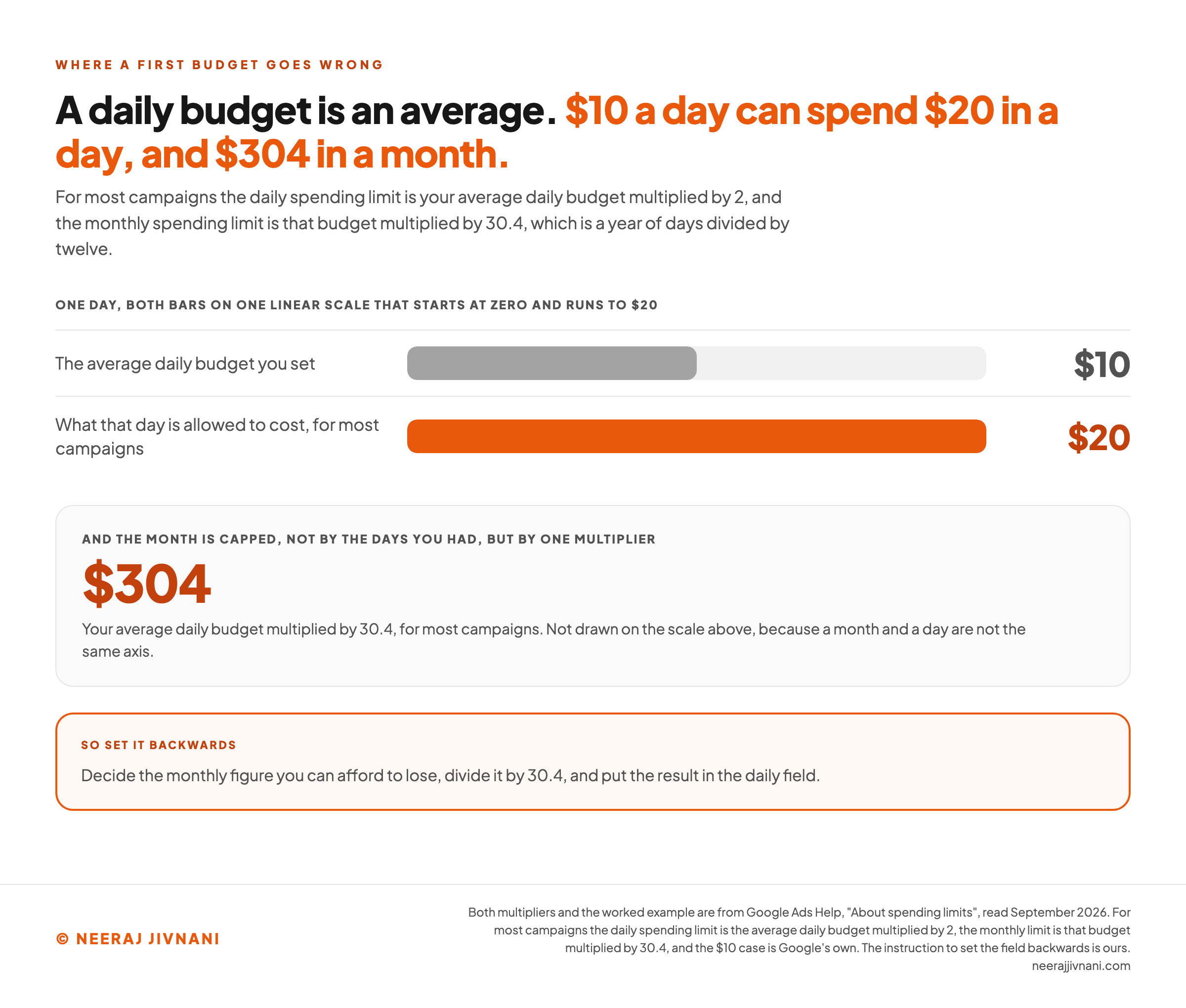
A daily budget is an average, not a ceiling, and this is where first-time advertisers get caught.
For most campaigns Google caps a single day at your average daily budget multiplied by 2, and the month at that budget multiplied by 30.4, which is a year of days divided by twelve.
Put $10 in the field, the case Google works through itself, and a busy day can cost $20 while the month cannot pass $304.
So the honest way to set this is backwards. Decide the monthly figure you can afford to lose, divide it by 30.4, and put the result in the daily field.
Treat the first month as the cost of finding out, because that is what it is. You are buying data about which searches convert, and some of it will be bad news you needed.
Use this chart — embed code and citation
<a href="https://neerajjivnani.com/blog/search-engine-marketing/"><img src="https://neerajjivnani.com/infographics/search-engine-marketing/average-not-a-ceiling.png" alt="Two horizontal bars on one linear scale that starts at zero and runs to $20, showing what a single day is allowed to cost: the average daily budget you set, $10, drawn in grey at half the width, and what that day is allowed to cost for most campaigns, $20, drawn in orange at the full width. Underneath, a separate panel gives the month as $304, described as the average daily budget multiplied by 30.4 for most campaigns and deliberately not drawn on the scale above, because a month and a day are not the same axis. A band across the foot says to set it backwards: decide the monthly figure you can afford to lose, divide it by 30.4, and put the result in the daily field." width="1200"></a>
<p>Chart: <a href="https://neerajjivnani.com/blog/search-engine-marketing/">Neeraj Jivnani</a></p>Neeraj Jivnani, "Search Engine Marketing Runs on an Auction You Enter Every Time Somebody Searches", neerajjivnani.com, https://neerajjivnani.com/blog/search-engine-marketing/Free to republish with a link back to this page.
Choosing the Keywords You Bid On
Pick keywords by what the searcher wants, not by how many of them there are.
Search volume tells you how many people type a phrase. It says nothing about whether any of them intended to buy, and the two often point in opposite directions.
Our plumber can bid on "plumber salary" or on "emergency plumber near me". The first has a bigger audience and none of it is a customer.
How Loosely Google Reads Your Keyword
A keyword is not a search. It is an instruction about which searches count, and there are three settings for how loosely Google reads it.
- Broad match shows your ad on searches related to your keyword, which Google says "can include searches that don't contain the direct meaning" of it.
- Phrase match shows your ad on searches that include the meaning of your keyword.
- Exact match shows it on searches with the same meaning or intent as the keyword.
Broad match is also what you get if you do nothing. It is the default every keyword is assigned, so the loosest setting is the one already switched on.
It is where budgets disappear, because the interpretation is Google's and the invoice is yours. Starting narrow and widening once you know what converts costs you reach; starting wide costs you money.
Negative Keywords Are the Cheapest Control You Have
A negative keyword is a term that stops your ad showing. Add one and the searches containing it stop costing you anything.
The plumber adds "salary", "jobs", "course", "free" and "how to" before spending anything, and the campaign stops paying for people who were never going to call.
One detail worth knowing: broad match is the default for negative keywords too, so a negative term blocks searches containing it in any order.
It does not stretch the way a positive keyword does, so you add the synonyms and the singular and plural forms yourself.
Then read the search terms report every week and add whatever nonsense arrived.
That is the highest return ten minutes in any new account.
Structuring the Account and Writing the Ad
Account structure exists so the reporting can tell you something.
A campaign carries the budget, the locations and the settings. Inside it, an ad group holds a tight set of keywords and the ads written for them.
Keep one theme per ad group.
Emergency callouts and bathroom refits are two different promises, two different pages and two different prices, so they belong in two ad groups.
The ad itself has one job: repeat the search back, then say the specific thing. "Round the clock emergency plumber, Indore, on site within the hour" beats "quality plumbing services" every time, because the second one could be about anybody.
The landing page is part of the ad rather than something after it.
The quality of your ad and landing page is the second of the six Ad Rank inputs, so a page that does not answer the ad costs you twice: once in conversions, once in the auction.
Send the click to the page about the thing the ad promised. A homepage is a menu, and somebody who searched for one specific thing does not want a menu.
Tracking What Happened
Set up conversion tracking before the first ad runs, not after.
Without it the account can only report clicks, and clicks are the one number you already know you are paying for. You will spend the first month optimizing toward traffic instead of toward customers.
Decide what counts as a conversion before you switch anything on.
A form submitted, a call that lasts longer than a minute, a purchase, a booking. Pick the thing closest to money that you can record.
After launch, give it enough time to say something. A campaign judged on three days of data is being judged on noise, and the temptation to change everything at once is what makes the next reading uninterpretable too.
Change one thing at a time and write down what you changed. It sounds obvious, and almost nobody does it.
Where a First Budget Gets Lost
Most of the money lost in a first campaign goes the same handful of ways. All of them are preventable before launch.
- Broad match with no negative keywords. The account is paying for searches that were never yours, and nobody looks at the search terms report until the budget is gone.
- All the traffic pointed at a homepage. The ad made a specific promise and the page answers a different question.
- No conversion action defined. Weeks of spending that can only be reported as clicks.
- A budget set as a daily figure nobody multiplied by 30.4. The monthly total arrives as a surprise.
- Bidding on what you want to sell rather than on what people search. The words in your brochure are rarely the words in the search box.
None of those are advanced mistakes. They are the default settings and the obvious shortcuts, which is exactly why they are so common.
Where Ads Now Appear on the Page
Ads now appear inside the AI answers as well as around them.
Text and shopping ads from existing Search, Shopping and Performance Max campaigns are eligible to show inside AI Overviews, the written answers Google places above the links.
Two things follow. The first is that there is nothing to configure: eligible ads enter that auction automatically, and Google gives you no way to opt out.
The one exception is a set of sensitive verticals: Google does not currently show ads in AI Overviews for adult, alcohol, gambling, finance, healthcare and politics, among others.
The second is about the ground underneath.
The space above the unpaid links is now often an answer rather than a list, which changes what a paid click is worth relative to earning a place in that list, and it is where the zero-click search comes from.
That is worth watching rather than reacting to. Nothing in the setup above changes because of it.
When Search Ads Are the Wrong Tool
Search advertising only works when people are already searching for what you sell, and four situations break that assumption.
Nobody is searching yet. If you have invented a category, there is no search volume to buy, and the demand has to be created somewhere other than a results page.
The auction clears above your ceiling. If twenty clicks cost more than a customer is worth, the answer is arithmetic and it is already decided. Better ads move what you pay a little; they do not move that.
You have no page that answers the ad. Buying attention you cannot convert is the most expensive way to learn that the page needed work.
You cannot tell whether a sale happened. With no way to connect a click to an outcome, you are spending on faith and calling it marketing.
Fix the second, third or fourth and search ads become available to you. The first one is a different problem entirely.
Common Questions
The answers below are short on purpose. Each one stands on its own, so you can read the one you came for and leave the rest.
What Is Search Engine Marketing?
Search engine marketing is advertising on a search results page, bought against the terms people type. Its defining feature is the auction: you never buy a position, you compete for one, and the bill is per click.
Strictly the term covers unpaid rankings too, but almost everybody using it today means the paid half.
What Is SEO Versus SEM?
SEM is bought and SEO is earned. Ads appear because you won an auction and are charged per click; unpaid results appear because the engine chose them, and no budget can buy that position.
They compete for the same reader on the same screen, and the work behind them has almost nothing in common: one is an account with a budget in it, the other is a website.
What Is an Example of SEM?
A local repair business bidding on "emergency plumber near me" in one city is the standard example. The ad appears above the unpaid results marked Sponsored, and the business is charged when somebody clicks.
A shopping ad is the same mechanism in a different format, showing one product with its price and image against a search for that kind of product.
Both are search engine marketing. So is a Microsoft Advertising campaign running the same keywords on Bing.
How Do I Learn SEM as a Beginner?
Run one small campaign rather than reading a second guide.
Take a monthly figure you can afford to lose and turn it into a daily budget with the arithmetic above.
Then build one campaign holding one ad group, ten exact match keywords you are confident about, a page that answers them, and a conversion action defined before launch.
Then spend your time in the search terms report, adding negatives. That report teaches faster than any course, because it is your own money describing your own mistakes.
Is SEM the Same as Google Ads?
No. Google Ads is one platform for doing it, and Microsoft Advertising is the other one at scale, serving ads on Bing.
The mechanics are close enough that learning one teaches you most of the other. Microsoft runs its own quality score, on the same one to ten scale, built from the same three components.