What Googlebot Is, and Which Google Crawler Is in Your Logs
More than one Google crawler answers to that name, and a rule you write for it binds more than you meant. See which is which before you write one.


/ On this page9 sections
Googlebot is the crawler Google Search uses to fetch pages from the web and pass them on for indexing.
The name covers more than one thing. Google runs a family of crawlers on shared infrastructure, several of them answer to a rule written for Googlebot, and whatever sent that string to your server has not proved it is Google at all.
So the useful questions are narrower than "what is Googlebot". Which crawler is this, what does a rule naming it bind, and how much of the page did it take.
What Googlebot Is
Googlebot is the reason a page you published turns up in results at all.
It runs as two crawlers. Googlebot Smartphone simulates a visitor on a phone, and Googlebot Desktop simulates one on a computer.
You can tell those two apart in the user-agent header of the request. You cannot tell them apart in robots.txt, because both obey the same token and no rule can address one without the other.
Most of what you see will be the phone.
For most sites Google indexes the mobile version, so the majority of crawl requests come from the smartphone crawler and a minority from the desktop one.
One distinction is worth having early, because the two halves of it follow different rules.
A crawler discovers and scans sites on its own. A fetcher makes a single request because a person asked it to, which is why fetchers are not bound by robots.txt the way crawlers are.
The Name Is Older Than the Thing
Googlebot started as the crawler, singular, because Google started as one product.
Gary Illyes put the current shape of it plainly on Google's blog in March 2026: Googlebot is now "just a user of something that resembles a centralized crawling platform".
Dozens of other clients run on that platform. Google Shopping, AdSense and the rest send their requests through it under their own crawler names, and each one sets its own configuration on the way through.
Three settings belong to each client, and they are the three that decide what you see:
- The user agent string it sends, which is what lands in your log.
- The robots.txt tokens it watches for, which decide whether your rules reach it.
- How many bytes it will take from one URL, which decides how much of a page it ever sees.
The sentence to carry into everything below is Illyes's own: "When you see Googlebot in your server logs, you are just looking at Google Search."
Which Google Crawler Is in Your Logs
Start with the string. Every Google crawler identifies itself in the user-agent header, and the fragment that names it is the part worth grepping for.
The version number in those strings is a placeholder. Google writes it as Chrome/W.X.Y.Z, warns that it moves with each Chromium release, and asks you to wildcard it rather than pin a version.
Here are the ones a normal site will meet, with the tokens a robots.txt rule can use to address each.
| Crawler | What appears in the log | robots.txt tokens |
|---|---|---|
| Googlebot Smartphone | compatible; Googlebot/2.1 on an Android string | Googlebot |
| Googlebot Desktop | compatible; Googlebot/2.1 on a desktop string | Googlebot |
| Googlebot Image | Googlebot-Image/1.0 | Googlebot-Image, Googlebot |
| Googlebot Video | Googlebot-Video/1.0 | Googlebot-Video, Googlebot |
| Googlebot News | no string of its own; uses the Googlebot strings | Googlebot-News, Googlebot |
| Google-InspectionTool | compatible; Google-InspectionTool/1.0 | Google-InspectionTool, Googlebot |
| Google StoreBot | Storebot-Google/1.0 | Storebot-Google |
| GoogleOther | compatible; GoogleOther | GoogleOther |
| Google-CloudVertexBot | Google-CloudVertexBot | Google-CloudVertexBot, Googlebot |
| Google-Extended | no string of its own | Google-Extended |
Two rows there have no user agent string of their own. Googlebot News and Google-Extended both crawl under existing Google strings, so neither can be picked out of a log, and Google-Extended's token exists purely as a control you set.
One Crawler, More Than One Token
Read the right-hand column again, because it is where the surprise is.
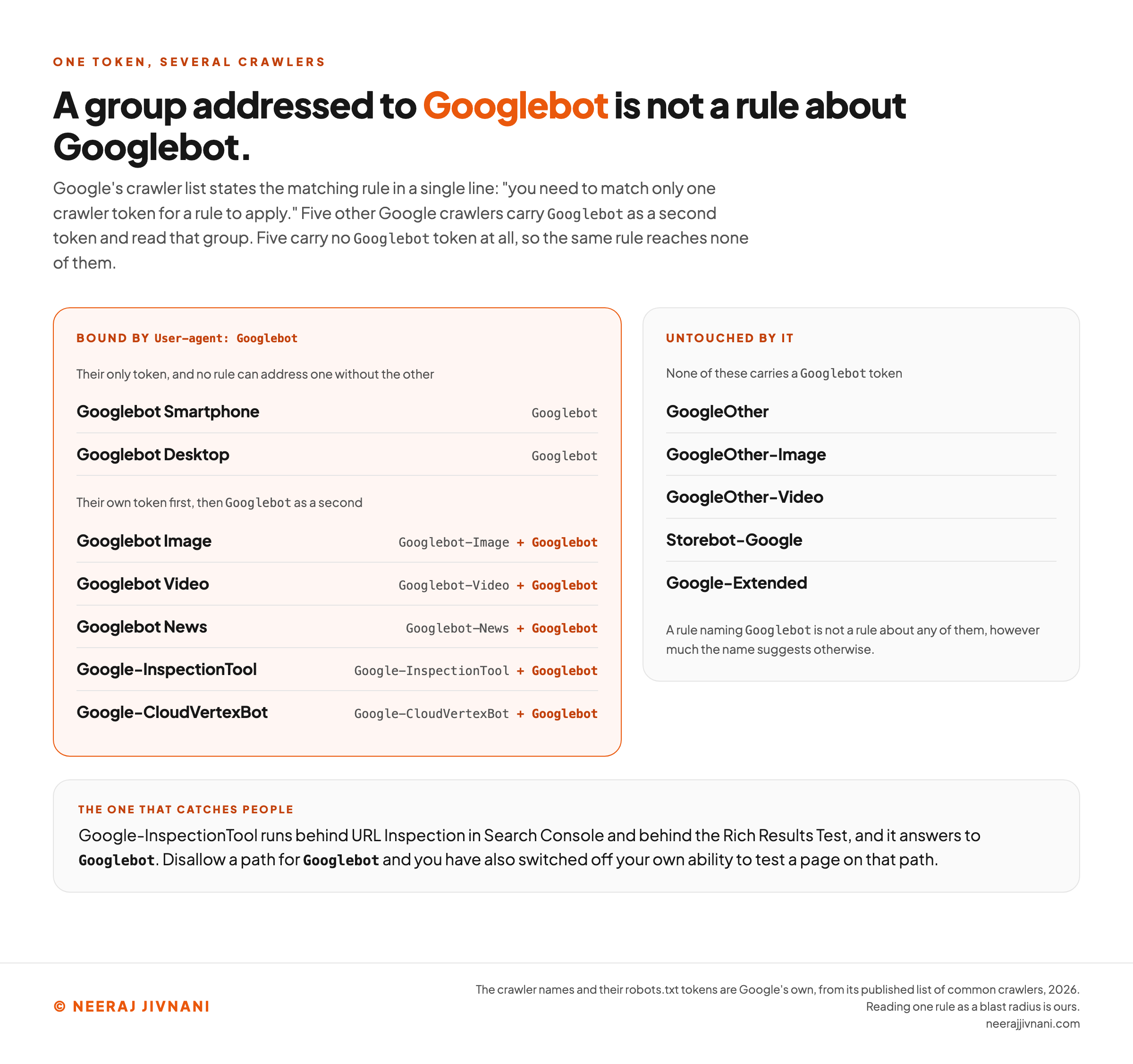
Several of those crawlers carry two tokens, and for five of them the second one is Googlebot. Google's crawler list states the matching rule in a single line: "you need to match only one crawler token for a rule to apply."
So a group addressed to Googlebot is not a rule about Googlebot.
It is a rule about Googlebot, Googlebot Image, Googlebot Video, Googlebot News, Google-InspectionTool and Google-CloudVertexBot, unless one of them has been given a group of its own.
The one that catches people is the inspection tool. Google-InspectionTool runs behind URL Inspection in Search Console and behind the Rich Results Test, and it answers to Googlebot.
Disallow a path for Googlebot and you have also switched off your own ability to test a page on that path.
The other half of the list matters as much. GoogleOther, GoogleOther-Image, GoogleOther-Video, Storebot-Google and Google-Extended carry no Googlebot token, so a rule naming Googlebot reaches none of them.
Our position on this is short enough to hold in your head. The name is not the unit of control; the token is.
Before writing a line that names a crawler, find out which crawlers answer to that name. The reach is wider in one direction and narrower in the other than the name suggests.
What that rule binds
Pick the name you were about to write into a robots.txt group. Google's published tokens are applied to it here, in your browser, in both directions: who reads that group, and who never sees it.
The line you are writing
User-agent: Googlebot
Already named somewhere else in your file
A crawler given a group of its own reads that one instead. Tick any of these you have already written a group for.
Googlebot Smartphone and Googlebot Desktop are not on that list. Their only token is the one you just wrote, so no rule can address one without the other and there is no group you could put them in.
1. What reads that group
Matching only one token is enough for the rule to apply, so every crawler below reads that group.
| Crawler | Matched on | What appears in the log |
|---|---|---|
| Googlebot Smartphone | Googlebot | compatible; Googlebot/2.1 on an Android string |
| Googlebot Desktop | Googlebot | compatible; Googlebot/2.1 on a desktop string |
| Googlebot Image | Googlebot | Googlebot-Image/1.0 |
| Googlebot Video | Googlebot | Googlebot-Video/1.0 |
| Googlebot News | Googlebot | no string of its own; uses the Googlebot strings |
| Google-InspectionTool | Googlebot | compatible; Google-InspectionTool/1.0 |
| Google-CloudVertexBot | Googlebot | Google-CloudVertexBot |
The one that catches people
Google-InspectionTool runs behind URL Inspection in Search Console and behind the Rich Results Test. Disallow a path for Googlebot and you have also switched off your own ability to test a page on that path.
2. What it never sees
These carry no Googlebot token, so this group is not a rule about any of them.
Two rows here have no user agent string of their own. Googlebot News and Google-Extended both crawl under existing Google strings, so neither can be picked out of a log, and Google-Extended's token exists purely as a control you set. And the version number in the strings above is a placeholder: Google writes it as Chrome/W.X.Y.Z, warns that it moves with each Chromium release, and asks you to wildcard it rather than pin a version.
The crawlers here are the table above, which is the ones a normal site will meet, and not every client on Google's crawling platform. GoogleOther-Image and GoogleOther-Video carry no Googlebot token either, and are named in the prose rather than listed here.
This says who reads the group, and nothing about whether the rule inside it is the one you want. Decide the token first and the control second.
Checking Whether It Is Really Google
A user agent string is text a client chooses to send. Anything can send Googlebot, and scrapers do, precisely because sites wave it through.
Google publishes two ways to settle it: a reverse lookup through the Domain Name System (DNS) on the address in your log, or a match against its published IP range files.
For the reverse lookup, the hostname has to be googlebot.com, google.com or googleusercontent.com. Then a forward lookup on that hostname has to resolve back to the same address, because one direction alone can be forged.
The hostname also tells you which kind of client you are looking at. Google documents three masks:
- `crawl-*-*-*-*.googlebot.com` or
geo-crawl-***-***-***-***.geo.googlebot.comis a common crawler, the group Googlebot belongs to, and those always respect robots.txt on automatic crawls. - `rate-limited-proxy-*-*-*-*.google.com` is a special-case crawler such as AdsBot, which is not bound by robots.txt in the way the common crawlers are.
- `*-*-*-*.gae.googleusercontent.com` or
google-proxy-***-***-***-***.google.comis a user-triggered fetcher, and those ignore robots.txt because a person asked for the fetch.
Google's worked example resolves 66.249.66.1 to crawl-66-249-66-1.googlebot.com, and the forward lookup returns the same address. That round trip is the whole test.
Use this chart — embed code and citation
<a href="https://neerajjivnani.com/blog/googlebot/"><img src="https://neerajjivnani.com/infographics/googlebot/one-token-more-than-one-crawler.png" alt="Two panels splitting Google's crawlers by whether a robots.txt rule naming Googlebot reaches them. The headline reads that a group addressed to Googlebot is not a rule about Googlebot, and a line beneath it quotes Google's crawler list stating that you need to match only one crawler token for a rule to apply. The left panel, highlighted in orange and headed bound by User-agent colon Googlebot, is split in two. The first pair, Googlebot Smartphone and Googlebot Desktop, carry Googlebot as their only token, and a note says no rule can address one without the other. The second group carries its own token first and Googlebot as a second: Googlebot Image, Googlebot Video, Googlebot News, Google-InspectionTool and Google-CloudVertexBot. The right panel, headed untouched by it, lists GoogleOther, GoogleOther-Image, GoogleOther-Video, Storebot-Google and Google-Extended, with a note that none of these carries a Googlebot token and that a rule naming Googlebot is not a rule about any of them. A band underneath is headed the one that catches people and says Google-InspectionTool runs behind URL Inspection in Search Console and behind the Rich Results Test and answers to Googlebot, so disallowing a path for Googlebot also switches off your own ability to test a page on that path." width="1200"></a>
<p>Chart: <a href="https://neerajjivnani.com/blog/googlebot/">Neeraj Jivnani</a></p>Neeraj Jivnani, "What Googlebot Is, and Which Google Crawler Is in Your Logs", neerajjivnani.com, https://neerajjivnani.com/blog/googlebot/Free to republish with a link back to this page.
What Googlebot Does on a Visit
A visit has a shape, and knowing it tells you which of your problems are fixable where.
Googlebot picks a URL it knows about, requests it, takes some bytes, and hands them on.
Everything after that is a different system's decision. Indexing in particular is not Googlebot's call, so a page can be crawled perfectly and still not be stored, and "Googlebot came and nothing happened" is usually a question about the page rather than about the crawler.
How It Finds a URL in the First Place
Links, mostly. Google's own wording is that Googlebot "discovers new URLs to crawl primarily from links embedded in previously crawled pages".
A sitemap adds to that list, and an inspection request in Search Console adds one URL to it. Neither replaces linking, and neither guarantees a fetch.
The consequence Google spells out is worth reading twice, because it disappoints people regularly.
It is "almost impossible to keep a site secret by not publishing links to it". One click from your unlinked page to somebody else's site can put your URL in their referrer log, and from there into public view.
A page that must stay private needs a login in front of it. Not linking to it is a hope, not a setting.
How Much of the Page It Reads
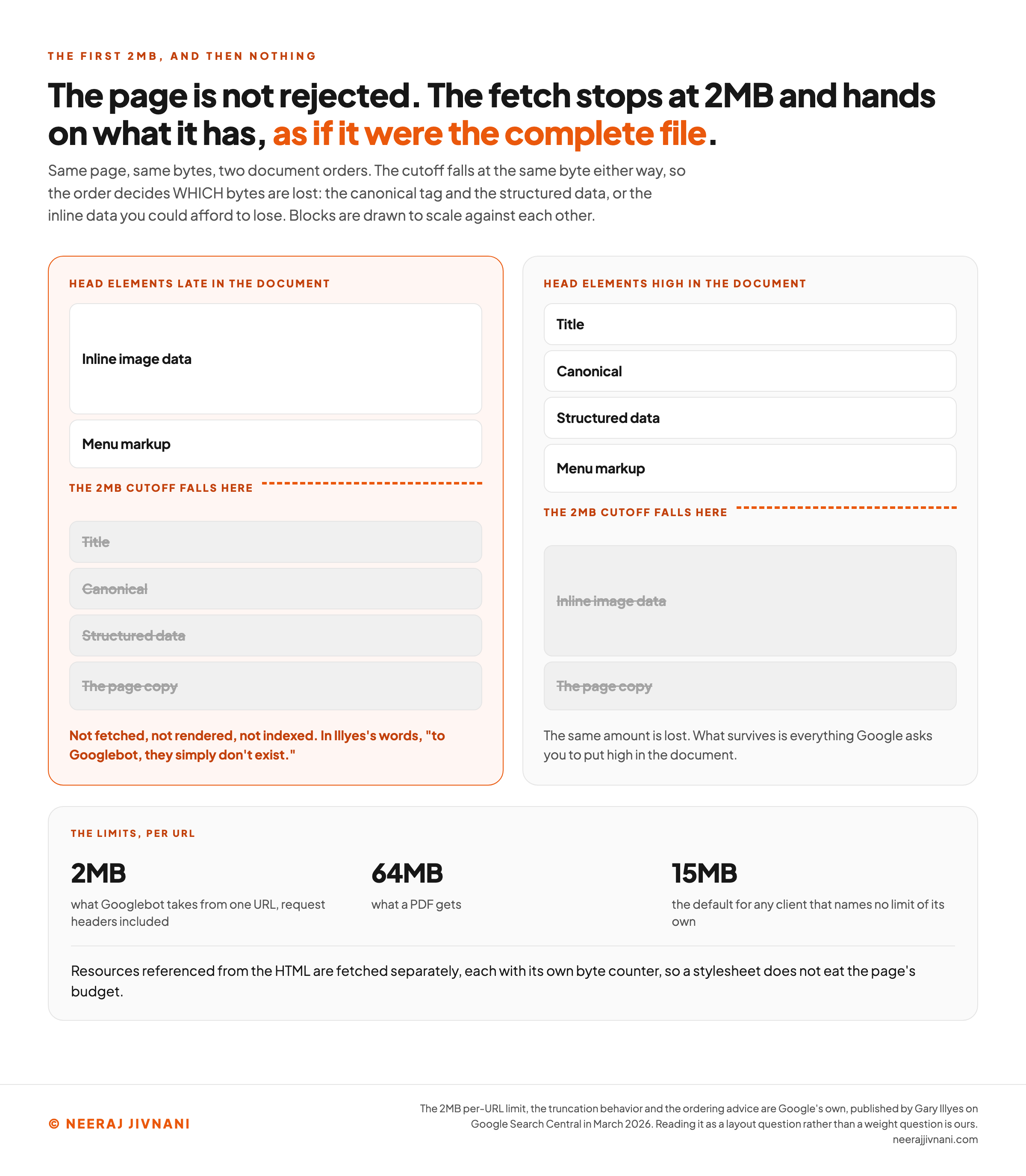
Googlebot takes the first 2MB of a URL and stops. A PDF gets 64MB, and 15MB is what Google's crawling documentation sets as the default for any client that names no limit of its own.
The request headers count toward that 2MB, which Illyes spelled out when he published the figures in March 2026.
What happens at the cutoff is the part that costs people.
The page is not rejected. The fetch stops exactly at the limit, and Google's indexing systems and its renderer receive the truncated file "as if it were the complete file".
Everything past the cutoff is not fetched, not rendered and not indexed. In Illyes's words, "to Googlebot, they simply don't exist".
Resources referenced from the HTML are fetched separately, each with its own byte counter, so a stylesheet does not eat the page's budget. Media files, fonts and what Google calls "a few exotic files" are not fetched by the renderer at all.
Two megabytes of HTML is an enormous page and most sites will never approach it.
That is why we treat this as a layout question rather than a weight question.
The failure case is not a big page. It is a page whose first megabyte is an inline image or a menu, pushing the canonical tag and the structured data below the line.
Google's own advice points the same way: put the meta tags, the title, the link elements, the canonical and the essential structured data high in the document.
And the number is provisional. Google says the limit "is not set in stone and may change over time as the web evolves and HTML pages grow in size".
Rendering happens after all of this, in a separate service that runs the JavaScript on whatever bytes the crawler retrieved. That service has its own rules and its own limits, and it is a subject of its own.
Use this chart — embed code and citation
<a href="https://neerajjivnani.com/blog/googlebot/"><img src="https://neerajjivnani.com/infographics/googlebot/where-the-fetch-stops.png" alt="Two documents drawn as stacks of labeled blocks with a dashed orange cutoff line across each, showing that the 2MB limit is decided by document order rather than page weight. The headline reads that the page is not rejected, that the fetch stops at 2MB and hands on what it has as if it were the complete file, and a line beneath adds that the cutoff falls at the same byte either way, so the order decides which bytes are lost, and that the blocks are drawn to scale against each other. The left stack, highlighted in orange and headed head elements late in the document, puts a tall inline image data block and menu markup above the cutoff, and shows title, canonical, structured data and the page copy struck through below it, with a verdict reading not fetched, not rendered, not indexed, and quoting Illyes that to Googlebot they simply do not exist. The right stack, headed head elements high in the document, puts title, canonical, structured data and menu markup above the cutoff, and shows the same tall inline image data block and the page copy struck through below it, with a note that the same amount is lost and what survives is everything Google asks you to put high in the document. A band underneath gives the per-URL limits: 2MB is what Googlebot takes from one URL with request headers included, 64MB is what a PDF gets, and 15MB is the default for any client that names no limit of its own, with a line adding that resources referenced from the HTML are fetched separately, each with its own byte counter." width="1200"></a>
<p>Chart: <a href="https://neerajjivnani.com/blog/googlebot/">Neeraj Jivnani</a></p>Neeraj Jivnani, "What Googlebot Is, and Which Google Crawler Is in Your Logs", neerajjivnani.com, https://neerajjivnani.com/blog/googlebot/Free to republish with a link back to this page.
How Often It Comes, and Why It Is Here Now
Not often, on a normal site. Google's guidance is that for most sites Googlebot "shouldn't access your site more than once every few seconds on average", and the rate can look higher in short bursts.
Nobody sets that rate by hand any more.
Googlebot watches how your server responds and backs off when it struggles, which Google describes as crawlers automatically slowing "to avoid overloading your infrastructure".
When crawling genuinely spikes, Google names three causes it sees most often. Each one is a site minting addresses faster than anybody meant it to:
- Faceted navigation, or any sorting and filtering that builds a URL per combination. A catalog with four filters can produce more addresses than it has products.
- A calendar with a URL for every date. A next-month link has no natural end, so a crawler can keep walking forward through empty dates indefinitely.
- A Dynamic Search Ad target. The ad system generates the addresses, so the crawling follows from the ad account rather than from anything on the site.
Before treating heavy traffic as a Googlebot problem, check the identity. A scraper sending the Googlebot string is common, and the reverse lookup above takes seconds.
Slowing It Down Without Losing the Page
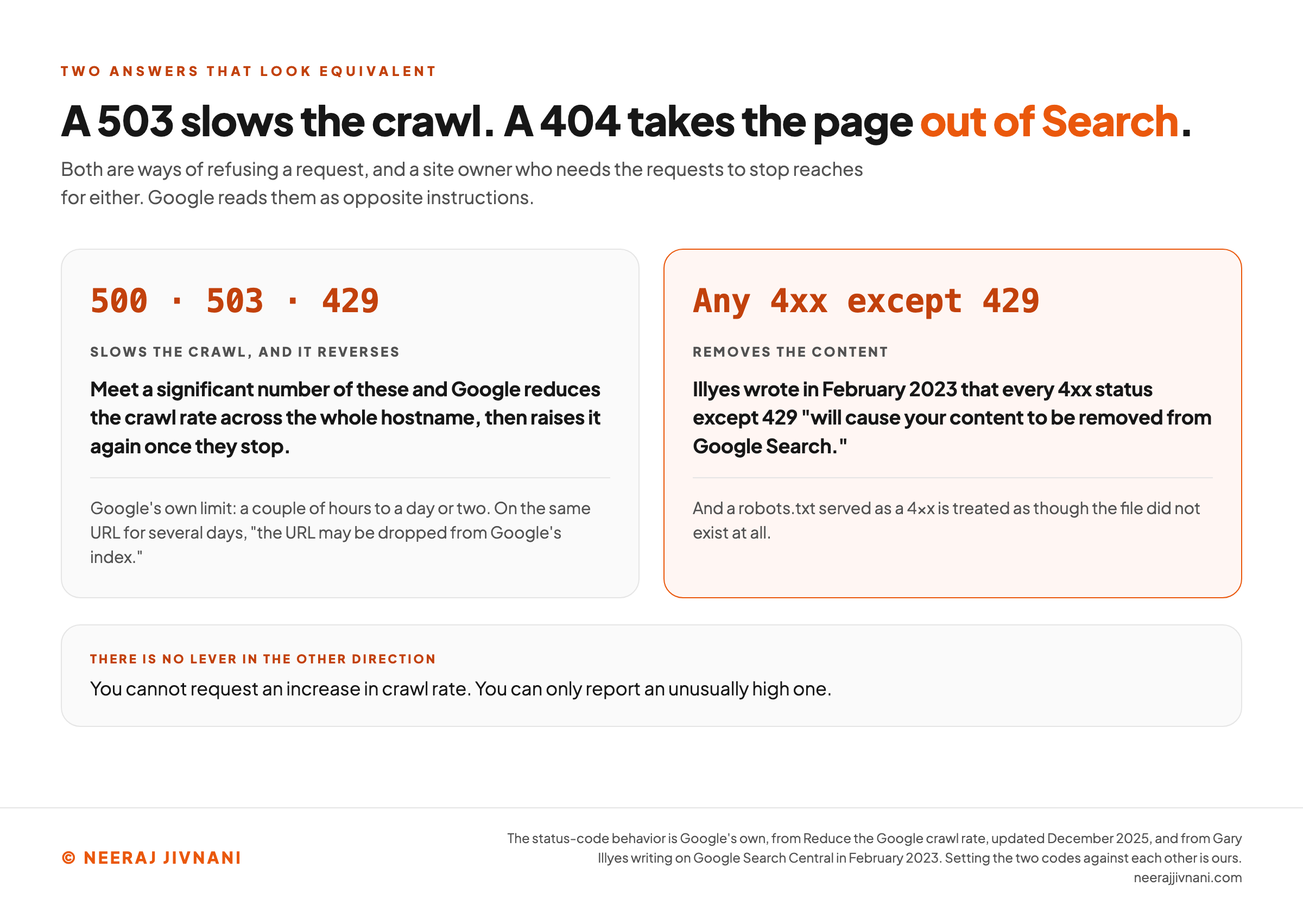
If you need the requests to stop now, return a 500, 503 or 429 status code instead of a 200. Google reduces the crawl rate across the whole hostname when it meets a significant number of those, and raises it again once they stop.
Keep it short.
Google's own limit is a couple of hours to a day or two, and it warns that if Googlebot sees those codes on the same URL for several days "the URL may be dropped from Google's index".
Reaching for a 404 or a 403 instead is the mistake worth naming, because it looks equivalent and is not.
Illyes wrote in February 2023 that every 4xx status except 429 "will cause your content to be removed from Google Search", and that a robots.txt served as a 4xx is treated as though the file did not exist.
There is no lever in the other direction. Google states you cannot request an increase in crawl rate, only report an unusually high one.
Use this chart — embed code and citation
<a href="https://neerajjivnani.com/blog/googlebot/"><img src="https://neerajjivnani.com/infographics/googlebot/slow-it-or-lose-it.png" alt="Two panels setting the status codes that slow a crawl against the ones that remove a page, under a headline reading that a 503 slows the crawl while a 404 takes the page out of Search. A line beneath says both are ways of refusing a request and a site owner who needs the requests to stop reaches for either, while Google reads them as opposite instructions. The left panel is headed 500, 503, 429 and says meeting a significant number of these makes Google reduce the crawl rate across the whole hostname and raise it again once they stop, with a note giving Google's own limit as a couple of hours to a day or two and warning that on the same URL for several days the URL may be dropped from Google's index. The right panel, highlighted in orange and headed any 4xx except 429, says Illyes wrote in February 2023 that every 4xx status except 429 will cause your content to be removed from Google Search, and adds that a robots.txt served as a 4xx is treated as though the file did not exist at all. A band underneath is headed there is no lever in the other direction and says you cannot request an increase in crawl rate, only report an unusually high one." width="1200"></a>
<p>Chart: <a href="https://neerajjivnani.com/blog/googlebot/">Neeraj Jivnani</a></p>Neeraj Jivnani, "What Googlebot Is, and Which Google Crawler Is in Your Logs", neerajjivnani.com, https://neerajjivnani.com/blog/googlebot/Free to republish with a link back to this page.
What You Can Tell It
You get two decisions and they are separate.
Whether Googlebot may fetch a URL is set in robots.txt. Whether a page may appear in results is set on the page with a noindex robots meta tag, and that tag only works if the fetch is allowed.
Blocking the crawler is possible and it is blunt. Google lists what goes with it: Search, including Discover and every Search feature, plus Google Images, Google Video and Google News.
Password protection is the control when neither a crawler nor a visitor should reach the page. It is the only option here that stops a person as well.
Decide the token first and the control second. A wrong name breaks nothing, which is what makes it hard to catch: the rule runs, and it runs against the wrong set of crawlers.
What It Will and Will Not Take
Googlebot takes almost any transport and exactly two caching mechanisms, and both halves are worth knowing before you tune anything.
On transport, it speaks both versions of the hypertext transfer protocol (HTTP) in common use. Googlebot supports HTTP/1.1 and HTTP/2, picks whichever performs better, and may switch between crawling sessions if the statistics change.
HTTP/2 saves computing resources on both sides and buys nothing else. Google is explicit that there is no ranking benefit to it.
To opt out of HTTP/2, Google's instruction is to answer its requests with a 421 status code. The crawler infrastructure also supports the older file transfer protocol (FTP) and its secure form (FTPS), and Google describes crawling over either as rare.
On compression, it accepts gzip, deflate and Brotli, and advertises what it accepts in the Accept-Encoding header of every request.
On caching, the supported set is two pairs: ETag with If-None-Match, and Last-Modified with If-Modified-Since. Google recommends ETag of the two, because it has no date format to get wrong, and states that other caching directives are not supported.
It does still suggest setting Cache-Control: max-age alongside Last-Modified, as a hint about when a URL is worth re-fetching.
One geography detail explains a log that looks strange.
Google crawls from many datacenters, so a log showing several addresses is normal. Google "egresses primarily from IP addresses in the United States", and if it detects that your site blocks requests from there, it may crawl from another country instead.
How to See What It Did
Two records exist and they answer different questions.
The Crawl stats report in Search Console, under Settings, is the fast one.
It breaks crawl requests down by response code, by file type, by purpose, and by which Googlebot made them. That is enough to spot a wave of 404s or a server slowing down.
Your server log is the complete one. It holds every request from every client, including the ones pretending to be Googlebot, and it is the only place the identity test can be run.
Use the report to notice something. Use the log to prove it.
Googlebot, in Four Short Answers
What is a Googlebot? It is Google Search's web crawler, running as a smartphone crawler and a desktop crawler that share one robots.txt token. It is also one client of a wider Google crawling platform, which is why other Google crawler names turn up in the same logs.
Can you block Googlebot? Yes, with a robots.txt rule, and the cost is everything Google lists under that name: Search including Discover and all Search features, Images, Video and News. Blocking the crawl is also the wrong way to remove a page from results, because the noindex tag that does that has to be fetched before it can be read.
Why is Googlebot checking me? Usually because it found a link and is keeping the index current. If the volume is unusual, the common causes are filter or calendar addresses your site is generating without meaning to, and the first thing to confirm is that the visitor is Google rather than something sending its name.
How often do Google bots crawl a site? For most sites, not more than once every few seconds on average, with the rate set automatically from how your server responds. There is no setting to raise it.
The Name in the Log Is Not the Unit
The mistake worth guarding against here is a scoping error rather than a technical one. Somebody writes a rule for a name, and it lands on five crawlers they were not thinking about, or on none of the ones they meant.
The two things worth carrying out of this are both about scope. A rule reaches crawlers by token rather than by the name you had in mind, and a fetch takes bytes rather than pages.
Get those the right way round and the rest is housekeeping. Verify what is knocking, keep the important elements near the top of the document, and answer with a 503 rather than a 404 on the day your server needs a rest.