BIMI, and Everything That Has to Agree Before Your Logo Appears
BIMI puts your brand logo beside your email. See what the DNS record needs, when you have to buy a certificate, and why the logo may still not show.

/ On this page11 sections
BIMI puts your brand logo beside your name in the inbox. You publish a DNS record that points at the logo, and depending on who you are sending to, you may also have to buy a certificate proving the logo is yours.
None of that switches the logo on. It puts in a request.
The requirements differ by provider, the certificate is optional at some of them, and a correct record can still show nothing.
What BIMI Stands For, and What It Does Not Do
BIMI stands for Brand Indicators for Message Identification, and it is said bih-mee. It is how you tell mailbox providers which logo belongs to your sending domain.
You publish a text record in the Domain Name System (DNS). That record points at a logo file, and sometimes at a certificate as well.
A provider that supports BIMI reads the record after your mail has passed authentication, and may then draw your logo where it would otherwise draw a colored circle with your initial in it.
That is all of it.
It is worth being clear about what it is not. BIMI filters nothing.
It does not block a message that forges your domain, it does not decide whether your mail is delivered, and it adds no protection you did not already have from the authentication sitting underneath it.
What it adds is visibility. The checks that decide whether your mail is genuine already run on every message, silently, and BIMI is the first of them a person can see.
How the Logo Gets There
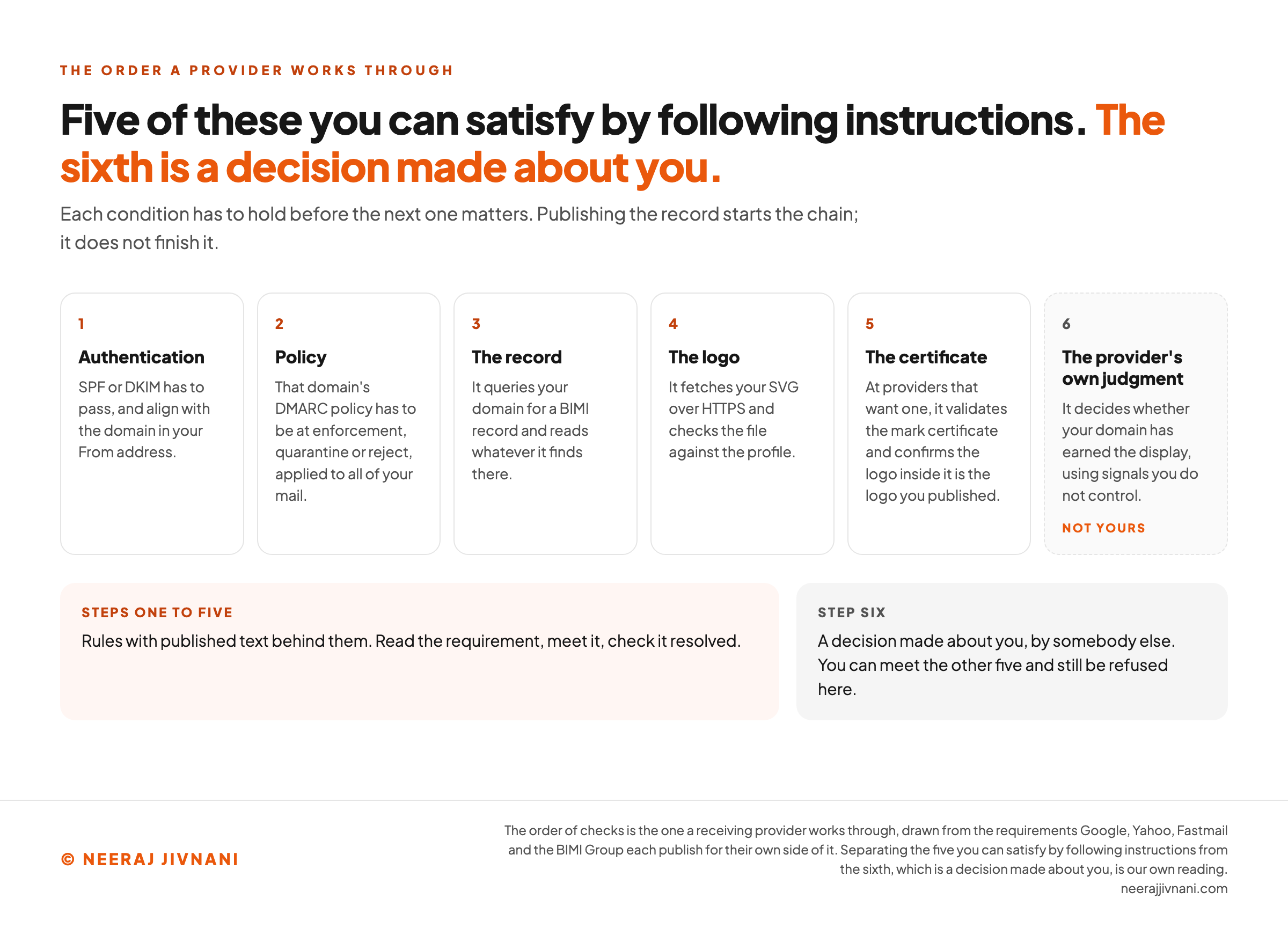
A receiving provider works through the conditions in order, and each one has to hold before the next one matters.
- Authentication. SPF or DKIM has to pass, and align with the domain in your From address.
- Policy. That domain's policy under DMARC, Domain-based Message Authentication, Reporting and Conformance, has to be at enforcement.
- The record. It queries your domain for a BIMI record and reads whatever it finds there.
- The logo. It fetches your SVG over HTTPS and checks the file against the profile.
- The certificate, at providers that want one. It validates the mark certificate and confirms the logo inside it is the logo you published.
- The provider's own judgment. It decides whether your domain has earned the display.
Only the first five are rules you can satisfy by following instructions.
The sixth is a decision made about you, by somebody else, using signals you do not control. You can meet the other five and still be refused here.
Use this chart — embed code and citation
<a href="https://neerajjivnani.com/blog/bimi/"><img src="https://neerajjivnani.com/infographics/bimi/the-last-one-is-not-yours.png" alt="Six numbered cards in a row, setting out the order a receiving provider works through. One, authentication: SPF or DKIM has to pass, and align with the domain in your From address. Two, policy: that domain's DMARC policy has to be at enforcement, quarantine or reject, applied to all of your mail. Three, the record: it queries your domain for a BIMI record and reads whatever it finds there. Four, the logo: it fetches your SVG over HTTPS and checks the file against the profile. Five, the certificate: at providers that want one, it validates the mark certificate and confirms the logo inside it is the logo you published. The sixth card is drawn apart, with a dashed border and a grey fill, and is tagged not yours: the provider's own judgment, which decides whether your domain has earned the display using signals you do not control. Beneath, two panels make the split explicit. Steps one to five are rules with published text behind them, where you read the requirement, meet it and check it resolved. Step six is a decision made about you, by somebody else, and you can meet the other five and still be refused there." width="1200"></a>
<p>Chart: <a href="https://neerajjivnani.com/blog/bimi/">Neeraj Jivnani</a></p>Neeraj Jivnani, "BIMI, and Everything That Has to Agree Before Your Logo Appears", neerajjivnani.com, https://neerajjivnani.com/blog/bimi/Free to republish with a link back to this page.
Getting DMARC to Enforcement First
Nothing happens until DMARC is enforcing, and getting there is the longest piece of work on the free route.
You need SPF or DKIM passing for every service that sends mail as you, aligned with your From domain. Then a DMARC record with a policy of quarantine or reject.
The pct option has to be 100 as well, so the policy applies to all of your mail rather than a sample of it. That is the requirement Google publishes for Gmail on its admin documentation.
A policy of none will not do. It is the easiest setting to stop at, because it collects reports without risking a single delivery, and it is exactly the setting BIMI refuses.
You also need somewhere to serve files over HTTPS on your own domain, for the logo and, if you buy one, the certificate.
Getting to enforcement is genuine work when your mail leaves from several places at once. Do it for its own sake.
It is the half of this that protects the domain, and the logo is a side effect of having done it.
The Logo File
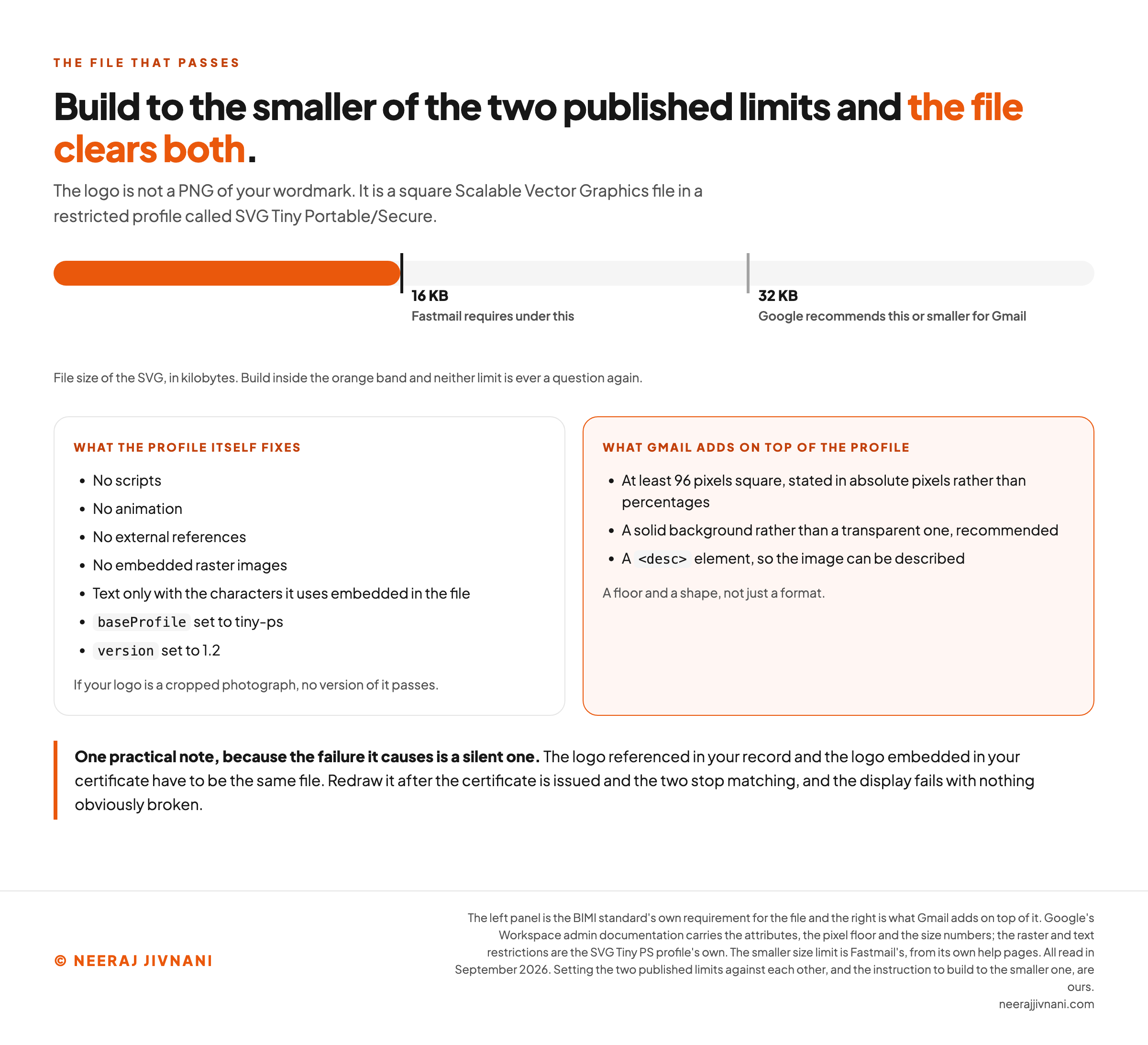
The logo is not a PNG of your wordmark. It is a square Scalable Vector Graphics (SVG) file in a restricted profile called SVG Tiny Portable/Secure.
The profile bans scripts, animation, external references and embedded raster images. Text is allowed only with the characters it uses embedded in the file, which is why converting type to outlines is the simpler route.
If your logo is a cropped photograph, no version of it passes.
The profile also fixes two attributes inside the file: baseProfile set to tiny-ps and version to 1.2.
Gmail adds a floor of its own on top of that. The image has to be at least 96 pixels square, stated in absolute pixels rather than percentages.
Google also recommends a solid background rather than a transparent one, and a description element inside the file so a screen reader has something to read.
Then there is size, where the two published limits differ.
Google recommends 32 KB or smaller for Gmail. Fastmail requires under 16 KB.
Build to the smaller number and you clear both without thinking about it again.
One practical note, because the failure it causes is a silent one. The logo referenced in your record and the logo embedded in your certificate have to be the same file.
Redraw the logo after the certificate is issued, update the SVG on your server, and the two stop matching. The display fails with nothing obviously broken.
Use this chart — embed code and citation
<a href="https://neerajjivnani.com/blog/bimi/"><img src="https://neerajjivnani.com/infographics/bimi/the-file-that-passes.png" alt="A horizontal scale of file size in kilobytes, with the band from zero filled in orange up to the first marker. That marker is labeled 16 KB, Fastmail requires under this. A second, greyed marker further along is labeled 32 KB, Google recommends this or smaller for Gmail. The caption under the scale says to build inside the orange band so neither limit is ever a question again. Below are two panels. The left one, what the profile itself fixes, lists no scripts, no animation, no external references, no embedded raster images, text only with the characters it uses embedded in the file, baseProfile set to tiny-ps and version set to 1.2, closing on the note that a logo which is a cropped photograph has no version that passes. The right panel, highlighted in orange and headed what Gmail adds on top of the profile, lists at least 96 pixels square stated in absolute pixels rather than percentages, a solid background rather than a transparent one as a recommendation, and a desc element so the image can be described, closing on the line that this is a floor and a shape, not just a format. A footnote says the logo referenced in your record and the logo embedded in your certificate have to be the same file, and that redrawing it after the certificate is issued makes the two stop matching while the display fails with nothing obviously broken." width="1200"></a>
<p>Chart: <a href="https://neerajjivnani.com/blog/bimi/">Neeraj Jivnani</a></p>Neeraj Jivnani, "BIMI, and Everything That Has to Agree Before Your Logo Appears", neerajjivnani.com, https://neerajjivnani.com/blog/bimi/Free to republish with a link back to this page.
Publishing the Record
The record is a TXT record at default._bimi under your domain, holding two tags or three.
``
default._bimi.example.com. IN TXT "v=BIMI1; l=https://example.com/logo.svg; a=https://example.com/certificate.pem"
``
v is the version, and it is always BIMI1. l is the HTTPS address of your SVG.
a points at the certificate, and you leave it out entirely if you do not have one.
default is a selector. It covers all of your mail, which is what you want unless you are deliberately running different logos on different streams.
Once it is published, check three things, in this order:
- The record resolves. Query
default._bimiunder your domain and read back what you published, typos included. - The logo loads. Open the
laddress in a browser. It has to return your SVG over HTTPS, from your own domain, with no redirect and no login. - The policy is where you believe it is. Read your live DMARC record rather than the one you remember writing.
Those three are where the self-inflicted failures are, and the first two take a minute between them.
Then wait. The logo can take up to 48 hours to appear, which is the window Google publishes for Gmail, and a provider that has already cached an avatar for your domain may hold onto it longer than that.
The Certificate Question
A mark certificate is the part of this that costs money, and whether you need one depends entirely on where your mail lands.
It is a file you buy from a certificate authority and host next to your logo, vouching for your right to use the image.
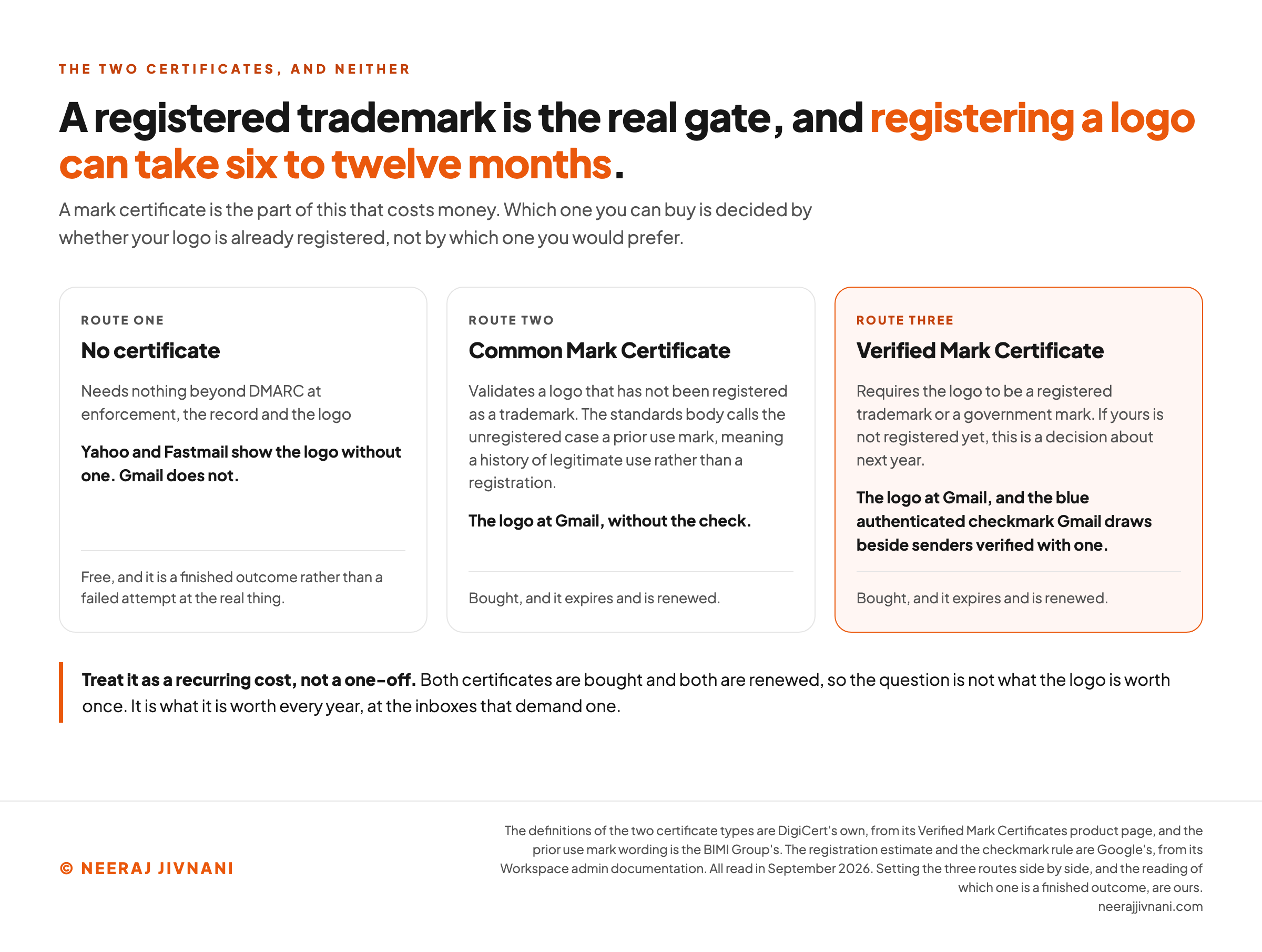
There are two kinds, and the difference between them is your trademark.
A Verified Mark Certificate (VMC) requires the logo to be a registered trademark or a government mark. A Common Mark Certificate (CMC) validates a logo that has not been registered as a trademark, and those are DigiCert's own definitions of the two products it sells.
The standards body draws the same line. The BIMI Group calls the unregistered case a prior use mark, meaning a logo with a history of legitimate use behind it rather than a registration.
So the trademark is the real gate, and it is slower than every other step here. Registering a logo can take six to twelve months, on Google's own estimate.
If yours is not registered yet, the VMC is a decision about next year rather than about this month.
There is one thing only a VMC buys. Gmail draws a blue authenticated checkmark beside senders verified with one, and a CMC gets the logo without the check.
Both certificates are bought, and both expire and are renewed. Treat it as a recurring cost rather than a one-off, and weigh it against what the free route already gets you.
Use this chart — embed code and citation
<a href="https://neerajjivnani.com/blog/bimi/"><img src="https://neerajjivnani.com/infographics/bimi/the-trademark-is-the-gate.png" alt="Three route cards side by side. Route one, no certificate, needs nothing beyond DMARC at enforcement, the record and the logo; Yahoo and Fastmail show the logo without one and Gmail does not; it is free, and a finished outcome rather than a failed attempt at the real thing. Route two, a Common Mark Certificate, validates a logo that has not been registered as a trademark, with the standards body calling the unregistered case a prior use mark, meaning a history of legitimate use rather than a registration; it gets the logo at Gmail without the check; it is bought, and it expires and is renewed. Route three, highlighted in orange, is a Verified Mark Certificate, which requires the logo to be a registered trademark or a government mark, so a logo that is not registered yet makes this a decision about next year; it gets the logo at Gmail and the blue authenticated checkmark Gmail draws beside senders verified with one; it is bought, and it expires and is renewed. A closing line says to treat it as a recurring cost rather than a one-off, because the question is not what the logo is worth once but what it is worth every year, at the inboxes that demand one." width="1200"></a>
<p>Chart: <a href="https://neerajjivnani.com/blog/bimi/">Neeraj Jivnani</a></p>Neeraj Jivnani, "BIMI, and Everything That Has to Agree Before Your Logo Appears", neerajjivnani.com, https://neerajjivnani.com/blog/bimi/Free to republish with a link back to this page.
Who Actually Shows It
Support is a list you check, not a standard you can assume.
BIMI has never been ratified. The Internet Engineering Task Force datatracker has it as an Internet-Draft at revision 14, dated 1 May 2026 and due to expire on 2 November 2026.
The same record notes that the draft is not endorsed by the IETF and has no formal standing in the standards process.
That is not a footnote, it is the explanation. With nothing ratified, every mailbox provider writes its own rules, and the rules are not the same.
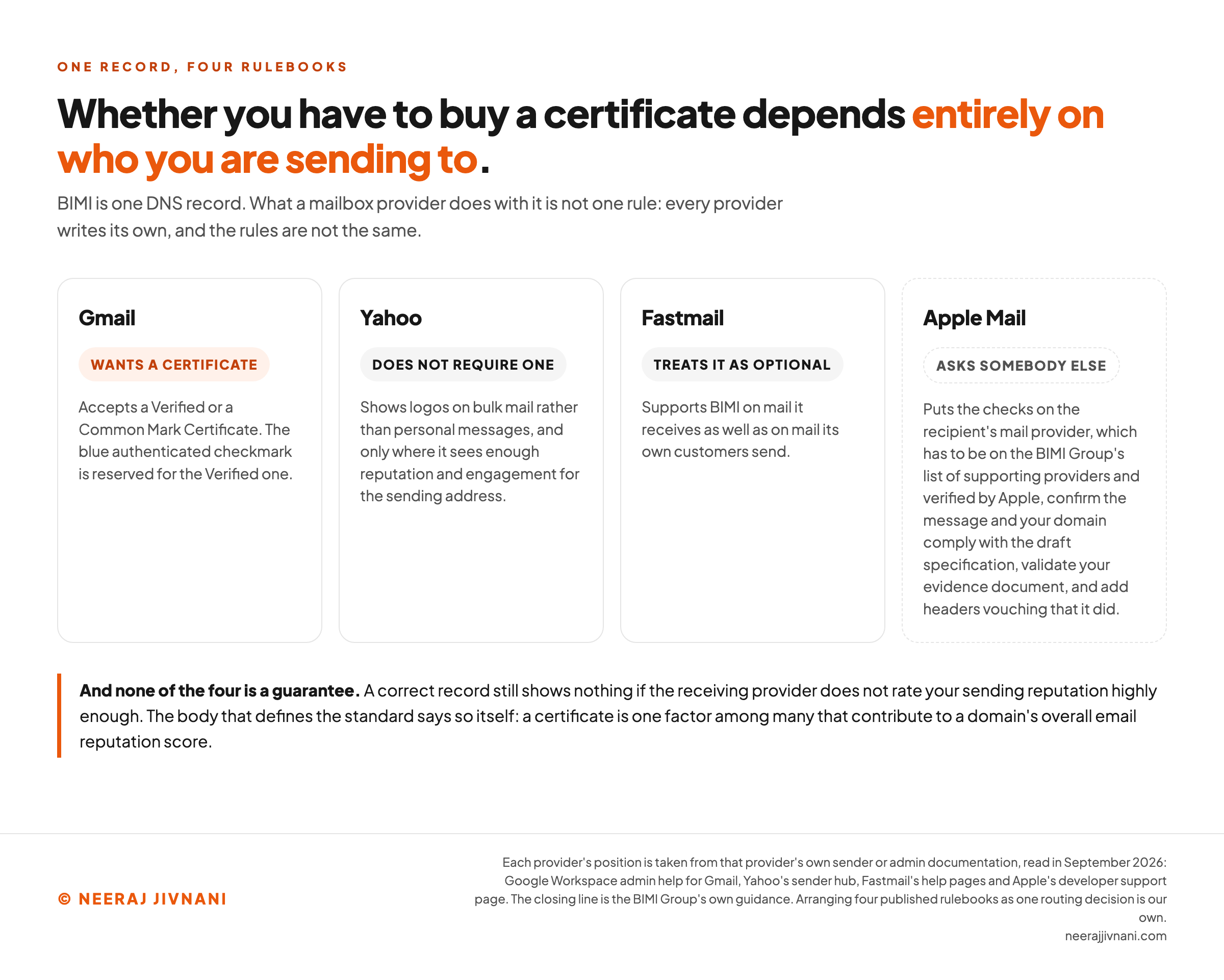
- Gmail accepts a VMC or a CMC, and reserves the checkmark for the VMC.
- Yahoo does not currently require a certificate. It shows logos on bulk mail rather than personal messages, and only where it sees enough reputation and engagement for the sending address.
- Fastmail treats the certificate as optional, and supports BIMI on mail it receives as well as mail its own customers send.
- Apple Mail attaches its condition to the recipient rather than the sender, which is unusual enough to be worth its own explanation below.
The display surface differs too. A provider may put your logo in the message list, or in the open message, or on mobile and not on desktop, and none of that is yours to decide.
So there is no general answer to whether you need a certificate. There is only your answer, and it comes from where your recipients happen to read their mail.
Use this chart — embed code and citation
<a href="https://neerajjivnani.com/blog/bimi/"><img src="https://neerajjivnani.com/infographics/bimi/who-shows-your-logo.png" alt="Four provider cards side by side, each carrying a badge for its position on mark certificates. Gmail wants a certificate: it accepts a Verified or a Common Mark Certificate, and the blue authenticated checkmark is reserved for the Verified one. Yahoo does not require one: it shows logos on bulk mail rather than personal messages, and only where it sees enough reputation and engagement for the sending address. Fastmail treats it as optional: it supports BIMI on mail it receives as well as on mail its own customers send. The fourth card, drawn apart with a dashed border, is Apple Mail, which asks somebody else: it puts the checks on the recipient's mail provider, which has to be on the BIMI Group's list of supporting providers and verified by Apple, confirm the message and your domain comply with the draft specification, validate your evidence document, and add headers vouching that it did. A closing line says none of the four is a guarantee, because a correct record still shows nothing if the receiving provider does not rate your sending reputation highly enough, and that the body defining the standard says a certificate is one factor among many that contribute to a domain's overall email reputation score." width="1200"></a>
<p>Chart: <a href="https://neerajjivnani.com/blog/bimi/">Neeraj Jivnani</a></p>Neeraj Jivnani, "BIMI, and Everything That Has to Agree Before Your Logo Appears", neerajjivnani.com, https://neerajjivnani.com/blog/bimi/Free to republish with a link back to this page.
Why a Correct Setup Still Shows Nothing
You can satisfy every published requirement and still see nothing, because the last decision in the chain is not yours to make.
The body that defines the standard says so outright. The BIMI Group's guidance is that a VMC "is not a guaranteed ticket to BIMI logo display", but "one factor among many that contribute to your domain's overall email reputation score".
Reputation is usually the answer. A domain three weeks into its first campaign, or one carrying complaint rates a provider dislikes, does not get a logo however correct its DNS is.
Yahoo says as much in its own requirements, which ask for sufficient reputation and engagement before it will display anything.
It adds that a certificate in your record still informs that judgment, even though it does not require one.
Apple Mail Asks the Recipient's Provider, Not You
Apple Mail attaches a condition that has nothing to do with you at all.
Apple's developer documentation puts the BIMI checks on the recipient's mail provider rather than on Apple Mail itself.
That provider has to be on the BIMI Group's list of supporting providers and verified by Apple, confirm the message and your domain comply with the draft specification, validate your evidence document, and add headers vouching that it did.
Apple states that "if a mail provider hasn't performed these actions, that message won't show an organization's logo in Apple Mail".
Read that again from the sending side. The same message, from the same domain, with the same certificate, shows your logo to one Apple Mail user and nothing at all to the person sitting next to them, because their mail is hosted somewhere different.
So a missing logo is not by itself evidence of a mistake. Before you spend a week debugging DNS that is already correct, find out whether the inbox you are testing in would ever have shown it.
One setup, four rulebooks
Set the three things you control. Every provider below reads the same three and answers differently, because each one publishes its own rules.
Waiting on your DMARC policy
Gmail wants quarantine or reject, with the pct option at 100 so the policy applies to all of your mail rather than a sample. A policy of none will not do.
Waiting on your DMARC policy
The policy has to be at quarantine or reject. A policy of none will not do.
Waiting on your DMARC policy
The policy has to be at quarantine or reject. A policy of none will not do.
Not waiting on anything you own
Apple's developer documentation puts the BIMI checks on the recipient's mail provider rather than on Apple Mail itself. That provider has to be on the BIMI Group's list of supporting providers and verified by Apple, confirm the message and your domain comply with the draft specification, validate your evidence document, and add headers vouching that it did.
Three of these columns answer to what you publish. The fourth does not, whatever you set.
And a correct record still shows nothing if the receiving provider does not rate your sending reputation highly enough.
The Logos That Are Not BIMI
Some logos in Gmail have nothing to do with BIMI, and this is why people conclude they already have it.
Setting a profile image on the Google account that sends the mail puts a picture beside your name for some recipients. Google Annotations can place imagery in the Promotions tab.
Neither touches DNS. Neither needs DMARC, a certificate or a trademark, and neither carries any of the verification that makes a BIMI logo mean something.
They are not cheating, and for a small sender they may be all the visual identity that is available. They are a different thing, and worth knowing about before you conclude that a competitor has solved something you have not.
If you want to know whether a domain genuinely publishes BIMI, look up its default._bimi record. A logo with no record behind it is a profile picture.
Questions That Come Up
Six questions are worth answering before you start.
Does BIMI improve deliverability? Not by itself. Everything it requires of you does, because enforced authentication is what providers reward, and the logo is downstream of that work rather than the cause of it.
Is BIMI free? The record and the logo are. The certificate is not, and it recurs.
Do I need a trademark? For a Verified Mark Certificate, yes, and the registration has to cover the logo rather than only your company name. For a Common Mark Certificate, no.
Does BIMI stop someone spoofing my brand? No. Your DMARC policy does that, and BIMI only shows that it worked.
What if my logo is not square? Rebuild it square, on a solid background, with room around the mark. It is going to be rendered at the size of a thumbnail and cropped to a circle in places.
How long does the whole thing take? Days, if DMARC is already enforcing and you skip the certificate. Months, if the logo is not registered yet and you want the one Gmail rewards with a check.
Is It Worth Doing?
Do the free half now, and pay for the certificate only when it wins you an inbox your audience reads.
The free half is worth doing on its own terms. Enforced DMARC, a clean SVG and a published record cost you an afternoon once the authentication work is done, and they already earn the logo at Yahoo and Fastmail.
There is no argument against it beyond the time.
The paid half is a narrower decision than the enthusiasm around it suggests. A certificate wins you the inboxes that require one, and it asks for either a registered logo or the patience to register it.
It is worth knowing how small that club still is.
The LogoTrust study, published at an IEEE security workshop in 2025, swept the DNS for BIMI records across zone files, passive DNS and certificate transparency logs. After validating the mark certificates it found 1,680 brands, 1,811 logos and 2,821 domain names.
That is what a worldwide sweep could find, counting only the default BIMI selector.
So the honest sequence is the cheap one first. Get DMARC to enforcement because your domain needs it, publish the record because it costs nothing more, and watch where the logo turns up.
If it turns up everywhere your audience reads, you are done.
If the gap is an inbox that wants a certificate and that inbox is where your customers are, you now have a specific reason to buy one, rather than a general feeling that you ought to.