Email Marketing: What the Channel Does, and Who It Never Reaches
You send to people who already gave you their address, and to nobody else. See what the channel is good at, where it stops, and whether it fits you yet.


/ On this page14 sections
Email marketing is a channel you own: commercial messages sent to your own list.
You reach the people who already gave you their address, and nobody else. That one fact decides what this channel is good at, where it stops, and whether it is worth setting up yet.
What Email Marketing Is
Email marketing is the use of email to send commercial or fundraising messages to a group of people who are on a list you hold.
That last part is what separates it from every other channel. The list is an asset you control, and it moves with you if a platform changes its rules.
Nobody on the list is a stranger whose attention you have to buy, and that changes what a message has to do before it works.
The word "marketing" is doing specific work in the phrase. A password reset is email, but it is not email marketing, and the law treats the two differently.
How It Works
Email marketing works in four steps, and a platform does the last two for you. You collect addresses with permission, you write a message, the platform sends it to everyone on the list at once, and the platform reports what happened.
What the platform owns. Sending at volume without your domain being treated as a spammer, storing the list, honoring unsubscribes automatically, and giving you the open, click and bounce figures afterwards.
What it cannot do for you. It cannot get you addresses, it cannot make people want the message, and it cannot repair a reputation you have already spent.
That division matters when you are choosing a platform, because the parts a platform competes on are mostly the parts that were never your problem.
The sending itself is not the hard bit.
Getting into the inbox is.
The Types of Email
Types of email are separated by the job they do and by what sets them off, not by how they look. Seven cover almost everything you will ever send.
- Welcome emails go out when somebody joins. Nothing else you send arrives with as much attention, because the person asked for it seconds earlier.
- Promotional emails announce an offer, a launch or a sale. This is the type the phrase usually refers to.
- Newsletters go out on a schedule and carry a mix. Their job is to stay wanted, which is harder than it sounds and is why so many are abandoned.
- Transactional emails confirm something the person did, such as a receipt, a shipping notice or a password reset. They are triggered by an action, not by a calendar.
- Lead nurturing emails run as a timed sequence after somebody shows interest, moving them toward a decision without a human sending each one.
- Survey and feedback emails ask for something instead of offering it, which is why they work best immediately after a good experience.
- Dedicated emails carry one message to one segment, with nothing else competing in the message.
One split in that list carries legal weight: transactional against everything else. A message whose primary purpose is transactional or relationship content sits outside most of what the law requires, and a promotional message dressed in a transactional subject line does not.
One requirement survives that exemption: the routing information still has to be honest. A transactional or relationship message "may not contain false or misleading routing information, but is otherwise exempt from most provisions of the CAN-SPAM Act", in the words of the Federal Trade Commission.
Automation Is Not a Type
Automation is not a type, it is how most of these get sent. An automated email is any of the types above with a trigger attached, such as somebody joining, somebody buying, or somebody not opening anything in ninety days.
The platform holds the rule and fires the message. What it cannot do is decide the rule for you, which is the part people expect the software to solve and it does not.
Building the List
A list is built by asking, and the ask that lasts is an exchange: you get an address, the person gets something specific.
The exchange has to be worth an address to them, not to you. A discount works, and so does something they would have gone looking for anyway, such as a price list or a checklist. "Sign up for updates" works on almost nobody, because it promises more email and nothing else.
People who sign up after a specific promise behave differently from people who sign up after a vague one. A smaller list that expected you is worth more than a large one that did not.
Permission Is Not What the Law Asks For
The law does not require permission before the first message. CAN-SPAM is opt-out, not opt-in, which is the opposite of what people assume, and the assumption is harmless because permission is what a sensible sender does anyway.
The statute is the CAN-SPAM Act, short for Controlling the Assault of Non-Solicited Pornography and Marketing, and the Federal Trade Commission (FTC) enforces it in the United States.
Knowing which is the law and which is the practice still matters. Breaking the law costs money; breaking the practice costs delivery.
Ask anyway. Permission is the difference between a list that arrives and one that does not.
A bought list fails on two counts at once. The people on it never asked for your mail, so they mark it as spam, and that damages the sending reputation you need for the people who did ask.
Segmentation, and Removing People
Segmentation is the part that separates a list from a pile of addresses. Splitting by what somebody bought, where they signed up, or how recently they opened anything lets one message be relevant instead of general.
Say a shop sells to both restaurants and home cooks. One message written for both gets ignored by both, and the split costs nothing more than a tag on the signup form.
The unglamorous half of list building is removing people, and it is the step everyone postpones. Somebody who has not opened anything in six months is unlikely to start, and keeping them costs you twice.
Once on the bill, which follows list size. Once on the complaint rate, which decides whether the rest of the list gets delivered at all.
What the Law Requires
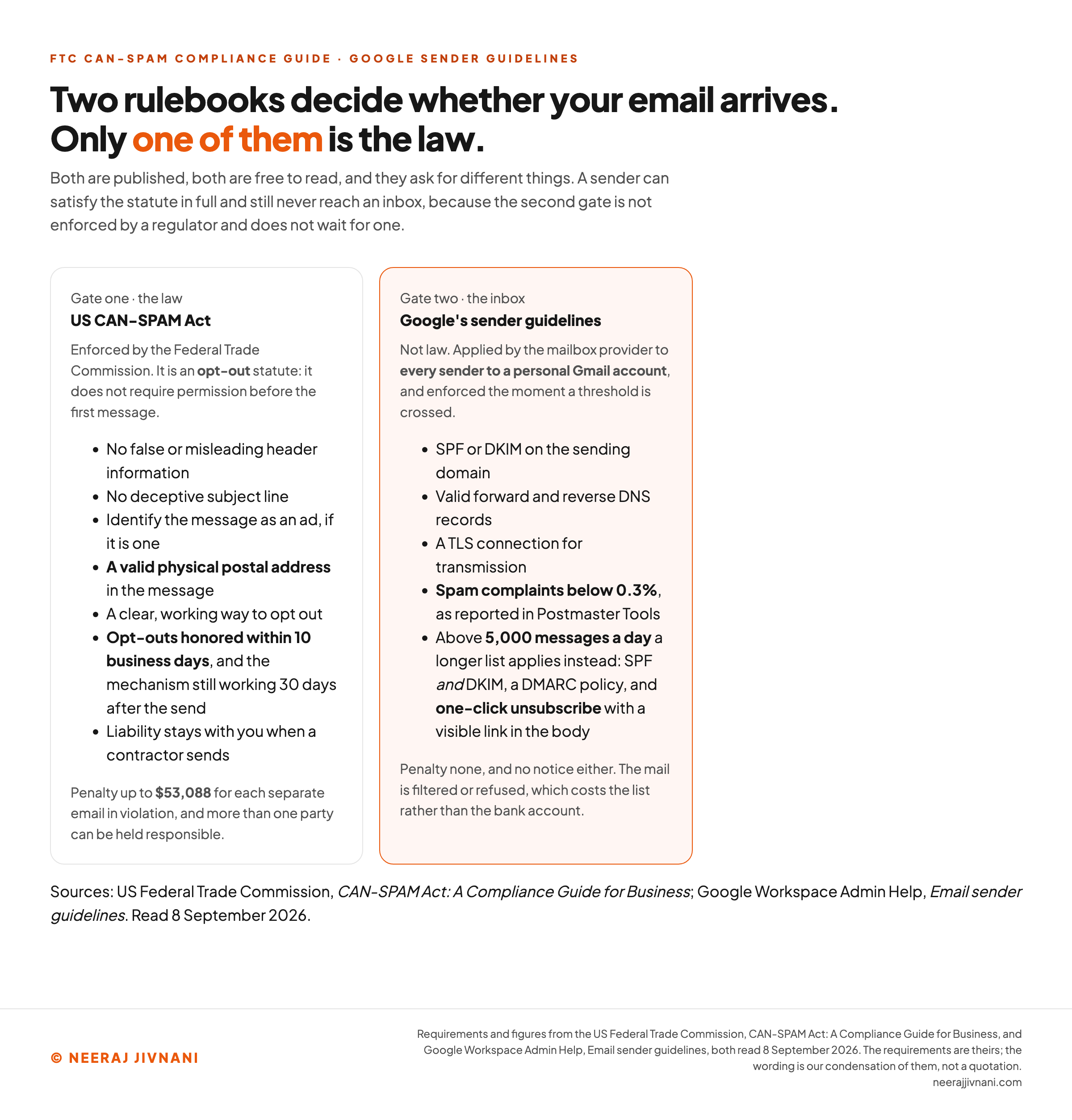
The CAN-SPAM Act requires seven things of a commercial email, and none of them is hard.
It applies to more than bulk mail. Despite the name, the Act is not limited to bulk sending. It covers all commercial messages, and the FTC is explicit that business-to-business email gets no exception, so a message to former customers announcing a new product line is covered like any other.
The seven, as the FTC's compliance guide for business states them in September 2026:
- Do not use false or misleading header information. The from, to, reply-to and routing details must identify who sent the message.
- Do not use a deceptive subject line. It has to reflect the content.
- Say the message is an ad, in a way that is clear, if it is one.
- Give your valid physical postal address. A current street address counts, so does a post office box registered with the US Postal Service, or a private mailbox registered with a commercial mail receiving agency.
- Provide a working way to opt out, explained clearly enough that an ordinary reader can find and use it.
- Honor opt-outs within 10 business days. The mechanism has to keep working for at least 30 days after you send, and you cannot charge a fee or demand any personal information beyond an email address to process it.
- Stay responsible for what a contractor does. Hiring an agency to handle your email does not move the liability off you.
The penalty is per email. The FTC's figure, current in September 2026, is up to $53,088 for each separate message in violation, and more than one party can be held responsible: the company whose product is promoted as well as whoever pressed send.
Outside the United States
Outside the United States the picture changes. The European Union's General Data Protection Regulation (GDPR) and Canada's Anti-Spam Legislation (CASL) are consent regimes, not opt-out regimes.
Consent has to come first there, which is a different obligation rather than a stricter version of the same one. A list built on an opt-out basis does not become compliant by being small.
What the Mailbox Providers Require
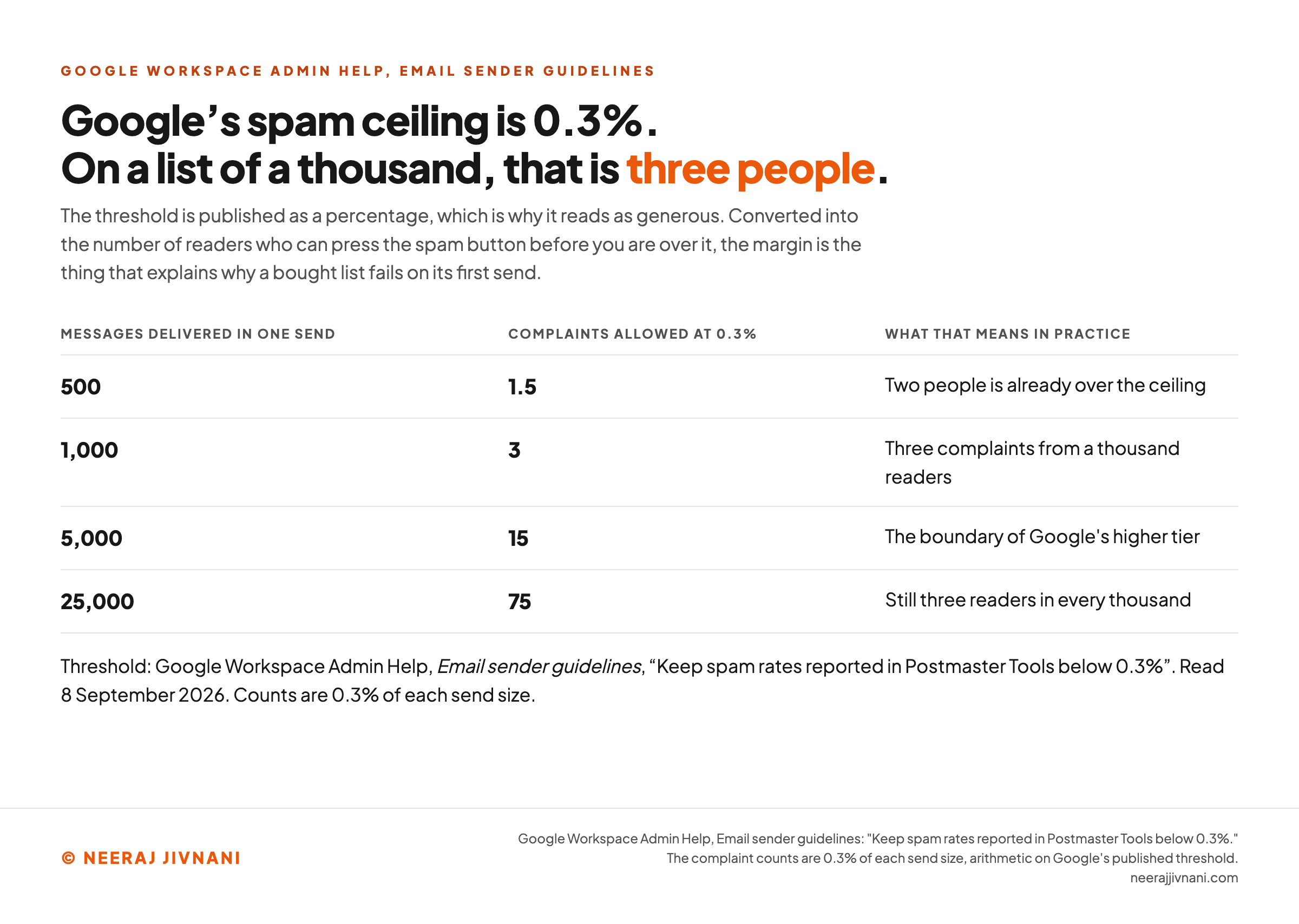
Three of Google's requirements need something from you: authenticate your sending domain, send over a secure connection, and keep spam complaints under 0.3%. That is where its sender guidelines stand in September 2026.
The published list runs to six. The other two are message formatting, which your platform handles, and a rule against forging a Gmail address, which no honest sender breaks.
Every mailbox provider runs filters, and Google publishes what its filters want. None of it is law, and it is enforced faster than any statute, because failing it means your mail stops arriving.
Google measures that complaint rate in its own Postmaster Tools, which is also where you can see it.
That number is the reason permission matters more than the statute does. Three complaints in a thousand messages is a low ceiling, and a bought list breaks it on the first send.
What Every Sender Must Do
Authenticate the domain you send from. Google requires SPF or DKIM, along with valid forward and reverse Domain Name System (DNS) records for your sending domains or addresses.
Send over a secure connection. Google asks for TLS on transmission, which the platform handles rather than you.
Keep the complaint rate under 0.3%, measured in Postmaster Tools, which is the only one of the three that moves on its own.
What Changes Above 5,000 a Day
Send more than 5,000 messages a day to personal Gmail accounts and a second, longer set of requirements applies instead.
SPF and DKIM both, rather than either, plus DMARC (Domain-based Message Authentication, Reporting and Conformance), which tells providers what to do with mail that fails those checks. Google says the policy may be set to none.
One-click unsubscribe. Marketing and subscribed messages must support it and carry a clearly visible unsubscribe link in the body.
Most small senders never cross that line. It is worth knowing which tier you are in before you rebuild your setup for requirements that do not apply to you.
Do the one-click unsubscribe anyway. It is a bulk-tier requirement and it is the right practice at any size, because a reader who cannot leave reports the message as spam instead, and that is the number that decides whether the rest of your mail arrives.
Deliverability is mostly configuration and list hygiene, done once and then maintained, rather than a technique applied to individual campaigns.
Which rules bind you
Two facts decide it: what kind of message you are sending, and how much of it. Nothing is stored, and nothing is sent anywhere.
1What is the message doing?
2How much do you send to Gmail?
3How many messages in one send?
Use this chart — embed code and citation
<a href="https://neerajjivnani.com/blog/email-marketing/"><img src="https://neerajjivnani.com/infographics/email-marketing/two-gates.png" alt="Two side-by-side cards comparing the two rulebooks that decide whether a marketing email is delivered. Gate one is the US CAN-SPAM Act, enforced by the Federal Trade Commission, an opt-out statute listing seven requirements: no false or misleading header information, no deceptive subject line, identify the message as an ad, a valid physical postal address, a clear working way to opt out, opt-outs honored within 10 business days with the mechanism still working 30 days after the send, and liability staying with the sender when a contractor sends; the penalty is up to $53,088 for each separate email in violation. Gate two is Google's published sender guidelines, which are not law and apply to every sender to a personal Gmail account: SPF or DKIM on the sending domain, valid forward and reverse DNS records, a TLS connection for transmission, and spam complaints below 0.3% as reported in Postmaster Tools; above 5,000 messages a day a longer list applies instead, adding SPF and DKIM together, a DMARC policy, and one-click unsubscribe with a visible link in the body. There is no fine and no notice, the mail is simply filtered or refused." width="1200"></a>
<p>Chart: <a href="https://neerajjivnani.com/blog/email-marketing/">Neeraj Jivnani</a></p>Neeraj Jivnani, "Email Marketing: What the Channel Does, and Who It Never Reaches", neerajjivnani.com, https://neerajjivnani.com/blog/email-marketing/Free to republish with a link back to this page.
Design and Content
Design for a phone first. A narrow column and a thumb is the harder constraint, and a message that works there works on a desktop as well.
One message, one action. An email trying to do three things does all three badly, because the reader decides whether to continue before finishing the first screen, and everything in it should point at a single call to action.
The subject line decides whether the rest is read at all, and it is the one piece of the design the law has an opinion about.
Personalization is a relevance tool, not a greeting. Using somebody's first name is close to worthless. Sending the right segment a message about the thing they looked at is the part that works.
Keep the unsubscribe link visible in the body rather than buried in tiny grey type at the bottom. Hiding it does not keep anybody; it only changes how they leave.
Design has a hard limit no amount of care removes. The same message renders differently in different email clients, and a layout such as a two-column table can look right in one inbox and stack into nonsense on a phone.
The answer is to keep it simple enough that it cannot break. One column, real text rather than one large image, and a message that still makes sense if the images never load.
Testing
Testing in email means an A/B test: two versions to two halves of a segment, compared on one metric.
It answers a narrow question well. Which subject line got opened more, which button got clicked more, whether sending Tuesday beat sending Thursday for this list.
On a small list it answers almost nothing. A difference of a few opens across a few hundred recipients is noise, and treating it as a finding is the easiest mistake to make in this channel.
The honest rule is to test one variable at a time, and only on lists large enough that a real difference would be visible above the run-to-run variation.
If your list is small, spend the effort on the offer and the segment instead. Those move results by amounts a test can see.
The Four Numbers That Change a Decision
Four numbers change a decision: delivery, clicks, conversions and complaints. The number most reports lead with is not one of them.
- Delivery and bounce rate. Whether the mail arrived at all. This is the first thing to look at, and a rising bounce rate is a list-hygiene problem, not a content problem.
- Click rate. The strongest ordinary signal of interest, because clicking takes a decision.
- Conversion rate. Whether the click ended in the purchase, the booking or the reply the message was sent for. Nothing else on this list connects to revenue.
- Unsubscribe and complaint rate. The early warning. Complaints are what Google's 0.3% ceiling is measured against.
Why the Open Rate Stopped Working
The open rate is the least trustworthy number you will be shown. Privacy features that pre-load images register an open that no human performed, so the figure is inflated by an unknown amount that varies with your audience.
The open rate is still useful as a trend against itself.
It is no longer useful as a measure of how many people read something.
Use this chart — embed code and citation
<a href="https://neerajjivnani.com/blog/email-marketing/"><img src="https://neerajjivnani.com/infographics/email-marketing/complaint-margin.png" alt="A table converting Google's published 0.3% spam-complaint ceiling into the number of complaints allowed at four send sizes. On 500 messages delivered the ceiling is 1.5 complaints, so two people is already over it. On 1,000 messages it is 3 complaints. On 5,000 messages, the boundary of Google's higher requirement tier, it is 15. On 25,000 messages it is 75, which is still three readers in every thousand." width="1200"></a>
<p>Chart: <a href="https://neerajjivnani.com/blog/email-marketing/">Neeraj Jivnani</a></p>Neeraj Jivnani, "Email Marketing: What the Channel Does, and Who It Never Reaches", neerajjivnani.com, https://neerajjivnani.com/blog/email-marketing/Free to republish with a link back to this page.
Priced Per Contact, Not Per Send
Email is priced per contact per month, in tiers, not per message sent. That is the first thing to check before signing up for anything, because it decides what a list costs you when it grows.
That pricing shape has a consequence that arrives late: you pay to store subscribers who never open anything. The cost follows list size, not activity, so an unpruned list is a bill that grows on its own.
Pricing usually steps up at contact counts rather than sliding smoothly. Say a list sits a little under a tier boundary: one good month of signups moves it up a tier, and the bill goes with it.
Free tiers are common, and genuinely usable at small volumes, with limits on contacts, sends per month, or both.
The ceiling varies far more than you would expect. MailerLite's free plan stops at 250 subscribers as of September 2026, while Kit's runs to 10,000.
The costs that are easy to miss are the ones that are not on the pricing page. Somebody's time to write and build each message, and the design work if you want something other than a template.
The expensive part was acquiring the addresses in the first place, and that cost sits in whichever channel brought them.
What Email Is Good For, and What It Is Not
Email is the best channel for selling again to people who already know you, and close to useless for reaching anyone who does not.
The reach is not rented. No ranking and no feed decides who sees the message, so the size of your audience is a number you own rather than one somebody else can adjust.
It is not a discovery channel. Nobody finds you by email, because somebody has to give you the address first. Email converts attention that another channel earned, such as a visit that search engine optimization brought in or an ad someone clicked.
Repeat business is where the economics work. The acquisition cost is already paid, so a later sale to the same person carries none of it.
It is measurable, with the caveat that the headline number is now unreliable and the useful numbers sit further down the funnel.
The disadvantages are worth naming. Mail gets filtered, it competes with everything else in an inbox, and a list disengages quietly unless you give it a reason not to.
The answer to whether it is worth doing depends on what you already have. If you have customers or an audience somewhere, this is the cheapest way to reach them again, and it should be among the first things you set up.
If you do not have them yet, email will not find them for you.
A list built before there is anything worth sending dies quietly, and takes the sending reputation with it.
The First Campaign, in Order
Your first campaign has an order, and two of its steps are the ones people skip: authenticate the domain, then put your postal address in the template.
- Pick a platform and stay on its free tier. Every platform sends. What differs at the start is whether the free tier includes automation, whether contacts are counted once or once per list they sit on, and how easily you can export the list if you leave.
- Set up authentication before the first send. SPF or DKIM on your sending domain, which is a one-time job and is what Google requires.
- Put your physical postal address into the template footer. It is required by law in every commercial message, and doing it once in the template means never forgetting it.
- Build the signup form and say what people are getting, including roughly how often. Specific promises produce smaller lists that perform better.
- Write the welcome email before you need it. It reaches people at the one moment they are paying attention, and it should say what happens next.
- Send something to a small segment first. Watch the bounce rate and the complaint rate rather than the opens.
- Prune before you scale. Remove addresses that have never engaged.
The order matters more than it looks. Authentication and the address are cheap before the first send and awkward to retrofit across a list that has already been mailed.
Common Questions
Six questions come up more than the rest, and the last two only once somebody has started.
How do I start email marketing? Pick a platform's free tier, authenticate your sending domain, put your postal address in the footer, build a signup form that says what people will get, and write the welcome email first.
Is email marketing still worth it? Yes, for keeping and reselling to people who already know you. It is not worth much as a way to find new people, since somebody has to give you an address first.
What is the 3-3-3 rule for marketing? Several different rules go by that name, and none of them is about email. If somebody offers you one for email, ask where it comes from.
How do I become an email marketer? Run a real list end to end, learn deliverability properly since that is the scarce skill, and get comfortable with the reporting.
Which rules apply if my list is international? The strictest one that covers any subscriber on it. A single European address brings GDPR to that message, so running one consent-based process is simpler than maintaining two.
How often should I send? As often as you promised at signup and can sustain. Irregular sending damages recognition, and a frequency you abandon after two months is worse than a slower one you keep.
What Decides Whether This Works for You
What decides whether email works for you is not the writing. It is whether you have people who want to hear from you, and whether your mail is set up to reach them.
The first is list work. Ask properly, promise something specific, and remove the people who stopped reading.
The second is configuration, and it is done once. Authenticate the domain, put the postal address in the template, keep the unsubscribe easy to find, and watch the complaint rate rather than the opens.
The bill follows the first of those and not the second. You pay for the size of the list, so the pruning that protects delivery also protects what you spend.
Get the configuration wrong and there is nothing to see. The mail sends, the bounce rate looks normal, and it lands in a folder nobody opens.