What Is Marketing Automation? The Six Parts of a Workflow, and the Record That Decides Them
The software is the easy half. See what a workflow is built from, what your contact record has to hold, and what teams are automating less.


/ On this page13 sections
Marketing automation is software that watches what a contact does and sends the next message without anyone pressing send. Buying it is the easy half.
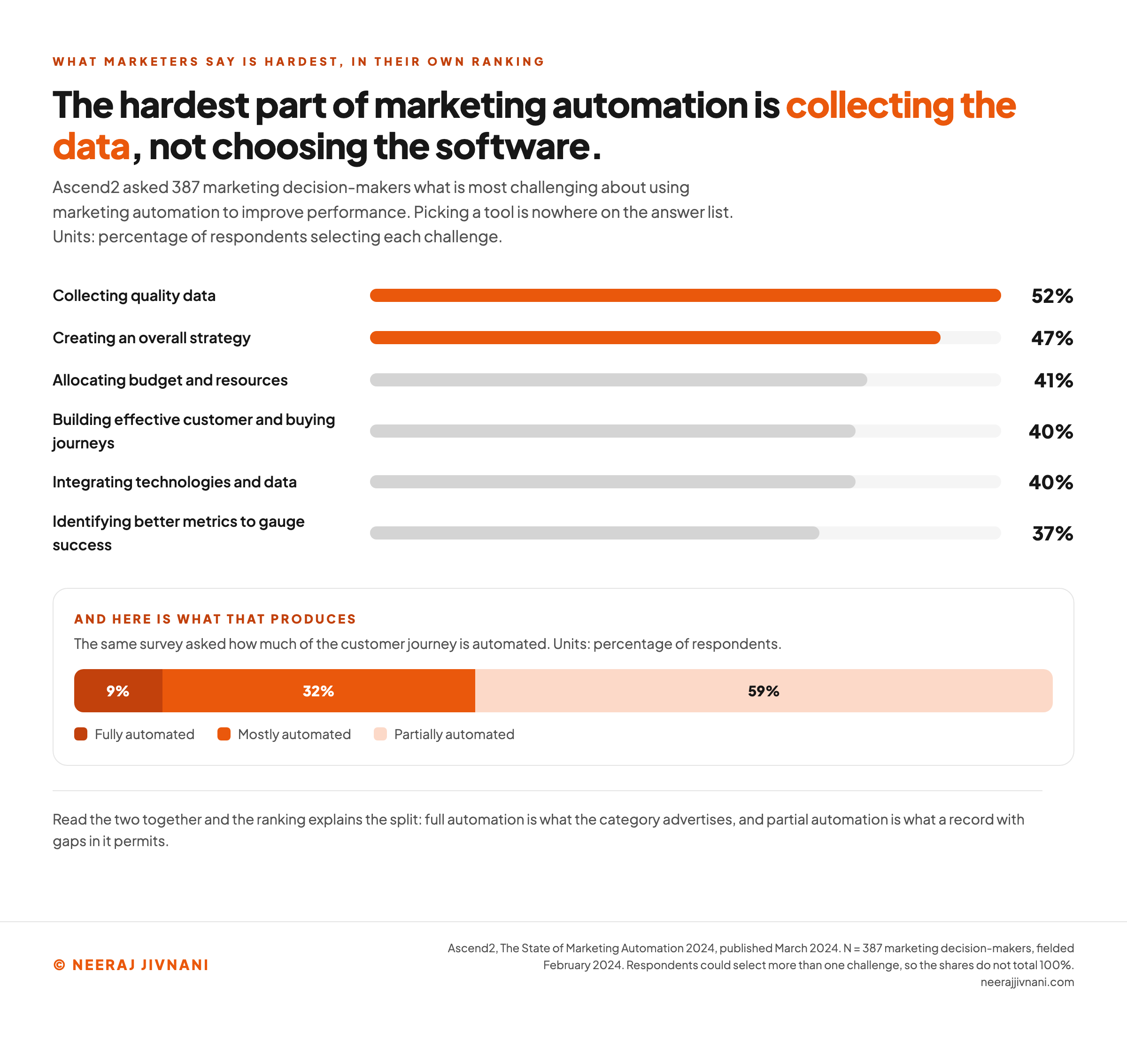
The hard half is the record it reads. Collecting quality data is the hardest part of running automation: 52% named it, ahead of every question about tools, in Ascend2's State of Marketing Automation 2024.
A workflow is six parts, five of them reading that record, and what teams choose to automate has been moving away from the broadcast channels.
What Marketing Automation Actually Automates
Marketing automation is a set of rules that run against your contact records, sending messages and updating fields when something happens. What it automates is delivery, timing and record-keeping.
The distinction that decides everything downstream is between the sending and the deciding.
A platform can send ten thousand messages tonight. Which ten thousand, and whether tonight is the right night, are questions it takes from you.
That narrowness is why setup is harder than the demo.
The Six Parts of an Automated Workflow
Every automated workflow is assembled from the same six parts. Vendors rename them, which is why learning the parts beats learning any single tool.
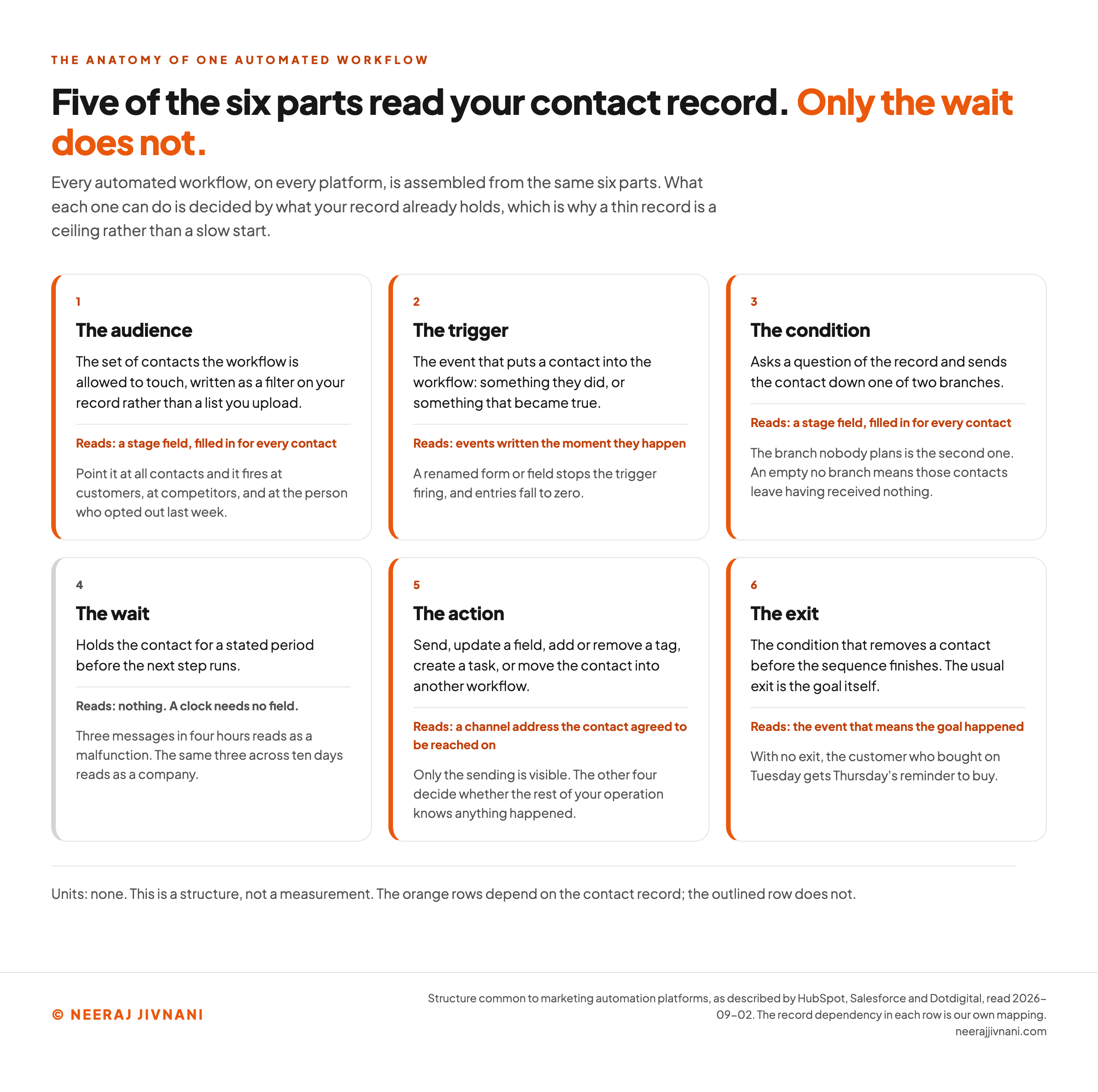
The diagram below sets out what each part decides and what breaks when it is set carelessly.
The Audience It Watches
The audience is the set of contacts a workflow is allowed to touch, written as a filter on your record rather than a list you upload.
Get this filter wrong and every other part inherits the mistake. A workflow pointed at all contacts will fire at existing customers, at competitors who downloaded something once, and at the person who opted out last week.
The Trigger That Starts It
The trigger is the event that puts a contact into the workflow. It is the part people picture when they picture automation at all.
Triggers come in two shapes.
Something the contact did, such as submitting a form or viewing a product page. Or something that became true, such as a date arriving or a field changing value.
The Condition That Splits It
A condition asks a question of the record and sends the contact down one of two branches.
Opened the last email or not. In the trial or not. Based in one country or another.
The branch nobody plans is the second one. Whatever you write for the yes branch, somebody will land on the no branch, and an empty no branch means those contacts leave the workflow having received nothing.
The Wait That Paces It
A wait holds the contact for a stated period before the next step runs. A clock needs no field, so this is the one part of the six that asks nothing of your record.
Waits are also where first builds go wrong on tone. Three messages in four hours reads as a malfunction. The same three across ten days reads as a company.
The Action It Takes
The action is what the workflow does when a contact reaches it, and sending is only the most visible kind. The other four decide whether the rest of your operation knows anything happened:
- Update a field, so the next workflow can read what this one learned about the contact.
- Add or remove a tag, which is how somebody stops qualifying for a sequence they no longer belong in.
- Create a task, which is the handoff to a person and the only action a human sees.
- Move the contact into another workflow, which is how a long journey gets built out of short ones.
The Exit That Ends It
An exit is the condition that removes a contact before the sequence finishes. The usual exit is the goal itself: they replied, they bought, they asked to speak to somebody.
A workflow with no exit keeps sending to people who already did the thing it was asking for. The customer who bought on Tuesday gets Thursday's reminder to buy.
Use this chart — embed code and citation
<a href="https://neerajjivnani.com/blog/marketing-automation/"><img src="https://neerajjivnani.com/infographics/marketing-automation/workflow-parts.png" alt="The six parts of an automated marketing workflow set out in order, audience, trigger, condition, wait, action and exit, each with the decision it makes and the failure it causes when set carelessly, and with the five parts that read the contact record marked against the one that does not." width="1200"></a>
<p>Chart: <a href="https://neerajjivnani.com/blog/marketing-automation/">Neeraj Jivnani</a></p>Neeraj Jivnani, "What Is Marketing Automation? The Six Parts of a Workflow, and the Record That Decides Them", neerajjivnani.com, https://neerajjivnani.com/blog/marketing-automation/Free to republish with a link back to this page.
The Record the Workflow Reads
Five of the six parts read your contact record, which is why the record and not the software decides what you can build.
A contact record is one row per person: what you know about them, everything they have done that you captured, and what they agreed to receive. Every filter, every question and every trigger in those six parts is answered out of that row.
The teams already running it put the record first too, and choosing a tool is nowhere on their list. This is how often Ascend2's 2024 respondents named each one:
| the hardest part of using marketing automation | share of respondents |
|---|---|
| Collecting quality data | 52% |
| Creating an overall strategy | 47% |
| Allocating budget and resources | 41% |
| Building effective customer and buying journeys | 40% |
| Integrating technologies and data | 40% |
| Identifying better metrics to gauge success | 37% |
Fields, Events and Permission
Three kinds of thing have to be in the record before a workflow can read it:
- Fields describe who somebody is, and they are what an audience filter and a condition ask about.
- Events record what a contact did and when, and they are the only thing a trigger can listen for.
- Permission says which channel you are allowed to reach them on, without which no action can run.
Each of the five reading parts depends on one of the three. That is what makes a thin record a hard ceiling rather than a slow start.
| what the record holds | which part of the workflow needs it |
|---|---|
| A stage field, filled in for every contact | The audience, and every condition that asks a question of it |
| Events written the moment they happen | The trigger |
| A channel address the contact agreed to be reached on | The action |
| The event that means the goal happened | The exit |
Work out which of those four rows your own record already satisfies before you compare a single platform.
Your record, against the six parts
Tick what your contact record already holds. It reads back which of the six parts you can build today and what is missing for the rest, because the record and not the software decides what you can build.
What that record can fire
- blockedThe audienceNeeds: a stage field, filled in for every contact.
- blockedThe triggerNeeds: events written the moment they happen.
- blockedThe conditionNeeds: a stage field, filled in for every contact.
- readyThe waitHolds the contact for a stated period before the next step runs. A clock needs no field, so this is the one part of the six that asks nothing of your record.
- blockedThe actionNeeds: a channel address the contact agreed to be reached on.
- blockedThe exitNeeds: the event that means the goal happened.
1 of the six parts can be built, and 5 cannot. The row worth fixing first is a stage field, filled in for every contact, which on its own unblocks 2 parts. The wait is the only one of the six that asks nothing of the record, so it is never on the blocked list.
How Far Teams Actually Get
The ceiling shows in what teams end up running. Only 9% have fully automated their customer journey, against 32% mostly and 59% partially, in Ascend2's 2024 survey.
Full automation is what the category advertises. Partial automation is what a thin record permits, and it is where almost six teams in ten have settled.
Use this chart — embed code and citation
<a href="https://neerajjivnani.com/blog/marketing-automation/"><img src="https://neerajjivnani.com/infographics/marketing-automation/what-breaks.png" alt="Bar chart of the six most challenging aspects of using marketing automation from the Ascend2 2024 survey, with collecting quality data highest at 52%, set beside the split showing only 9% of teams have fully automated their customer journey against 59% partially automated." width="1200"></a>
<p>Chart: <a href="https://neerajjivnani.com/blog/marketing-automation/">Neeraj Jivnani</a></p>Neeraj Jivnani, "What Is Marketing Automation? The Six Parts of a Workflow, and the Record That Decides Them", neerajjivnani.com, https://neerajjivnani.com/blog/marketing-automation/Free to republish with a link back to this page.
What Teams Automate, and What They Are Automating Less
Teams are automating the broadcast channels less than they used to, and the plumbing underneath them more.
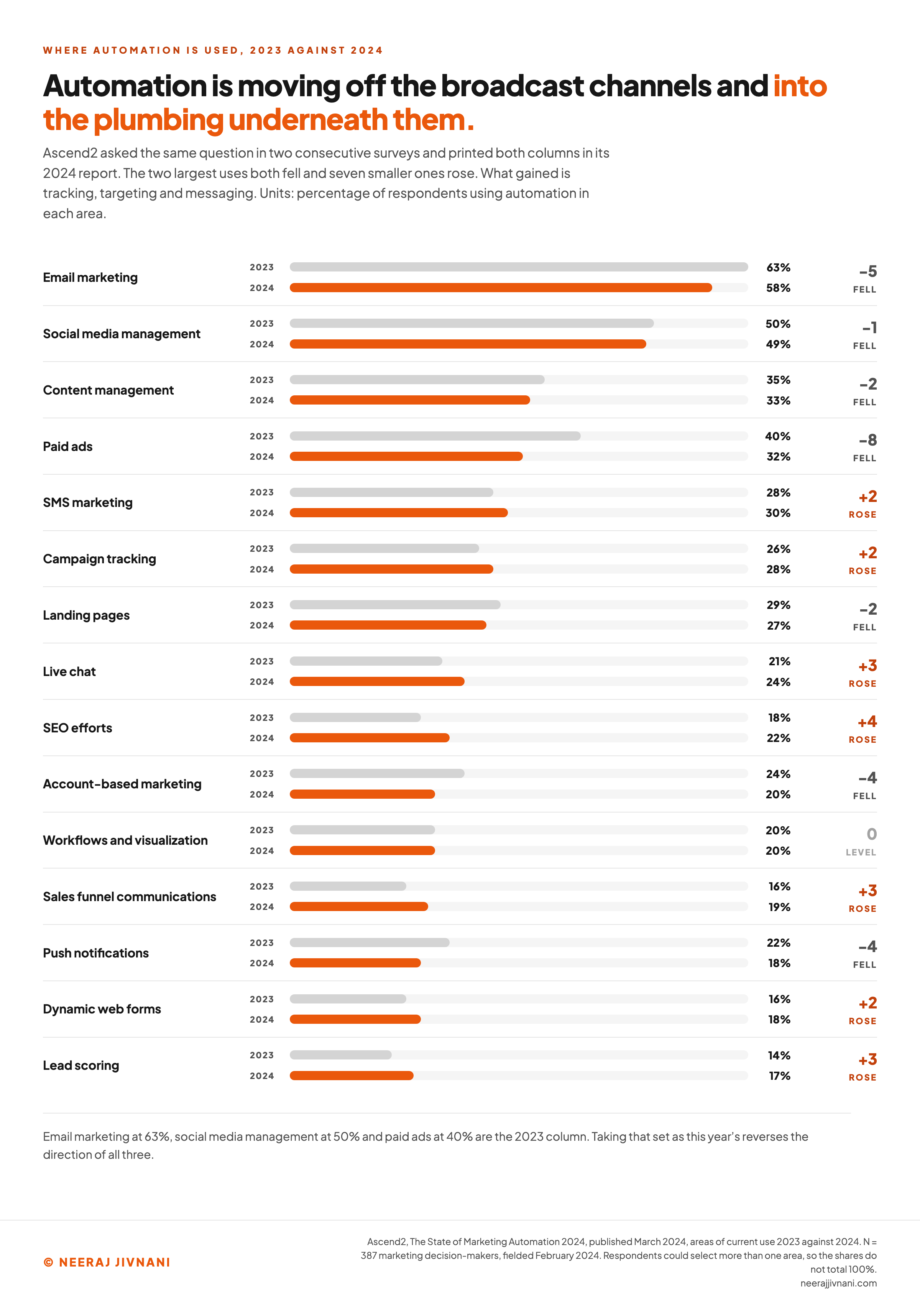
The two largest uses both fell between 2023 and 2024, while seven smaller ones rose. Ascend2 asked the same question in both years and printed the columns side by side.
The full comparison is below, ordered by the 2024 reading.
| where automation is used | 2023 | 2024 | direction |
|---|---|---|---|
| Email marketing | 63% | 58% | down |
| Social media management | 50% | 49% | down |
| Content management | 35% | 33% | down |
| Paid ads | 40% | 32% | down |
| SMS marketing | 28% | 30% | up |
| Campaign tracking | 26% | 28% | up |
| Landing pages | 29% | 27% | down |
| Live chat | 21% | 24% | up |
| SEO efforts | 18% | 22% | up |
| Account-based marketing | 24% | 20% | down |
| Workflows and visualization | 20% | 20% | level |
| Sales funnel communications | 16% | 19% | up |
| Push notifications | 22% | 18% | down |
| Dynamic web forms | 16% | 18% | up |
| Lead scoring | 14% | 17% | up |
What Rose, and What Fell
Email marketing is still the top answer, and it gave up five points in a year. Paid ads gave up eight.
What gained is the machinery underneath the sending: text messaging (SMS), campaign tracking, live chat, search engine optimization (SEO) work, sales funnel communications, dynamic web forms and lead scoring.
None of those is a broadcast. Each one is a piece of tracking or targeting that makes the next send better.
Which Column You Are Looking At
Email marketing at 63%, social media management at 50% and paid ads at 40% are the 2023 column, and all three are lower in the 2024 column printed beside it. If you meet those three figures quoted as current, that is the older set.
Take it as current and you reverse the direction of the change. The move is away from broadcast automation and towards tracking, scoring and messaging.
Use this chart — embed code and citation
<a href="https://neerajjivnani.com/blog/marketing-automation/"><img src="https://neerajjivnani.com/infographics/marketing-automation/use-shift.png" alt="Paired bars comparing where marketing teams used automation in 2023 and 2024 across fifteen tactics, showing email marketing down from 63 to 58 percent and paid ads down from 40 to 32 percent while SMS, campaign tracking, live chat, SEO and lead scoring all rose." width="1200"></a>
<p>Chart: <a href="https://neerajjivnani.com/blog/marketing-automation/">Neeraj Jivnani</a></p>Neeraj Jivnani, "What Is Marketing Automation? The Six Parts of a Workflow, and the Record That Decides Them", neerajjivnani.com, https://neerajjivnani.com/blog/marketing-automation/Free to republish with a link back to this page.
What You Can Expect From It
Expect a working system that some teams run well. Most rate theirs as working rather than exceptional: 28% call it best in class, 69% see some success and 3% call it unsuccessful, in Ascend2's 2024 survey.
Budgets kept climbing regardless: 54% expected an increase in the year ahead. A category can be worth funding and still not deliver a step change.
The headline multiples this category advertises are worth two minutes of tracing before you repeat one.
The 451% increase in qualified leads that circulates for this category runs back through HubSpot's page to Oracle's, where the two sources given are "Top 25 statistics about marketing automation software 10/2020" and a 2021 report.
A roundup of other people's statistics, dated October 2020, is not a study. Oracle lists that roundup and the 2021 report under three different claims at once, so which of the two produced the 451% is never stated.
Nothing here says the figure is false; it says the page crediting it does not tell you what was measured, or on whom.
Before a vendor figure enters a business case, find out who was measured and when.
Lead Scoring, and the Handoff to Sales
Lead scoring adds and subtracts points on a contact record so a workflow can tell interest from noise.
Two things have to be settled before it can run: how the score is calculated, and the threshold at which a lead counts as qualified.
A score is made of two kinds of input: fields describing who the contact is, and events describing what they did.
Fields age slowly. Events decay, which is why a score with no decay rule drifts until it says everybody is warm.
The number that breaks teams is the threshold. Marketing sets it, sales inherits it, and what the number is supposed to mean usually goes unwritten.
Agree the threshold as a definition and not as a value.
A qualified score means this person has done the three things that, in your own data, come before a real conversation. The number is then derived, and it can be moved without an argument.
Scoring is also the least used of the fifteen tactics Ascend2 measured, at 17% in 2024. It rose from 14%, a three point gain that is one of the larger rises on the list, and it is still the capability most teams have not built.
Where the Automation Platform Ends and the CRM Begins
The automation platform ends where behavior stops and the relationship begins.
Automation watches what people do on the way in. The CRM holds who they are and how far the conversation has got.
The automation platform owns behavior and the CRM owns the relationship. Behavior is a stream of events. A relationship is a record with an owner, a stage and a history of conversations.
Two rules keep the two systems from disagreeing. One system owns each field, and the sync runs one direction for that field.
When both systems can write the same field, the last write wins and neither team can explain the result. Decide the owner field by field, in writing, before the connector is switched on.
Integration is not a rare problem. Integrating technologies and data was named a challenge by 40% of Ascend2's respondents, level with building effective customer journeys.
Picking a Platform Without Reading a Feature List
Picking a platform comes down to the two or three things you will do every week, not to the feature grid.
Nearly a third of teams are not using the full capabilities of the stack they already own, 32% against 28% the year before, in Ascend2's Future of the Martech Stack 2025.
Overall cost was the top complaint about the stack at 61%. Paying for capability nobody opens is the common version of both problems.
The market sorts into four shapes, and the shape matters more than the feature count:
- All-in-one platforms such as HubSpot, Salesforce, Adobe and Microsoft Dynamics 365, which put marketing, CRM and reporting in one system.
- Ecommerce-leaning platforms such as Klaviyo, built around orders, catalogs and repeat purchase.
- Developer-leaning platforms such as Customer.io, which expect events to arrive from your own product.
- Connectors such as Zapier, which automate between the tools you already run rather than replacing them.
None of that is a ranking, and a ranked best-of belongs to a different question from this one.
The Four Questions That Settle It
Four criteria decide most choices, and all four are about your own setup rather than the vendor's:
- Does it read the events your product or website already emits?
- Does it write to the CRM your sales team lives in?
- Can the person who will run it build a workflow without an agency?
- Can you export the contact record, with its events, if you leave?
A platform that fails the first two will be worked around rather than used, which is the shape of that 32%.
Before You Automate Anything, Two Things Have to Be True
Two conditions have to hold before any of this pays. There has to be a message worth sending more than once, and a record that can tell who should get it.
Automation multiplies what exists. If your best message has never been sent by hand and worked, automating it puts an uncertain email in front of everybody who qualifies.
The clearest way to see it is one sequence traced end to end.
A webinar invitation goes out and the form submission triggers a confirmation. Non-attendees receive the recording, attendees move into a nurture sequence, and the ones who reply asking to talk become tasks for sales.
Say a company runs one webinar a month. That sequence is worth building, because the same sequence runs twelve times a year and the record fills itself as they go.
Say instead the webinar happens once. Building the sequence costs more than sending those emails by hand, and it will be out of date before it runs again.
For a lot of small teams the honest answer is not yet. Send the sequence by hand twice. The version worth automating is the one that already worked.
The Checks That Catch a Broken Automation
Four numbers per workflow, read once a week, catch most of what goes wrong:
- Entries. How many contacts started it. A fall to zero means the trigger has stopped firing, usually because a form or a field was renamed.
- Exits by the goal. How many left because they did the thing. Entries with almost no goal exits describe a sequence that runs and achieves nothing.
- Contacts currently waiting. A number that only grows means people are stuck in a wait, or in a branch with nothing after it.
- Opt-outs attributed to this workflow. Measured per workflow rather than per campaign, because that is the level at which you can switch something off.
The check that finds the quietest problems is reading your own no branch.
Take one real contact who failed the condition and follow what they received. If the answer is nothing, that branch is a leak and not a filter.
Building effective customer journeys and identifying better metrics are the same difficulty seen from two ends, named by 40% and 37% of Ascend2's respondents. You cannot improve a journey you have no measurement of.
Do that no branch read monthly on any workflow built more than a quarter ago. Fields get renamed and forms get replaced, and a workflow written against the old names has to be pointed at the new ones by somebody who remembers it exists.
The Skills This Actually Asks For
The skills are less technical than the software makes them look and more analytical than a marketing job description usually admits.
They are also in short supply, with 36% of respondents naming martech and marketing automation as a skills gap in the Digital Marketing Institute's 2024 Global Digital Skills and Training Report.
Four capabilities carry most of the work:
- Data hygiene and segmentation. Knowing which fields exist, which are trustworthy, and how to express an audience as a filter rather than a list.
- Writing that survives being read out of order. Every message in a sequence has to make sense to somebody who missed the one before it.
- Reading a funnel report. Entries, exits and drop-off per step, without needing an analyst to interpret them.
- Working with sales. The threshold, the handoff and the feedback loop are negotiations, not settings.
None of those is a certification, and all four are the reason this software is easier to buy than to run.
Where AI Has Actually Landed in These Tools
AI marketing has landed in these tools as assistants inside existing steps, not as a system that decides. Nearly three in ten teams are using marketing automation platforms with AI features, 29% in Ascend2's Evolution of AI in Marketing 2025.
Self-reported success in that survey is mixed: 25% called their AI use best in class, 60% somewhat successful and 14% unsuccessful.
The blockers are practical rather than philosophical. The cost of AI tools came first at 38%, integration with existing systems and data privacy tied at 37%, and a lack of internal expertise followed at 35%.
Inside automation the applications are narrower still. Targeting audiences leads at 45%, then analytics and reporting at 39%, email marketing at 36%, content creation at 34% and personalization at 33%, in the 2024 automation survey.
Across those applications, AI is being used to choose who and to draft what, and almost nowhere to decide whether.
So AI has changed the inputs to these steps and not the anatomy. A trigger is still a trigger, and somebody still has to decide what the condition asks.
The Work the Software Does Not Do
The software sends, waits, branches and records. Everything upstream of that is yours: the offer, the audience, the words, and the rule that decides who gets which.
That division is why so few teams reach full automation.
Partial automation is not a failure of nerve. It is the normal outcome.
The first weeks of an automation project are best spent nowhere near the platform. The time goes on one message that already worked when somebody sent it by hand, and on the field that records who it worked on.
The six parts then assemble around that in an afternoon.
Buy it any earlier and all you have automated is a guess, at speed.