Lazy Loading, and the Things You Must Never Defer
One HTML attribute holds back offscreen images and embeds. See where it belongs on your pages, what to leave eager, and how to prove nothing vanished.

/ On this page10 sections
Lazy loading is one HTML attribute that holds back offscreen images and embeds. Switching it on takes seconds.
The part that takes thought is the short list of things it must never go on, and the one-minute check that proves nothing vanished when you turned it on.
If your site runs on a managed platform or a bought theme, it is probably switched on already. Something looks wrong months later, and lazy loading gets the blame.
What Lazy Loading Is
Lazy loading is the practice of not fetching something until a visitor is close to needing it. The picture eight screens down is not downloaded when the page opens; it is downloaded when the reader gets near it.
The opposite is eager loading, and it is what browsers do unless you say otherwise. Every image, every embed and every frame comes down at once, whether or not anybody scrolls that far.
That costs real bandwidth on a media-heavy page. At the 90th percentile, sites send over 5 MB of images on desktop and mobile, on web.dev's 2024 reading of the HTTP Archive.
On a long page most of those pictures sit below the first screen, and a reader who leaves before scrolling paid for every one of them.
The One Line That Does Most of It
The attribute goes on the element itself, takes one of two values, and needs no library behind it.
```html <img src="gallery-04.jpg" alt="A slate roof under repair" width="800" height="600" loading="lazy">
<iframe src="https://www.youtube.com/embed/xyz" title="Roof repair, step by step" width="560" height="315" loading="lazy"></iframe> ```
lazy defers the fetch. eager is the default, and it means load this now regardless of where it sits on the page.
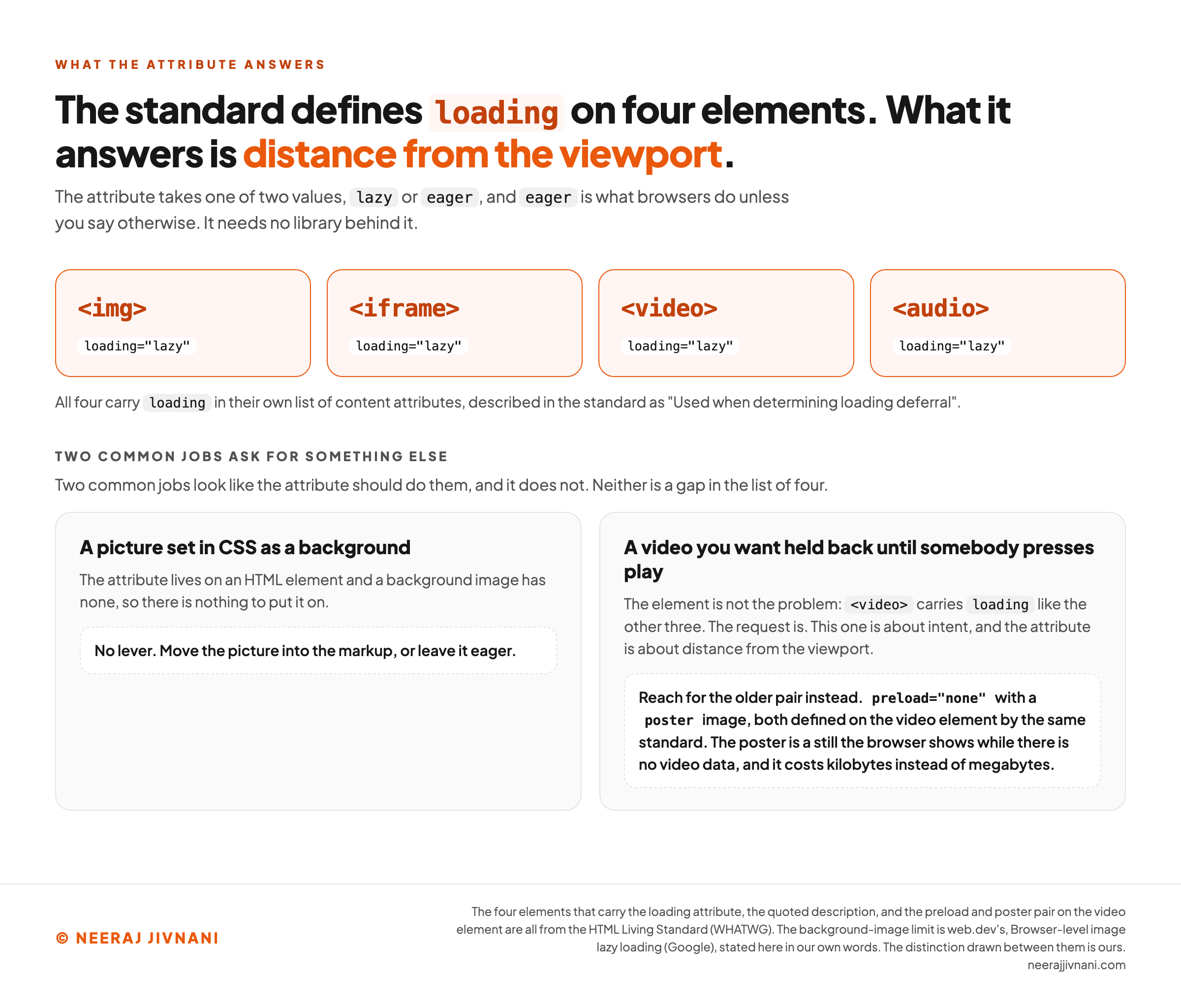
The HTML Living Standard defines the attribute on four elements. Alongside img and iframe, both the video and the audio element carry loading in their own list of content attributes, described there as "Used when determining loading deferral".
Set width and height while you are in the markup.
A deferred element with no dimensions occupies no space, and a browser that thinks nothing takes up room can decide the whole gallery fits on screen. It then fetches every file at once, which is the opposite of what you asked for.
The Two Cases It Does Not Answer
Two common jobs look like the attribute should do them, and it does not.
A picture set in CSS as a background is the first. The attribute lives on an HTML element and a background image has none, so there is nothing to put it on.
Move the picture into the markup, or leave it eager.
The second is a video you want held back until somebody presses play. That is a different request from the one the attribute makes, which is about distance from the viewport rather than about intent.
Reach for the older pair instead: preload="none" with a poster image, both defined on the video element by the HTML standard.
The poster is a still the browser shows while there is no video data. It costs kilobytes instead of megabytes.
``html
<video controls preload="none" poster="repair-still.jpg" width="800" height="450">
<source src="repair.mp4" type="video/mp4">
</video>
``
Use this chart — embed code and citation
<a href="https://neerajjivnani.com/blog/lazy-loading/"><img src="https://neerajjivnani.com/infographics/lazy-loading/four-elements-two-gaps.png" alt="A scope card in two parts. The upper row shows the four HTML elements that carry the loading attribute, img, iframe, video and audio, each printed with loading set to lazy, under a note that all four carry loading in their own list of content attributes, described in the standard as used when determining loading deferral. The headline states that what the attribute answers is distance from the viewport. The lower half, headed two common jobs ask for something else, says plainly that neither of them is a gap in the list of four. The first is a picture set in CSS as a background, where there is no element to put the attribute on because a background image is not an HTML element, so there is no lever at all and the picture either moves into the markup or stays eager. The second is a video you want held back until somebody presses play, where the card notes that the video element carries loading like the other three and that the request is what differs, this one being about intent while the attribute is about distance from the viewport, so the older pair applies instead, preload set to none together with a poster image, both defined on the video element by the same standard, the poster being a still the browser shows while there is no video data at a cost of kilobytes instead of megabytes." width="1200"></a>
<p>Chart: <a href="https://neerajjivnani.com/blog/lazy-loading/">Neeraj Jivnani</a></p>Neeraj Jivnani, "Lazy Loading, and the Things You Must Never Defer", neerajjivnani.com, https://neerajjivnani.com/blog/lazy-loading/Free to republish with a link back to this page.
What to Defer, and What Never To
Defer anything a visitor has to scroll to reach, and leave everything else eager. That is the whole decision, and it is a checklist, not a judgment call.
Where It Belongs
Long articles with photographs, product grids, comment threads, a map at the foot of a contact page, a gallery, an embedded video partway down.
Third-party embeds are the highest-value case on most sites. A single map or video frame pulls in somebody else's scripts and fonts, and deferring one iframe often saves more than deferring twenty images.
The Four Exclusions
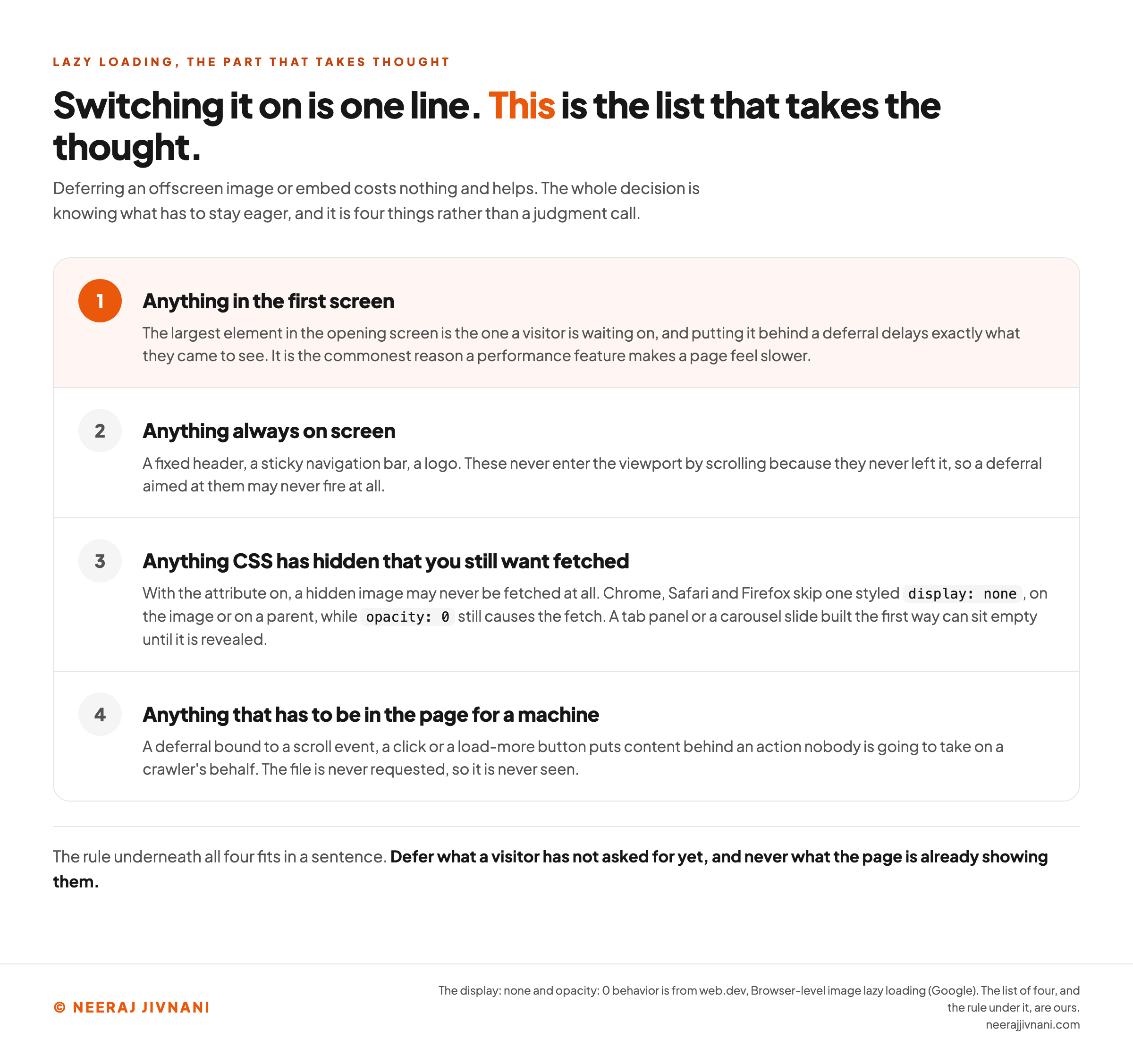
Four exclusions are worth writing down before you switch anything on.
- Anything in the first screen. The largest element in the opening screen is the one a visitor is waiting on, and putting it behind a deferral delays exactly what they came to see. It is the commonest reason a performance feature makes a page feel slower.
- Anything always on screen. A fixed header, a sticky navigation bar, a logo. These never enter the viewport by scrolling because they never left it, so a deferral aimed at them may never fire at all.
- Anything CSS has hidden that you still want fetched. With the attribute on, a hidden image may never be fetched at all. Chrome, Safari and Firefox skip one styled
display: none, on the image or on a parent, whileopacity: 0still causes the fetch. A tab panel or a carousel slide built the first way can sit empty until it is revealed. - Anything that has to be in the page for a machine. If a file only arrives after somebody scrolls or clicks, nothing that does not scroll or click will ever see it.
The rule underneath all four fits in a sentence. Defer what a visitor has not asked for yet, and never what the page is already showing them.
Use this chart — embed code and citation
<a href="https://neerajjivnani.com/blog/lazy-loading/"><img src="https://neerajjivnani.com/infographics/lazy-loading/the-four-you-never-defer.png" alt="A numbered card listing the four things never to lazy load, with the reason beside each one. First, anything in the first screen, because the largest element in the opening screen is the one a visitor is waiting on and deferring it delays exactly what they came to see, which is the commonest reason a performance feature makes a page feel slower. Second, anything always on screen, such as a fixed header, a sticky navigation bar or a logo, because these never enter the viewport by scrolling as they never left it, so a deferral aimed at them may never fire. Third, anything CSS has hidden that you still want fetched, because with the attribute on a hidden image may never be fetched at all, since Chrome, Safari and Firefox skip one styled display none, on the image or on a parent, while opacity zero still causes the fetch, so a tab panel or carousel slide built the first way can sit empty until it is revealed. Fourth, anything that has to be in the page for a machine, because a deferral bound to a scroll event, a click or a load more button puts content behind an action nobody takes on a crawler's behalf and the file is never requested. A band across the foot gives the rule underneath all four: defer what a visitor has not asked for yet, and never what the page is already showing them." width="1200"></a>
<p>Chart: <a href="https://neerajjivnani.com/blog/lazy-loading/">Neeraj Jivnani</a></p>Neeraj Jivnani, "Lazy Loading, and the Things You Must Never Defer", neerajjivnani.com, https://neerajjivnani.com/blog/lazy-loading/Free to republish with a link back to this page.
What Lazy Means, and What It Does Not
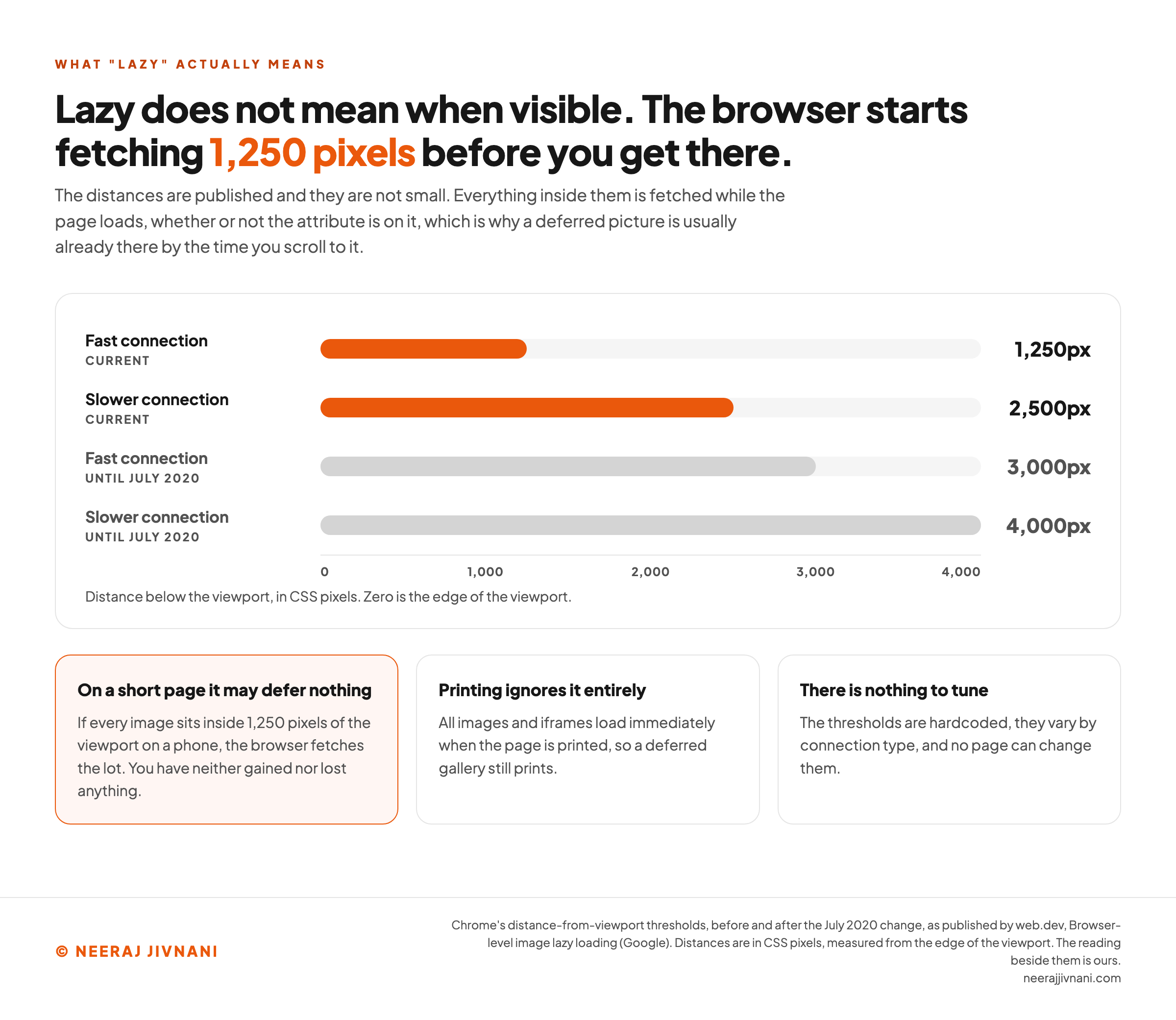
Lazy means near the viewport, not visible in it. Browsers start fetching well before an element comes into view, which is why the picture is usually there by the time you scroll to it.
The distances are published. In July 2020 Chrome cut its distance-from-viewport thresholds from 3000px to 1250px on fast connections, and from 4000px to 2500px on slower ones, a change web.dev sets out in full.
Two consequences follow, and both surprise people.
On a short page the attribute may defer nothing at all. If every image sits inside 1250 pixels of the viewport on a phone, the browser fetches the lot, and you have neither gained nor lost anything.
And printing ignores it entirely. All images and iframes load immediately when the page is printed, so a deferred gallery still prints.
There is nothing to tune, either. The thresholds are hardcoded, they vary by connection type, and no page can change them.
Use this chart — embed code and citation
<a href="https://neerajjivnani.com/blog/lazy-loading/"><img src="https://neerajjivnani.com/infographics/lazy-loading/lazy-is-not-when-visible.png" alt="A horizontal bar chart of Chrome's distance-from-viewport thresholds, measured in CSS pixels below the edge of the viewport on a scale running from zero to four thousand. The two current values are drawn in orange: a fast connection at one thousand two hundred and fifty pixels, and a slower connection at two thousand five hundred. The two values that applied until July 2020 are drawn in gray behind them at three thousand and four thousand pixels, showing how far the thresholds were cut. Three cards underneath read the chart. On a short page the attribute may defer nothing at all, because if every image sits inside one thousand two hundred and fifty pixels of the viewport on a phone the browser fetches the lot and nothing is gained or lost. Printing ignores it entirely, so all images and iframes load immediately when the page is printed and a deferred gallery still prints. And there is nothing to tune, because the thresholds are hardcoded, they vary by connection type, and no page can change them." width="1200"></a>
<p>Chart: <a href="https://neerajjivnani.com/blog/lazy-loading/">Neeraj Jivnani</a></p>Neeraj Jivnani, "Lazy Loading, and the Things You Must Never Defer", neerajjivnani.com, https://neerajjivnani.com/blog/lazy-loading/Free to republish with a link back to this page.
The Script, and When You Still Need One
Before the attribute existed, lazy loading meant JavaScript.
A script watched the viewport, usually through the Intersection Observer application programming interface, or API, which reports when an element enters or leaves the visible area. It swapped a placeholder for the real file as each one came near.
That pattern still works, and it is still what most plugins ship. It also leaves a particular mark in the markup.
``html
<img src="blank.gif" data-src="gallery-04.jpg" class="lazyload" alt="A slate roof under repair">
``
The real file is in data-src, an attribute the browser knows nothing about. Until the script runs, src points at a one-pixel placeholder, so anything reading the page without executing JavaScript sees the placeholder and nothing else.
That is the case for making the attribute your default.
Browsers that do not understand it ignore it and load the image normally, which is the safest failure available. A script that does not run leaves a blank.
A script still earns its place in three cases.
- You want a placeholder effect the attribute cannot produce, such as a blurred preview that resolves into the real picture.
- You are deferring something the attribute does not cover, such as a block of markup fetched from the server.
- You are deferring a whole component rather than a single file.
Stylesheets and scripts are a different job with different tools, and they are not what this attribute is for.
The Other Lazy Loading
The phrase has an older life in application code, and it is worth thirty seconds to know which one somebody means.
In application code, lazy loading is an old design pattern: hold an object empty until somebody asks for it, then fill it. The classic implementations are lazy initialization, a virtual proxy, a ghost and a value holder.
They turn up most often in database access, where the opposite habit is also called eager loading.
The front-end version of the same idea is code splitting. A framework holds back the part of its bundle a page does not need, then fetches it on navigation or on demand.
Automating that refactor across ten open-source JavaScript front ends cut initial application size by 36.2% and initial load time by 29.7% on average, in Turcotte, Gokhale and Tip's 2023 paper on introducing lazy loading automatically.
It is also a different piece of work, done in the build rather than in the markup.
What Google Sees, and What It Misses
Deferred content is indexable, on one condition: the deferral must not wait for a person to do something.
Google's own guidance names three implementations that work. Browser built-in lazy loading for images and iframes is the first, the Intersection Observer API with a polyfill is the second, and a library that loads an element as it enters the viewport is the third.
What breaks is the fourth kind, still common in older themes.
A script bound to a scroll event, a click, or a "load more" button puts content behind an action nobody is going to take on a crawler's behalf. The file is never requested, so it is never seen.
That is why the attribute is the safe default and a script is a decision. The deferral becomes the browser's own distance calculation rather than an event.
The check Google publishes is to look at the rendered page and confirm that your image and video URLs appear in the src attribute of the img or video elements.
There is a faster version you can run yourself. Switch JavaScript off in your browser and reload the page.
Natively deferred images still appear, because the deferral belongs to the browser and the browser is still there. Anything that vanishes is being swapped in by a script, so it depends on that script running wherever the page is read.
Turning It Off, and Checking It Worked
Turning lazy loading off is usually asked as a browser question, and Chrome is the wrong place to look for the switch.
Chrome used to defer images on its own for some users, through a data-saving mode and a loading="auto" value. Both were deprecated, and web.dev says plainly that there are no plans to provide automatic lazy loading of images in Chrome.
So the deferral is the page asking for it, which means the page is what you change. Remove the attribute from the element you want loaded eagerly, or set it to eager explicitly.
On a managed platform it is a setting rather than markup.
WordPress has added loading="lazy" to images by default since version 5.5, and since 5.9 it deliberately skips the first content image or iframe on a page so the biggest element is not held back.
Checking the result needs nothing but the browser you already have.
In your browser's developer tools, open the network panel, filter it to images, and reload the page without scrolling. What is listed is what the page fetched eagerly, and it should be the first screen and nothing else.
Then scroll, and watch the rest arrive.
Lighthouse gives you the other half. Its Defer offscreen images audit has passed pages using browser-level lazy loading since Lighthouse 6.0, so a red result there is a real finding rather than the audit failing to recognize the attribute.
What it defers, and what it hides
List the images and embeds on one of your pages. For each one, say where it sits and how it is being held back. Neither answer is a verdict on its own, which is the whole reason this is two questions rather than one.
The photograph at the top
The visitor sees it without scrolling.
The attribute, on the element itself.
What a visitor gets
Delayed. The largest element in the opening screen is the one a visitor is waiting on, and putting it behind a deferral delays exactly what they came to see. This is the commonest reason a performance feature makes a page feel slower.
On the exclusion list
With JavaScript switched off
Still there. The real file is in src, where anything reading the markup finds it, and a browser that does not understand the attribute ignores it and loads the image normally.
The map at the foot of the page
A gallery, a comment thread, a map at the foot.
The attribute, on the element itself.
What a visitor gets
Deferred, and this is exactly what the attribute is for. Nothing to change.
With JavaScript switched off
Still there. The real file is in src, where anything reading the markup finds it, and a browser that does not understand the attribute ignores it and loads the image normally.
Across the 2 you listed
1 is on the exclusion list. Take the deferral off. Defer what a visitor has not asked for yet, and never what the page is already showing them.
0 carry the attribute and will be fetched at load anyway. Nothing you listed sits inside the browser's fetch distance with the attribute on it.
0 disappear when JavaScript does not run. Every deferral you listed keeps the real file in src, which is the safest failure available.
This is what the check will find before you run it. Load one page with JavaScript switched off and see whether the same things disappear. Whatever vanishes was being swapped in by a script.
Questions People Ask About Lazy Loading
The Chrome question is the interesting one, because it goes looking for a browser setting and the setting is on your page.
What Does Lazy Loading Mean?
Lazy loading is the browser's way of putting off a download it may never have to make. In practice that is the loading="lazy" attribute on an image, an embed or a video.
Files below the first screen then arrive as you scroll, instead of all at once at the start.
Is Lazy Loading Good or Bad?
Good below the first screen, bad inside it.
Deferring offscreen images and embeds cuts the weight of the first load with no real downside. Deferring anything a visitor sees immediately delays the thing they came for, which makes a page feel slower while the numbers say it got lighter.
Is Lazy Loading Bad for SEO?
Not on its own. Deferral that relies on the browser's own distance calculation is fine, and Google names browser built-in lazy loading as an implementation that works.
Deferral that waits for a scroll, a click or a button is the problem, because that action never happens for a crawler.
How Do I Disable Lazy Loading in Chrome?
There is no browser setting, because the page requests the deferral rather than Chrome imposing it.
Remove loading="lazy" from the element, set it to eager, or switch off the option in whatever plugin or platform is adding it. On WordPress that is a filter or a plugin setting rather than an edit to the template.
One Attribute and One List
Lazy loading is an attribute with two values, and a browser that has been doing the difficult part for years. It is not a project, and it does not need one.
The work that is yours is the list of exclusions: the first screen, the things always on screen, the things CSS has hidden, and anything that has to be in the page for a machine.
Write that list down for your own site and the feature stops being something to be wary of.
And if you inherited a site where a plugin did all this years ago, load one page with JavaScript off before you change anything. Whatever disappears is the part worth your afternoon.