Anchor Text, and How to Tell If Yours Is Doing Its Job
Read your link's words on their own. If they do not say where they go, rewrite them. What Google asks for instead, and the ratio you can ignore.

/ On this page8 sections
Anchor text is the visible, clickable words of a link. Read those words on their own, away from the sentence they sit in, and you have run the only test that matters.
If they still say where they go, they work. If not, rewrite them, and you are done.
What Anchor Text Is
Anchor text is the text a reader sees and clicks.
Everything else about the link, including where it goes, is invisible to them.
Here is the whole object:
``html
<a href="/returns-policy/">how to send something back</a>
``
The address is /returns-policy/. The anchor text is how to send something back.
HTML has no word for it. Google's own documentation calls it "anchor text (also known as link text)", and the specification describes it only as text the a element wraps around.
So if you meet it called link text, link label or link title, those all name this. Search Console does not use the phrase at all; its report is headed Top linking text.
One practical note before anything else. Style your links so a reader can see them: words that do not look like a link never get read as one, however well they are written.
The Three Things Called an Anchor
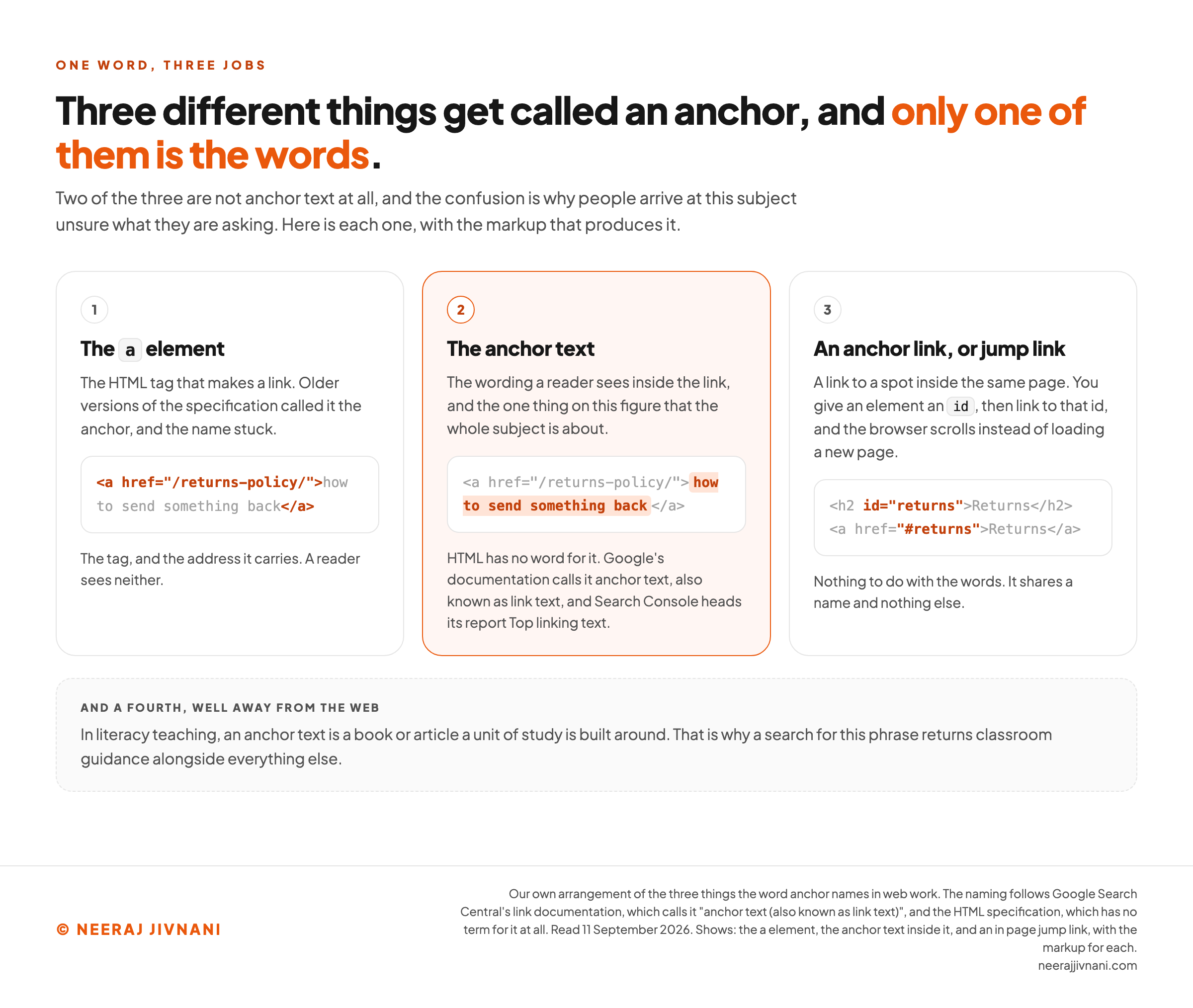
"Anchor" gets used for three different things, and two of them are not anchor text at all. The confusion is why people arrive at this subject unsure what they are asking.
| what gets called an anchor | what it really names |
|---|---|
The a element | The HTML tag that makes a link. Older versions of the specification called it the anchor, and the name stuck. |
| The anchor text | The wording a reader sees inside the link, and the one everything below is about. |
| An anchor link, or jump link | A link to a spot inside the same page, using an id. Nothing to do with the words. |
The third one is a different job altogether.
You give an element an id, then link to #that-id, and the browser scrolls instead of loading a new page.
It shares a name and nothing else.
The same words turn up in a fourth place, well away from the web.
In literacy teaching, an anchor text is a book or article a unit of study is built around. That is why a search for this phrase returns classroom guidance alongside everything else.
Use this chart — embed code and citation
<a href="https://neerajjivnani.com/blog/anchor-text/"><img src="https://neerajjivnani.com/infographics/anchor-text/three-anchors.png" alt="Three cards setting the a element, the anchor text inside it and an in page jump link side by side with the markup for each, plus the literacy sense of the phrase, showing that only the middle one is the words a reader sees. Every row is set out in the table above it." width="1200"></a>
<p>Chart: <a href="https://neerajjivnani.com/blog/anchor-text/">Neeraj Jivnani</a></p>Neeraj Jivnani, "Anchor Text, and How to Tell If Yours Is Doing Its Job", neerajjivnani.com, https://neerajjivnani.com/blog/anchor-text/Free to republish with a link back to this page.
What the Words in a Link Are Doing
Anchor text does two jobs, and the first one is the reason the second one works.
The words tell a reader what happens if they click. Somebody scanning a page sees blue words and decides, in about a second, whether the page behind them is worth leaving this one for. That decision is made entirely on the words.
The words tell a search engine what the destination is about. A crawler reading your page learns something about a page it has not fetched yet, from the words you chose to describe it.
The second job is old and deliberate.
Google's founders wrote in the 1998 paper describing its original design that "anchors often provide more accurate descriptions of web pages than the pages themselves".
So they built it to attach a link's words to the destination, and not only to the page carrying the link.
The reasoning holds up.
A page describes itself the way a company describes itself. A link describes it the way somebody else would.
Which is why the two jobs are one job.
Words that tell a reader where they are going are the same words that tell a crawler what is there. There is no version of this where you serve one at the other's expense.
Writing One That Works
An anchor works when it names its destination read alone, with the sentence around it taken away. That is the test, and it takes about a second a link.
The test is Google's, not ours.
Its link documentation says: "Try reading only the anchor text (out of context) and check if it's specific enough to make sense by itself. If you don't know what the page could be about, you need more descriptive anchor text."
Run it on something you wrote this week.
Most links fail, and the failure is always one of two kinds.
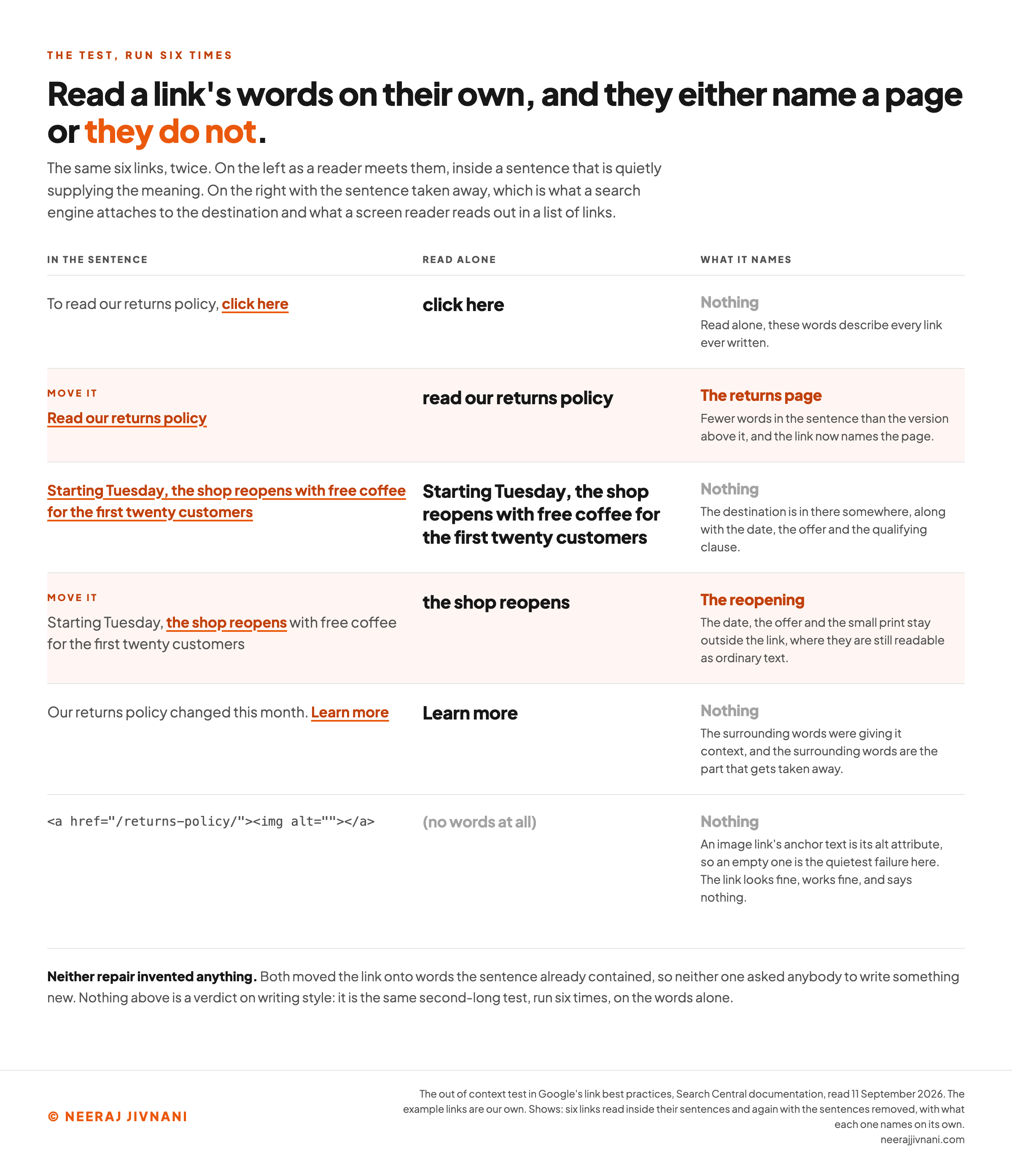
The words say nothing. "Click here", "read more", "more info", "learn more". Read alone, they describe every link ever written.
The words say everything. A whole sentence turned blue, so the destination is in there somewhere along with the date, the offer and the qualifying clause.
Both fail for the same reason: neither one, read alone, names a page.
The Fix Is Moving the Link, Not Writing More
Repairing a weak anchor almost never means writing anything new.
Take a line like "to read our returns policy, click here". The link sits on two words that mean nothing.
Move it: "read our returns policy".
Fewer words in the sentence, and the link now names the page.
MDN (Mozilla Developer Network) makes the same point about its own example and notes that the accessible version is the shorter of the two. The link itself may end up longer; the sentence does not.
You are not writing more. You are moving the link onto words the sentence already contained.
The long case works the same way. If a sentence runs "starting Tuesday, the shop reopens with free coffee for the first twenty customers", the anchor is "the shop reopens", not the whole thing.
Anchor the part that names the destination. Leave the date, the offer and the small print outside the link, where they are still readable as ordinary text.
The Same Test a Screen Reader Runs
The out-of-context test is not an arbitrary one, and this is why.
Somebody using a screen reader can pull up every link on a page as a list. MDN says so plainly, and adds that the shortcut mirrors the way sighted readers scan.
So "out of context" is not a hypothetical. It is a normal way to read a page, and a common one.
A list of twelve links reading "click here, here, read more, this, learn more" is useless to the person using it and useless to the crawler parsing it, for the identical reason.
Write the anchor that list would need, and you have not done a second piece of work for the crawler.
Take the sentence away
Put in a sentence you have written, then click the words the link sits on. Everything else disappears, which is the only condition the words are ever judged in.
Click the words the link is on. Click one of them again to start over.
With the sentence taken away
click here
2 words. No length is published anywhere. Long enough to name the page, short enough that it is not the whole sentence.
The words say nothing
Read alone, they describe every link ever written.
What that leaves inside the link, and what stays outside it as ordinary text
To read our returns policy, <a href="/page/">click here</a>
And the same words in a list of links, which is how assistive software can read a page
- click here
- here
- read more
- this
- learn more
- click here
Nothing in that list has a sentence around it, and a sighted reader scanning the page is doing the same thing faster.
Read those words on their own. Do they name a page?
Two Smaller Rules Worth Having
Do not chain links together. Google's documentation asks you not to put links next to each other, for two reasons: readers cannot tell them apart, and each link loses the surrounding words that would have given it context.
An image link's anchor text is its alt attribute. When a link wraps an image and no text, Google uses the alt text in its place, so an image link with empty alt is a link with no words at all.
An empty alt attribute is the quietest failure on this list. The link looks fine, works fine, and says nothing.
Use this chart — embed code and citation
<a href="https://neerajjivnani.com/blog/anchor-text/"><img src="https://neerajjivnani.com/infographics/anchor-text/read-it-alone.png" alt="Six links shown twice, first inside their sentences and then with the sentences taken away: click here, a whole sentence, Learn more and an image link with an empty alt attribute name nothing on their own, while the two repaired versions name the returns page and the reopening. Every example and every verdict is set out in the paragraphs around it." width="1200"></a>
<p>Chart: <a href="https://neerajjivnani.com/blog/anchor-text/">Neeraj Jivnani</a></p>Neeraj Jivnani, "Anchor Text, and How to Tell If Yours Is Doing Its Job", neerajjivnani.com, https://neerajjivnani.com/blog/anchor-text/Free to republish with a link back to this page.
The Names for the Different Kinds
There are seven kinds worth being able to name, and the names are the whole of what they are.
They are worth knowing because tools report in them and other people will use them at you. They are not worth memorising.
Each one below points at the same destination, a page setting out a shop's returns policy, so the only thing that changes is the wording.
| the name | what it means | an example |
|---|---|---|
| Branded | Your brand or site name | Acme |
| Exact match | The exact phrase the destination targets | returns policy |
| Partial match | That phrase inside a longer one | read our returns policy |
| Related | A phrase about the same thing, without the target words | sending an item back |
| Naked | The address itself, used as the words | example.com/returns-policy |
| Generic | Words that describe no page in particular | click here, read more |
| Image | No words at all; the image's alt attribute stands in | alt="how to return an item" |
What the Taxonomy Is Actually For
The list is a vocabulary for describing anchors after the fact, not an instruction for writing one.
The categories exist so that a tool, Ahrefs or Semrush or Search Console, can sort several thousand inbound links into buckets and draw you a chart. That is a real job and the buckets do it well.
They do not tell you what to type.
Nobody sits down to write a partial-match anchor. You write the words that describe the page, and somebody else's software files the result afterwards.
This matters because the categories are where the advice usually goes wrong. Once the kinds have names, the obvious next question is how many of each you should have.
That question has a worse answer than it looks.
The Ratio Question
Nobody has published a target ratio, and you can check that yourself in about two minutes.
Search Google's link best practices and its spam policies for a percent sign and you get nothing in either. No share, no band, no line about how many of your anchors may be exact match.
What the spam policies do carry is a single mention of anchor text, and its scope is the part that matters.
It appears inside a bullet about paid content: advertorials and native advertising where payment is received for articles carrying links that pass ranking credit, "or links with optimized anchor text in articles, guest posts, or press releases distributed on other sites".
Read that clause for what it is doing. It names a keyword-loaded anchor as a symptom of a paid placement, in a passage whose whole subject is paid placement.
It is not a rule about the words you write on your own pages.
Where the Fear Came From
The worry behind the question is real and it has a date on it.
In April 2012 Google released the first version of an update called Penguin, and sites that had been aggressive with keyword-matched anchors lost rankings overnight.
That happened, and it happened in 2012. What governs today is the passage above, not the folklore the shock left behind.
Where the Percentages Actually Came From
The tables circulating are somebody's opinion, written down.
LinkBoss's 2025 guide, which is about the links inside your own site, puts exact match at 10 to 15 per cent and branded anchors at 20 to 30.
The table published by the agency SEO.co, which is about links other sites give you, puts exact match at 1 to 5 per cent and branded at 50.
Those two are not even describing the same links, and the first of them is telling you what to type on your own pages.
SEO.co says plainly that "there isn't any general rule" before printing its ratios. Neither table cites a source, because there is nothing to cite.
The one large public measurement points the other way. Ahrefs studied 384,614 pages across 19,840 keywords in 2020 and reported that the median share of exact-match anchored links "for each ranking position is zero", with an average Spearman correlation against rankings of 0.1436.
Their own conclusion, in that study, was not to manipulate the ratios at all.
Treat that as a ceiling on how much the question is worth, rather than as a finding about your site. It is one snapshot, from one index, and its authors publish its flaws.
What to Do Instead
Ask Google's other question, the one you can answer about the link in front of you.
"Ask yourself, does the reader need these keywords to understand the next page? If it feels like you're forcing keywords into the anchor text, then it's probably too much."
That is answerable in a second, about one link, with no chart involved.
And it has the property a ratio never has: it scales. A hundred links written that way produce a distribution somebody can chart afterwards, and the chart is a consequence rather than a target.
And the Profile Is Mostly Not Yours to Set
There is a second problem with the percentages, underneath the first one.
The advice is almost always about your backlink profile, and every anchor in that profile was typed on somebody else's site. You did not choose those words and you cannot edit them.
So it is not merely hard advice to follow. You are being handed a target for a number whose inputs are other people's sentences.
Checking the Ones You Already Wrote
Two different checks, for the two kinds of anchor, and one of them is free and instant.
For the ones you wrote. Go down the page link by link, reading each one's words on their own and ignoring the sentence around them. Anything that does not name a page gets rewritten on the spot.
That is the out-of-context test again, run over a page instead of a link, and it takes a couple of minutes on anything you have written yourself.
For the ones other people wrote. Search Console reports them under Links, then External links, then Top linking text.
Two details about that report are worth knowing before you read it.
It covers only links from outside your property, so nothing you wrote appears there. And duplicates are combined by case-insensitive exact match, so "Returns Policy" and "returns policy" are one row.
Google's own stated use for it is the plain one: confirm the link text is what you expect and not spammy text, and confirm that other sites are describing your site accurately.
If they are not, the thing to change is usually the page they are describing.
Questions People Ask About Anchor Text
What is meant by anchor text? The part of a link a reader can see and click, as opposed to the address underneath it. HTML has no term of its own for it, and Google's documentation calls it anchor text, also known as link text.
What is the difference between a hyperlink and anchor text? The hyperlink is the whole thing, including the address it points at. The anchor text is only the part a reader can see.
What is an anchor text in reading? A different subject that shares the words. In literacy teaching, an anchor text is the central text a unit is built around: the Iowa Department of Education's guide to creating text sets describes it as "a rich, complex grade-level text" and the focus of a close reading.
How do I check anchor text? Read your own links' words on their own, away from their sentences. For the links other sites point at you, use the Top linking text report inside Search Console.
How long should anchor text be? No length is published anywhere, and any number you are given is a preference. Our own: long enough to name the page, short enough that it is not the whole sentence.
Does anchor text still matter? Yes, and less dramatically than the folklore suggests. Its job is to say where a reader is about to go, and that job has not changed.
What Writing a Good Anchor Comes Down To
Writing a good anchor comes down to one question, and it needs no distribution, no target percentage and no tool.
You need to read the words on their own and ask whether they name a page. That test is Google's, it is the one a screen reader applies, and it settles nearly every link you will ever write.
Everything else here, the category names and the ratio tables and the history, describes anchor text after the fact. None of it helps you write one.
So write the words that say where the link goes, and leave the chart to whoever wants to draw it.