Dynamic Number Insertion: What It Swaps, and What the Report Can Prove
Any tool can make the number change. A report you can trust takes three decisions: how many numbers, how long a call stays credited, and whether to do it.


/ On this page10 sections
Dynamic number insertion swaps the phone number on your website for a tracking number, so the number somebody dials tells you where they came from.
Any tool can make the number change.
A report you can trust takes three decisions.
How many numbers you need before it is right, how long a call stays credited to the source that earned it, and whether any of it is worth the machinery on a site where the phone barely rings.
What Dynamic Number Insertion Does
Dynamic number insertion (DNI) answers the one question web analytics cannot: which piece of marketing made the phone ring.
A click carries its source with it. Somebody arrives from a paid search ad and the ad platform knows, because the click came through a link the platform built.
A phone call carries nothing. It arrives as a number dialing a number.
Say a clinic runs Google Ads, sits in two local directories and ranks organically. Somebody calls. Without DNI, that call is one row in a phone bill, and all four of those channels can claim it.
DNI closes that gap by giving each source its own phone number. A small script on your site reads how the visitor got there, then rewrites the number on the page.
They call the number in front of them. It rings your normal line, and the tracking system records which source that particular number belonged to.
The idea is as old as putting a different extension in a newspaper advertisement. What has changed is the granularity, because you can now hold a separate number for every visitor on the site at once.
The Words the Tools Use
Four terms do most of the work in a call tracking account, and they are worth ten seconds.
The destination number is your real line, the one calls end up ringing. The tracking number is the substitute a visitor sees.
The swap target is the number the script hunts for on your page so it can replace it, which by default is your destination number.
A website pool is a group of tracking numbers handed out to visitors and taken back afterwards.
Those four labels are CallRail's, from its help documentation. They differ between tools; the objects behind them do not.
Get those four straight and the configuration screens stop looking like telephony. They start looking like what they are, which is a routing rule with a report attached.
How the Swap Happens
The swap is a script, a lookup and a rewrite.
You put a snippet on every page of the site. When somebody lands, the snippet reads the referrer and any campaign parameters on the URL, which is the same signal your analytics already reads.
It sends that to the tracking service, which decides which number this visitor should see. Somebody arriving from Google Ads gets a different one from somebody arriving from Bing or from a saved bookmark.
Then it finds your phone number in the page and swaps it, in the visible text and in the click-to-call link both.
The rewrite happens after the page has loaded, because the snippet has to ask the tracking service which number to show before it can show one.
From the visitor's side there is nothing to do. They see a phone number, they call it, and it rings you.
On your side the call arrives with a label attached. The visitor's source goes into a cookie, so the same person keeps seeing the same tracking number when they come back, which is how CallRail's documentation describes it.
Two things follow from that, and both matter later. The number is chosen once per visitor rather than once per call, and the credit rides on their browser rather than on the call itself.
One Number Per Source, or a Pool of Them
The choice between the two decides everything the report can later tell you, so make it first.
Source-level tracking gives each channel a fixed number. One belongs to Google Ads, another to the email footer, a third to a directory listing.
It is cheap, it never runs short, and it tells you the channel and nothing finer.
A website pool works the other way round. It holds a group of numbers and hands one to each visitor for as long as they are on the site, which is why CallRail's documentation describes each number as assigned to one visitor at a time.
Because the number belongs to a person rather than a channel, everything that person did can be attached to their call. That is where keyword-level reporting comes from.
The trade is arithmetic.
Channel-level costs you a handful of numbers forever. Visitor-level costs you as many numbers as you have people on the site at once.
How Many Numbers You Need
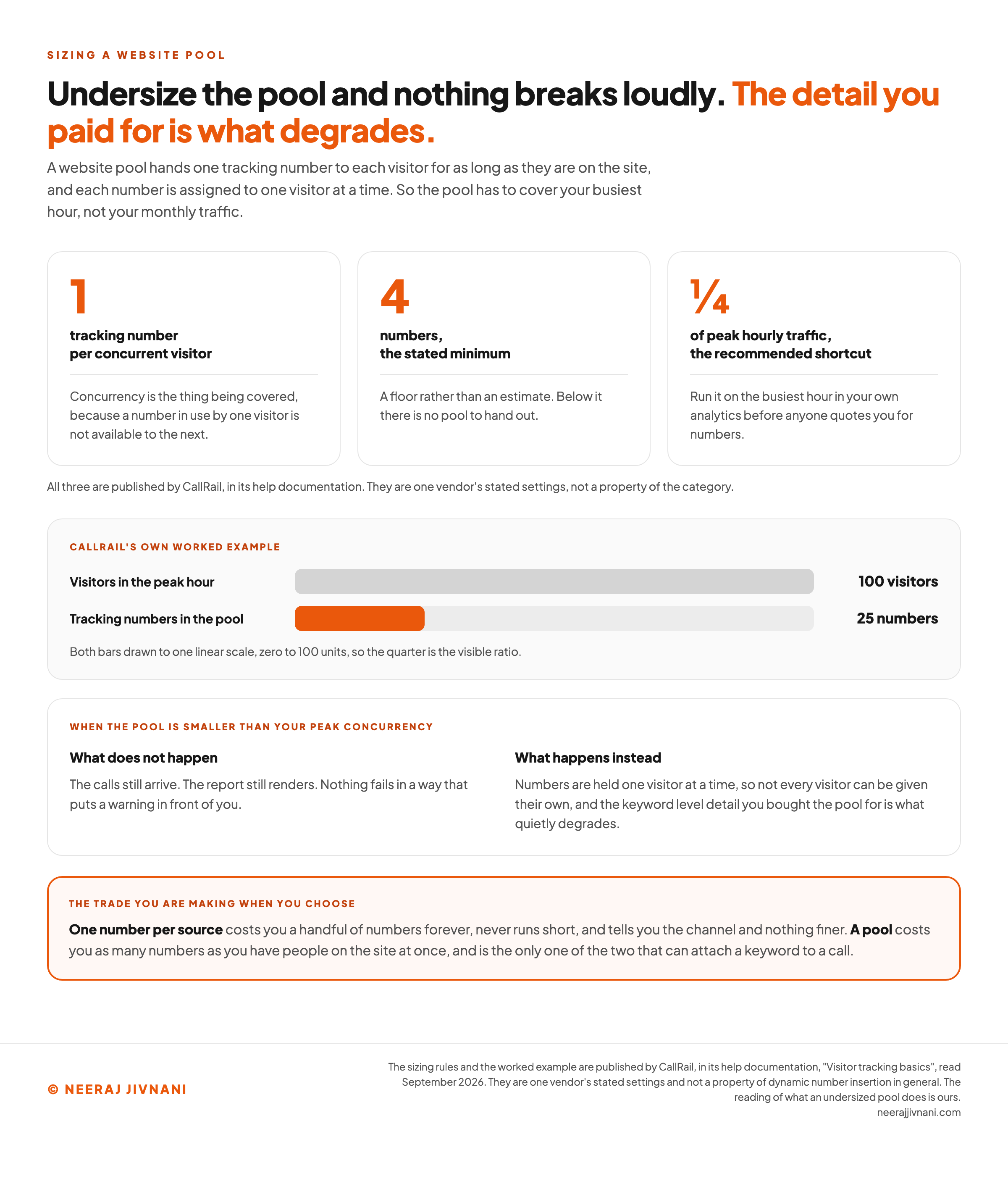
Size the pool off your busiest hour, not your monthly traffic, because concurrency is what the pool has to cover.
One phone number per concurrent visitor, with a minimum of four, is the method CallRail publishes.
Its recommended shortcut is a pool a quarter the size of your peak hourly traffic, and its own worked example is 100 visitors in an hour against a 25 number pool.
Run that on your own analytics before anyone quotes you for numbers. A site with a busy hour of a few dozen people needs a small pool, and a site with thousands needs a serious one.
Undersize it and nothing breaks loudly.
Numbers are held one visitor at a time, so a pool smaller than your peak concurrency cannot give every visitor their own, and the detail you paid for is what degrades.
The calls still arrive. The report still renders.
A visitor who lands when every number is held places a call that cannot be tied back to their session, and nothing in the report says which rows those were.
Use this chart — embed code and citation
<a href="https://neerajjivnani.com/blog/dynamic-number-insertion/"><img src="https://neerajjivnani.com/infographics/dynamic-number-insertion/sizing-the-pool.png" alt="Three published sizing rules for a website pool, shown as large figures with their units: one tracking number per concurrent visitor, a stated minimum of four numbers, and a recommended shortcut of a quarter of peak hourly traffic, with a line under them attributing all three to CallRail's help documentation and marking them as one vendor's stated settings rather than a property of the category. Below them, CallRail's own worked example is drawn as two bars on a single linear scale running from zero to 100 units: 100 visitors in the peak hour, against a pool of 25 tracking numbers that runs to a quarter of the length. A panel underneath splits what happens when the pool is smaller than peak concurrency into what does not happen, where the calls still arrive and the report still renders so nothing fails in a way that puts a warning in front of you, and what happens instead, where numbers held one visitor at a time mean not every visitor can be given their own and the keyword level detail the pool was bought for quietly degrades. A band across the foot states the trade: one number per source costs a handful of numbers forever, never runs short and tells you the channel and nothing finer, while a pool costs as many numbers as you have people on the site at once and is the only one of the two that can attach a keyword to a call." width="1200"></a>
<p>Chart: <a href="https://neerajjivnani.com/blog/dynamic-number-insertion/">Neeraj Jivnani</a></p>Neeraj Jivnani, "Dynamic Number Insertion: What It Swaps, and What the Report Can Prove", neerajjivnani.com, https://neerajjivnani.com/blog/dynamic-number-insertion/Free to republish with a link back to this page.
What Comes Back in the Report
Visitor-level tracking hands back the whole session, and CallRail's published list is a fair picture of what the category captures.
- The source type, and the keyword for paid search.
- The landing page, and the caller's full page-view history.
- The referring domain and the medium.
- Which tracking number was dialed, and when.
- Caller identification, city and device type.
- How long the call lasted.
- Any campaign parameters carried on the URL, such as a utm_campaign value.
That list is your web analytics record with a phone call stapled to it.
That is the real gain, and it is bigger than a per-channel call count.
A form fill already sits in your analytics. Before DNI, a call sat outside it, so every channel comparison you ran silently excluded whichever channels people phone about.
On a site where people phone rather than fill in forms, that exclusion removes the channels you most need to judge.
Where That Data Ends Up
Three places, and each one changes a different decision.
- Your ad platform can take the call back as a conversion, which lets bidding optimize toward calls instead of toward forms alone.
- Your analytics can hold it as an event, so a channel report finally counts both ways somebody can convert.
- Your CRM can hold it against the person, which is where a call stops being a lead count and starts being revenue.
What the Report Can Prove, and What It Cannot
A DNI report proves one thing precisely: this call came from a session that arrived by that route.
That is worth having and it is narrower than how it gets read. It is not proof the route caused the call, and it says nothing at all about whether the call was any good.
There is also a whole population it cannot see. Anyone who dialed your real number, from a business listing, from a van, from a card, or from a page your snippet never loaded on, arrives with nothing attached.
So a channel that generates offline word of mouth reads as weaker than a channel that generates clicks. That is a property of the instrument, not of the channel.
The Credit Window Is a Setting, Not a Fact
The source attached to a call comes out of a cookie, which means somebody chose how long it lasts.
CallRail's default is six months, extended every time the visitor returns, with 30 days, 60 days and 90 days available instead, read in September 2026. On the default, a call in September can still be credited to a click from March.
Whether that is right depends on how long your buying cycle is.
For a roof, six months is reasonable. For an emergency plumber, it is a way of crediting old ads for today's work.
Set that window against your own sales cycle before you read a single row of the report, and set it again if the report is being used to move budget.
A pool softens this, because it records the path rather than one source. CallRail's own example runs a visitor in through Google Ads, back through organic search, then back again through retargeting, and keeps all three.
Which of those three gets the credit is then a reporting choice you are making, and it is worth making it on purpose.
The row this call makes
Describe one caller. This prints the row they produce in your report, the fields that stay empty, and what the row is entitled to claim. It grades nothing, because the answer is a consequence of three settings rather than a score.
1. What you are running
A number is held by one visitor at a time, so everything that person did can be attached to their call. That is where keyword level reporting comes from.
2. How this person reached the number they dialed
Nothing swaps that is not on a page your script runs on, so this is the control that decides whether a row exists at all.
Pick a way in above and the row appears here.
Putting It On Your Site Without Breaking Anything
Two things have to be true before anything swaps, and almost every broken install is one of them.
The snippet has to be on every page. A number sitting on a page the script never loads on is your real number, and calls to it arrive unlabeled.
The number in your page has to match what the tool is looking for. That target is a specific number in a specific shape, and CallRail's documentation notes that its script detects several common formats rather than one.
Leave your real number as the one written into the page. The swap happens for a visitor in a browser, so what sits underneath stays correct for anyone the script never runs for.
Then test it before you trust it. Arrive from a Google Ads click, check the number changed, call it, and confirm the row lands against the right source.
The Places a Number Will Not Swap
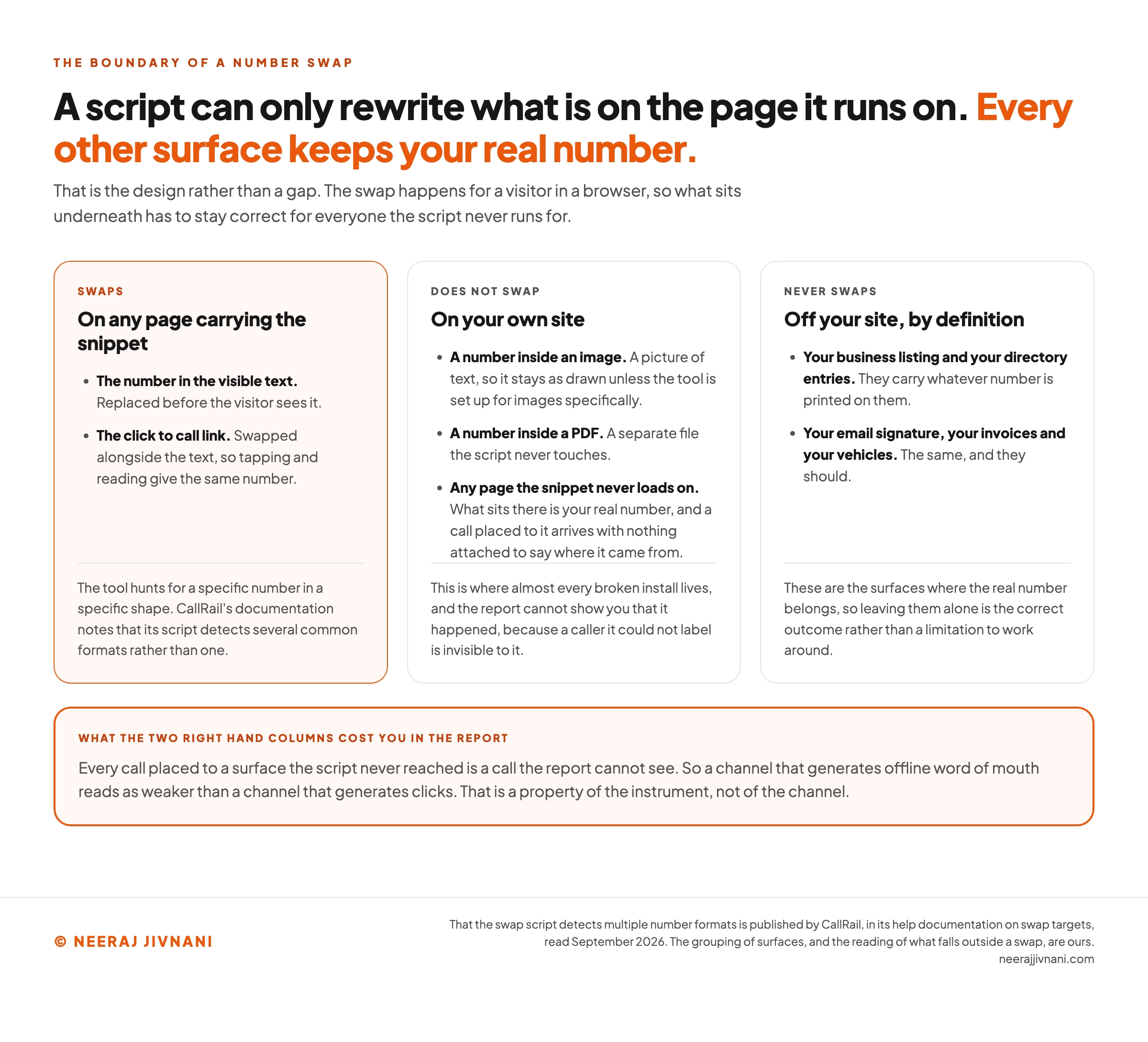
A script can only rewrite what is on the page it runs on, and that rules out more surfaces than people expect.
A number inside an image is a picture of text, so it stays as drawn unless the tool is set up for images specifically. A number inside a PDF sits in a separate file the script never touches.
Everything off your site is untouched by definition. Your business listing, your directory entries, your email signature, your invoices and your vehicles all carry whatever number is printed on them.
That is a feature rather than a gap. Those are the surfaces where the real number belongs.
Use this chart — embed code and citation
<a href="https://neerajjivnani.com/blog/dynamic-number-insertion/"><img src="https://neerajjivnani.com/infographics/dynamic-number-insertion/what-a-swap-can-reach.png" alt="Three columns setting out the boundary of a number swap. The first, swaps, covers any page carrying the snippet: the number in the visible text, replaced before the visitor sees it, and the click to call link, swapped alongside the text so that tapping and reading give the same number, with a note that the tool hunts for a specific number in a specific shape and that CallRail's documentation says its script detects several common formats rather than one. The second, does not swap, covers your own site: a number inside an image, which is a picture of text and stays as drawn unless the tool is set up for images specifically, and a number inside a PDF, which sits in a separate file the script never touches, and any page the snippet never loads on, where what sits there is your real number and a call placed to it arrives with nothing attached to say where it came from. The third, never swaps, covers everything off your site by definition: your business listing and your directory entries, and your email signature, your invoices and your vehicles, which carry whatever number is printed on them and are the surfaces where the real number belongs. A band across the foot says every call placed to a surface the script never reached is a call the report cannot see, so a channel that generates offline word of mouth reads as weaker than a channel that generates clicks, and that this is a property of the instrument rather than of the channel." width="1200"></a>
<p>Chart: <a href="https://neerajjivnani.com/blog/dynamic-number-insertion/">Neeraj Jivnani</a></p>Neeraj Jivnani, "Dynamic Number Insertion: What It Swaps, and What the Report Can Prove", neerajjivnani.com, https://neerajjivnani.com/blog/dynamic-number-insertion/Free to republish with a link back to this page.
Your Business Listing, Your Citations and Your Rankings
Your rankings are not at risk and neither is your listing, provided the real number stays where the real number belongs.
Take the rankings question first, because it is the one people arrive worried about.
A number swapped for a human visitor so a marketer can count a call is not cloaking.
Cloaking means presenting different content to users and search engines with intent to manipulate search rankings and mislead users, which is how the spam policies Google publishes for Google Web Search define it.
The listing question has a plainer answer. The number on a profile has to be under the direct control of the business, and a local number is preferred to a call center line, under the guidelines Google publishes for representing your business.
The same page tells you not to give a number that refers callers to a business other than yours, which is aimed at lead generation middlemen rather than at a number that rings your own line.
The practical rule is to leave the real number on the profile and on every citation, and confine the swapping to your own pages.
The reason is consistency rather than policy. Your name, address and phone number are matched across dozens of directories, and putting a rotating number into that set makes a mess nobody is being paid to clean up.
Questions People Ask About Dynamic Number Insertion
Four questions sit under this topic, and three of them are vocabulary rather than strategy.
They are worth a minute, because the names mislead in ways the concepts do not.
The last one is the question that arrives months later, once a tracking number has been in the world long enough for somebody to keep it.
What Is a DNI Code?
A DNI code is the snippet, and the phrase usually means the few lines of JavaScript your call tracking provider gives you to paste into your site.
There is nothing bespoke in it. The same snippet goes on every page of the site.
The name causes trouble because it sounds like a per-campaign identifier that you generate separately for each ad. It is not, and a team hunting for the code for this campaign is usually hunting for something that does not exist.
What Is an Example of a Dynamic Number?
Any number that changes with who is looking at it.
Load your own home page from a Google Ads click and note the number.
Open it again in a private window, arriving from a search result instead. If those two numbers differ, you are looking at a dynamic number.
Is Dynamic Number Insertion the Same as Call Tracking?
No. Call tracking is the whole practice of attributing and recording phone calls, and DNI is one technique inside it.
You can track calls without it by printing a different number on each advertisement. What DNI adds is doing that automatically, on a website, per visitor.
What Happens to Somebody Who Saved the Tracking Number?
A saved tracking number keeps reaching you, because it is a working line that routes to your real one.
Which number they saved is worth knowing.
A fixed source number still stands for the channel it always stood for. A pool number is one the pool takes back and hands out again, so it may since have been standing for somebody else's visit.
The caution is about giving one up. Release a number that a customer has stored, or that ended up printed somewhere, and you have retired a route into your business to save a small subscription line.
What to Check Before You Buy Anything
Five questions to check, and they decide whether the report is worth reading.
- Does it do pools, or only fixed numbers per source? That decides whether you ever see keyword-level data, and it is the difference the pricing tiers are usually built on.
- How is the pool sized, and what does an extra number cost you each month? Get a figure against your own peak hour, so a quote arrives for 25 numbers rather than for a plan name.
- Can you set the attribution window yourself? If the answer is no, somebody else has decided how long your ads get credit for.
- Does it push the call back into your ad platform, your analytics and your CRM without a project? A call that stays inside the call tracking tool changes nothing.
- And what happens to a number when you stop paying for it? Any number printed on a van, or saved by a customer, is one you cannot casually give up.
Who Should Not Bother With This
Plenty of businesses should not bother, and the cases are specific enough to name.
If phone calls are a small share of your leads, skip it. The machinery only pays for itself when the calls are the part of the funnel you cannot currently see.
If you are running one channel, skip it. You already know which campaign to credit, and a fixed number on a landing page will tell you how many.
If your traffic is thin, keep it simple. Say a site takes 8 calls in a month: no pool separates one keyword from another at that volume, and source-level numbers will answer the only question you can act on.
And if nobody is going to move budget on the answer, do not buy the instrument. Attribution that changes no decision is a subscription with a dashboard attached.
Where it earns its place is narrow and it is easy to state. A business where the phone is the main way people buy, running more than one channel, spending enough that moving budget between them is worth being right about.