Video Marketing: Decide Where It Gets Watched, Then Decide What to Make
Pick the placement before the camera. It decides your length, your shape, whether the sound is on, and whether you owe a caption file.

/ On this page13 sections
Video marketing is promotion done with video, and the first decision in it is not the camera. It is the placement: where the video will be watched.
That single choice fixes the shape of the file, its length ceiling, whether the sound can be relied on, and whether you owe a caption file. Pick it first and the budget question stops being a guess.
Video Marketing, and the Three Narrower Names Inside It
Video marketing is the use of video to sell something, explain something, or be found by someone searching for what you do. In practice it means video made for a business purpose and published where the people you want are already watching.
That definition is deliberately broad, because the field runs under four names that overlap and are not interchangeable. Knowing which one you are doing decides who you hire and what you count afterwards.
Video marketing is the whole activity. Three narrower names sit inside it:
- Video advertising is the paid part. You buy inventory and the platform delivers your video to an audience you defined, so the delivery has a date on it.
- Video content marketing is video made to be useful rather than to sell in the moment, such as a recorded workshop. It earns attention instead of buying it, and it is judged over months rather than weeks.
- Social video marketing is video built to be passed along, and it is planned around the sharing rather than left hoping for it.
The distinction that matters is what each one is judged on. Viral video is scored on pass-along rate and impressions; social video is built on the relationship between the person sharing and the person receiving.
Virality is an outcome you cannot commission, because the sharing it depends on is somebody else's decision.
Where Video Beats a Page, and Where It Does Not
The honest case for video is narrower than it is usually made to sound. A page can describe almost anything; what a page cannot do is demonstrate.
Three things earn the cost:
- A product that takes a paragraph to describe is often obvious in fifteen seconds of somebody using it.
- Tone, hesitation and confidence survive a recording. None of them survive a bullet point.
- A feed that plays video automatically will not do the same for your pricing page.
All three trade on a watching habit that is large and well measured. Television took 2.6 hours a day in 2025, half of the 5.2 hours of daily leisure time, on the American Time Use Survey published by the US Bureau of Labor Statistics.
That reading carries a caveat the Bureau prints itself. A federal shutdown suspended all survey operations from October 1 to November 12, 2025, and the effect on the 2025 estimates cannot be quantified.
None of it promises your video will be watched, and it counts television rather than marketing video.
Video does not make a weak offer good, and it does not shorten a decision that is long because the thing is expensive.
The Kinds of Video, Sorted by What They Are Hired to Do
Sort video by the job it is hired for, not by how many types of it exist.
A kind of video earns its cost when it is the cheapest way to do one specific job. The job also tells you where in the marketing funnel it belongs.
Sorted that way, the whole catalog collapses into four groups:
| The job it is hired for | The kinds that do it | Where it sits in the decision |
|---|---|---|
| Explain something | Explainer, how-to, product demo, animated guide, webinar | Early, while the reader is still deciding whether the problem is theirs |
| Prove something | Testimonial, case study, customer interview, behind the scenes, company culture | Middle, once they believe the problem and doubt you |
| Be found and remembered | Short vertical social video, brand film, thought-leadership interview, filmed podcast, live video | Early, and then continuously |
| Answer one person | Personalized message, recorded walkthrough, support reply, event recap | Late, when a named person has a named question |
Two formats sit outside that table because they answer a question almost nobody is asking. Immersive and virtual reality video are worth the money when the space itself is the product, such as a building somebody is deciding whether to visit.
For anything else they are an expensive way to say an ordinary thing.
The mapping is not decoration. A testimonial shown to strangers who have never heard of you is proof offered to people with nothing to doubt yet, which is why it underperforms and then gets blamed on the production.
Decide Where It Gets Watched Before You Decide What to Shoot
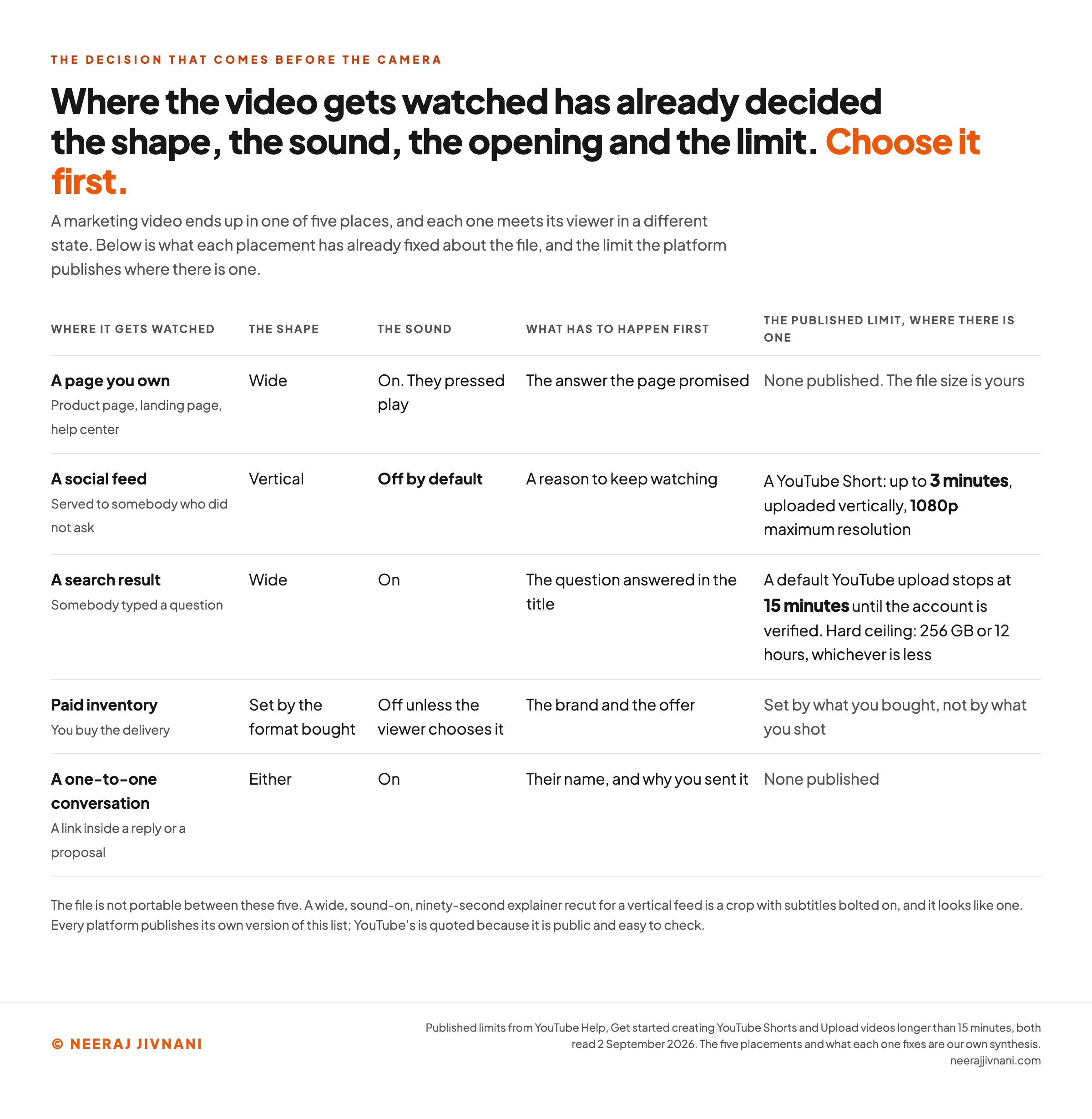
Decide where the video will be watched before you decide what to shoot, because the placement settles more of the file than the idea does. A marketing video ends up in one of five places, and each one meets its viewer in a different state.
The Five Places a Marketing Video Ends Up
Here is what each of the five is good at:
- A page you own, such as a product page, a landing page or a help center. The viewer arrived on purpose and pressed play, so the sound is on and a slower opening survives. This is the most durable placement, because you control the page around it.
- A social feed. The video is served to somebody who did not ask for it, starts on its own, and starts silent. Everything about the file changes here, and most disappointment in video marketing comes from ignoring that.
- A search result. Somebody typed a question, so the video competes with an answer rather than with entertainment. The title and the first line have to match the question that was typed.
- Paid inventory. You buy the delivery, which makes this the only placement with a predictable date on it. The format is set by what you bought rather than by what you shot.
- A one-to-one conversation. A link sent to a named person inside a reply or a proposal. It is the least glamorous of the five and the one nobody plans for.
Why the Order Cannot Be Reversed
The order matters because the file is not portable between those five. A wide, sound-on, ninety-second explainer recut for a vertical feed is a crop with subtitles bolted on, and it looks like one.
One placement served properly beats five placements served by a single export.
Use this chart — embed code and citation
<a href="https://neerajjivnani.com/blog/video-marketing/"><img src="https://neerajjivnani.com/infographics/video-marketing/placement-decides-the-file.png" alt="A five-row table showing what each placement has already decided about a marketing video before anyone writes a script. A page you own: wide frame, sound on, opens with the answer the page promised, no published ceiling. A social feed: vertical frame, sound off by default, opens with a reason to keep watching, and on YouTube a Short runs up to 3 minutes, uploads vertically and caps at 1080p. A search result: wide frame, sound on, opens with the question answered in the title, and a default YouTube upload stops at 15 minutes until the account is verified. Paid inventory: the shape is set by the format bought, sound off unless the viewer chooses it, opens with the brand and the offer. A one-to-one conversation: either shape, sound on, opens with the person's name and why you sent it, no published ceiling." width="1200"></a>
<p>Chart: <a href="https://neerajjivnani.com/blog/video-marketing/">Neeraj Jivnani</a></p>Neeraj Jivnani, "Video Marketing: Decide Where It Gets Watched, Then Decide What to Make", neerajjivnani.com, https://neerajjivnani.com/blog/video-marketing/Free to republish with a link back to this page.
What the Placement Fixes About the File
The placement fixes four things before anybody writes a script: the shape of the frame, the length ceiling, whether the sound is on, and whether a caption file is required. None of the four is a creative choice.
The ceilings are the part you can look up. On YouTube, a Short runs up to 3 minutes, uploads vertically, and caps at a maximum resolution of 1080p.
A default upload there stops at 15 minutes until the account is verified, and the hard ceiling is 256 gigabytes or 12 hours, whichever is less.
Every platform publishes its own version of that list, and the one for wherever you are publishing is worth reading before the shoot rather than after it.
Does the file you have fit where you want it?
These are YouTube's published limits, put against the file you actually have.
Which way up?
As a Short
Not eligible yet
A Short uploads vertically. A wide file is not eligible until it is reframed, and reframing is a decision made at the camera.
As a standard upload
Eligible as it stands
2 minutes is inside the 15 minute default limit, verified account or not.
What that placement has already decided for you
- The viewer pressed play, so the sound is on and a slower opening survives.
- Frame wide and let the edit breathe.
- The title and the first line still have to match the question somebody typed.
- Either way the caption file is separate. YouTube accepts SubRip (.srt), SubViewer (.sbv), WebVTT (.vtt), TTML and Scenarist Closed Caption (.scc), and names Scenarist Closed Caption its preferred format.
The Shape Is Not a Crop
A vertical placement wants a vertical frame, and that is decided at the camera rather than in the edit. Cropping a wide shot to a tall one throws away the sides of every frame you paid to light.
If the video will live in a feed, frame for a tall rectangle and keep the subject in the middle third; if it will live on a page you own, frame wide and let the edit breathe.
Sound Is a Setting You Do Not Control
A feed starts your video silent, so anything carried only by the audio is carried by nothing. That is a requirement of the file rather than a tip about style.
It means the first line is on screen as text, the product is visible rather than described, and the video still makes its point with the audio muted.
Turn your own sound off and watch the cut once before it goes anywhere.
Captions Are a File You Have to Supply
A caption file is the text of what is said in the video, carrying a time code on each line. It is a separate file you have to supply.
YouTube accepts SubRip (.srt), SubViewer (.sbv), WebVTT (.vtt), TTML (Timed-Text Markup Language) and Scenarist Closed Caption (.scc), among others.
YouTube names Scenarist Closed Caption its preferred format, and points anyone making their first one at SubRip or SubViewer instead.
Captions earn their trouble twice over.
They make the video usable with the sound off, and they hand the platform a readable version of everything said in it.
The 3-3-3 Rule, and What the Platforms Actually Publish
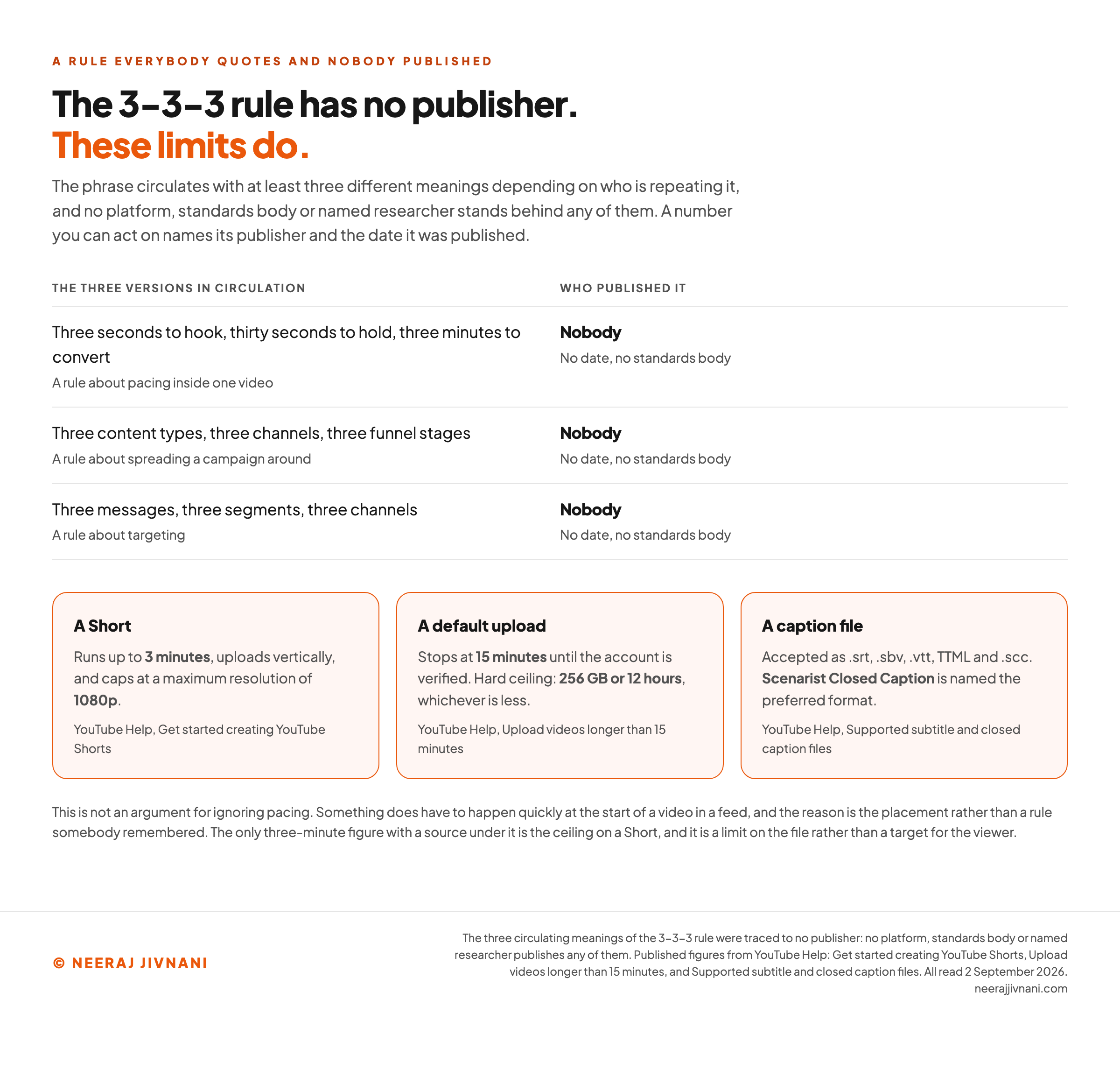
The 3-3-3 rule has no publisher. No platform, standards body or named researcher publishes it, and it circulates with at least three different meanings depending on who is repeating it.
The three versions in circulation are these:
- Three seconds to hook, thirty seconds to hold, three minutes to convert. A rule about pacing inside one video.
- Three content types, three channels, three funnel stages. A rule about spreading a campaign around.
- Three messages, three segments, three channels. A rule about targeting.
Three rules, one name, and no source under any of them. A number you can act on names its publisher and the date it was published, and none of these does either.
That is not an argument for ignoring pacing.
Something does have to happen quickly at the start of a video in a feed, and the reason for it is the placement rather than a rule somebody remembered.
The Numbers That Do Have a Publisher
The numbers with publishers behind them are the platform limits, and they are duller and far more useful.
The only three-minute figure with a source under it is the ceiling on a Short. That is a limit on the file rather than a target for the viewer.
Treat an unattributed rule the way you would treat an unattributed statistic.
Use it as a working habit if it helps you, and never as evidence inside a plan somebody is paying for.
Use this chart — embed code and citation
<a href="https://neerajjivnani.com/blog/video-marketing/"><img src="https://neerajjivnani.com/infographics/video-marketing/no-publisher.png" alt="A two-column comparison. The left column lists the three meanings the 3-3-3 rule carries in circulation: three seconds to hook, thirty seconds to hold and three minutes to convert; three content types, three channels and three funnel stages; and three messages, three segments and three channels. Each is marked as having no publisher, no date and no standards body behind it. The right column lists numbers that do have a publisher: a YouTube Short runs up to 3 minutes, uploads vertically and caps at a maximum resolution of 1080p; a default YouTube upload stops at 15 minutes until the account is verified; the hard ceiling is 256 gigabytes or 12 hours, whichever is less; and YouTube names Scenarist Closed Caption its preferred caption format." width="1200"></a>
<p>Chart: <a href="https://neerajjivnani.com/blog/video-marketing/">Neeraj Jivnani</a></p>Neeraj Jivnani, "Video Marketing: Decide Where It Gets Watched, Then Decide What to Make", neerajjivnani.com, https://neerajjivnani.com/blog/video-marketing/Free to republish with a link back to this page.
Goal, Audience, Message, Money
A video plan is four decisions and they are made in one order: the goal, the audience, the message, and then the money. Taking them out of order is how a shoot produces a file nobody can publish.
The placement is not a fifth decision. It falls straight out of the goal, which is how it comes to be settled long before anybody picks up a camera.
The Goal Decides the Placement
A goal that is not a number is a mood.
More awareness cannot be planned against; fifty sales conversations from the pricing page in a quarter can.
The goal then names the placement, because each of the five is good at a different thing. Being remembered is a feed job, being chosen is a page job, and being answered is a one-to-one job.
The Audience Decides How Much You Explain
The audience decision here is not which platform they use. It is what they already know, and how much explanation they will sit through before deciding you are not talking to them.
A video for somebody who has never met the problem spends its first third on the problem. The same opening loses badly when the viewer is comparing two vendors and already knows why they came.
The Message That Has to Survive the Cut
Every video gets cut down, and the cut is where the message either survives or quietly disappears.
Decide the one sentence a viewer should be able to repeat afterwards, and protect it through every edit.
If you cannot write that sentence before the shoot, the shoot will not produce it. This is the cheapest correction available anywhere in the process.
Money, and the Only Published Number
There is no list price for a video, because the cost is set by what you are asking somebody to make and how many people it takes.
The public wage data is the closest thing this work has to a published rate.
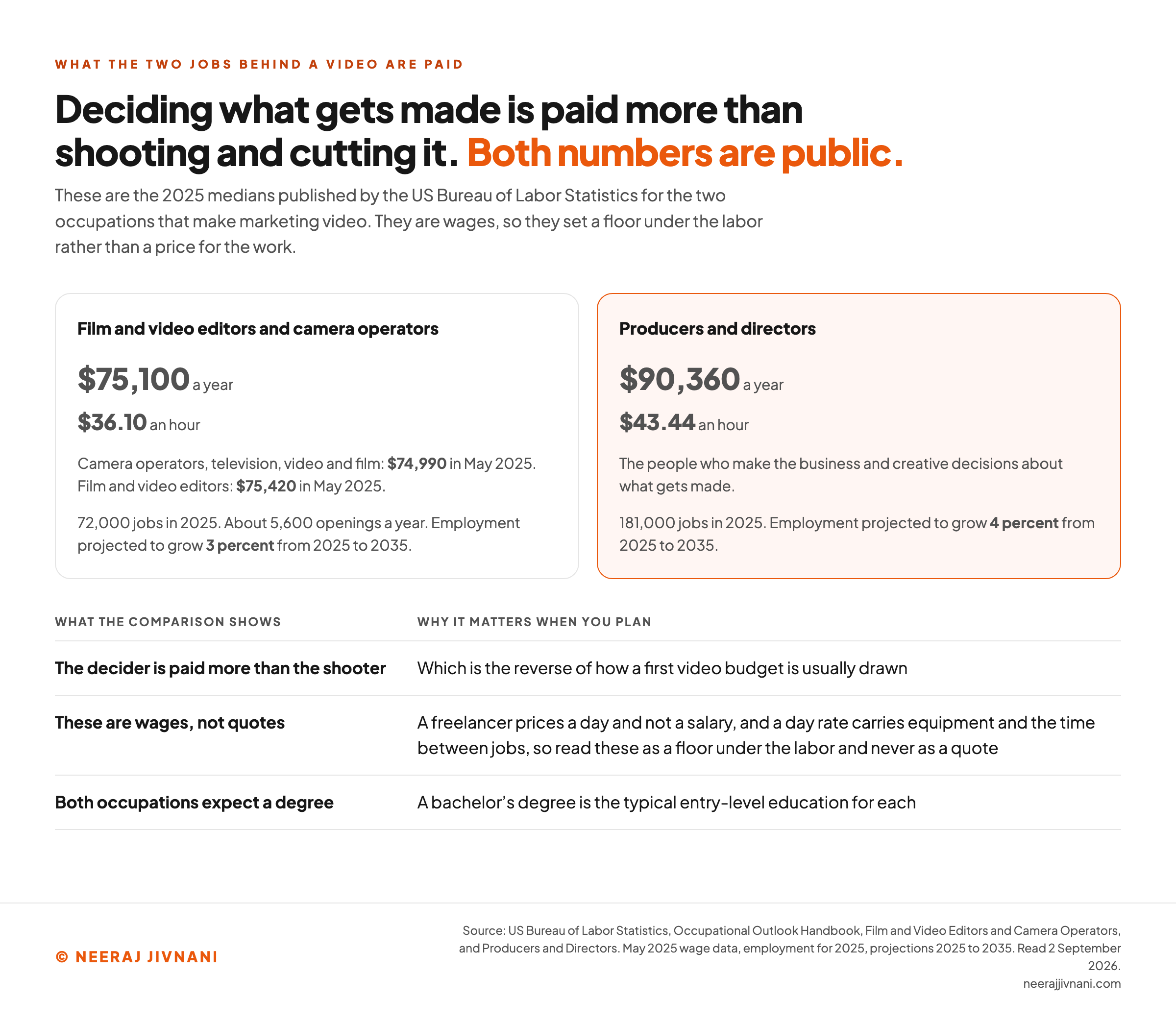
Median pay for film and video editors and camera operators was $75,100 a year in 2025, or $36.10 an hour, on US Bureau of Labor Statistics figures. Within that group, camera operators were at $74,990 and film and video editors at $75,420 in May 2025.
Producers and directors, the people who make the business and creative decisions about what gets made, had a 2025 median of $90,360 a year, or $43.44 an hour.
Those are wages rather than quotes, and the difference matters when you plan.
A freelancer prices a day and not a salary, and a day rate has to carry equipment and the time between jobs, so read these as a floor under the labor and never as a quote.
The occupations behind those wages are small ones. The Bureau counted 72,000 film and video editors and camera operators in 2025, with about 5,600 openings a year and 3 percent growth projected to 2035.
Producers and directors number 181,000 on the same measure, growing at 4 percent over the same decade. Both occupations are listed with a bachelor's degree as the typical entry-level education.
Read together, those two medians say something about what the two jobs are worth, and it is not the order a first budget usually assumes: the person deciding what gets made is paid more per hour than the people shooting and cutting it.
Use this chart — embed code and citation
<a href="https://neerajjivnani.com/blog/video-marketing/"><img src="https://neerajjivnani.com/infographics/video-marketing/decider-paid-more.png" alt="A two-panel comparison of 2025 median pay for the two occupations that make marketing video, from the US Bureau of Labor Statistics Occupational Outlook Handbook. Film and video editors and camera operators: $75,100 a year, or $36.10 an hour, across 72,000 jobs in 2025, with about 5,600 openings a year and 3 percent projected growth to 2035; within the group, camera operators were at $74,990 and film and video editors at $75,420 in May 2025. Producers and directors: $90,360 a year, or $43.44 an hour, across 181,000 jobs, growing 4 percent over the same decade. A note records that the people who decide what gets made are paid more than the people who shoot and cut it." width="1200"></a>
<p>Chart: <a href="https://neerajjivnani.com/blog/video-marketing/">Neeraj Jivnani</a></p>Neeraj Jivnani, "Video Marketing: Decide Where It Gets Watched, Then Decide What to Make", neerajjivnani.com, https://neerajjivnani.com/blog/video-marketing/Free to republish with a link back to this page.
The Three Stages of Making One, and Who Does Each
Making a video is three stages, and the common mistake is treating the middle one as the whole job. The shoot is the shortest of the three and the one everybody pictures.
The three stages, in the order they happen:
- Pre-production is the script, the location, the talent, the schedule, and the shot list the script hands you. It is where the video is decided, and where a bad video is still cheap to fix.
- Production is the shoot itself. It is the stage with the largest crew and the least room to change your mind.
- Post-production is the edit, the sound, the captions and the versions. It is where the video is either finished properly or explained away.
Producers and directors make the business and creative decisions, camera operators run the shoot, and film and video editors assemble what comes back.
In a company that employs none of the three, one marketer does all three jobs: the plan, the shoot and the edit.
That is a reasonable way to start and a poor way to stay, because the edit is where the hours go and it is the stage that rewards practice most.
The honest signal for bringing in somebody who does this for a living is repetition rather than ambition. One video a quarter can be made in-house, one a week cannot.
What AI Changed, and What You Now Have to Declare
AI changed what a marketing video costs to make, and added one thing you now have to declare. AI video marketing means using generative tools to write, storyboard, generate footage, voice or cut a video for a business purpose.
The Three Cases That Need a Label
YouTube requires creators to disclose when they use AI to meaningfully alter or generate photorealistic content. Three specific cases trigger it.
- Making a real person appear to say or do something they did not do.
- Altering footage of a real event or a real place.
- Generating a realistic scene that never occurred.
Disclosure happens at upload, through an AI use setting in YouTube Studio. Photorealistic content may then carry a label in the video player, while a label for non-photorealistic or animated content may appear in the expanded description.
What Does Not Need Declaring
The exemptions are broad, and they are the reason the rule is workable at all.
YouTube lists beauty filters, color adjustment and lighting filters, special effects filters, caption creation, sharpening or upscaling, idea generation, and using generative tools to improve an outline, script, thumbnail or title.
Cloning your own voice for a voiceover is on the exempt list too. The line being drawn is about realism concerning real people and real events, not about the use of the tools.
Ignoring the rule has a stated cost. Creators who consistently choose not to disclose may have a label applied manually, or face penalties including removal of content or suspension from the YouTube Partner Program.
A label can also arrive without you asking for one. YouTube may apply one automatically to content made with its own generative tools, to content carrying C2PA metadata, and to content its systems detect as generated or altered.
You are notified in YouTube Studio when that happens.
One detail is worth knowing before anybody talks you out of declaring. YouTube states that disclosing AI content will not limit a video's audience or affect its eligibility to earn money.
Our reading is that AI changed the price of a shoot and nothing about the job.
A generated video still has to be worth watching, still has to fit its placement, and now also has to be declared when it depicts something that never happened.
Getting It Found After You Publish
A published video is not a found video, and the four things that decide whether it gets found all sit outside the footage. None of them is fixed by shooting the video again.
Those four, in the order somebody encounters them:
- The title answers the question somebody typed, in their words rather than an internal name such as the model number nobody types.
- The thumbnail is the real competition on a results page, and it is chosen against the thumbnails around it rather than in isolation.
- The description is where words a machine can read live, which the footage itself does not provide.
- The caption file is the other half of that, and the only one of the four you do not have to write from scratch.
Putting a video on a page does not make that page rank.
What it can do is hold somebody there long enough to read the page, and give you a second surface, the video itself, that can be found on its own terms.
Cutting a separate version for each destination is part of publishing rather than part of the edit.
Judging Whether the Video Worked
Three numbers change a decision about a video. Most of what a video dashboard reports does not, however satisfying it is to watch go up.
The three worth reporting, and what each one judges:
- Play rate. The share of the impressions a video received that turned into a play, which is the click-through rate arithmetic applied to a thumbnail. It judges the title and the thumbnail, and says nothing about the video.
- Completion rate. The share of people who reached the end. It is the only one of the three that judges the video itself.
- The action afterwards. Whatever the video was hired to cause, such as a reply, a booked conversation, an account created or a page visited next.
Completion rate is a different object at different lengths, and comparing across lengths is where the reading goes wrong. A thirty-second clip watched to the end and a twelve-minute recording watched to the end are not the same achievement.
Set the benchmark against your own earlier videos at the same length in the same placement.
An industry average with no definition under it cannot be compared with yours, whatever it claims about your sector.
When Video Is the Wrong Format
Video is the wrong format for some jobs, and three situations account for most of them. Naming them now is cheaper than discovering them after a shoot.
When the Subject Is Really a Document
Some subjects are a document wearing a video costume. A price list, a specification, a comparison, anything a reader will want to come back and re-find is worse as video and better as text.
The test is whether a viewer would ever need to look at one part twice.
If they would, they need something they can scan.
When You Cannot Keep It Up
One video is a cost. A run of videos is a channel, and the entire difference between the two is cadence.
Say a five-person company records one demo, publishes it, and makes nothing else for a year. The script, the lighting, the editor's time and everything learned are spread across a single file, and none of it compounds.
The honest question before starting is not whether you can make a video.
It is whether you can make the tenth one.
When Nothing About It Is Worth Watching
A crowded feed is not a production problem. If the thing itself is not interesting, better lighting produces a better-lit video that nobody finishes.
The fix for that sits upstream of the camera, in what you chose to film.
Video is not a necessity. It is a format, and formats are chosen for jobs.
Start With the Screen It Ends Up On
Every other decision here hangs off one: which screen this ends up on.
The question it asks is what state the screen meets a viewer in: tall or wide, sound on or off, a few seconds of patience or several minutes.
The kind of video comes from the job you hired it for. The length, the shape and the caption file come from the placement, and the money comes from how many people have to touch it.
Two questions settle the first version, and both can be answered before anybody books a camera. Where will this be watched, and what has that placement already decided for you?