SEO Automation: Which Jobs Run Without You, and Where You Still Have to Stand
Some SEO jobs can run without you. See which to leave alone, which need a reader before you use them, and which must never touch a live page.

/ On this page9 sections
Some search engine optimization (SEO) jobs do run without you. Others only look like they do, and the difference is not the tool, it is what happens to a live page when the job gets something wrong.
Sort your own list that way and most of the arguing about which platform to buy disappears.
What SEO Automation Actually Is
SEO automation is any search job that a machine starts on its own and finishes without you. A schedule fires it, or an event does, and the output lands somewhere you will see it later.
The things people put under this name are ordinary. A crawler that maps your site every Monday. A rank check that runs nightly.
A report that assembles itself and arrives before the meeting. A script that rewrites every title tag on the site in one pass.
What they share is not intelligence. It is that nobody had to remember.
That is worth separating from the other thing sold under this heading, because both get called automation and they behave differently.
Pasting a spreadsheet into a chat window and asking for keyword groups is a task you perform. It happens because you sat down and did it.
An automation happens on Tuesday morning whether you sat down or not.
Most tools now do both, and a model sitting inside a scheduled job is genuinely useful.
The distinction still matters. The second kind keeps running after you stop paying attention to it, and that is where this work goes wrong.
The Only Question That Sorts This Work
Every automated search job answers one question about you: where do you have to be standing when it runs?
For a job that touches your own site there are three honest answers, and they follow from what the job can damage rather than from how clever it is.
| what the job does | where you stand | worst case if it is wrong |
|---|---|---|
| Measures and reports | Nowhere. Read the output when you want it | A wasted email, or a number you misread |
| Produces something you then use | Downstream. You read it before it goes anywhere | A plausible, wrong idea reaches a page |
| Writes to your live site | Upstream and behind. You approve a sample and keep a way back | The same error on every page it touched |
Sorting by tool gets you a shopping list. Sorting by damage gets you a rule, and the rule holds when the tools change.
Everything below is those three, in order of how much attention each one asks for.
Jobs That Never Touch a Page
Every job in this group can be switched on without asking anyone, because none of them can change a page. This is also where most of the genuine time saving lives.
A measuring job reads your site, or a search results page, or your own analytics, and writes down what it found. It changes nothing.
If it is wrong, you have a bad number rather than a bad page, and you find out by looking.
The work that belongs here is the work you would otherwise do on a Monday with too many browser tabs open:
- Site crawls, which find broken links, missing titles, redirect chains and pages that have quietly gone to a 404.
- Rank checks, which look up where you sit for a list of phrases and record the movement.
- Change detection, which watches specific pages and tells you when a heading, a canonical tag, a status code or a robots directive changes underneath you.
- Reporting, which pulls Search Console and analytics data into one dashboard that assembles itself.
None of that needs your permission. Turn all four on this week.
The Scheduled Crawl, and the Setting That Decides Its Worth
A recurring crawl is the single best first automation for most sites, and it is the one most often set up badly.
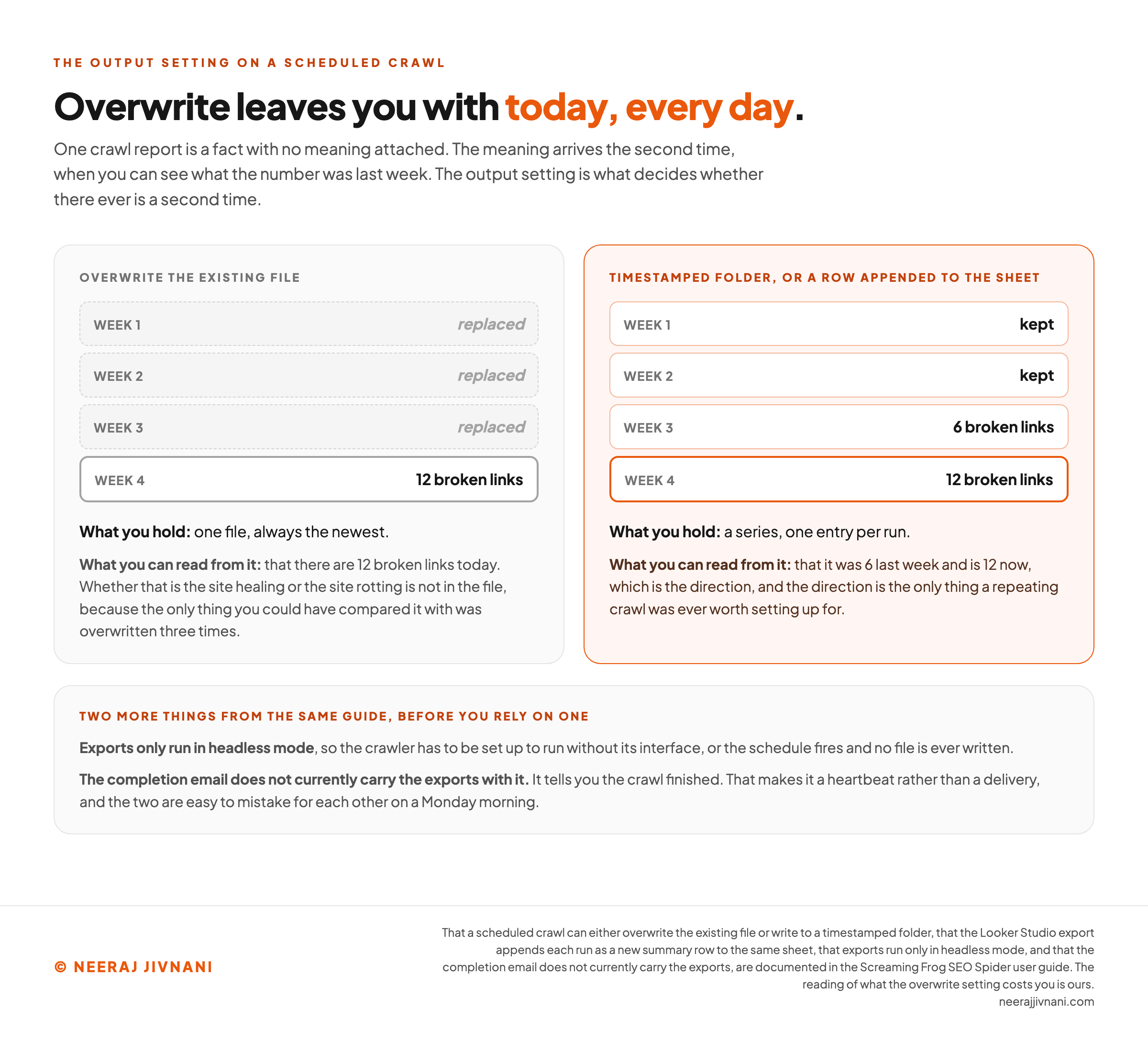
The reason is that a crawl on its own tells you little. One report saying you have 12 broken links is a fact with no meaning attached.
The meaning arrives the second time, when you can see that last week it was 6.
So the value of a repeating crawl is the comparison, which makes the output setting the thing to get right.
Screaming Frog's user guide is explicit that a scheduled crawl can either overwrite the existing file or write to a timestamped folder. Its Looker Studio export appends each run as a new summary row to the same sheet over time.
Overwrite is the choice that quietly throws the comparison away. You end up with today, every day, and no history to read a trend from.
Pick the timestamped folder, or the appending sheet, before you pick a crawl frequency.
Two smaller things from the same guide are worth knowing before you rely on one.
Exports only run in headless mode, so the crawler has to be set up to run without its interface.
And the completion email tells you the crawl finished. It does not currently carry the exports with it, so that notification is a heartbeat rather than a delivery.
What a Rank Report Is Telling You, and What It Is Not
A rank tracker does not read your position. It samples one.
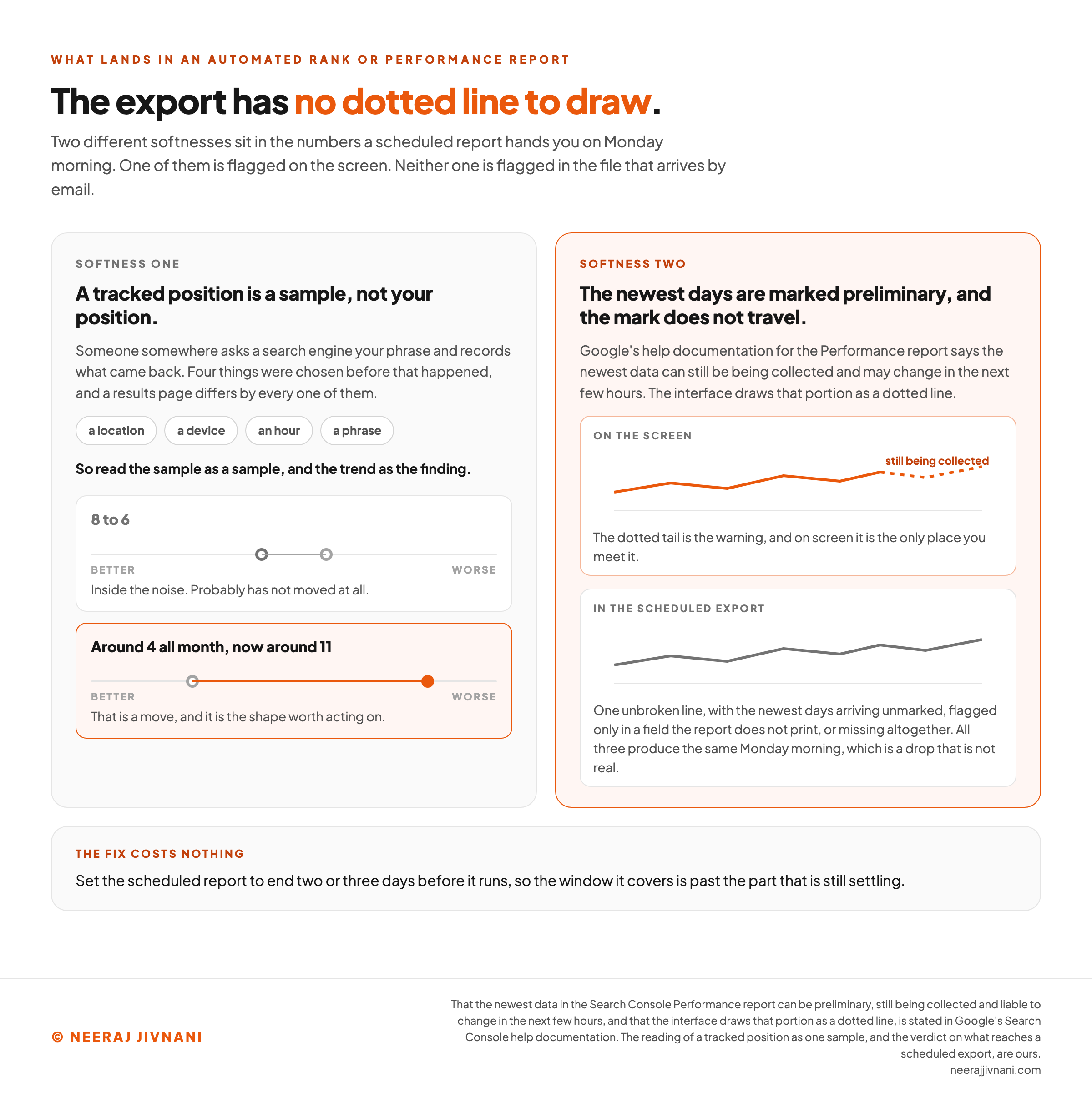
Someone somewhere asks a search engine your phrase, from a chosen location, on a chosen device, at a chosen hour, and records what came back. That is a measurement of one results page, and results pages differ by place, by history and by the minute.
Treat the number as a sample and the trend as the finding.
A phrase that moved from 8 to 6 has probably not moved. A phrase that sat around 4 all month and now sits around 11 has.
Search Console carries the same caveat, and it publishes it.
Google's help documentation for the Performance report says the newest data can be preliminary, still being collected and liable to change in the next few hours. The interface draws that portion as a dotted line.
A scheduled export has no dotted line to draw. Depending on how it pulls the data, the newest days arrive unmarked, flagged only in a field the report does not print, or missing altogether.
All three produce the same Monday morning, which is a drop that is not real.
The fix costs nothing. Set the scheduled report to end two or three days before it runs.
The Job That Stops Without Saying So
Here is the failure nobody sets up for, and it deserves more attention than the choice between two crawlers.
A monitoring job that has stopped running produces the same silence as a monitoring job that found nothing wrong.
An empty inbox means everything is fine, or it means the credential expired six weeks ago, the site moved, the quota ran out, or a laptop that was doing the crawling has been closed since March.
You will not notice, because you set it up so you could stop thinking about it. That was the whole point, and it is also the trap.
The answer is not a louder alert, because an alert only fires when something gets found. It is to make the absence of a job visible:
- Make every recurring job report that it ran, even on a clean result. A weekly line saying the crawl ran and found 0 new issues is information. Silence is not.
- Put the run date in the artifact itself. A dashboard with a last-updated stamp tells you in one glance what a dashboard without one never will.
- Check the size, not only the verdict. A crawl that suddenly reaches a fraction of the pages it reached last week has not cleaned up your site, it has failed to log in.
- Set a date to review the jobs themselves. Once a quarter, open each one and confirm it is still pointed at something real.
That last one is the least exciting habit on this list and the one that pays for itself. Automations rot, quietly, in the direction of doing nothing.
Which one did you get?
Pick a job that runs on a schedule, then say what it actually sends you. Three different things could have happened this week. This prints what you would be looking at in each case, and groups together the ones you could not tell apart.
What you would be looking at on Monday
- It ran, and found nothing wrongThe ordinary week, and the one everybody assumes they are having.
- It stopped firingThe credential expired, the site moved, the quota ran out, or the machine that was doing the work has been closed since some month nobody remembers.
- It ran, and reached a fraction of what it reached last weekIt has not cleaned up your site. It has failed to log in, and it found nothing wrong in the part it could still see.
All of these look like this
A quiet inbox, and nothing at all to open.
Same screen, three different weeks. Nothing tells you which one you got, and an empty inbox is not the evidence it feels like. To pull them apart, have it report that it ran even on a clean result, or put the run date in the output, and make the size of the run visible beside the verdict.
the weekly site crawl is telling you less than it appears to. You set it up so you could stop thinking about it, and that was the point of it and also the trap.
Use this chart — embed code and citation
<a href="https://neerajjivnani.com/blog/seo-automation/"><img src="https://neerajjivnani.com/infographics/seo-automation/overwrite-gives-you-today.png" alt="Two columns comparing what four weekly runs of a scheduled crawl leave behind under each output setting. On the left, overwrite the existing file: weeks one to three are marked replaced and only week four survives, reading 12 broken links, so what you hold is one file, always the newest, and what you can read from it is that there are 12 broken links today, with no way to tell whether that is the site healing or the site rotting, because the only thing you could have compared it with was overwritten three times. On the right, highlighted in orange, a timestamped folder or a row appended to the sheet: every week is kept, week three reads 6 broken links and week four reads 12, so what you hold is a series, one entry per run, and what you can read from it is the direction, which is the only thing a repeating crawl was ever worth setting up for. A band beneath adds two more things from the same guide: exports only run in headless mode, so the crawler has to be set up to run without its interface or the schedule fires and no file is ever written, and the completion email does not currently carry the exports with it, which makes it a heartbeat rather than a delivery." width="1200"></a>
<p>Chart: <a href="https://neerajjivnani.com/blog/seo-automation/">Neeraj Jivnani</a></p>Neeraj Jivnani, "SEO Automation: Which Jobs Run Without You, and Where You Still Have to Stand", neerajjivnani.com, https://neerajjivnani.com/blog/seo-automation/Free to republish with a link back to this page.
Use this chart — embed code and citation
<a href="https://neerajjivnani.com/blog/seo-automation/"><img src="https://neerajjivnani.com/infographics/seo-automation/the-report-strips-the-warning.png" alt="Two panels setting out the two different softnesses in the numbers an automated rank or performance report hands you on Monday morning, under a headline reading that the export has no dotted line to draw. The left panel says a tracked position is a sample and not your position: someone somewhere asks a search engine your phrase and records what came back, and four things were chosen before that happened, a location, a device, an hour and a phrase, each of which changes the results page. Two movements are drawn on a better-to-worse scale beneath it: 8 to 6, marked as inside the noise and probably not a move at all, and around 4 all month now around 11, marked in orange as a real move and the shape worth acting on. The right panel, highlighted in orange, says the newest days are marked preliminary on the screen and the mark does not travel into the file. It shows the same line twice: on the screen, where the last stretch is drawn as a dotted tail labeled still being collected, and in the scheduled export, where the line is unbroken and the newest days arrive unmarked, flagged only in a field the report does not print, or missing altogether, all three of which produce the same Monday morning, which is a drop that is not real. A band beneath gives the fix, which costs nothing: set the scheduled report to end two or three days before it runs." width="1200"></a>
<p>Chart: <a href="https://neerajjivnani.com/blog/seo-automation/">Neeraj Jivnani</a></p>Neeraj Jivnani, "SEO Automation: Which Jobs Run Without You, and Where You Still Have to Stand", neerajjivnani.com, https://neerajjivnani.com/blog/seo-automation/Free to republish with a link back to this page.
Jobs That Hand You Something to Check
The second group produces something a person then uses. It saves real hours, and it moves the cost rather than removing it.
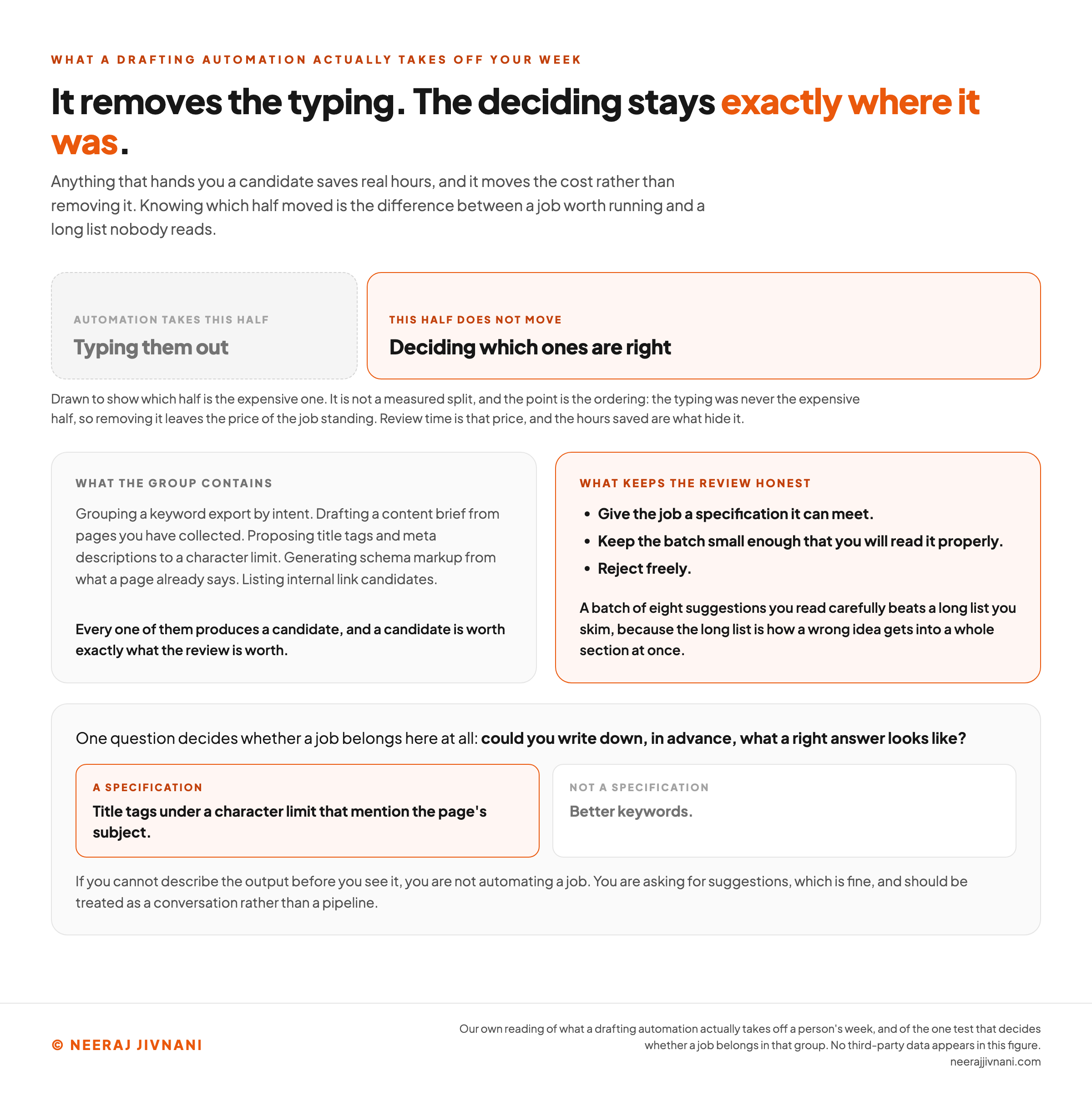
Work that sits here includes grouping a keyword export by intent, drafting a content brief from pages you have collected, proposing title tags and meta descriptions to a character limit, generating schema markup from what a page already says, and listing internal link candidates.
Notice what all of those have in common. Each one produces a candidate, and a candidate is worth exactly what the review is worth.
Where the Cost Moved To
Review time is the honest price of this group, and the time savings tend to hide it.
You have not removed the work of deciding which meta descriptions are right. You have removed the work of typing them, which was never the expensive half.
So the useful version of this group is narrow and boring. Give the job a specification it can meet, keep the batch small enough that you will read it properly, and reject freely.
A batch of eight suggestions you read carefully beats a long list you skim.
The long list is how a wrong idea gets into a whole section at once, wearing the authority of having been produced by a system.
The Test That Settles Most Cases
One question decides whether a job belongs here at all. Could you write down, in advance, what a right answer looks like?
Title tags under a character limit that mention the page's subject is a specification. Better keywords is not.
If you cannot describe the output before you see it, you are not automating a job. You are asking for suggestions, which is fine, and should be treated as a conversation rather than a pipeline.
Use this chart — embed code and citation
<a href="https://neerajjivnani.com/blog/seo-automation/"><img src="https://neerajjivnani.com/infographics/seo-automation/it-removes-the-typing.png" alt="A split bar showing which half of a drafting job an automation actually takes away, under a headline reading that it removes the typing and the deciding stays exactly where it was. The smaller grey segment is labeled typing them out and marked as the half automation takes; the larger orange segment is labeled deciding which ones are right and marked as the half that does not move, with a caption saying the picture shows which half is the expensive one rather than a measured split. Two cards follow. The first lists what the group contains: grouping a keyword export by intent, drafting a content brief from pages you have collected, proposing title tags and meta descriptions to a character limit, generating schema markup from what a page already says, and listing internal link candidates, every one of which produces a candidate, and a candidate is worth exactly what the review is worth. The second, in orange, lists what keeps the review honest: give the job a specification it can meet, keep the batch small enough that you will read it properly, and reject freely, because a batch of eight suggestions you read carefully beats a long list you skim. A panel beneath carries the one question that decides whether a job belongs in the group at all, could you write down in advance what a right answer looks like, with title tags under a character limit that mention the page's subject given as a specification and better keywords given as not one." width="1200"></a>
<p>Chart: <a href="https://neerajjivnani.com/blog/seo-automation/">Neeraj Jivnani</a></p>Neeraj Jivnani, "SEO Automation: Which Jobs Run Without You, and Where You Still Have to Stand", neerajjivnani.com, https://neerajjivnani.com/blog/seo-automation/Free to republish with a link back to this page.
Jobs That Write to Your Site
Nothing in this group runs without an approved sample and a way back, because these are the jobs that edit live pages by themselves.
This is bulk metadata rewriting, automated internal linking that inserts rather than suggests, on-page changes pushed by a script or an embedded snippet, and content generated and published without anyone reading it.
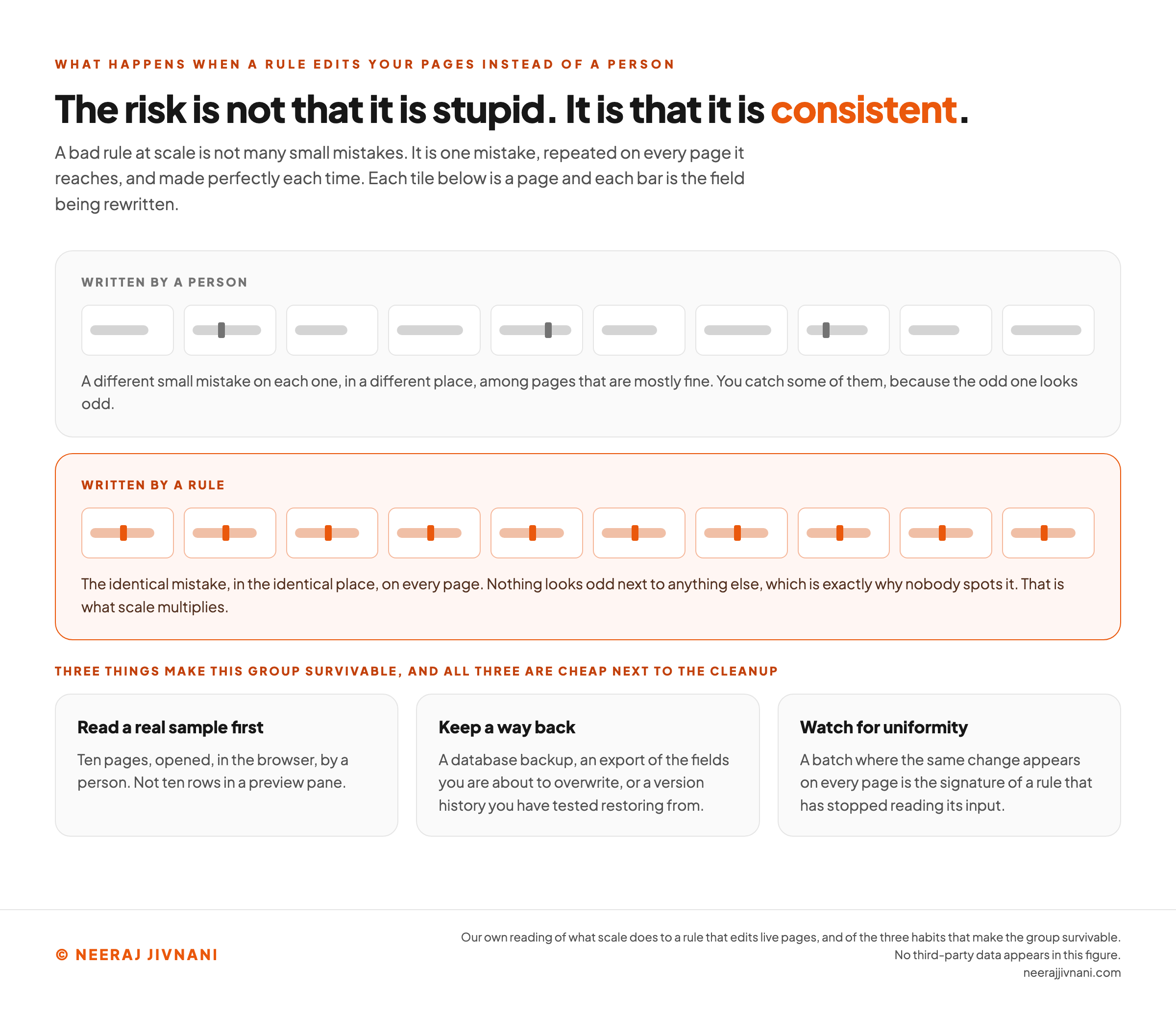
The risk here is not that the machine is stupid. It is that it is consistent.
The Same Mistake, Made Perfectly
A person writing title tags by hand makes a different small mistake on each one, and you catch some of them.
A rule writing the same set makes the identical mistake on every page, and it makes it perfectly. That is what scale multiplies.
Three things make this group survivable, and all three are cheap next to the cleanup:
- Read a real sample before the rest runs. Ten pages, opened, in the browser, by a person. Not ten rows in a preview pane.
- Keep a way back. A database backup, an export of the fields you are about to overwrite, or a version history you have tested restoring from.
- Watch for uniformity. A batch where the same change appears on every page is the signature of a rule that has stopped reading its input.
Publishing Belongs Here Too
Publishing is the case people most want to treat as an exception, and it is not one.
Google's spam policy on scaled content abuse asks what a page was generated for, not what generated it.
That is why publishing belongs in this group, and why it is the hardest case in it. A bulk metadata rewrite can be reverted and the pages carry on.
Once a page is live and has been fetched, it has been read. Taking it down later does not undo that, so the way back the other jobs here rely on arrives too late to be a way back.
So there is one control left, and it is not a rollback. Somebody reads the page before it publishes, or the schedule does not get to publish.
Use this chart — embed code and citation
<a href="https://neerajjivnani.com/blog/seo-automation/"><img src="https://neerajjivnani.com/infographics/seo-automation/the-identical-mistake-perfectly.png" alt="Two rows of page tiles comparing what a person and a rule leave behind when they rewrite the same field, under a headline reading that the risk is not that it is stupid, it is that it is consistent. Each tile is a page and each bar inside it is the field being rewritten. In the upper row, written by a person, the bars vary in length and only three carry a mark, each in a different place, among pages that are mostly fine, so you catch some of them because the odd one looks odd. In the lower row, highlighted in orange and headed written by a rule, every bar is identical and every one carries the identical mark in the identical place, so nothing looks odd next to anything else, which is exactly why nobody spots it, and that is what scale multiplies. Three cards beneath give the habits that make the group survivable: read a real sample first, meaning ten pages opened in the browser by a person and not ten rows in a preview pane; keep a way back, meaning a database backup, an export of the fields you are about to overwrite, or a version history you have tested restoring from; and watch for uniformity, because a batch where the same change appears on every page is the signature of a rule that has stopped reading its input." width="1200"></a>
<p>Chart: <a href="https://neerajjivnani.com/blog/seo-automation/">Neeraj Jivnani</a></p>Neeraj Jivnani, "SEO Automation: Which Jobs Run Without You, and Where You Still Have to Stand", neerajjivnani.com, https://neerajjivnani.com/blog/seo-automation/Free to republish with a link back to this page.
The Work That Is Hard, Not Slow
Some of this work is not slow. It is hard, and the two get confused because both of them take time.
Deciding which phrase is worth a page this quarter is a judgment about your business, your capacity and what you can credibly beat.
Deciding what a page should say is a judgment about a reader. Deciding that a section of the site should be retired is a judgment nobody can make from a crawl.
Outreach is the clearest case, and the one most often sold as automatable.
You can automate the sending of outreach emails asking for a link. The reason that does not work is not technical.
The person on the other end can tell, and their reply rate is the measurement that matters.
Say a batch of ten gets two replies. Sending the same email to a much longer list does not raise that ratio, it gets you a sending domain nobody opens.
What you automated was the part that was already cheap, and it degraded the part that was carrying the result.
A useful way to hold this: automation is good at the parts of your week that are tedious because they repeat, and bad at the parts that are tedious because they are hard.
Those two feel identical on a Monday morning. They are not the same thing at all.
Buy for the Position You Can Staff
Once the work is sorted, the buying question stops being about features and becomes a staffing question.
Each of the three positions has a standing cost in somebody's week, and the cost rises sharply as you move down them:
- Measuring costs a login. Set it up once, then spend a few minutes reading output that already exists.
- Drafting costs recurring attention. Somebody has to read every batch before it is used, and that hour appears on nobody's calendar until the work is already flowing.
- Writing to the site costs authority. Somebody has to be allowed to approve changes and able to reverse them, and that person has to be available when the job runs, not the following Thursday.
The common mistake is buying for the third position while only staffing the first.
A subscription that will rewrite a whole site is worth nothing to a team where nobody is empowered to approve the sample. It is dangerous to a team where somebody approves it without reading.
So the honest order is to match the purchase to the attention you can commit to it. If the only position you can staff this quarter is the first, buy nothing.
What the Free Stack Already Covers
The first position is the one you can staff, and it is also the one that costs nothing to run.
Search Console is the spine of it. Queries, impressions, clicks, indexing status and most of what a site health report would tell you are already there, for free, about your own site.
Put a crawler with a scheduler beside it and a free dashboard tool on top, and the measuring position is covered for the price of an afternoon.
Whatever you pay for after that should be a thing you looked for and could not find in those three, rather than a category you bought into.
Two Things to Settle Before You Sign
Time-saved figures attached to this category are estimates made by the people selling it, and almost none of them state what they were measured against. Read them as advertising rather than arithmetic.
And find out what happens to your setup if you leave.
A year of configured jobs, thresholds and report templates living inside a subscription is a real cost, and it is one that only shows up on the day you try to move.
Beginners, ChatGPT and the Best Tool Question
Anxiety runs under most of what gets asked about automating search work, and it is usually the same anxiety wearing a different question: whether the skill is still worth having.
It is. What changed is which part of it earns the week, and every one of these questions turns out to be a version of that.
Can SEO Be Automated?
The repeating parts, yes. The measuring group can run unattended, and drafting can be handed to a first pass that somebody then reads.
What does not automate is the deciding: which search is worth a page, whether you can win it, what the page should say, and when to stop.
That was always the expensive part. Taking the tedium off it makes it a larger share of the job rather than a smaller one.
Can a Beginner Do SEO?
Yes, and the measuring group is the right place for a beginner to start.
Setting up Search Console and a recurring crawl teaches you what your own site is doing before you change anything about it.
It costs nothing, it breaks nothing, and a month of it will tell you more about your pages than any amount of reading.
Can ChatGPT Do SEO?
ChatGPT will do a great deal of this work well. What it will not do is start.
A chat window answers when you ask, and never on Tuesday morning.
Making it part of something that starts itself means connecting it to a schedule or a trigger, and the schedule is the automation, not the model.
Will SEO Be Replaced by AI?
The mechanical parts have been moving to machines for decades, and this is a continuation of that rather than a break in it.
What has not moved is the judgment about what deserves a page and what that page owes a reader.
If anything, the newer tools raise the value of that judgment, because a wrong call now gets carried out faster and across more pages than it used to.
What Is the Best Automated SEO Tool?
There is no best one, and the question hides a better one: which of the three positions are you buying for, and can you staff it?
A product that measures is almost always worth its price, because the only thing it asks of you is a few minutes of reading. A product that drafts is worth its price only if somebody is going to read the output every week.
A product that edits your site is worth its price only if a named person can approve a sample and undo a bad run. Without that person it is not a bargain at any price.
Only the Measuring Runs Unattended
Take your own list of recurring search jobs and mark each one with what it touches.
Only the measuring group runs unattended, and the single thing it needs from you is proof that it is still running.
Anything that produces a draft needs somebody downstream who reads it, which means keeping the batches small enough that reading stays honest.
Anything that writes to a live page needs an approved sample and a way back, every time, including the times it has worked for six months.
That mark is the whole decision. Not which platform, not how many hours anybody claims to save, and not whether the thing has a model inside it.
The jobs that repeat are the ones to hand over. The judgment about what is worth doing stays exactly where it was.